1. Uvod
Thank you for choosing the Monster N-Tune mini 02 Noise Cancelling Headphones. These headphones are designed to provide a superior audio experience with advanced noise cancellation, extended battery life, and comfortable wear. This manual will guide you through the setup, operation, and maintenance of your new headphones.
2. Šta se nalazi u kutiji
- Monster N-Tune mini 02 Noise Cancelling Headphones
- Kabel za punjenje (tip-C)
- Audio Cable (Aux)
- Uputstvo za upotrebu
3. Proizvod je gotovview
Familiarize yourself with the components and features of your Monster N-Tune mini 02 headphones.

Slika 3.1: Eksplodirao view of the headphone driver, illustrating the components that deliver Pure Monster Sound.

Slika 3.2: Gotovoview of headphone controls. The Power button manages play/pause and call functions. Volume buttons adjust audio levels and skip tracks. The ANC button controls noise cancellation.
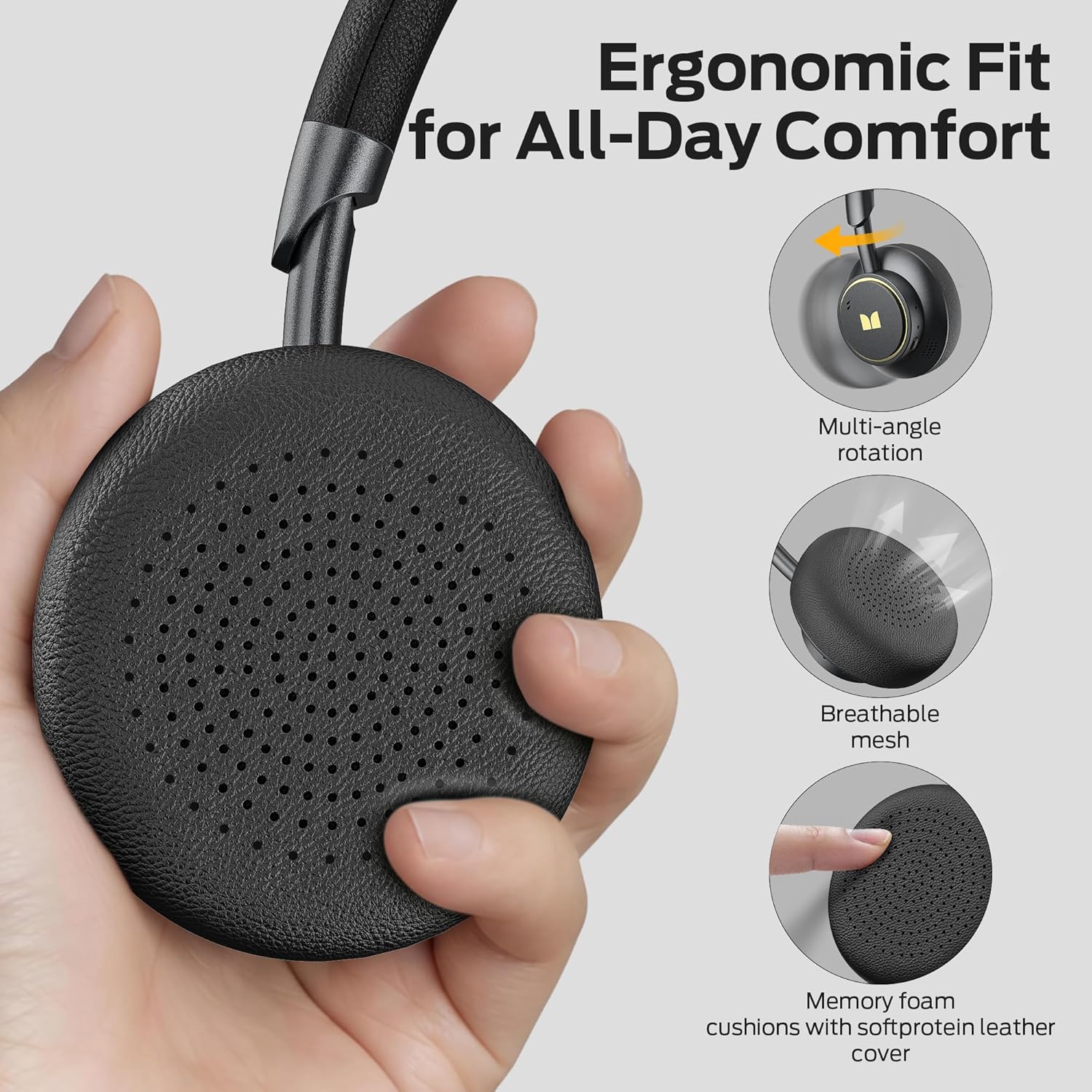
Slika 3.3: Ergonomic design features for comfort, including multi-angle rotation, breathable mesh, and memory foam cushions with soft protein leather cover.
4. Podešavanje
4.1 Punjenje slušalica
Before first use, fully charge your headphones. Connect the provided Type-C charging cable to the charging port on the headphones and to a USB power source. The LED indicator will show charging status. A full charge provides up to 50 hours of listening time (ANC off). A quick 5-minute charge provides approximately 4 hours of listening.

Slika 4.1: The headphones offer up to 50 hours of playtime with ANC off, ensuring extended use.
4.2 Bluetooth uparivanje
- Uvjerite se da su slušalice isključene.
- Pritisnite i držite dugme za napajanje dok LED indikator ne zatreperi plavo i crveno, što označava režim uparivanja.
- Na svom uređaju (pametnom telefonu, tabletu, laptopu) omogućite Bluetooth i potražite dostupne uređaje.
- Select "Monster N-Tune mini 02" from the list.
- Nakon povezivanja, LED indikator će svijetliti stalno plavo ili će se ugasiti, ovisno o modelu.
The Bluetooth 6.0 technology ensures a stable connection with lower latency and improved audio output.

Slika 4.2: Seamless Bluetooth pairing with your devices for wireless audio freedom.
5. Uputstvo za upotrebu
5.1 Uključivanje/isključivanje napajanja
- Uključeno: Pritisnite i držite dugme za napajanje 2 sekundi.
- Iskljuciti: Pritisnite i držite dugme za napajanje 3 sekundi.
5.2 Reprodukcija muzike
- Pusti/pauza: Kratko pritisnite dugme za napajanje.
- Povećavanje glasnoće: Kratko pritisnite dugme "+".
- Smanjivanje jačine zvuka: Kratko pritisnite dugme "-".
- Sljedeća pjesma: Long press the "+" button for 2 seconds.
- Prethodna pjesma: Long press the "-" button for 2 seconds.
5.3 Upravljanje pozivima
- Odgovor / Prekini vezu: Kratko pritisnite dugme za napajanje.
- odbiti poziv: Dugo pritisnite dugme za napajanje na 2 sekunde.
- Otkaži poziv: Pritisnite dugme za napajanje dva puta.
The built-in microphone ensures clear voice quality during calls.

Slika 5.1: Enjoy crystal-clear calls with the integrated microphone.
5.4 Aktivno poništavanje buke (ANC)
- Uključivanje/isključivanje ANC -a: Pritisnite dugme ANC.
- When ANC is on, a white light will illuminate.
- When ANC is off, the white light will turn off.
The Hybrid Active Noise Cancelling feature uses two internal and two external microphones to detect and reduce ambient noise, providing an immersive listening experience.

Slika 5.2: Experience effective noise cancellation in various environments, from busy cafes to public transport.
6. Održavanje
- čišćenje: Za čišćenje slušalica koristite meku, suhu krpu. Nemojte koristiti jake hemikalije ili abrazivne materijale.
- Skladištenje: Store the headphones in a cool, dry place away from direct sunlight and extreme temperatures. The foldable design makes them compact for travel and storage.
- Održavanje baterije: Da biste produžili vijek trajanja baterije, izbjegavajte često potpuno pražnjenje slušalica. Redovno ih punite, čak i ako ih ne koristite duži period.

Slika 6.1: The compact and foldable design allows for easy storage and portability.
7. Otkrivanje problema
| Problem | Mogući uzrok | Rješenje |
|---|---|---|
| Slušalice se ne uključuju | Niska baterija | U potpunosti napunite slušalice. |
| Nije moguće upariti uređaj | Slušalice nisu u načinu rada za uparivanje; Bluetooth isključen na uređaju; uređaj je previše udaljen | Ensure headphones are in pairing mode (flashing blue/red LED). Turn on Bluetooth on your device. Move device closer to headphones. |
| Nema zvuka | Volume too low; device not connected; incorrect audio source | Increase volume on headphones and device. Re-pair headphones. Check audio output settings on your device. |
| ANC ne funkcioniše efikasno | ANC not activated; extreme noise levels | Press the ANC button to activate. ANC is most effective against low-frequency ambient noise. |
8. Specifikacije
| Feature | Detalj |
|---|---|
| Naziv modela | Monster N-Tune mini 02 |
| Broj modela stavke | MH22265 |
| Tehnologija povezivanja | bežični (Bluetooth) |
| Bluetooth verzija | 6.0 |
| Funkcije kontrole buke | Hibridno aktivno uklanjanje buke |
| Trajanje baterije | Do 50 sati (ANC isključen) |
| Vrijeme punjenja | 5 minutes for 4 hours listening (Type-C Fast Charge) |
| Oblik slušalice | On Ear |
| Uključene komponente | Microphone, Charging Cable, Audio Cable |
| Boja | Crna |
| Proizvođač | Monster |
9. Garancija i podrška
Monster N-Tune mini 02 Noise Cancelling Headphones come with lifetime customer service. If you have any questions or require assistance, please feel free to contact us. We are committed to responding to inquiries within 24 hours.
For further support or warranty claims, please refer to the contact information provided with your purchase or visit the official Monster website.


