1. Uvod
Thank you for choosing the GOBOULT Z40 V2.0 Truly Wireless In-Ear Earbuds. This manual provides essential information to help you set up, operate, and maintain your earbuds for optimal performance. Please read these instructions carefully before use and retain them for future reference.
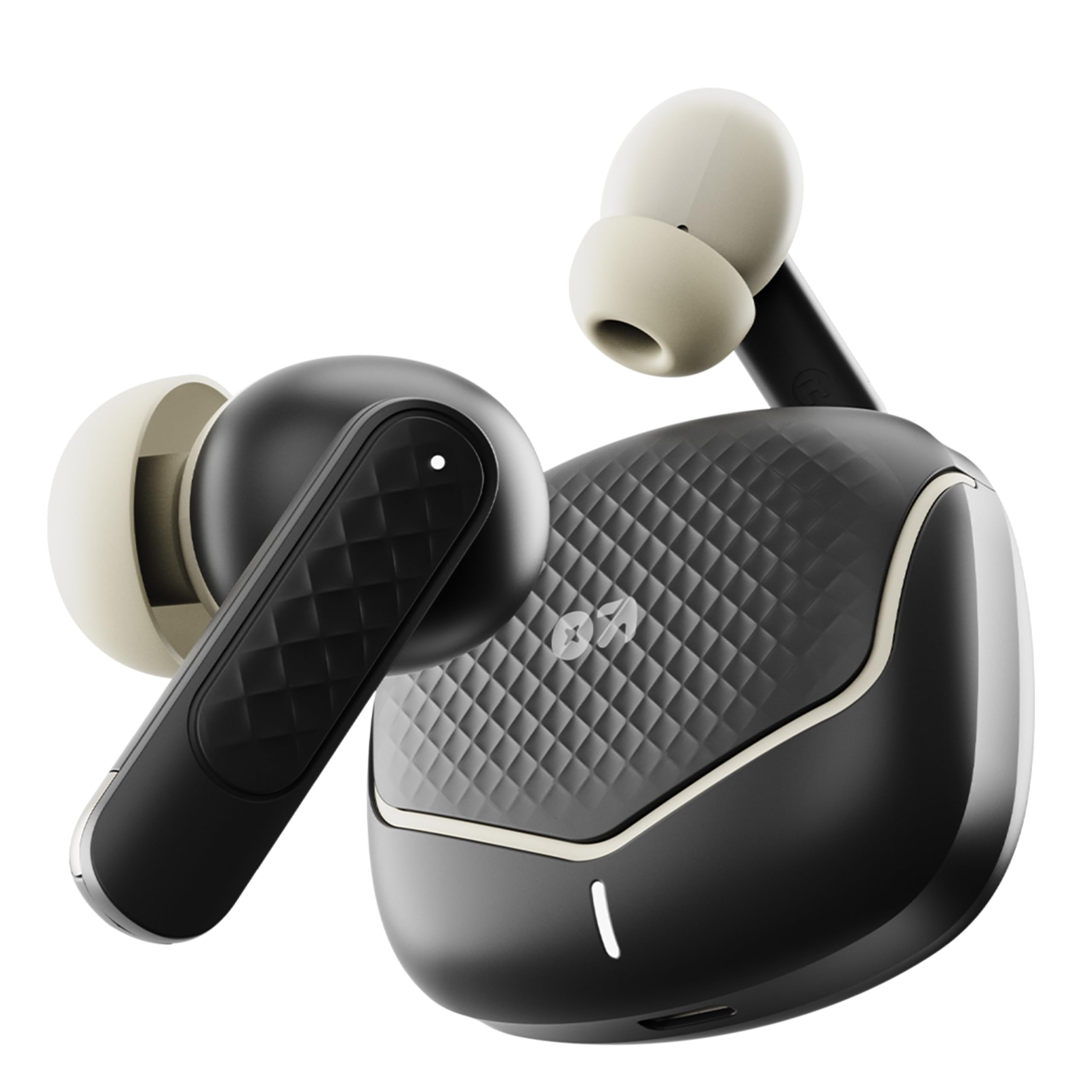
Image: The GOBOULT Z40 V2.0 earbuds with their charging case, showcasinelegantan dizajn.
2. Sadržaj paketa
Provjerite da li su sve stavke prisutne u paketu:
- GOBOULT Z40 V2.0 Earbuds (Left and Right)
- Futrola za punjenje
- USB kabel za punjenje tipa C
- Naušnice (različite veličine)
- Korisnički priručnik (ovaj dokument)
- Garantni list
3. Proizvod je gotovview
The GOBOULT Z40 V2.0 earbuds feature a compact design with advanced audio technology. Key components include:
- Slušalice: Equipped with 13mm dynamic drivers for enhanced bass and clear audio. Each earbud includes touch control sensors and multiple microphones for Environmental Noise Cancellation (ENC).
- Futrola za punjenje: Provides extended battery life and protects the earbuds. Features a USB Type-C charging port and an LED indicator.
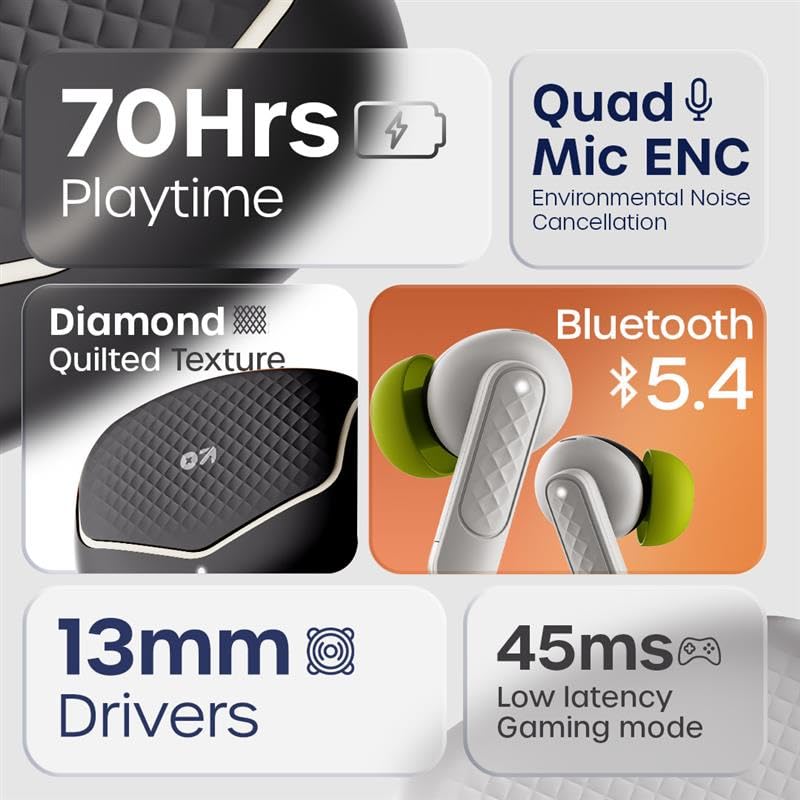
Image: An infographic highlighting key features such as 70 hours playtime, Quad Mic ENC, Bluetooth 5.4, 13mm drivers, and 45ms low latency.

Image: The iconic V-Flip charging case and earbuds displayed in Opal Black, Onyx Grey, Solar Orange, and Arctic Blue color options.
4. Podešavanje
4.1. Punjenje slušalica i kutijice
Prije prve upotrebe, potpuno napunite slušalice i kutijicu za punjenje.
- Stavite slušalice u futrolu za punjenje.
- Spojite USB Type-C kabel za punjenje na priključak za punjenje na kućištu i na izvor napajanja.
- LED indikator na kućištu će prikazivati status punjenja. Nakon što se uređaj potpuno napuni, indikator će se promijeniti ili ugasiti.
A 10-minute charge provides approximately 120 minutes of playtime. The case provides up to 70 hours of total playtime with multiple charges.

Image: Visual representation of the charging case and earbuds, highlighting 70 hours battery life and fast charging capability (10 mins charge = 120 mins playtime).
4.2. Uparivanje sa uređajem
The GOBOULT Z40 V2.0 uses Bluetooth 5.4 for quick and reliable pairing.
- Otvorite kutijicu za punjenje. Slušalice će automatski ući u način rada za uparivanje.
- Na vašem uređaju (pametnom telefonu, tabletu, laptopu) omogućite Bluetooth.
- Traži dostupne Bluetooth uređaje i odaberite "GOBOULT Z40 V2.0" s popisa.
- Nakon povezivanja, čut će se zvuk potvrde i slušalice će biti spremne za upotrebu.
The earbuds feature Blink&Pair™ technology for quicker pairing.

Image: The charging case open with earbuds, illustrating the upgraded Bluetooth v5.4 for quicker pairing and higher reliability with Blink&Pair™ Tech.
5. Uputstvo za upotrebu
5.1. Dodirnite Kontrole
Slušalice imaju intuitivne kontrole na dodir za upravljanje zvukom i pozivima:
| Akcija | Funkcija |
|---|---|
| Jedan dodir (lijevo/desno) | Reprodukcija/Pauziranje muzike, Odgovor/Završetak poziva |
| Dvostruki dodir (desno) | Next Track |
| Dvostruki dodir (lijevo) | Previous Track |
| Trostruki dodir (lijevo/desno) | Aktivirajte glasovnog asistenta |
| Dugi pritisak (lijevo/desno) | Odbiti poziv |
| Dugi pritisak (lijevo/desno, 2 sekunde) | Uključi/isključi način rada za igranje (niska latencija) |

Image: A user interacting with the earbuds to activate voice assistant, demonstrating hands-free control. Also highlights the IPX5 water resistance.
5.2. Upućivanje i primanje poziva
The Z40 V2.0 earbuds are equipped with Quad Microphones and Environmental Noise Cancellation (ENC) for clear call quality.
- Odgovori na poziv: Jednom dodirnite bilo koju slušalicu.
- Završi poziv: Jednom dodirnite bilo koju slušalicu tokom poziva.
- odbiti poziv: Dugo pritisnite bilo koju slušalicu.
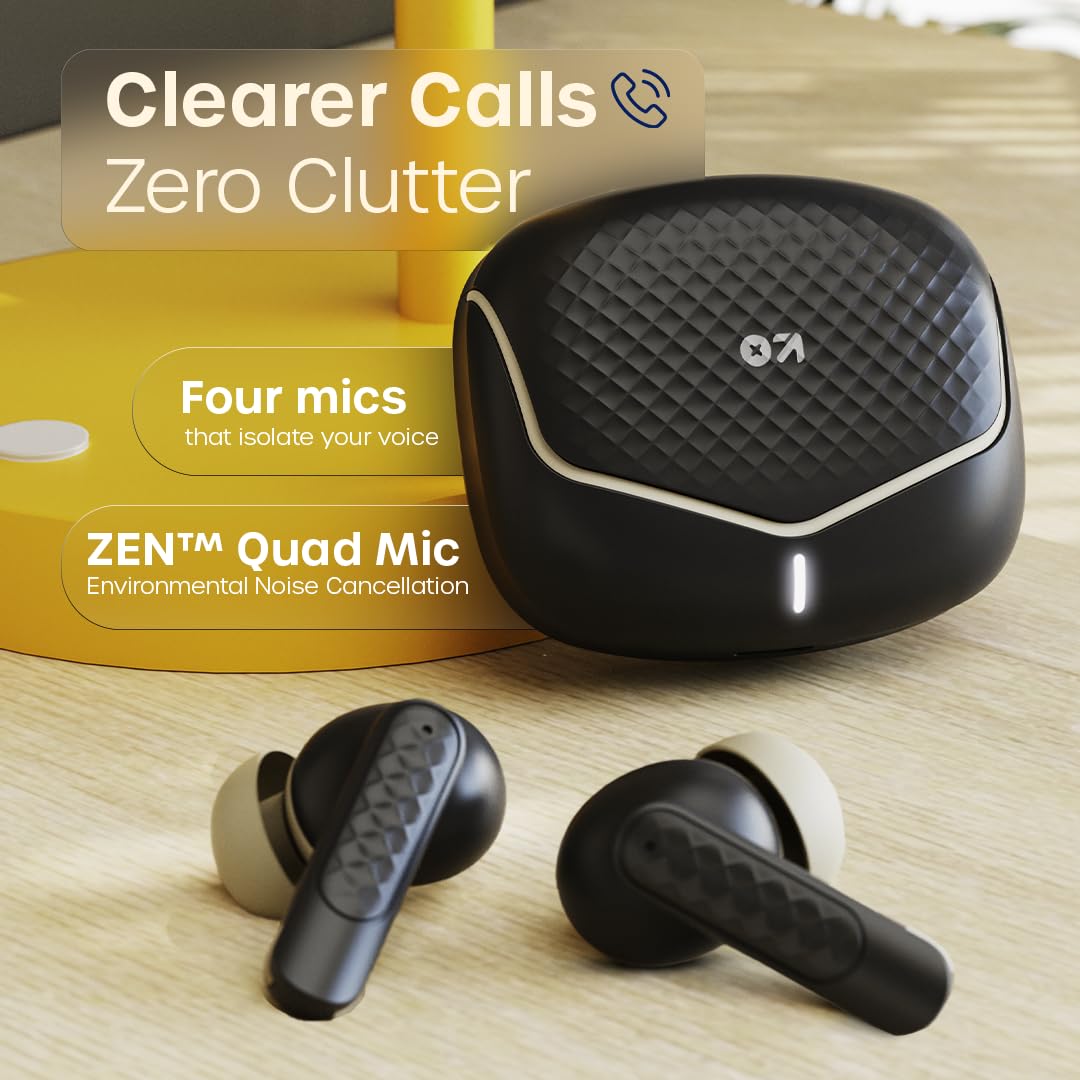
Image: The charging case and earbuds, emphasizing the ZEN™ Quad Mic Environmental Noise Cancellation for clearer calls.
5.3. Režim igranja (niska latencija)
Activate Gaming Mode for reduced audio latency, ideal for gaming and video playback.
- Aktiviraj/Deaktiviraj: Dugo pritisnite bilo koju slušalicu na 2 sekunde.
This mode provides a 45ms low latency experience for synchronized audio and visuals.

Image: Earbuds and charging case near a gaming console, illustrating the 45ms low latency Combat™ Gaming Mode for faster responses.
6. Održavanje
6.1. Čišćenje
Redovno čišćenje pomaže u održavanju kvalitete zvuka i higijene.
- Koristite meku, suhu krpu koja ne ostavlja dlačice za brisanje slušalica i kućišta za punjenje.
- Pažljivo uklonite ušni vosak ili ostatke sa vrhova slušalica i mrežice zvučnika pomoću male četkice ili pamučnog štapića.
- Ne koristite abrazivna sredstva za čišćenje, alkohol ili hemijske rastvarače.
6.2. Skladištenje
Kada se ne koriste, slušalice čuvajte u kutijici za punjenje kako biste ih zaštitili od prašine, oštećenja i kako biste ih održali napunjenima.
6.3. Vodootpornost (IPX5)
The GOBOULT Z40 V2.0 earbuds are IPX5 water-resistant, meaning they can withstand sweat and light splashes of water. They are not designed for submersion in water or for use during swimming. Ensure earbuds are dry before placing them back in the charging case to prevent damage.
7. Otkrivanje problema
Ako naiđete na probleme, isprobajte sljedeća rješenja:
| Problem | Rješenje |
|---|---|
| Slušalice se ne uparuju | Ensure earbuds are charged. Turn off and on Bluetooth on your device. Forget "GOBOULT Z40 V2.0" from your device's Bluetooth list and re-pair. |
| Samo jedna slušalica radi | Place both earbuds back in the charging case, close the lid, then open again. Ensure both earbuds are charged. Re-pair with your device. |
| Niska jačina zvuka ili loš kvalitet zvuka | Adjust volume on your device. Clean the speaker mesh and eartips. Try different sized eartips for a better seal. |
| Problemi s punjenjem | Ensure the charging cable is securely connected. Try a different USB port or power adapter. Clean the charging contacts on both earbuds and case. |
| Kontrole na dodir ne reagiraju | Provjerite jesu li vam prsti čisti i suhi. Ponovo pokrenite slušalice tako što ćete ih staviti u kutijicu i izvaditi. |
8. Specifikacije
Technical details of the GOBOULT Z40 V2.0 Earbuds:
| Feature | Detalj |
|---|---|
| Naziv modela | Z40 V2.0 (Airbass slušalice) |
| Povezivanje | Bluetooth v5.4 |
| Bluetooth domet | 10 metara |
| Veličina audio drajvera | 13mm dinamički drajveri |
| Mikrofoni | Quad mikrofon sa poništavanjem buke iz okoline (ENC) |
| Audio kašnjenje | 45 milisekundi (režim igre) |
| Trajanje baterije (ukupno) | Do 70 sata (s kućištem za punjenje) |
| Vrijeme punjenja | Fast Charging (10 mins charge for 120 mins playtime) |
| Port za punjenje | USB Type-C |
| Otpornost na vodu | IPX5 |
| Kontrolni metod | Touch Control |
| Frekvencijski odziv | 20 Hz |
| Osjetljivost | 115 dB |
| Težina artikla | 600 g (Product + Packaging) |
| Dimenzije proizvoda | 5.8 x 4 x 4.9 cm |
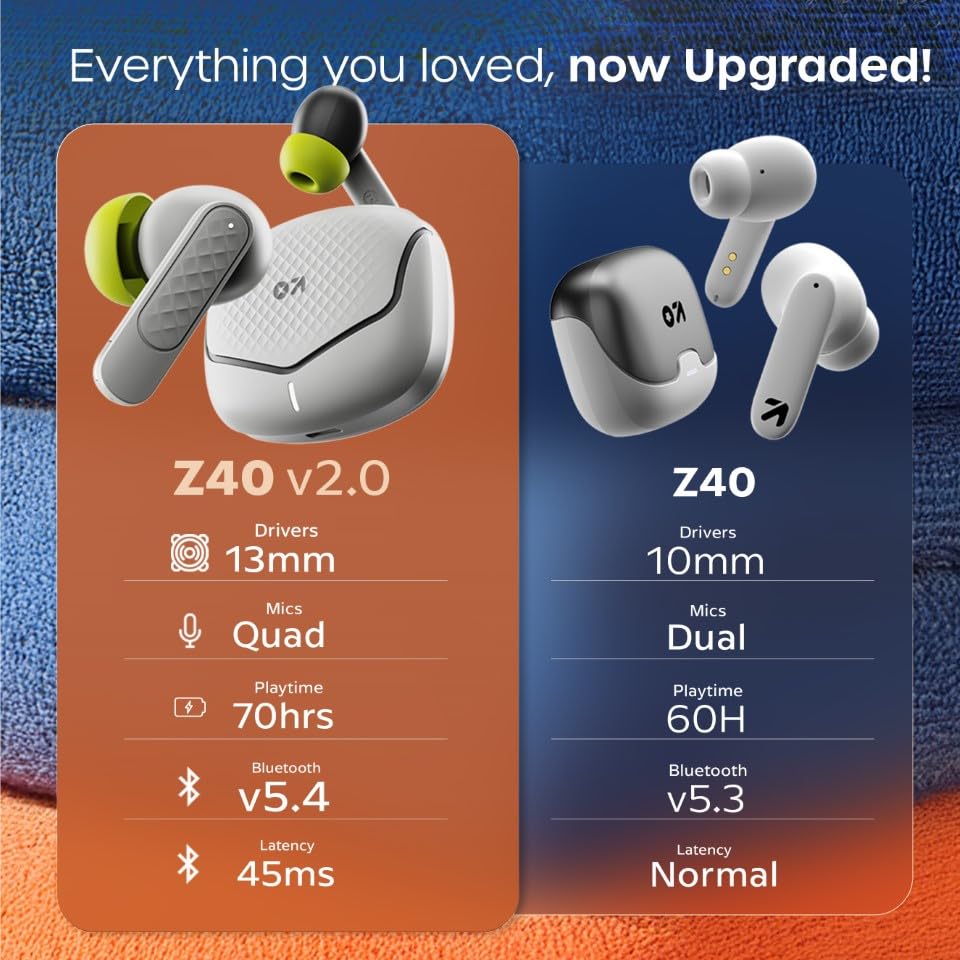
Image: A comparison table showing upgrades from Z40 to Z40 V2.0, including 13mm drivers, Quad Mics, 70hrs playtime, Bluetooth v5.4, and 45ms latency.
9. Jamstvo i podrška
The GOBOULT Z40 V2.0 earbuds come with a 1-godišnja garancija proizvođača from the date of purchase. This warranty covers manufacturing defects and ensures trusted quality and durability.
For warranty claims, technical support, or any product-related inquiries, please refer to the contact information provided on your warranty card or visit the official GOBOULT support website.
Proizvođač: GOBOULT, B-67 Wazirpur Industrial Area, New Delhi 110052, India