1. Uvod
The ThermoPro TP210B is a wireless thermometer system designed to monitor temperatures in refrigerators and freezers. It provides real-time temperature readings from up to two remote sensors to a central receiver unit. This system features a 500 ft (150 m) wireless range, high accuracy, and customizable temperature alerts to help maintain optimal storage conditions for food and other temperature-sensitive items.
Ključne karakteristike uključuju:
- Prošireni bežični domet: Up to 500 ft (150 m) using updated RF technology for stable connection.
- Pre-Paired for Immediate Use: No complex setup required; units are ready to operate upon powering on.
- Široki raspon mjerenja: Accurate readings from -40°F to 158°F (-40°C to 70°C).
- Smart Temperature Alerts: Customizable high/low temperature alarms on the receiver.
- LCD ekran sa pozadinskim osvetljenjem: Clear display of current, maximum, and minimum temperatures, visible day or night.
- Rechargeable Transmitter: Transmitter uses a rechargeable lithium battery, suitable for low-temperature environments.
- Fleksibilan plasman: Multiple mounting options for both receiver and transmitters.
2. Sadržaj paketa
- 1 x prijemnik
- 2 x Transmitter Units
- 2 x AAA Batteries (for Receiver)
- 1 x USB Charging Cable (for Transmitters)
- 1 x Uputstvo za upotrebu
3. Dijagram proizvoda
Familiarize yourself with the components of your ThermoPro TP210B system:

Image: The main receiver unit with its large display and control buttons (MODE, UP, DOWN, HISTORY/CLEAR, LIGHT °F/°C), alongside two smaller transmitter units.
Prijemna jedinica:
- LCD ekran: Shows temperatures for both channels, Max/Min records, and battery status.
- Dugme MODE: Cycles through settings and alarm modes.
- GORE/DOLJE tipke: Adjust values in settings or alarm modes.
- HISTORY/CLEAR Button: Views and clears Max/Min temperature records.
- LIGHT °F/°C Button: Activates backlight and switches temperature units.
- Pretinac za baterije: Located on the back, for 2x AAA batteries.
Transmitter Units:
- Senzor temperature: Mjeri temperaturu okoline.
- LED indikator: Flashes to indicate data transmission.
- Dugme za napajanje: Uključuje/isključuje predajnik.
- Port za punjenje: USB-C port for recharging the internal lithium battery.
4. Podešavanje
The ThermoPro TP210B units are pre-paired at the factory. Follow these steps for initial setup:
- Instalirajte baterije prijemnika: Open the battery compartment on the back of the receiver unit. Insert 2 AAA batteries, ensuring correct polarity (+/-). Close the compartment.
- Predajnici naboja: Connect the provided USB charging cable to the charging port on each transmitter unit and to a standard USB power source (e.g., phone charger, computer USB port). The LED indicator will show charging status. Charge fully before first use.
- Uključivanje odašiljača: Press and hold the power button on each transmitter unit until the LED indicator flashes.
- Potvrdite vezu: The receiver unit should automatically display temperature readings from both transmitters. If not, refer to the Troubleshooting section for re-pairing instructions.

Slika: Krupni plan view illustrating the battery installation for the receiver unit and the USB charging process for a transmitter unit.
5. Uputstvo za upotrebu
5.1 Prikaz prekoview
LCD ekran prijemnika prikazuje sljedeće informacije:

Image: The receiver's digital display, highlighting the current temperature readings for two channels, along with their respective maximum and minimum recorded temperatures and low battery indicators.
- Channel 1 Temperature: Typically for the refrigerator.
- Channel 2 Temperature: Typically for the freezer.
- Maks/min zapisi: Highest and lowest temperatures recorded since the last reset.
- Indikator slabe baterije: Appears when receiver or transmitter batteries are low.
- Indikator jačine signala: Shows connection status to transmitters.
5.2 Izbor temperaturne jedinice (°F/°C)
Za prebacivanje između Fahrenheita (°F) i Celzijusa (°C), pritisnite LIGHT °F/°C button on the receiver unit.
5.3 Postavljanje upozorenja o temperaturi
The system allows you to set custom high and low temperature limits for each channel. An audible and visual alarm will activate if the temperature exceeds these limits.
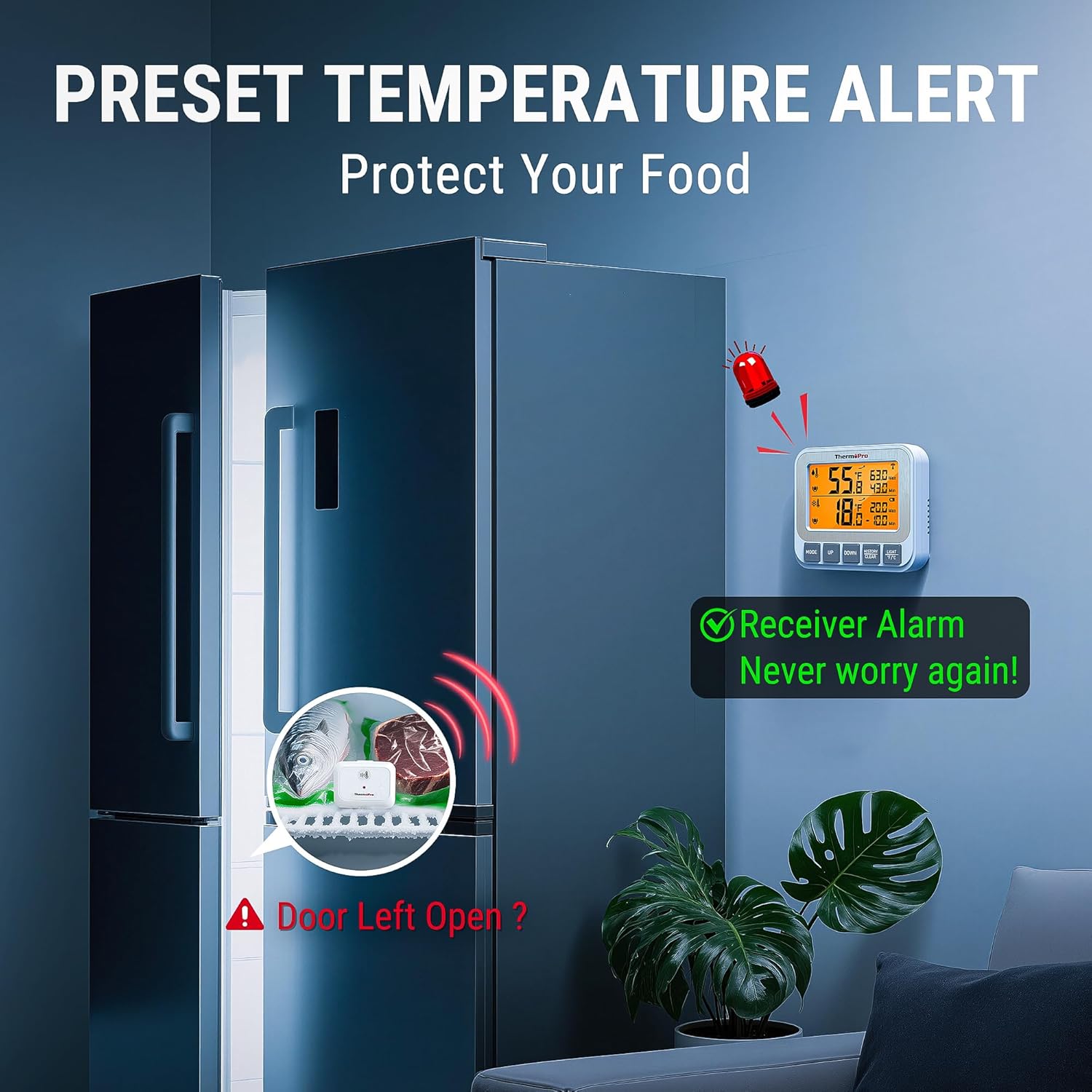
Image: The receiver unit showing an active alarm, with a visual representation of a refrigerator door left open and a transmitter inside, illustrating a scenario where a temperature alert would be triggered.
- Pritisnite MODE button once to enter the alarm setting mode for Channel 1 (refrigerator). The high limit will flash.
- Koristite UP or DOLJE buttons to adjust the desired high temperature limit.
- Pritisnite MODE again to set the low limit for Channel 1. Adjust with UP or DOLJE.
- Pritisnite MODE a third time to enter the alarm setting mode for Channel 2 (freezer). Repeat steps 2 and 3 for Channel 2.
- Pritisnite MODE again to exit alarm setting mode. The alarm icon will appear next to the channel if an alarm is active.
5.4 Viewing and Clearing Max/Min Records
The receiver automatically records the maximum and minimum temperatures for each channel since the last reset.
- Pritisnite HISTORY/CLEAR dugme jednom do view the maximum recorded temperatures for both channels.
- Pritisnite HISTORY/CLEAR ponovo da view the minimum recorded temperatures for both channels.
- To clear the Max/Min records, press and hold the HISTORY/CLEAR dugme na 3 sekunde viewing the records. The display will reset to current temperatures.
5.5 Smjernice za postavljanje
Optimalno postavljanje osigurava tačna očitavanja i pouzdanu bežičnu komunikaciju.

Image: A visual guide demonstrating the versatility of the ThermoPro TP210B, showing the receiver magnetically attached to a fridge, standing on a table, and hanging from a hook, while transmitters are shown standing on a shelf and clipped to a rack inside a fridge.
- Položaj prijemnika: The receiver can be placed on a countertop using its integrated stand, mounted magnetically to a metal surface (e.g., refrigerator exterior), or hung on a wall using the hanging hole. Position it within 500 ft (150 m) of the transmitters, minimizing obstructions.
- Položaj predajnika: Place transmitters inside the refrigerator and freezer compartments. They can stand on a shelf or clip onto a rack. Ensure they are not directly exposed to cold air vents or heating elements, which could affect accuracy.

Image: A diagram showing the wireless signal path from transmitters inside a refrigerator and freezer to a receiver unit located in another room, emphasizing the 500-foot range.
6. Održavanje
- čišćenje: Obrišite jedinice s oglasomamp tkanina. Nemojte uranjati u vodu niti koristiti abrazivna sredstva za čišćenje.
- Battery Replacement (Receiver): When the low battery indicator appears for the receiver, replace the 2 AAA batteries.
- Punjenje odašiljača: When the low battery indicator appears for a transmitter, recharge it using the provided USB cable. A full charge ensures reliable operation, especially in low-temperature environments.
- Skladištenje: If storing the device for an extended period, remove the AAA batteries from the receiver and ensure transmitters are fully charged before storage. Store in a dry, cool place.
7. Otkrivanje problema
- No Temperature Readings / Lost Connection:
- Ensure both the receiver and transmitters are powered on.
- Check battery levels for both units. Recharge or replace as needed.
- Move the receiver closer to the transmitters. Walls, metal appliances, and electronic devices can interfere with the wireless signal.
- Ponovno uparivanje: If connection is lost, try re-pairing. Power off all units. Power on the receiver. Then, power on each transmitter one by one. They should automatically reconnect.
- Netačna očitavanja:
- Ensure transmitters are not placed directly in front of cold air vents or near heat sources.
- Allow units to stabilize for 30 minutes after placement to get accurate readings.
- Compare readings with another known accurate thermometer if possible.
- Alarm se ne oglašava:
- Verify that the high/low temperature limits are set correctly for each channel.
- Ensure the alarm function is enabled (check for the alarm icon on the display).
8. Specifikacije
| Feature | Specifikacija |
|---|---|
| Broj modela | TP210B |
| bežični domet | Do 500 stopa (150 m) |
| Preciznost temperature | ±0.9°F (±0.5°C) from 32°F-122°F (0°C-50°C), otherwise ±1.8°F (±1.0°C) |
| Measurement Range | -40°F do 158°F (-40°C do 70°C) |
| Snaga prijemnika | 2 x AAA baterije (uključene) |
| Snaga predajnika | Rechargeable Lithium Battery (charging cable included) |
| Display | LCD sa pozadinskim osvetljenjem |
9. Informacije o garanciji
ThermoPro products are manufactured with high-quality materials and craftsmanship. This product is covered by a limited warranty against defects in materials and workmanship from the date of purchase. Please refer to the official ThermoPro webweb-mjesto ili kontaktirajte korisničku podršku za specifične uvjete i odredbe garancije.
10. Podrška
For any questions, assistance, or troubleshooting not covered in this manual, please contact ThermoPro Customer Service:
- Webstranica: Visit the official ThermoPro webstranica za često postavljana pitanja, registraciju proizvoda i kontakt informacije.
- Email: Refer to your product packaging or the ThermoPro webweb-stranicu za adresu e-pošte korisničke podrške.
- Telefon: Contact the customer support hotline if available in your region.
Please have your model number (TP210B) and purchase date ready when contacting support.


