1. Proizvod je gotovview
The BN-LINK WiFi Smart Plug (Model CP-J31WT) allows you to control your home appliances remotely, set schedules, and use voice commands for a smarter, more convenient lifestyle. This compact plug is designed for ease of use and integrates seamlessly with popular smart home platforms.

Image: BN-LINK WiFi Smart Plug overview with icons for WiFi, timer, app control, voice control, remote operation, and group control.
Ključne karakteristike:
- daljinski upravljač: Turn appliances ON/OFF from anywhere using your smartphone.
- upravljanje glasom: Kompatibilno s Alexom i Google Homeom za rad bez upotrebe ruku.
- Funkcija tajmera: Schedule appliances to turn ON/OFF automatically, saving energy and preventing overcharging.
- Kompaktan dizajn: Small size ensures it doesn't block adjacent outlets.
- Sigurnosne karakteristike: Equipped with high-temperature flame-retardant material, overload protection, electric shock prevention, and anti-tracking design.

Image: Diagram highlighting the smart plug's features: LED indicator, ON/OFF button, WiFi connection, timer function, remote operation, and voice control.
2. Sigurnosne informacije
Molimo pročitajte i razumite sva sigurnosna uputstva prije upotrebe ovog proizvoda. Nepoštivanje ovih uputstava može dovesti do strujnog udara, požara ili ozbiljnih povreda.
- Nemojte rastavljati niti modificirati uređaj.
- Ne koristiti u vlažnim okruženjima ili u blizini vode.
- Uvjerite se da je utikač do kraja utaknut u utičnicu.
- Ne prekoračujte maksimalno opterećenje od 15A / 1500W.
- Čuvati van domašaja djece.
- Isključite uređaj iz utičnice prije čišćenja.
- Ovaj proizvod je dizajniran samo za upotrebu u zatvorenom prostoru.
Ugrađene sigurnosne karakteristike:
- High-Temperature Flame-Retardant Material: Reduces fire risk.
- Zaštita od preopterećenja: Automatski isključuje napajanje kako bi spriječio oštećenja uzrokovana prekomjernom strujom.
- Electric Shock Prevention Design: Enhanced safety against accidental contact.
- Anti-Tracking Design: Prevents dust accumulation and potential short circuits.
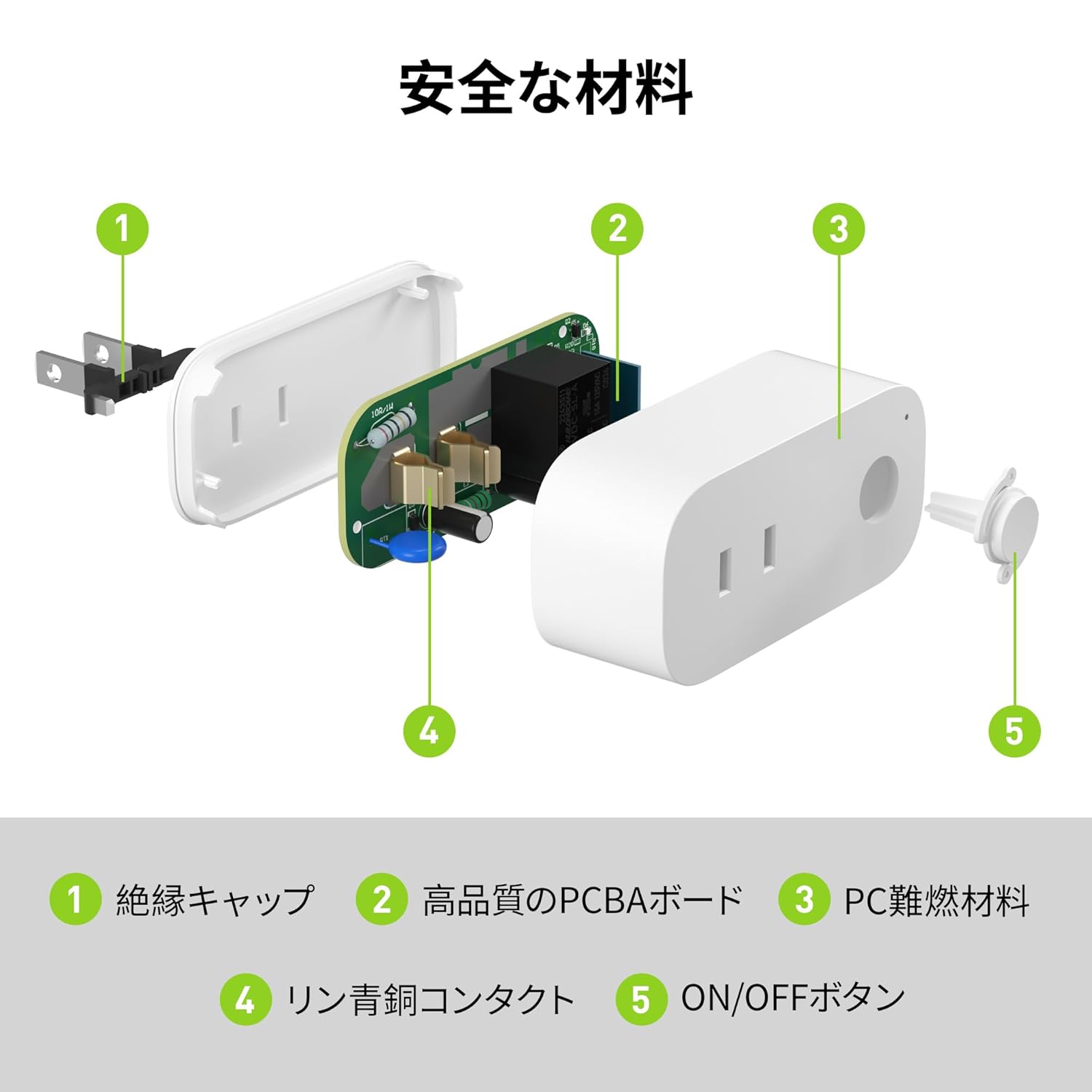
Image: Internal components of the smart plug, highlighting safety features such as the insulation cap, high-quality PCBA board, PC flame-retardant material, phosphor bronze contacts, and the ON/OFF button.
3. Upute za postavljanje
3.1. Početno podešavanje
- Unpack the BN-LINK Smart Plug from its packaging.
- Plug the smart plug into a standard wall outlet.
- Observe the indicator light on the plug. It should start blinking. If it does not blink, press and hold the ON/OFF button for approximately 5 seconds until it starts blinking rapidly.
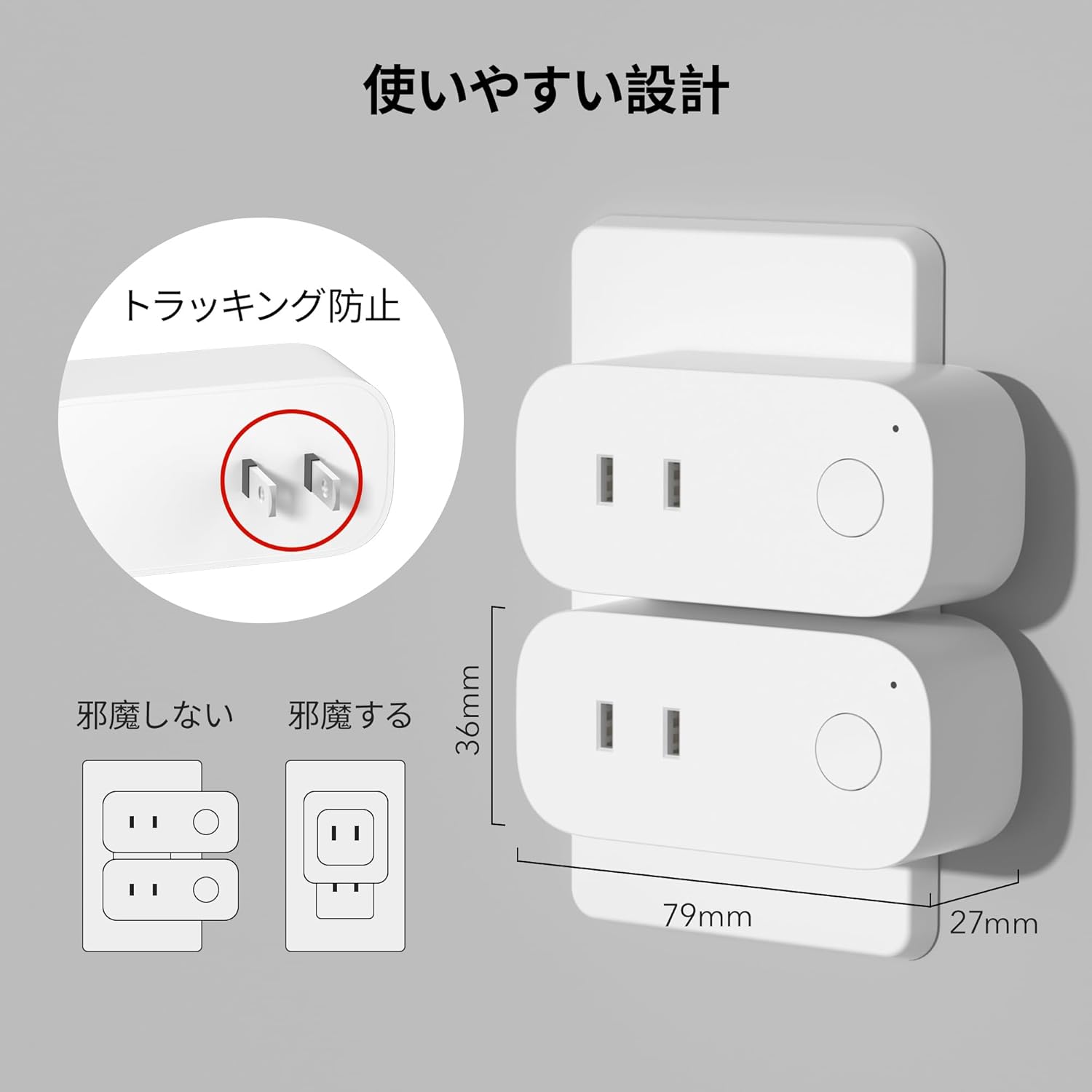
Image: The compact design of the smart plug, illustrating how it fits into an outlet without obstructing the adjacent one. Dimensions are also shown.
3.2. Instalacija aplikacije i Wi-Fi veza
To utilize all smart features, you need to install the BN-LINK app and connect the plug to your 2.4GHz Wi-Fi network. This device only supports 2.4GHz Wi-Fi.
- Download the "BN-LINK" app from your smartphone's app store (Google Play Store for Android or Apple App Store for iOS).
- Otvorite aplikaciju i kreirajte račun ili se prijavite ako ga već imate.
- Dodirnite ikonu "+" ili "Dodaj uređaj" da biste započeli proces uparivanja.
- Select "Smart Plug" from the device list.
- Follow the on-screen instructions to connect the smart plug to your 2.4GHz Wi-Fi network. Ensure your phone is also connected to the 2.4GHz network during setup.
- Once connected, you can rename your smart plug for easy identification (e.g., "Living Room Lamp", "Aparat za kafu").
Video: This video demonstrates the process of connecting the smart plug to the BN-LINK app and your Wi-Fi network, including resetting the device and confirming indicator light status.
Video: This video provides a step-by-step guide on setting up the ePlugBT and connecting it to Wi-Fi, which is similar to the BN-LINK Smart Plug setup process.
4. Uputstvo za upotrebu
4.1. Daljinsko upravljanje putem aplikacije
Once connected to Wi-Fi, you can control your appliances from anywhere with an internet connection.
- Open the BN-LINK app.
- Tap on the device name you wish to control.
- Use the ON/OFF toggle button within the app to switch your appliance on or off.

Image: Remote operation of the smart plug via the BN-LINK app on a smartphone. The image shows the app's ON/OFF control for a device connected to the smart plug, with a WiFi router in the background.

Image: A user controlling a smart plug remotely with their smartphone in a modern kitchen environment.
4.2. Upravljanje glasom
Integrate your smart plug with Amazon Alexa or Google Home for convenient voice commands.
- Ensure your smart plug is successfully connected to the BN-LINK app and your Wi-Fi network.
- Otvorite aplikaciju Alexa ili Google Home.
- Follow the app's instructions to add a new device or skill, searching for "BN-LINK" or "Smart Plug."
- Nakon povezivanja, možete koristiti glasovne komande kao što su:
- "Alexa, uključi [naziv uređaja]."
- "Hej Google, isključi [naziv uređaja]."

Image: A user in a living room controlling a lamp connected to a smart plug using voice commands with an Alexa device. The image also indicates Google Home compatibility.

Image: A smart plug connected to an outlet, being controlled by a Google Home device. A person is shown in bed, illustrating hands-free operation.
4.3. Timer Function and Scheduling
Set custom schedules to automate your appliances and manage energy consumption.
- In the BN-LINK app, select your smart plug.
- Idite do odjeljka "Tajmer" ili "Raspored".
- Set specific ON/OFF times for your appliances. You can create daily, weekly, or one-time schedules.
- Use the countdown timer for temporary automation, such as turning off a charger after a set period to prevent overcharging.

Image: The BN-LINK app displaying timer and scheduling features. Examples show a coffee maker turning on at 7:15 AM and a lamp turning off at 10:00 PM, demonstrating automated control.

Image: A smart plug connected to a microwave, with the app interface showing a timer set to turn the device ON at 7:00.
5. Održavanje
To ensure optimal performance and longevity of your BN-LINK Smart Plug, follow these maintenance guidelines:
- čišćenje: Disconnect the smart plug from the power outlet before cleaning. Use a dry, soft cloth to wipe the surface. Do not use liquid cleaners or sprays.
- Skladištenje: If not in use for an extended period, unplug the device and store it in a cool, dry place away from direct sunlight and moisture.
- inspekcija: Periodically check the plug and outlet for any signs of damage, wear, or overheating. If any issues are found, discontinue use and contact customer support.
6. Otkrivanje problema
If you encounter issues with your BN-LINK Smart Plug, refer to the following common problems and solutions:
| Problem | Mogući uzrok | Rješenje |
|---|---|---|
| Uređaj se ne može povezati na Wi-Fi. | Incorrect Wi-Fi password, 5GHz Wi-Fi network, weak signal, or device not in pairing mode. |
|
| Daljinski upravljač ne radi. | No internet connection on phone or smart plug, or app issue. |
|
| Glasovno upravljanje ne reaguje. | Incorrect device name, smart assistant not linked, or internet connection issue. |
|
| Utikač ne reaguje. | Power outage, device malfunction, or firmware issue. |
|
7. Specifikacije
| Feature | Detalj |
|---|---|
| Brand | BN-LINK |
| Broj modela | CP-J31WT |
| Težina artikla | 70 g |
| Dimenzije paketa | 8.2 x 4.7 x 4.3 cm |
| Veličina | 1 pak |
| Tip prekidača | 1-way |
| Uključene komponente | Smart Plug body, Instruction Manual |
| Batteries Used | br |
| Način rada | UKLJUČENO ISKLJUČENO |
| Current Rating | 15 Amps |
| Operating Voltage | 100 Volts |
| Tip konektora | Plug-in |
| Materijal | Plastika |
| Tip kruga | 1-way |
8. Garancija i podrška
BN-LINK products are designed for quality and reliability. For warranty information and customer support, please refer to the contact details provided in the product packaging or visit the official BN-LINK website.
For further assistance, you may also contact the seller directly through the Amazon platform.
Online resursi:
- Official BN-LINK Webstranica: www.bn-link.com (Napomena: Ovo je rezervirano mjesto URL, zamijenite stvarnim ako je dostupno)
- Stranica proizvoda na Amazonu: Amazon.co.jp Product Page


