1. Uvod
Thank you for choosing the Dexnor Keyboard Case. This manual provides essential information for setting up, operating, and maintaining your keyboard case to ensure optimal performance and longevity.
Šta je u kutiji
- Slim Folio Magnetic Keyboard Case
- USB kabel
- Vodič za brzi početak
- Uputstvo za upotrebu
Kompatibilnost
This keyboard case is designed for the following iPad models:
- iPad Air 11-inch 2025 M3 (Models: A3266/A3267/A3270)
- iPad Air 11-inch 2024 M2 (Models: A2902/A2903/A2904)
- iPad Pro 11-inch 2022 4th Gen (Models: A2435/A2759/A2761/A2762)
- iPad Pro 11-inch 2021 3rd Gen (Models: A2377/A2301/A2459/A2460)
- iPad Pro 11-inch 2020 2nd Gen (Models: A2228/A2068/A2231)
- iPad Pro 11-inch 2018 1st Gen (Models: A1980/A2013/A1934/A1979)
- iPad Air 5th Gen 2022 (Models: A2588/A2589/A2591)
- iPad Air 4th Gen 2020 (Models: A2072/A2316/A2324/A2325)
Please double-check the 'A' code on the back of your device for compatibility. This case is NOT compatible with iPad Pro 11 M4/M5 2024/2025 or iPad (A16) 11th/10th Gen. iPad and Apple Pencil are not included.

Image: Compatibility chart for Dexnor Keyboard Case.
2. Podešavanje
2.1 Priključivanje vašeg iPada
- Otvorite kućište tastature.
- Align your compatible iPad with the magnetic back cover of the case. The strong magnets will securely attach the iPad.
- Position the bottom edge of your iPad into the designated slot on the keyboard for a stable viewing angle. The ergonomic 120-degree viewing angle is designed for comfort during study, work, and entertainment.
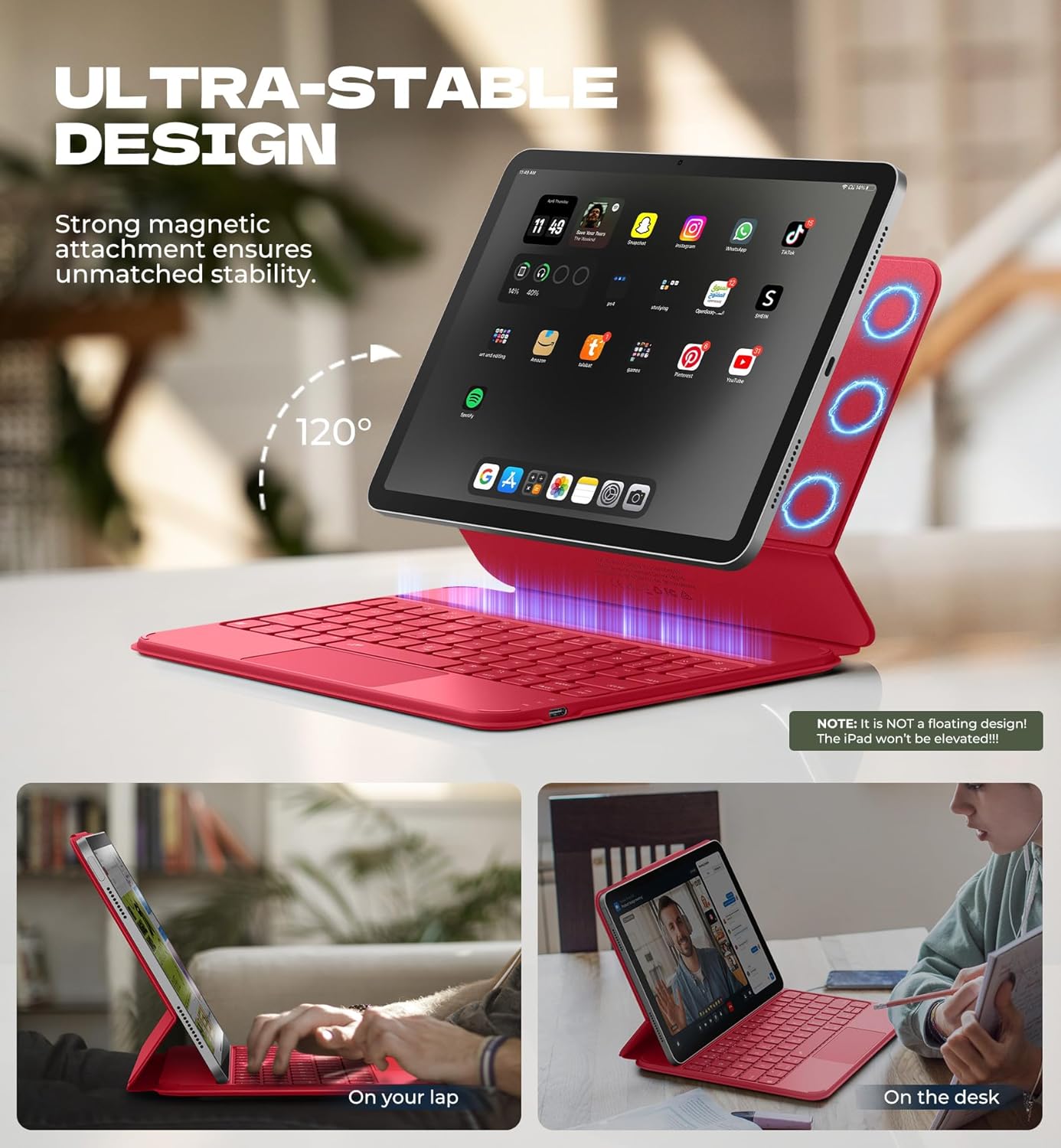
Image: iPad attached to the keyboard case, demonstrating the stable viewing kut.
2.2 Bluetooth uparivanje
- Ensure your keyboard case is charged.
- Turn on the keyboard using the side power button.
- Na vašem iPadu idite na Postavke > Bluetooth i UKLJUČITE Bluetooth.
- Pritisnite Fn ključ i Par key (often indicated by a Bluetooth symbol) simultaneously on the keyboard. The Bluetooth indicator light on the keyboard will flash.
- On your iPad, locate "Dexnor Keyboard" in the "Other Devices" list and tap to connect. A pairing request pop-up will appear; tap "Pair".
- Once connected, the Bluetooth indicator light on the keyboard will stop flashing, and your iPad will show "Connected" next to "Dexnor Keyboard".
Video: Demonstrates the setup and magnetic attachment of the Dexnor Ultra-light Folio Keyboard Case with Trackpad.
Video: Shows the connection process for the Dexnor Keyboard Case for iPad Air 11/Pro 11/Air 5th/4th Gen.
3. Uputstvo za upotrebu
3.1 Funkcije tastature
- Tasteri sa pozadinskim osvetljenjem: The keyboard features a single-color backlight with 3 adjustable brightness levels for comfortable typing in low-light conditions. Use the dedicated backlight keys (often Fn + light icon) to adjust brightness.
- Funkcijski tasteri: Utilize the function keys for quick access to iPad features such as media control, volume adjustment, and screen lock.
- Auto-Wake/Sleep: The case supports auto-wake/sleep functionality, preserving battery life by automatically turning your iPad screen on or off when the case is opened or closed.
3.2 Višestruki dodirni dodir
The integrated multi-touch trackpad provides precise navigation and supports various gestures for a laptop-like experience on your iPad.
- Povećaj/Smanji: Use pinch gestures on the trackpad.
- Upravljaj Files: Utilize standard trackpad gestures for file navigaciju i odabir.
- Pregledaj Webstranice: Scroll and navigate with ease.
- Prebacivanje aplikacija: Use multi-finger gestures to switch between applications.
- Onemogućite trackpad: To prevent accidental touches during typing, press Fn + razmaknica to disable or enable the trackpad.

Image: Multi-touch trackpad with gesture illustrations.

Image: Backlit keyboard keys.
4. Održavanje
4.1 Njega baterija
The keyboard case is equipped with a 650mAh lithium polymer battery. To maximize battery life:
- Charge the keyboard using the provided USB cable when the battery indicator is low.
- Izbjegavajte često potpuno pražnjenje baterije.
- Tastaturu čuvajte na hladnom i suhom mjestu kada je ne koristite duži period.
Expected battery performance:
- Do 720 sati u stanju pripravnosti.
- Up to 200 hours of use without backlight.
- Up to 10 hours of continuous use with the brightest backlight setting.
4.2 Čišćenje
Za čišćenje kućišta tastature:
- Obrišite spoljašnjost mekom krpom, damp tkanina.
- Izbjegavajte korištenje jakih kemikalija ili abrazivnih sredstava za čišćenje.
- Ensure no moisture enters the keyboard or charging port.
5. Otkrivanje problema
Tastatura se ne povezuje putem Bluetootha
- Provjerite bateriju: Provjerite da li je tastatura dovoljno napunjena.
- Ponovo pokrenite tastaturu: Isključite tastaturu, a zatim je ponovo uključite.
- Ponovno uparivanje Bluetootha: Go to your iPad's Bluetooth settings, forget the "Dexnor Keyboard" device if it appears, and then repeat the pairing steps in Section 2.2.
- Ponovo pokrenite iPad: Sometimes a simple iPad restart can resolve connectivity issues.
Dodirna pločica ne reaguje
- Check if Disabled: Ensure the trackpad is not disabled (press Fn + razmaknica za prebacivanje).
- Očistite trackpad: Provjerite je li površina dodirne pločice čista i bez ostataka.
- Restart Keyboard/iPad: Perform a restart of both devices.
Tasteri ne odgovaraju
- Provjerite bateriju: A low battery can cause keys to become unresponsive.
- Ponovno uparivanje Bluetootha: Follow the steps to re-pair the keyboard.
- Čisti ključevi: Pazite da se ispod tipki ne zaglave ostaci.
6. Specifikacije
| Feature | Detalj |
|---|---|
| Broj modela | DK015 |
| Težina artikla | 1.06 lbs (482 grama) |
| Dimenzije paketa | 10.43 x 9.05 x 1.05 inča |
| Proizvođač | Dexnor |
| Tehnologija povezivanja | Bluetooth |
| Opis tastature | Višenamenski |
| Posebne karakteristike | Backlit keys, Long-lasting rechargeable battery, Auto-wake/sleep, High precision click-anywhere trackpad, Magnetic detachable, Magnetic clasp, Pencil Holder, Smart Magnetic Keyboard Folio with Rock-solid stability (NOTE: NOT Floating), Ultra-thin slim lightweight portable compact |
| Boja | Rose Red (Current Product Variant) |
| Pozadinsko osvetljenje tastature | Single Color |
| Materijal | Polycarbonate, Polyurethane (PU) |
| Baterija | 1 A battery required (included) - 650mAh Lithium Polymer |
7. Garancija i podrška
Dexnor is committed to providing high-quality products and customer satisfaction. For any inquiries or support needs, please refer to the following:
- garancija: This product comes with a 10-year warranty for phone/tablet cases.
- Politika povrata: Dostupna je politika povrata u roku od 60 dana.
- Customer Support Response: Expect a response within 24 hours on business days and 48 hours on weekends/holidays.
For further assistance, please visit the official Dexnor store or contact customer service through your purchase platform.


