1. Uvod
The AsiaHorse ASH-S1 ARGB Fan Hub is designed to centralize control over your PC's cooling fans and addressable RGB (ARGB) lighting. It provides extensive customization options through its unique color-learning mode, preset lighting effects, and comprehensive remote control. This hub supports up to 9 PWM fans and 9 ARGB devices, ensuring efficient cooling and vibrant aesthetics for your custom PC build.
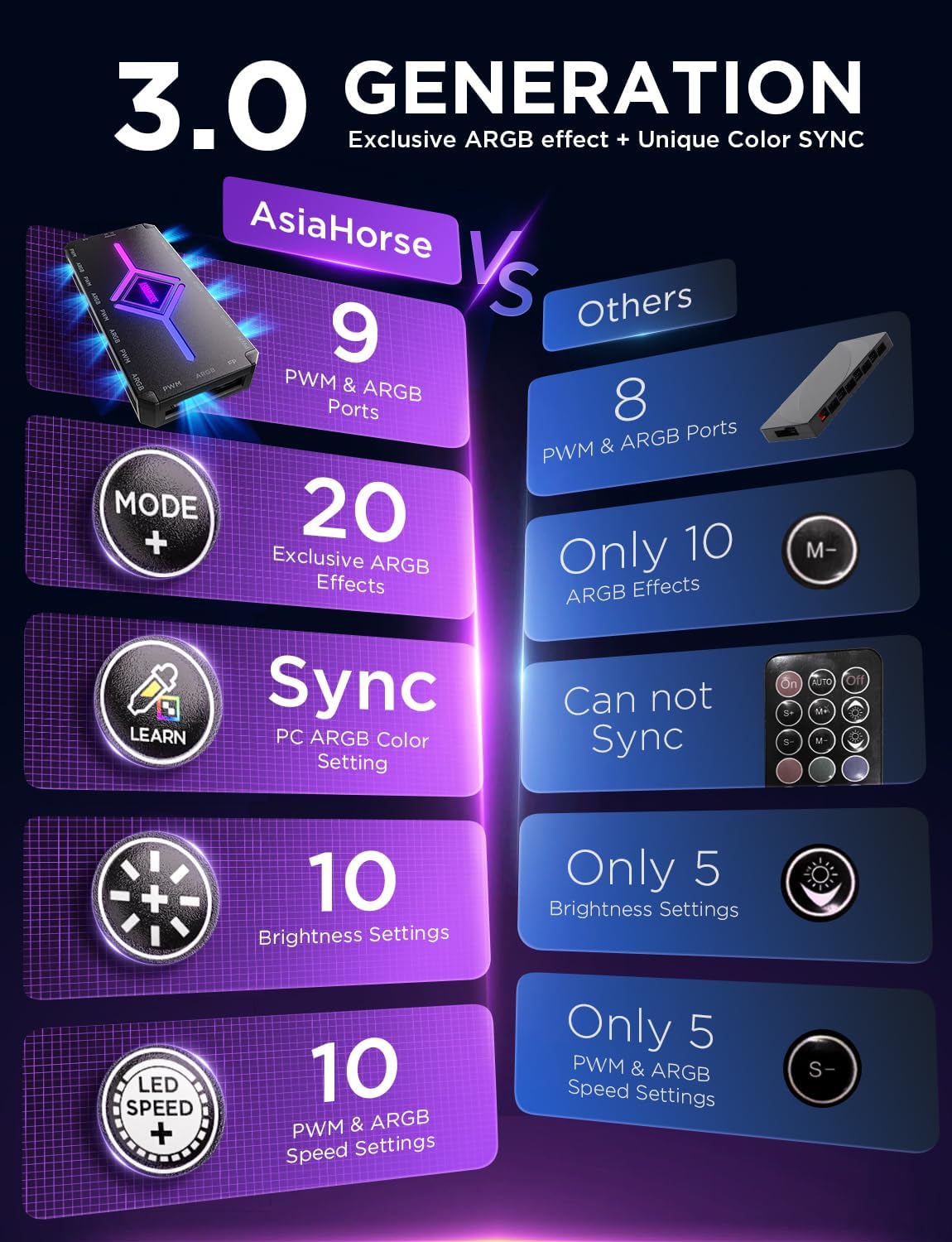
Image 1.1: The AsiaHorse ASH-S1 ARGB Fan Hub, showcasing its compact design and multiple ports for fan and ARGB connections.
2. Značajke proizvoda
- 20 Exclusive Custom Preset ARGB Effects: The ASH-S1 ARGB Hub features a built-in customized chip that provides 20 unique and visually appealing preset ARGB lighting effects. These effects can be activated and cycled through using the remote control.
- Exclusive Color-Learning Technology: This innovative feature allows the hub to detect and learn colors set by your computer's motherboard lighting software. This enables the integration of custom colors with the hub's unique lighting effects for a personalized lighting experience.
- AURA Mode: When connected to a compatible motherboard, the hub can be fully controlled by the motherboard's software. This allows for seamless adjustment of both lighting effects and colors, ensuring synchronization with your system's existing RGB ecosystem.
- PWM način rada: The hub intelligently adjusts fan speeds automatically based on system temperature. This optimizes cooling performance while managing noise levels for efficient operation.
- Sveobuhvatni daljinski upravljač: An included remote control provides intuitive access to all hub functions. Users can adjust 10 brightness levels, 10 ARGB speed settings, and 10 PWM fan speed settings.
- Abundant Ports & High LED Capacity: Equipped with 9 PWM ports for fans and 9 ARGB ports for lighting devices. The hub supports over 400 LED beads, allowing for extensive and vibrant lighting setups (e.g., 9 fans with 24 LEDs each plus a 161-LED strip).

Slika 2.1: Gotovoview of the ASH-S1 hub's key features, including port count, effect variety, synchronization capabilities, and adjustable settings.
3. Sadržaj paketa
Molimo Vas da provjerite da li se u Vašem paketu nalaze sve komponente:
- AsiaHorse ASH-S1 ARGB Fan Hub
- Daljinski upravljač
- SATA kabl za napajanje
- PWM Signal Cable (for motherboard connection)
- ARGB Sync Cable (for motherboard connection)
4. Vodič za instalaciju
Follow these steps to properly install your AsiaHorse ASH-S1 ARGB Fan Hub:
- Montirajte hub: Choose a suitable location within your PC case, typically on a flat surface, and secure the hub using adhesive pads or screws (not included, if required). Ensure it is accessible for cable management.
- Povežite SATA napajanje: Connect the provided SATA power cable to the hub's power input and to an available SATA power connector from your power supply unit (PSU). WARNING: Ensure the power supply is off before connecting any cables. Incorrect power connection can damage the hub and connected components.
- Connect PWM Fans: Connect your PC case fans to the PWM ports on the hub. The hub supports up to 9 PWM fans.
- Povežite ARGB uređaje: Connect your ARGB fans or other ARGB lighting devices to the ARGB ports on the hub. The hub supports up to 9 ARGB devices. Ensure correct orientation to avoid damage.
- Connect to Motherboard (Optional for AURA Sync/PWM Control):
- PWM Signal Cable: Connect the PWM signal cable from the hub to an available 4-pin PWM fan header on your motherboard (e.g., CPU_FAN, SYS_FAN). This allows the motherboard to control fan speeds.
- ARGB kabl za sinhronizaciju: Connect the ARGB sync cable from the hub to a 3-pin 5V ARGB header on your motherboard. This enables motherboard software control over the ARGB lighting. Do NOT connect to a 4-pin 12V RGB header, as this will damage the ARGB devices.
- Uključeno: Once all connections are secure, power on your PC. The hub should initialize, and connected fans and ARGB devices will light up.
5. Uputstvo za upotrebu
The ASH-S1 ARGB Fan Hub is primarily controlled via the included remote. Familiarize yourself with the remote's layout and functions:

Image 5.1: The remote control for the ASH-S1 hub, showing buttons for various lighting and fan speed adjustments.
5.1 Funkcije daljinskog upravljača
- Dugme za napajanje (⏻): Turns the ARGB lighting on or off.
- Dugme za zaključavanje (🔒): Locks the current lighting effect.
- Learn Button (LEARN): Activates the exclusive Color-Learning Technology. Press this button to capture the current ARGB color from your motherboard software.
- Mode Buttons (MODE + / MODE -): Cycles through the 20 exclusive preset ARGB lighting effects.
- Color Buttons (COLOR + / COLOR -): Adjusts the color within certain lighting modes or cycles through static colors.
- Auto dugme (AUTO): Initiates an automatic cycle through all preset ARGB lighting effects.
- Dugmad za brzinu ventilatora (FAN + / FAN -): Adjusts the PWM fan speed in 10 increments.
- LED Speed Buttons (LED SPEED + / LED SPEED -): Adjusts the speed of the ARGB lighting effects in 10 increments.
- Brightness Buttons (☀ + / ☀ -): Adjusts the brightness of the ARGB lighting in 10 increments.
- AURA SYNC Button: Toggles between remote control mode and motherboard ARGB software control (AURA Mode). When AURA Mode is active, lighting is controlled by your motherboard software.
- Dugmad za odabir boja: Direct selection of static colors (Red, Green, Blue, Yellow, Cyan, Magenta, White).

Image 5.2: The Color-Learning feature in action, allowing the hub to synchronize with custom colors from PC software.
5.2 PWM Mode Operation
When the PWM signal cable is connected to your motherboard, the hub will automatically adjust fan speeds based on the temperature readings from your motherboard. This ensures optimal cooling performance without manual intervention. You can still use the remote's FAN +/- buttons to override or fine-tune the fan speed if desired.
5.3 AURA Mode Operation
If the ARGB Sync Cable is connected to a compatible 5V ARGB header on your motherboard, pressing the 'AURA SYNC' button on the remote will transfer ARGB control to your motherboard's software (e.g., ASUS Aura Sync, MSI Mystic Light Sync, Gigabyte RGB Fusion, ASRock Polychrome Sync). This allows for unified lighting control across all compatible components in your system.

Image 5.3: The hub's compatibility with various motherboard ARGB synchronization software.
6. Održavanje
To ensure the longevity and optimal performance of your ASH-S1 ARGB Fan Hub, follow these simple maintenance guidelines:
- čišćenje: Periodically clean the hub and its connections using a soft, dry cloth. Avoid using liquid cleaners or abrasive materials.
- Uklanjanje prašine: Use compressed air to gently remove any dust accumulation from the hub and connected fans.
- Upravljanje kablovima: Ensure all cables are neatly routed and not under excessive tension, which could lead to damage over time.
- Uslovi okoline: Operate the hub within standard PC operating temperatures and humidity levels. Avoid extreme conditions.
7. Otkrivanje problema
If you encounter issues with your ASH-S1 ARGB Fan Hub, refer to the following common problems and solutions:
- Nema napajanja/Ventilatori se ne okreću:
- Ensure the SATA power cable is securely connected to both the hub and the PSU.
- Verify that your PSU is providing power.
- Check individual fan connections to the hub.
- ARGB osvjetljenje ne radi/treperi:
- Confirm ARGB devices are correctly plugged into the hub's ARGB ports (ensure correct 3-pin orientation).
- If using AURA Mode, ensure the ARGB Sync Cable is connected to a 5V ARGB header on the motherboard, not a 12V RGB header.
- Try cycling through different lighting modes with the remote.
- Check for loose connections on ARGB cables.
- If flickering persists on one module, it might indicate a faulty ARGB device or connection. Try isolating the problematic device.
- Daljinski upravljač ne reaguje:
- Ensure the remote control's battery is functional and correctly inserted.
- Point the remote directly at the hub's IR receiver.
- Remove any obstructions between the remote and the hub.
- Motherboard Sync Not Working:
- Verify the ARGB Sync Cable is connected to the correct 3-pin 5V ARGB header on your motherboard.
- Ensure the 'AURA SYNC' button on the remote has been pressed to switch control to the motherboard.
- Provjerite softverske postavke ARGB-a na vašoj matičnoj ploči.
- CRITICAL WARNING: Smoke or Burning Smell:
- Immediately power off your PC and disconnect the power supply.
- This indicates a severe electrical short or component failure. Do not attempt to power on the system again.
- Carefully inspect all connections, especially power and ARGB cables, for incorrect orientation or damage.
- Contact customer support for assistance. Do not attempt to repair the hub yourself.
8. Specifikacije proizvoda
| Feature | Specifikacija |
|---|---|
| Brand | AsiaHorse |
| Model | ASH-S1 |
| Vrsta konektora za napajanje | SATA |
| Metoda hlađenja | Forced Air (via connected fans) |
| Kompatibilni uređaji | Stoni računari |
| Materijal | Metal, Plastika |
| Broj stavki | 1 (Hub) |
| Dimenzije paketa | 5.98 x 3.23 x 1.34 inča |
| Težina artikla | 5 unce |
| Potrebne baterije (daljinski upravljač) | 1 litijum-jonska baterija (uključena) |
9. Informacije o garanciji
The AsiaHorse ASH-S1 ARGB Fan Hub comes with a 2-godišnja garancija from the date of purchase. This warranty covers manufacturing defects and malfunctions under normal use. Please retain your proof of purchase for warranty claims. The warranty does not cover damage caused by improper installation, misuse, accidents, unauthorized repairs, or modifications.
10. Korisnička podrška
For further assistance, technical support, or warranty inquiries, please contact AsiaHorse customer service through their official channels. You can typically find contact information on the AsiaHorse webweb-mjestu ili putem prodavača gdje ste kupili proizvod.
Posjetite AsiaHorse Store on Amazon za više informacija i proizvoda.


