1. Proizvod je gotovview
The LIGE FV21-G Smart Watch is a versatile activity tracker designed for women, featuring a 1.43-inch AMOLED display, Bluetooth call functionality, and comprehensive health monitoring. This manual provides essential information for using your device effectively.

Image 1.1: LIGE FV21-G Smart Watch with mesh silver strap and an alternative pink silicone strap.
Šta je u kutiji:
- 1 x LIGE FV21-G Smart Watch
- 1 x Mesh Strap
- 1 x silikonski remen
- 1 x Uputstvo za upotrebu
- 1 x Kabl za punjenje
2. Vodič za postavljanje
2.1 Početno punjenje
Before first use, fully charge your LIGE FV21-G Smart Watch. Connect the magnetic charging cable to the charging points on the back of the watch and plug the USB end into a compatible power source (e.g., computer USB port, USB wall adapter).

Image 2.1: Magnetic charging connection on the LIGE FV21-G Smart Watch.
2.2 Instalacija i uparivanje aplikacije
- Download the "FitCloudPro" app from your smartphone's app store (compatible with Android 4.4+ or iOS 9.0+).
- Omogućite Bluetooth na svom pametnom telefonu.
- On the watch, navigate to the settings and find the QR code. Scan this QR code using your smartphone's camera or the app's built-in scanner to initiate pairing.
- Follow the on-screen prompts in the app to complete the binding process. Ensure the watch remains within 10 meters of your phone for optimal data synchronization.
Video 2.2: This video demonstrates the unboxing and initial setup process, including app pairing for the LIGE FV21 Smart Watch.
2.3 Zamjena remena
The LIGE FV21-G Smart Watch comes with two interchangeable straps: a mesh silver strap and a silicone strap. To change the strap, locate the quick-release pins on the underside of the watch where the strap connects. Slide the pin to detach the current strap and attach the new one by aligning the pin with the lug holes and releasing it.

Image 2.3: The LIGE FV21-G Smart Watch includes both silicone and mesh straps.
3. Uputstvo za upotrebu
3.1 Osnovna navigacija
- Touchscreen: Prevucite prstom lijevo, desno, gore ili dolje za navigaciju kroz menije i funkcije. Dodirnite za odabir.
- Bočno dugme: Pritisnite da biste probudili ekran, vratili se na početni ekran ili pristupili listi aplikacija.
3.2 Bluetooth pozivi i obavještenja
Once paired with your smartphone, the watch supports Bluetooth calls and notifications.
- Upućivanje/odgovaranje na pozive: Use the watch's dial pad or contact list to make calls. Incoming calls can be answered or declined directly from the watch.
- Obavještenja: Receive instant alerts for messages from apps like WhatsApp, Instagram, Facebook, and Twitter. Ensure push notifications are enabled in the FitCloudPro app settings.
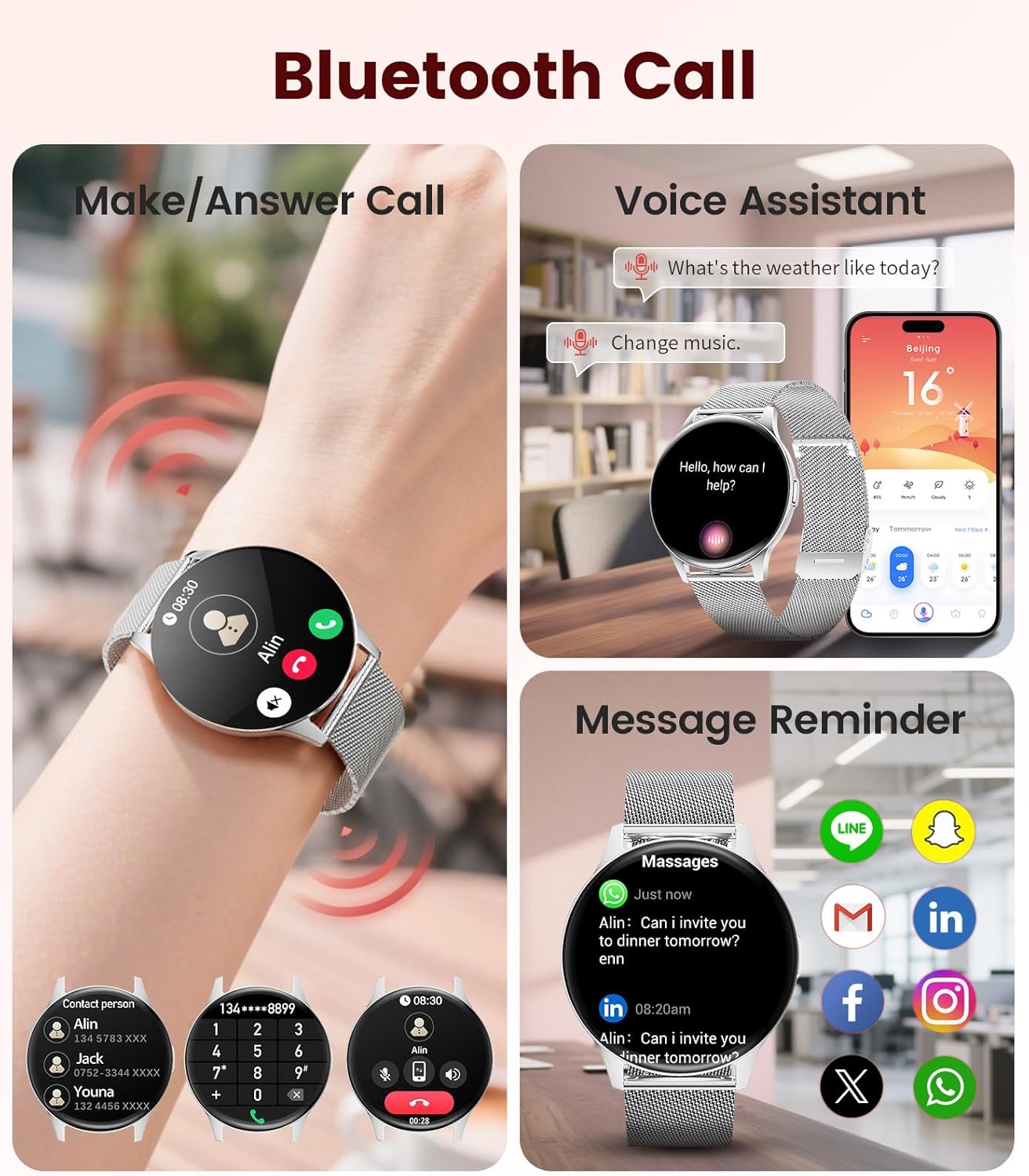
Image 3.1: Bluetooth call, voice assistant, and message reminder functions on the LIGE FV21-G Smart Watch.
3.3 Monitoring zdravlja
The watch tracks various health metrics:
- Otkucaji srca: Monitors your heart rate continuously throughout the day.
- Kiseonik u krvi (SpO2): Mjeri nivo zasićenosti krvi kisikom.
- Praćenje spavanja: Prati vaše obrasce spavanja, uključujući duboki san, lagani san i vrijeme buđenja.
- Praćenje ženskog zdravlja: Provides menstrual cycle, ovulation, and safe period predictions. Set personalized reminders in the FitCloudPro app.

Image 3.2: Heart rate, blood oxygen, and sleep monitoring features.

Image 3.3: Female health and cycle tracking interface.
3.4 sportskih modova
The watch offers over 100 sports modes to track your activities. Select your desired sport from the watch menu to record data such as steps, distance, calories burned, and heart rate during exercise.

Slika 3.4: Izbor od preko 100 sportskih modova.
3.5 prilagodljivih brojčanika
Choose from over 200 pre-designed watch faces or customize your own using photos through the FitCloudPro app.

Image 3.5: Customizable watch faces and app interface.
3.6 Dodatne funkcije
The LIGE FV21-G Smart Watch includes several other useful functions:
- Glasovni asistent: Access your smartphone's voice assistant directly from the watch.
- Kontrola muzike: Kontrolišite reprodukciju muzike na svom pametnom telefonu.
- Daljinsko upravljanje kamerom: Koristite sat kao daljinski okidač za kameru vašeg pametnog telefona.
- Vremenska prognoza: View trenutni vremenski uslovi i prognoze.
- Alarmi i tajmeri: Postavite alarme i koristite funkcije tajmera.
- Pronađite telefon: Locirajte upareni pametni telefon tako što ćete ga natjerati da zvoni.
- Sedentarni podsjetnik: Primajte upozorenja za kretanje nakon perioda neaktivnosti.
- Podsjetnik na vodu za piće: Primajte podsjetnike da ostanete hidrirani.
Video 3.6: This video highlights various features of the FV21 Smart Watch, including its design, sports modes, health monitoring, and smart functions like calls and notifications.
4. Održavanje
4.1 Čišćenje sata
- Redovno čistite ekran i kućište sata mekom krpom koja ne ostavlja dlačice.
- For the silicone strap, use mild soap and water. Rinse thoroughly and dry completely.
- For the mesh strap, use a soft brush to remove debris and wipe with a damp cloth. Ensure it is completely dry before wearing.
- Avoid using harsh chemicals or abrasive materials, as these can damage the watch.
4.2 Otpornost na vodu
The LIGE FV21-G Smart Watch has an IP68 water resistance rating. This means it is resistant to dust and can withstand immersion in water up to 1.5 meters for up to 30 minutes. It is suitable for daily use, such as hand washing, rain, or brief splashes. However, it is not recommended for hot showers, saunas, or deep-water activities like swimming or diving, as steam and high water pressure can compromise the seals.

Image 4.1: The watch is IP68 waterproof, suitable for daily splashes.
4.3 Njega baterija
- Redovno punite sat kako biste održali zdravlje baterije.
- Izbjegavajte ekstremne temperature, koje mogu smanjiti performanse baterije.
- Ako sat skladištite duži period, napunite ga do oko 50% i čuvajte ga na hladnom i suhom mjestu.
5. Otkrivanje problema
5.1 Sat se ne uključuje
- Provjerite je li sat potpuno napunjen. Spojite ga na punjač na najmanje 30 minuta.
- Press and hold the side button for 10-15 seconds to perform a forced restart.
5.2 Nije moguće upariti uređaj sa pametnim telefonom
- Provjerite je li Bluetooth omogućen na vašem pametnom telefonu i satu.
- Ensure the FitCloudPro app is installed and running.
- Keep the watch and smartphone close to each other (within 10 meters).
- Ponovo pokrenite sat i pametni telefon.
- If previously paired, try unpairing the device from your phone's Bluetooth settings and then re-pair through the app.
5.3 Netačni zdravstveni podaci
- Pazite da sat čvrsto prianja uz vaš zglob, ali ne previše stegnut.
- Očistite senzore na poleđini sata.
- Environmental factors and individual physiology can affect sensor accuracy. The data is for reference and not for medical diagnosis.
5.4 Obavještenja se ne prikazuju
- Check if push notifications are enabled for specific apps within the FitCloudPro app.
- Ensure your smartphone's notification settings allow the FitCloudPro app to display alerts.
- Verify that the watch is connected via Bluetooth to your smartphone.
6. Specifikacije
| Feature | Detalj |
|---|---|
| Model | FV21-G |
| Veličina ekrana | 1.43 inča AMOLED |
| Rezolucija | 466x466 HD |
| Debljina | 7.9 mm |
| Povezivanje | Bluetooth 5.2 |
| Kapacitet baterije | 200 mAh |
| Trajanje baterije | 5-7 dana (tipična upotreba) |
| Otpornost na vodu | IP68 |
| Kompatibilnost | Android 4.4+ / iOS 9.0+ |
| App | FitCloudPro |
| Monitoring zdravlja | Heart Rate, SpO2, Sleep, Female Health |
| Sportski modovi | 100+ |
| Težina | 5.3 unce |

Image 6.1: Product dimensions of the LIGE FV21-G Smart Watch.
7. Garancija i podrška
LIGE provides professional customer service. If you encounter any questions regarding the quality, settings, or usage of your FV21 Smart Watch, please contact us through the Amazon platform where you purchased the product. Our team is dedicated to assisting you.
For further assistance, please refer to the contact information provided with your purchase or visit the official LIGE store on Amazon.
Note: Specific warranty terms and conditions may vary. Please consult your purchase documentation for detailed warranty information.


