Uvod
The MAHANCRIS PCHS216E01 Computer Tower Stand is a versatile and height-adjustable mobile solution designed to elevate your PC tower, improve airflow, and provide convenient mobility. It features an integrated power outlet with USB-A and Type-C ports, making it a central charging point for your devices. This manual provides detailed instructions for safe assembly, operation, and maintenance of your new computer stand.
Sigurnosne informacije
- Ograničenja težine: Do not exceed the maximum weight capacity. The top surface supports up to 33 lb (15 kg) for accessories, and the bottom shelf supports up to 88 lb (40 kg) for your computer, printer, or speakers. Overloading can cause instability and damage.
- električna sigurnost: Ensure the power cord is fully inserted into a grounded outlet. Do not overload the integrated power strip. Avoid exposing the power strip to moisture. Disconnect power before cleaning or moving the unit.
- Stabilnost: Always ensure all fasteners are securely tightened. When using casters, lock them to prevent unintended movement. On uneven surfaces, utilize the adjustable feet for enhanced stability.
- Montaža: Follow all assembly steps carefully. Do not use power tools for assembly unless explicitly instructed, as this may overtighten screws and damage components.
- plasman: Place the stand on a level, stable surface. Keep children and pets away from the stand during assembly and operation.
Sadržaj paketa
Prije početka montaže, provjerite jesu li svi dijelovi prisutni i neoštećeni. Ako bilo koji dio nedostaje ili je oštećen, obratite se korisničkoj podršci.
- Gornja polica (1)
- Donja polica (1)
- Side Frames/Metal Tubes (2 sets)
- Integrated Power Outlet Unit with 4.9 ft Cord (1)
- Swivel Casters (4, two with locks)
- Podesiva stopala (4)
- Kuke za slušalice (2)
- Assembly Hardware (screws, bolts, nuts)
- Assembly Tools (Allen key, wrench)
- Uputstvo za upotrebu (1)
Uputstva za sastavljanje
Assembly typically takes approximately one hour. All parts are numbered for easy identification. Please refer to the included diagram for visual guidance.
- Raspakujte i identifikujte dijelove: Carefully remove all components from the packaging. Lay them out and compare them against the package contents list and the assembly diagram to ensure everything is present.
- Sastavite okvir: Attach the metal side frames to the bottom shelf using the provided hardware. Ensure all connections are finger-tight before fully securing.
- Install Casters or Adjustable Feet: Decide whether you prefer mobility or stationary use. Screw the four swivel casters into the designated holes on the bottom of the frame for mobility, or screw in the four adjustable feet for stationary placement. If using casters, ensure the two locking casters are positioned at the front for easy access.
- Attach the Top Shelf: Secure the top shelf to the upper part of the side frames using the appropriate hardware.
- Mount the Power Outlet: Attach the integrated power outlet unit to the designated location on the side of the stand. Ensure the power cord is routed safely and not pinched.
- Install Headphone Hooks: Attach the two L-shaped headphone hooks to the underside of the top shelf as desired.
- Završno zatezanje: Once all components are in place, systematically tighten all screws and bolts using the provided tools. Do not overtighten.


Uputstvo za upotrebu
Podešavanje visine
The stand's height is adjustable from 26.6 inches to 32.7 inches (67.5 cm to 83 cm). To adjust the height, loosen the adjustment knobs on the side frames, carefully raise or lower the top shelf to the desired position, and then reinsert and securely tighten the knobs. Note that this adjustment requires manual repositioning and is not designed for frequent, quick changes.

Mobilnost i stabilnost
The stand is equipped with four swivel casters, two of which have locking mechanisms. To move the stand, unlock the casters. To keep the stand stationary, engage the locks on the two casters. For use on uneven surfaces or when maximum stability is desired, the casters can be replaced with the included adjustable feet. These feet allow you to level the stand and prevent movement.

Integrisana utičnica
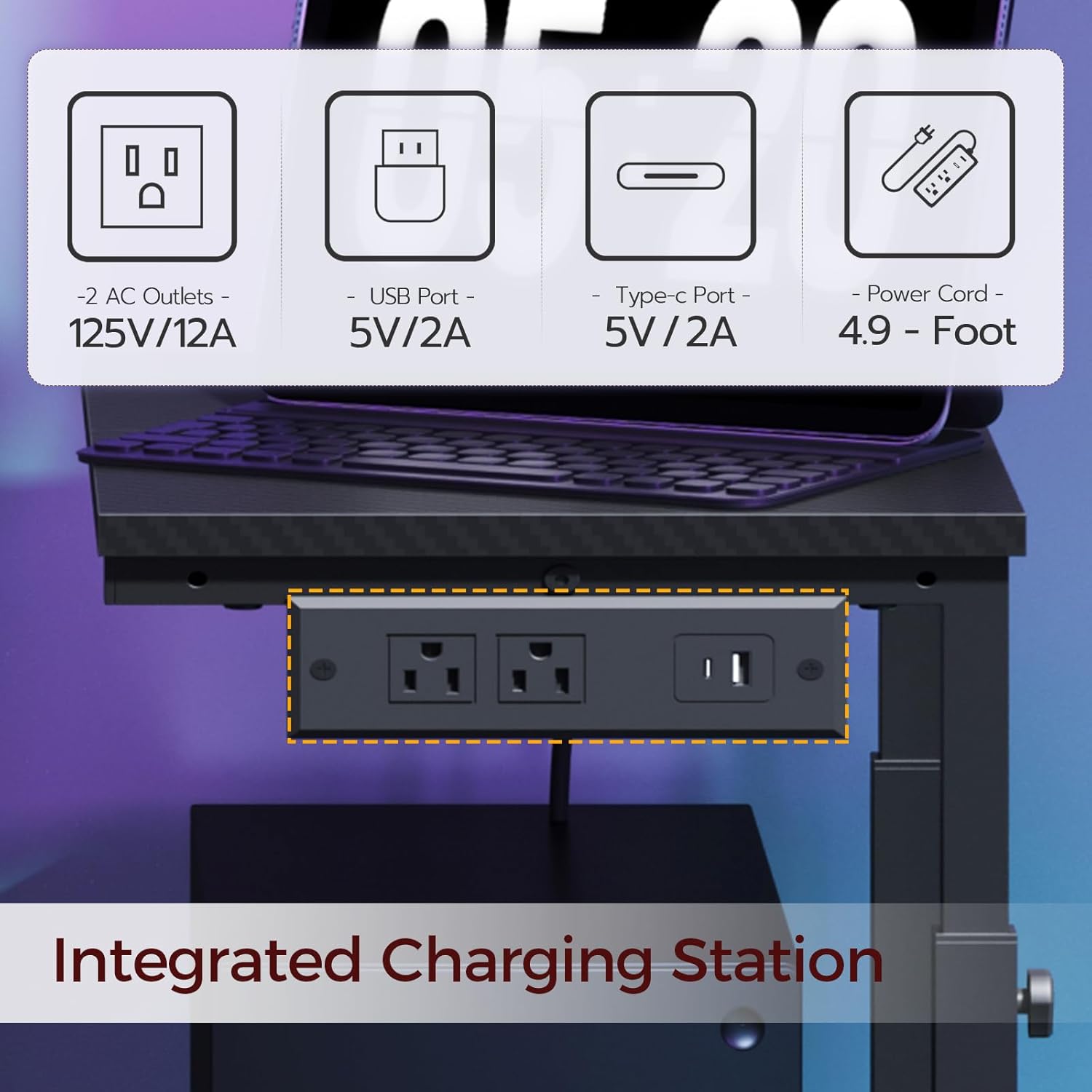
The side-mounted power outlet provides convenient access to power and charging. It includes two standard AC outlets (125V/12A), one USB-A port (5V/2A), and one Type-C port (5V/2A). The attached 4.9 ft power cord allows for flexible placement. Use this feature to power your PC, monitor, and charge mobile devices directly from the stand, helping to organize cables.
Kuke za slušalice
Utilize the two L-shaped hooks located under the top shelf to hang headphones or other lightweight accessories, keeping your workspace tidy.
Održavanje
- čišćenje: Obrišite površine mekom, damp cloth. Avoid abrasive cleaners or harsh chemicals that could damage the finish. Ensure the power outlet is unplugged before cleaning.
- Provjera pričvršćivača: Periodically check all screws and bolts to ensure they remain tight. Retighten as necessary to maintain structural integrity.
- Održavanje kotača: Keep casters free of dust, hair, and debris to ensure smooth rolling.
Rješavanje problema
- Issue: Stand feels wobbly or unstable.
- Rješenje:
- Osigurajte da su svi vijci i šrafovi za montažu potpuno zategnuti.
- Verify that the stand is placed on a level surface. If not, use the adjustable feet to compensate for unevenness.
- If using casters, ensure they are locked when the stand is stationary.
- Distribute weight evenly across the shelves, adhering to the specified weight limits.
- Issue: Difficulty with height adjustment.
- Rješenje:
- Ensure the adjustment knobs are fully loosened before attempting to change the height.
- Confirm that the support tubes are correctly aligned and not obstructed.
- Issue: Power outlet not functioning.
- Rješenje:
- Check that the stand's power cord is securely plugged into a working wall outlet.
- Ensure the devices plugged into the stand's outlets are functioning correctly.
- Izbjegavajte preopterećenje produžne utičnice s previše uređaja velike snage.
Specifikacije
| Feature | Detalj |
|---|---|
| Broj modela | PCHS216E01 |
| Dimenzije (D x Š x V) | 23.6" x 11.0" x 26.6"-32.7" (60cm x 28cm x 67.5cm-83cm) |
| Materijal | Projektovano drvo, metal |
| Boja | Crna |
| Nosivost gornje police | 33 lb (15 kg) |
| Kapacitet težine donje police | 88 lb (40 kg) |
| Utičnica | 2 AC Outlets (125V/12A), 1 USB-A Port (5V/2A), 1 Type-C Port (5V/2A) |
| Dužina kabla za napajanje | 4.9 stopa (1.5 m) |
| Mobilnost | 4 Swivel Casters (2 with locks) |
| Stabilnost | 4 podesive noge |
| Dodatne karakteristike | 2 Headphone Hooks, Carbon Fiber Pattern Surface |
Garancija i podrška
For warranty information, product support, or to report missing/damaged parts, please contact MAHANCRIS customer service through the retailer where the product was purchased or visit the official MAHANCRIS website. Please have your model number (PCHS216E01) and purchase details ready when contacting support.


