1. Uvod
The Audizio Desio is a versatile digital radio that combines classic aesthetics with modern audio technology. It features DAB, DAB+, and FM tuning for clear radio reception, along with Bluetooth 5.0 for wireless streaming, a USB port for media playback, and a 3.5mm AUX input for wired connections. The radio is equipped with a 2.4-inch color LCD display and integrated stereo speakers, making it suitable for various environments such as living rooms, kitchens, or bedrooms.
This manual provides detailed instructions for setting up, operating, and maintaining your Audizio Desio radio. Please read it thoroughly before use to ensure proper functionality and to maximize your listening experience.
2. Sigurnosne informacije
- Provjerite jačinu adaptera za napajanjetage matches your local power supply before connecting.
- Ne izlažite uređaj kiši, vlazi ili ekstremnim temperaturama.
- Izbjegavajte postavljanje jedinice u blizini izvora topline ili na direktnu sunčevu svjetlost.
- Ne otvarajte casing; sve servisne radove prepustite kvalifikovanom osoblju.
- Držite uređaj dalje od jakih magnetnih polja.
- Čistite jedinicu samo mekom, suvom krpom.
3. Sadržaj paketa
Molimo Vas da prilikom raspakivanja provjerite da li su svi artikli prisutni:
- Audizio Desio DAB/DAB+/FM Radio
- Adapter za napajanje (DC 5V)
- Daljinski upravljač
- Uputstvo za upotrebu
4. Kontrole i veze
Kontrole na prednjoj ploči
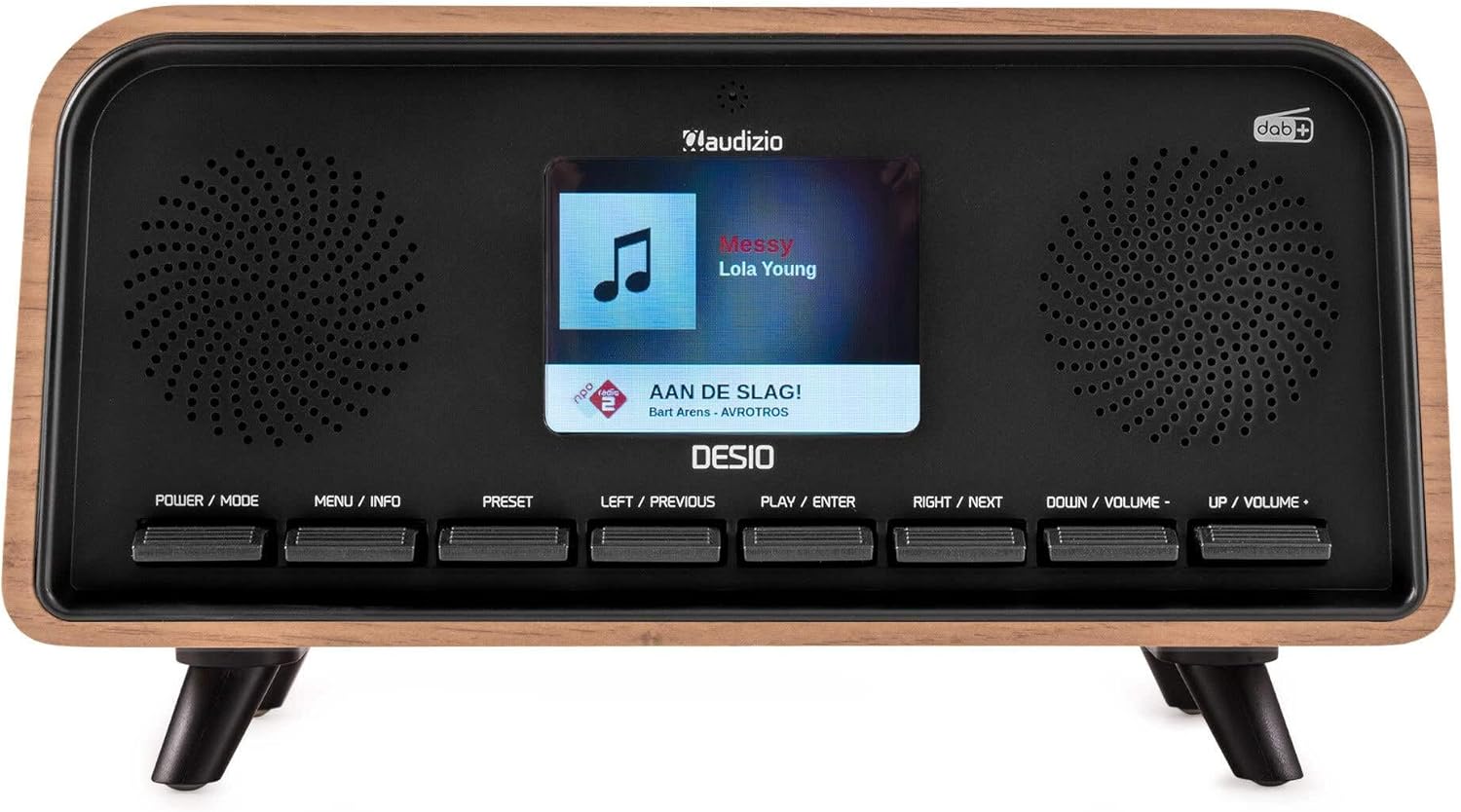
Front view of the Audizio Desio radio, showing the display playing music with artist and track information. The control buttons are visible below the screen.
- POWER / MODE: Press to turn on/off. Press and hold to switch between DAB, FM, Bluetooth, USB, and AUX modes.
- MENU / INFO: Press to access menu options. In playback mode, press to cycle through information display.
- PRESET: Press to recall saved stations. Press and hold to save current station.
- LEFT / PREVIOUS: Navigate left in menus, or skip to previous track/station.
- PLAY / ENTER: Confirm selection in menus, or play/pause media.
- RIGHT / NEXT: Navigate right in menus, or skip to next track/station.
- DOWN / VOLUME -: Decrease volume, or navigate down in menus.
- UP / VOLUME +: Increase volume, or navigate up in menus.
Priključci na stražnjoj ploči
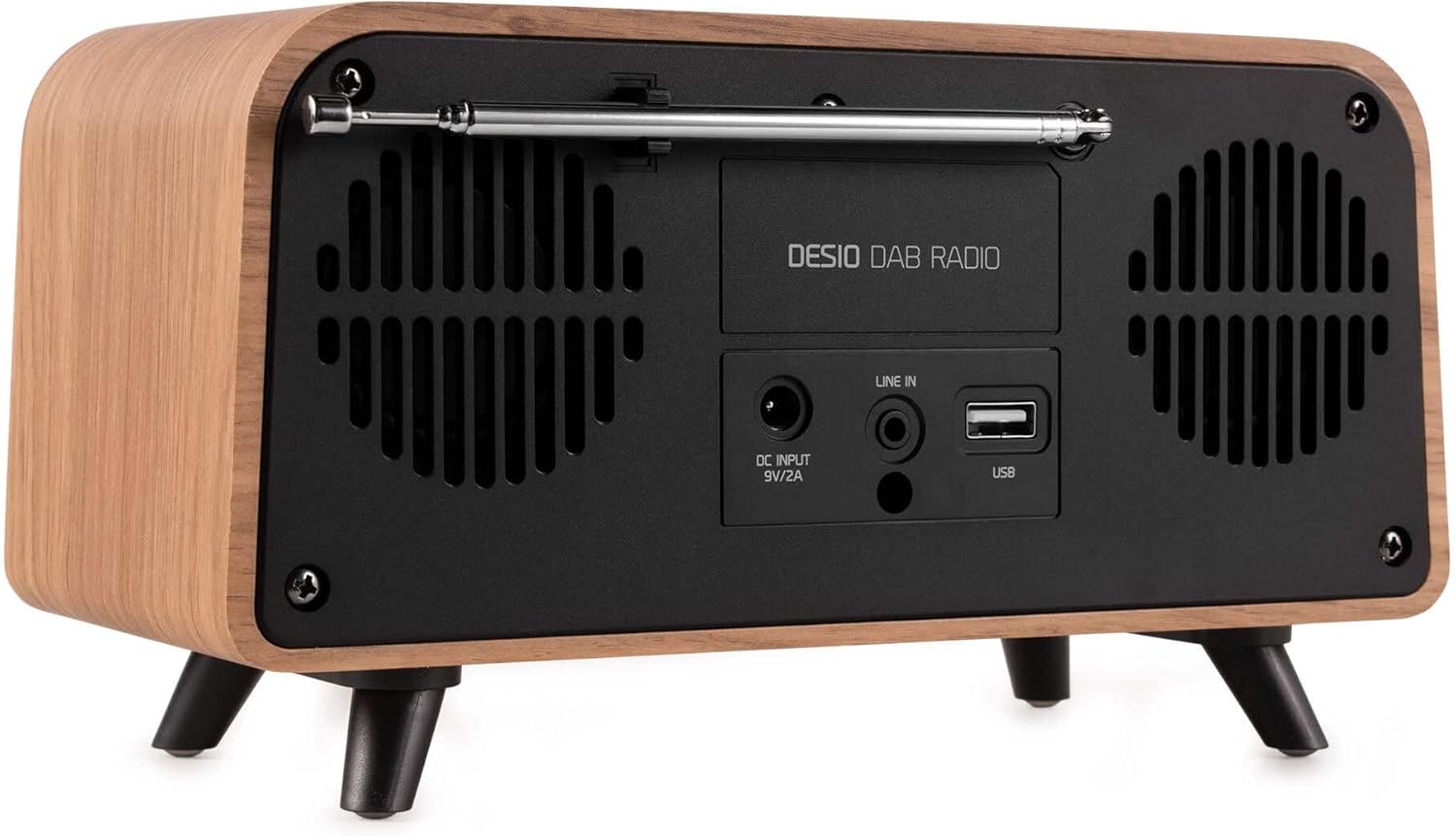
Pozadi view of the Audizio Desio radio, highlighting the DC INPUT 9V/2A, LINE IN (3.5mm AUX), and USB ports. The telescopic antenna is extended.
- DC INPUT 9V/2A: Ovdje priključite priloženi adapter za napajanje.
- LINE IN (3.5mm AUX): Povežite eksterne audio uređaje pomoću 3.5 mm audio kabla.
- USB: Umetnite USB fleš disk za reprodukciju MP3 datoteka.
- Teleskopska antena: Extend fully for optimal DAB/DAB+ and FM reception.
5. Početno podešavanje
- Priključite napajanje: Plug the provided DC 5V power adapter into the DC INPUT port on the rear of the radio, then plug the adapter into a wall outlet.
- Produžna antena: Fully extend the telescopic antenna located on the rear of the unit for best reception.
- Uključeno: Pritisnite POWER / MODE dugme za uključivanje radija.
- First-time DAB Scan: Upon first power-on, the radio will automatically perform a full scan for DAB/DAB+ stations. This may take a few minutes. The display will show the scanning progress.
- Postavite vrijeme/datum: The time and date will usually be set automatically via DAB signal. If not, you can manually set them via the menu.
6. Uputstvo za upotrebu
6.1 Rad DAB/DAB+ radija

Front view of the Audizio Desio radio, displaying a DAB radio station ('NPO Klassiek') and current time.
- Select DAB Mode: Pritisnite POWER / MODE button repeatedly until 'DAB' is displayed.
- Skeniranje stanica: If no stations are found or you wish to rescan, press MENU / INFO, a zatim koristite LEFT / PREVIOUS or DESNO / SLJEDEĆE to select 'Full Scan' and press PLAY / ENTER.
- Odaberite stanicu: Koristite LEFT / PREVIOUS or DESNO / SLJEDEĆE buttons to browse available stations. Press PLAY / ENTER za odabir stanice.
- Spremi unaprijed postavljeno: Da biste sačuvali stanicu, pritisnite i držite PRESET dugme. Koristi LEFT / PREVIOUS or DESNO / SLJEDEĆE da biste odabrali unaprijed postavljeni broj (1-50), a zatim pritisnite PLAY / ENTER za potvrdu.
- Podsjetite unaprijed postavljeno: Da biste pozvali sačuvanu stanicu, pritisnite PRESET button (do not hold). Use LEFT / PREVIOUS or DESNO / SLJEDEĆE to select the desired preset, then press PLAY / ENTER.

Front view of the Audizio Desio radio, showing the 'Preset Recall' menu on the display, indicating empty preset slots.
6.2 Rad FM radija
- Odaberite FM način rada: Pritisnite POWER / MODE button repeatedly until 'FM' is displayed.
- Automatsko skeniranje: Pritisnite i držite PLAY / ENTER za automatsko skeniranje i spremanje dostupnih FM stanica.
- Ručno podešavanje: Koristi LEFT / PREVIOUS or DESNO / SLJEDEĆE za fino podešavanje frekvencije.
- Save/Recall Presets: Follow the same procedure as for DAB radio (Section 6.1).
6.3 Bluetooth (BT) Operation

Front view of the Audizio Desio radio, with the display showing 'BT' (Bluetooth) mode and 'Connected' status.
- Odaberite BT način rada: Pritisnite POWER / MODE button repeatedly until 'BT' is displayed. The radio will enter pairing mode, indicated by a flashing Bluetooth icon.
- Uparite uređaj: On your smartphone, tablet, or laptop, enable Bluetooth and search for available devices. Select 'Audizio Desio' from the list.
- Povežite se: Once paired, the display will show 'Connected'. You can now stream audio from your device to the radio.
- Kontrola reprodukcije: Use your connected device or the radio's PLAY / ENTER, LEFT / PREVIOUS, i DESNO / SLJEDEĆE dugmad za kontrolu reprodukcije.
6.4 Reprodukcija s USB-a

Front view of the Audizio Desio radio, with the display showing 'USB' mode, current time, and details of an MP3 file se igra.
- Umetnite USB disk: Umetnite USB fleš disk (formatiran u FAT32) koji sadrži MP3 datoteku fileu USB priključak na stražnjoj strani radija.
- Odaberite USB način rada: Pritisnite POWER / MODE button repeatedly until 'USB' is displayed. The radio will automatically start playing the first compatible audio file.
- Navigiraj Files: Koristi LEFT / PREVIOUS or DESNO / SLJEDEĆE to skip tracks. Press PLAY / ENTER za pauziranje/nastavljanje reprodukcije.
6.5 AUX ulaz
- Povežite uređaj: Connect an external audio device (e.g., MP3 player, smartphone) to the 'LINE IN' (3.5mm AUX) port on the rear of the radio using a 3.5mm audio cable (not included).
- Odaberite AUX način rada: Pritisnite POWER / MODE button repeatedly until 'AUX' is displayed.
- Kontrolirajte reprodukciju: Playback is controlled directly from your connected external device. Adjust volume using the radio's volume controls.
6.6 Funkcije alarma i tajmera
- Postavljanje alarma: Pristupite postavkama alarma putem MENU / INFO button. You can set multiple alarms with customizable sources (DAB, FM, Buzzer), volume, and recurrence (daily, weekdays, weekends).
- Tajmer za isključivanje: The sleep timer allows the radio to turn off automatically after a set period. Access this function via the MENU / INFO button and select the desired duration.
- Funkcija odgode: When an alarm sounds, press any button (except Power) to activate the snooze function for a short period.
7. Održavanje
- čišćenje: Use a soft, dry, lint-free cloth to clean the radio's surface. Do not use abrasive cleaners, waxes, or solvents.
- Održavanje antene: Pažljivo rukujte teleskopskom antenom kako biste izbjegli savijanje ili lomljenje.
- Skladištenje: If storing the radio for an extended period, disconnect it from the power supply and store it in a cool, dry place.
8. Otkrivanje problema
| Problem | Mogući uzrok | Rješenje |
|---|---|---|
| Nema struje | Adapter za napajanje nije priključen ili je utičnica neispravna. | Check power adapter connection and try a different outlet. |
| Loš DAB/FM prijem | Antenna not fully extended or poor signal area. | Fully extend the antenna. Try repositioning the radio. Perform a full scan. |
| Bluetooth se ne povezuje | Radio not in BT mode, device not in pairing mode, or too far away. | Ensure radio is in BT mode. Put your device in pairing mode. Move device closer to the radio (within 10m). |
| USB reprodukcija ne radi | USB drive not inserted correctly, unsupported file format, or drive not FAT32. | Reinsert USB drive. Ensure files are MP3. Check USB drive format (FAT32). |
| Nema zvuka iz AUX-a | Radio not in AUX mode, cable faulty, or external device volume low. | Select AUX mode. Check 3.5mm cable. Increase volume on both radio and external device. |
9. Tehničke specifikacije
- Brand: Audizio
- Model: Desio
- Tehnologija tjunera: FM, DAB+
- Bluetooth: Version 5.0 (Range: 10m)
- Opcije reprodukcije: Bluetooth, USB, 3.5mm AUX input
- Unaprijed postavljene stanice: 50
- Prikaz: 2.4 inčni LCD zaslon u boji
- Funkcije: Alarm, Sleep Timer, Snooze, Dimming, Week/Weekend Alarm
- Max Speaker Power: 30 Watt
- Napajanje: DC 5V (Power Adapter)
- Dimenzije proizvoda (V x Š x D): 32 x 16 x 18 cm
- Težina: 1.66 kg
10. Garancija i podrška
This product comes with a standard manufacturer's warranty. For detailed warranty terms and conditions, please refer to the documentation provided at the time of purchase or contact your retailer.
For technical support, troubleshooting assistance, or service inquiries, please contact the Audizio customer support team or your local dealer. Please have your product model number (Desio) and purchase information ready when contacting support.