Uvod
This manual provides instructions for the setup, operation, and maintenance of your DC Wireless Keyboard and Mouse Combo. This full-size ergonomic keyboard features a wrist rest and a silent 6-button mouse, designed for comfortable and efficient use with various devices.
Sadržaj paketa
- Bežična tastatura
- Bežični miš
- 2-u-1 USB prijemnik (kompatibilan s USB-A i USB-C)
- Korisnički priručnik (ovaj dokument)
Note: AAA batteries for the keyboard (1x) and mouse (2x) are not included and must be purchased separately.
Setup
1. Instalacija baterije
Install the required batteries into both the keyboard and mouse. Ensure correct polarity.
- tastatura: Requires 1x AAA battery. Locate the battery compartment on the underside of the keyboard.
- miš: Requires 2x AAA batteries. Locate the battery compartment on the underside of the mouse.
After installing batteries, turn on the keyboard and mouse using their respective ON/OFF switches.

Image: Underside of the mouse, illustrating the battery compartment, the USB receiver storage slot, and the ON/OFF switch. The USB-C adapter is also visible.

Image: Diagram showing the battery requirements (1 AAA for keyboard, 2 AAA for mouse) and the auto-sleep feature for power saving.
2. Povezivanje USB prijemnika
The keyboard and mouse share a single USB receiver for connection. This receiver supports both USB-A and USB-C ports.
- Pronađite USB prijemnik, koji se obično nalazi u odjeljku za baterije miša.
- Plug the USB receiver into an available USB-A or USB-C port on your computer or device. Use the included USB-C adapter if necessary.
- The keyboard and mouse will automatically connect to your device. No additional software or drivers are required.
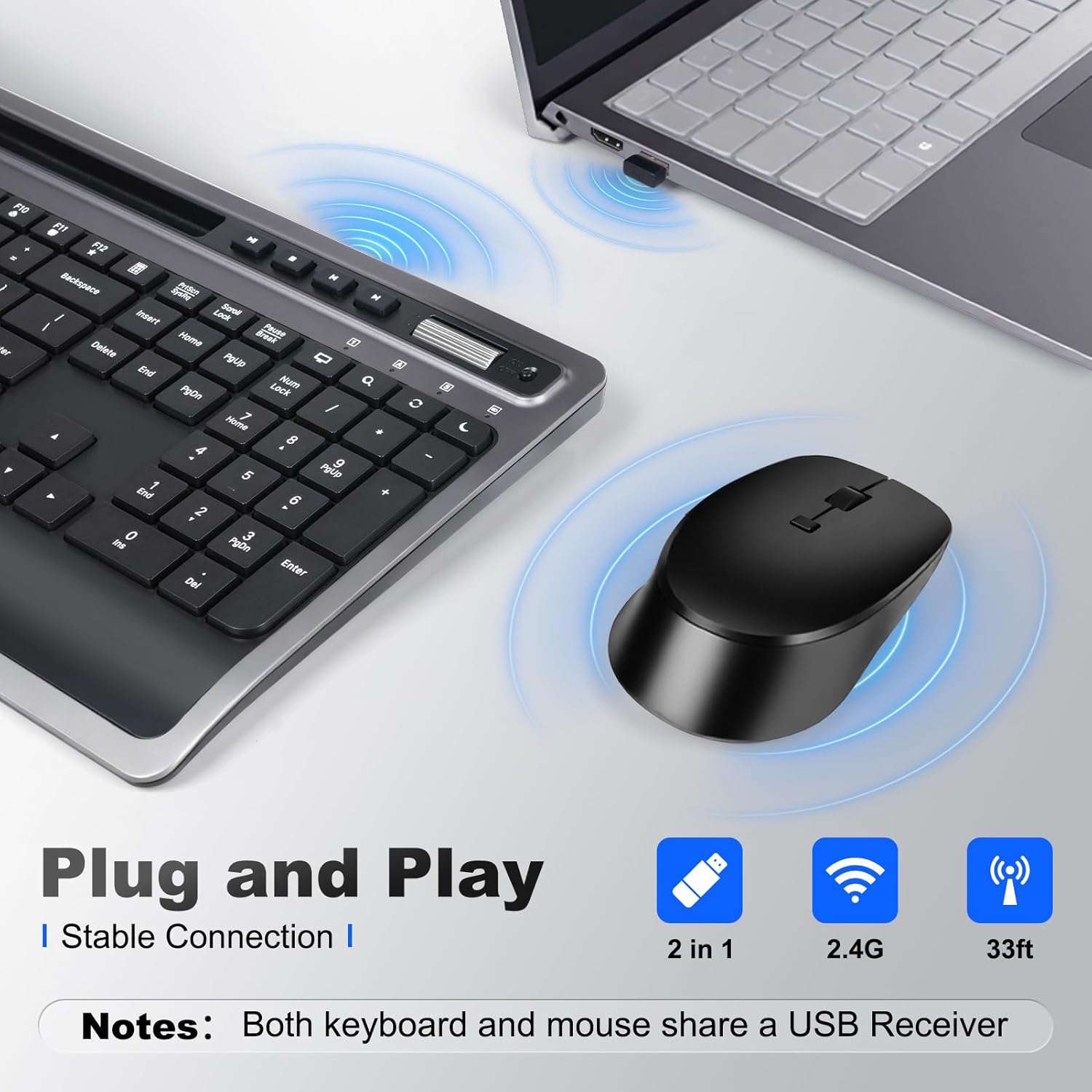
Image: A close-up of the keyboard and mouse, showing the USB receiver plugged into a laptop, indicating a stable 2.4G wireless connection.
3. Podešavanje nagiba tastature
For optimal typing comfort, the keyboard features foldable stands on the underside. Extend these stands to achieve an 8-degree tilt, which can help reduce wrist strain during prolonged use.

Image: A visual comparison demonstrating the ergonomic benefit of the integrated wrist rest, promoting a more natural hand position.

Image: The keyboard shown with its foldable stand extended, providing an 8-degree tilt for improved ergonomic comfort.
Uputstvo za upotrebu
Funkcije tastature
The keyboard features a full-size layout with dedicated function keys and multimedia shortcuts.
- Multimedijalni ključevi: Dedicated keys for Play/Pause, Stop, Previous Track, Next Track, Volume Up, Volume Down.
- Function (Fn) Combinations: Use the 'Fn' key in combination with F1-F12 for additional shortcuts such as Media Player, Volume control, Mute, Search, Refresh, Dormancy, My Computer, and Email.
- Integrisani držač za telefon/tablet: A slot above the function keys allows you to securely hold your smartphone or tablet for easy viewing i multitasking.
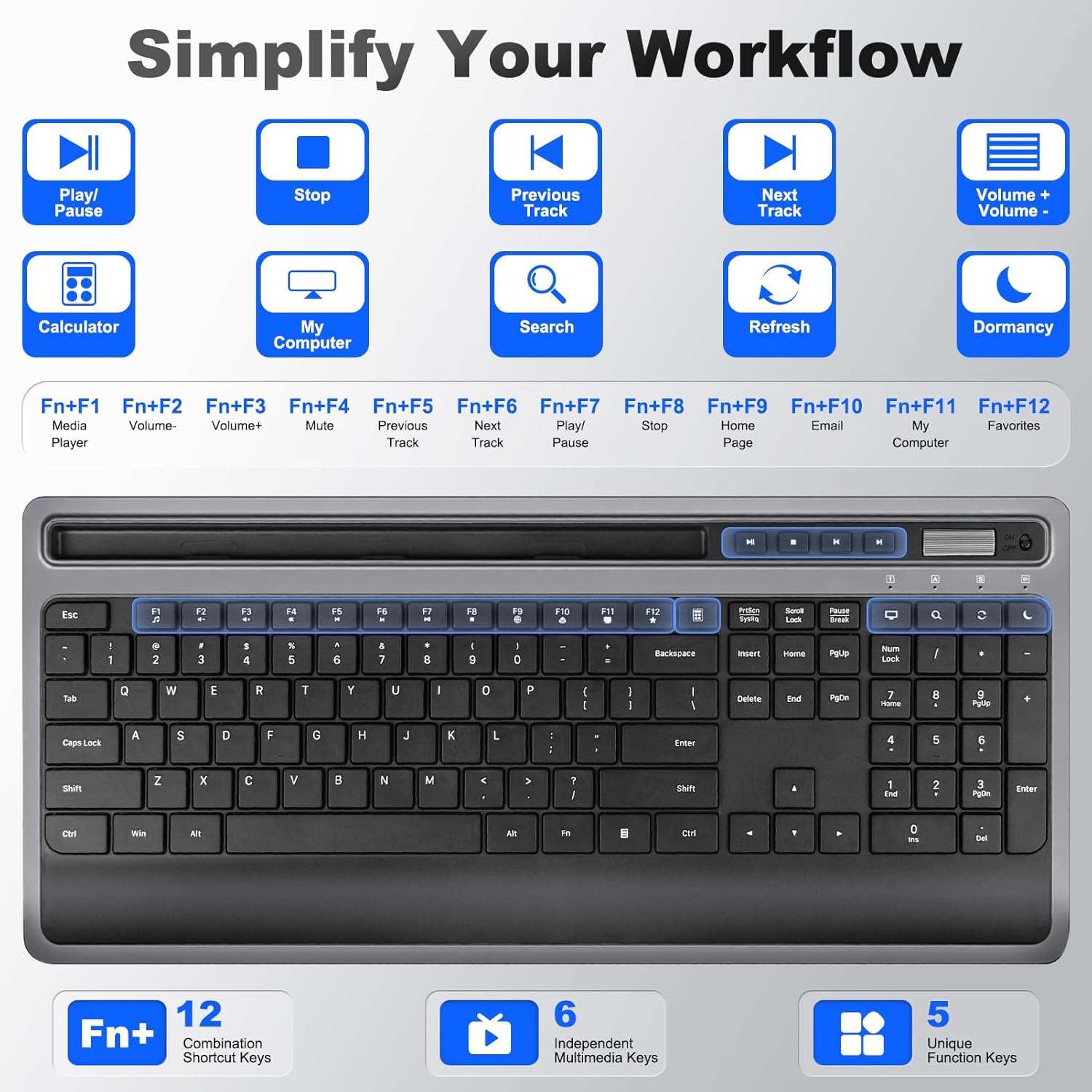
Slika: Detaljna view of the keyboard, illustrating the dedicated multimedia keys and the various functions accessible via the 'Fn' key combinations (F1-F12).

Image: A user operating the keyboard, with a smartphone and tablet placed in the integrated holder, demonstrating its utility for multitasking.
Slika: Krupni plan view of the integrated phone/tablet holder on the keyboard, showing a tablet securely placed within the slot.
Funkcije miša
The silent 6-button mouse offers precise control and quiet operation.
- Dugmad: Left Click, Right Click, Scroll Wheel, DPI Adjustment, Forward, Back.
- DPI podešavanje: Cycle through DPI settings (800, 1200, 1600) to adjust cursor sensitivity.
- Tihi klikovi: Designed for quiet operation, minimizing distractions.

Slika: Eksplodirala view diagram of the mouse, labeling its six buttons (Left, Right, Scroll Wheel, DPI, Forward, Back) and indicating the adjustable DPI settings (800, 1200, 1600).
Kompatibilnost
This combo is broadly compatible with various operating systems and devices:
- Windows
- macOS
- iOS
- Android
- Chrome OS
Compatible devices include desktops, laptops, tablets, Macbook, Personal Computer, Surface, and iMac.
Image: A graphic displaying the logos of Windows, Chrome OS, Mac OS, iOS, and Android, signifying the broad operating system compatibility of the keyboard and mouse combo.
Režim automatskog spavanja
To conserve battery life, both the keyboard and mouse feature an auto-sleep mode. If inactive for a period (e.g., 5 minutes), they will enter a low-power state. To wake them up, simply press any key on the keyboard or move/click the mouse.
Održavanje
Čišćenje
Za čišćenje tastature i miša:
- Provjerite da li su oba uređaja isključena.
- Koristite meku krpu koja ne ostavlja dlačiceampnatopljen vodom ili blagim rastvorom za čišćenje.
- Avoid excessive moisture and do not spray cleaners directly onto the devices.
- For crevices, use compressed air or a soft brush.
Zamjena baterije
When the devices become unresponsive or exhibit intermittent connectivity, it may be time to replace the batteries. Follow the battery installation steps in the Setup section.
Rješavanje problema
- Nema veze/Ne reaguje:
- Uvjerite se da su baterije ispravno instalirane i napunjene.
- Verify both keyboard and mouse are switched ON.
- Provjerite je li USB prijemnik sigurno priključen u ispravan USB priključak. Pokušajte s drugim USB priključkom.
- Move the devices closer to the receiver to rule out interference.
- Ponovo pokrenite računar ili uređaj.
- Lagging/Delayed response:
- Zamijenite baterije ako su slabe.
- Smanjite udaljenost između uređaja i prijemnika.
- Avoid using the devices on metallic surfaces, which can interfere with the wireless signal.
- Kursor miša nestabilan:
- Očistite senzor miša na donjoj strani.
- Koristite miš na čistoj, nereflektirajućoj površini ili podlozi za miša.
- Adjust DPI settings if the cursor is too fast or too slow.
Specifikacije
| Dimenzije proizvoda | 11.2 x 5.2 x 0.7 inča (tastatura) |
| Težina artikla | 2.18 funte |
| Tehnologija povezivanja | 2.4G Wireless (USB-A, USB-C) |
| Posebne karakteristike | Ergonomic design, USB-C compatible, Volume Roller, Wrist Rest, Phone Holder |
| Kompatibilni uređaji | Macbook, Personal Computer, Surface, iMac, Windows, macOS, iOS, Android, Chrome OS |
| Postavke DPI miša | 800, 1200, 1600 |
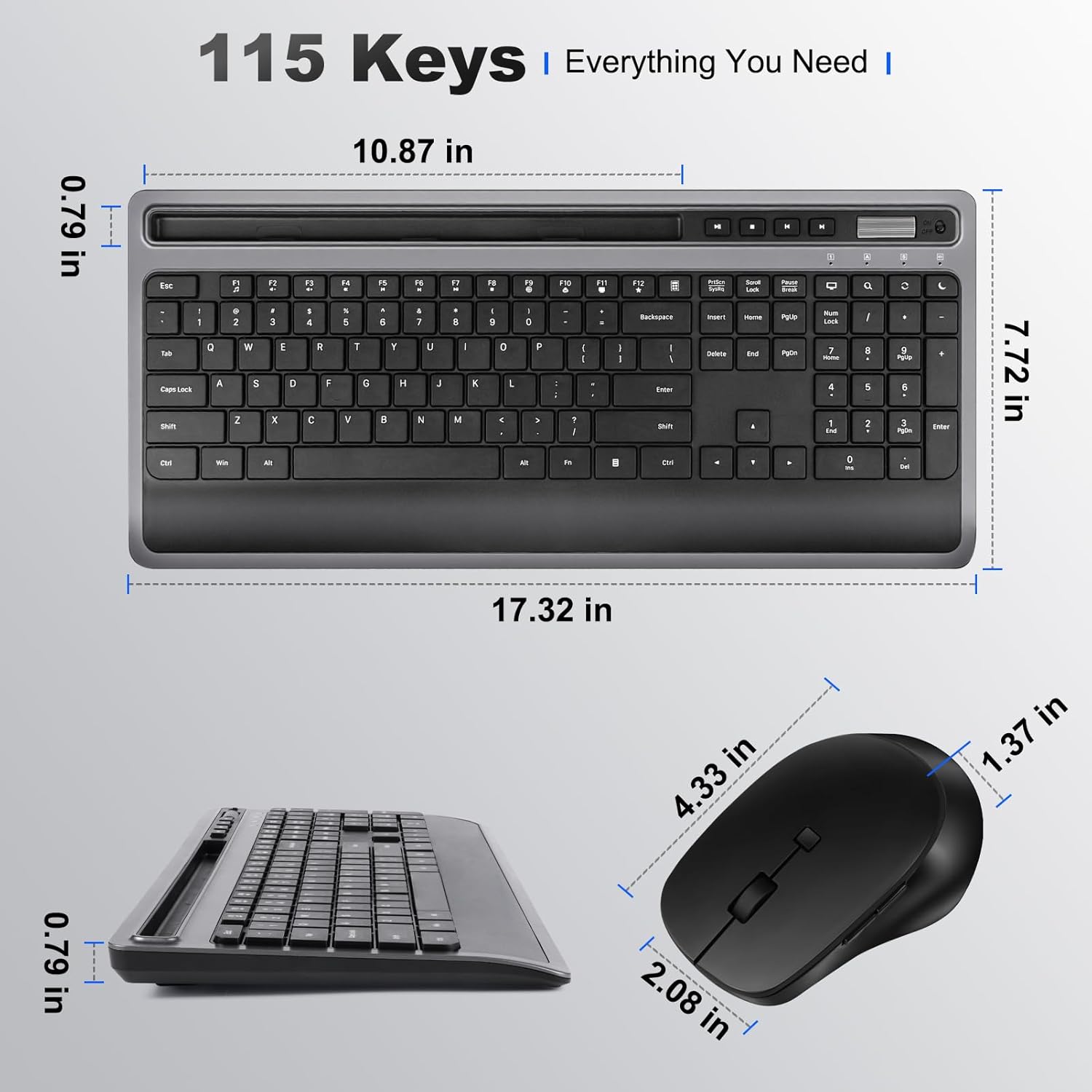
Image: Technical drawing illustrating the precise dimensions of both the keyboard and the mouse.
Informacije o garanciji
Please refer to the product packaging or the seller's information for specific warranty details. Typically, products come with a limited warranty covering manufacturing defects from the date of purchase.
Podrška
For further assistance or technical support, please contact the seller directly through your purchase platform or refer to the contact information provided on the product packaging.