1. Uvod
This manual provides essential information for the safe and efficient operation of your Thomson 43FT2S15 FHD LED Smart TV. Please read this manual thoroughly before using the television and retain it for future reference.
2. Sigurnosne informacije
Uvijek slijedite osnovne sigurnosne mjere prilikom korištenja ovog proizvoda kako biste smanjili rizik od požara, strujnog udara i ozljeda.
- Ne izlažite televizor kiši ili vlazi.
- Ne blokirajte otvore za ventilaciju.
- Osigurajte pravilno uzemljenje kabla za napajanje.
- Ne postavljajte TV na nestabilna kolica, postolje, tronožac, nosač ili stol.
- Isključite televizor iz struje tokom oluje sa grmljavinom ili kada ga ne koristite duži period.
- Sav servis prepustite kvalifikovanom serviseru.
3. Sadržaj paketa
Provjerite da li se u vašem paketu nalaze sve dolje navedene stavke:
- Thomson 43FT2S15 FHD LED Smart TV
- Adapter za napajanje
- Daljinski upravljač
- Korisnički priručnik (ovaj dokument)
- Garantni list

Slika: Front view of the Thomson 43FT2S15 Smart TV.
4. Podešavanje
4.1 Fizička instalacija
The Thomson 43FT2S15 TV is designed for table mounting. Ensure the TV is placed on a stable, flat surface.

Image: Diagram showing the dimensions of the Thomson 43FT2S15 Smart TV. The screen size is 109 cm (43 inches) diagonally, with a width of 95 cm and height of 60 cm (including stand). The depth is 6 cm.
Dimenzije (Š x V x D): 95 cm x 60 cm x 6 cm (without stand, depth is 6 cm). The screen diagonal is 109 cm (43 inches).
4.2 Povezivanje uređaja
Connect your external devices to the appropriate ports on the TV. Refer to the diagram below for port locations.
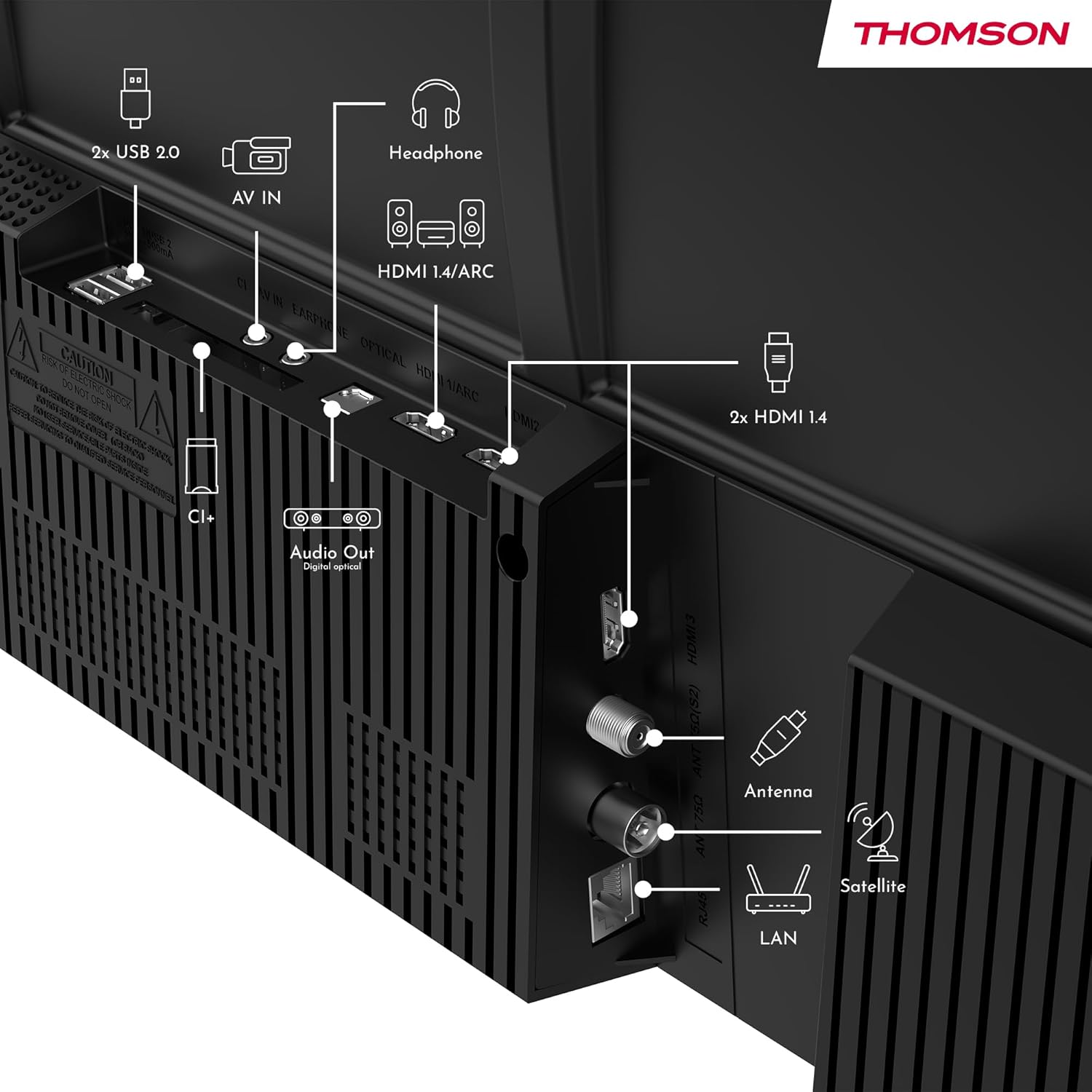
Slika: Stražnja strana view of the Thomson 43FT2S15 Smart TV showing various connection ports. These include 2x USB 2.0, AV IN, Headphone out, HDMI 1.4/ARC, Optical Audio Out, CI+, Antenna (DVB-T2/C), Satellite (DVB-S2), and LAN (Ethernet).
- HDMI: Connect external devices like Blu-ray players, game consoles, or set-top boxes. The TV has 2 HDMI 1.4 ports, one with ARC support.
- USB: For connecting USB storage devices. The TV has 2 USB 2.0 ports.
- Antena/Satelit: Connect your terrestrial or satellite antenna for live TV.
- LAN (Ethernet): Za žičanu internet vezu.
- Wi-Fi: Za bežičnu internet konekciju.
- Bluetooth: Za povezivanje kompatibilne bežične dodatne opreme.
- Audio izlaz (optički): Za povezivanje sa eksternim zvučnim sistemom.
- slušalice: Za povezivanje slušalica.
- CI+ slot: For inserting a Conditional Access Module (CAM) for encrypted channels.
5. Uputstvo za upotrebu
5.1 Uključivanje/isključivanje napajanja
Connect the power adapter to the TV and a power outlet. Press the power button on the remote control to turn the TV on or off.
5.2 TiVo OS and Smart Features
Your Thomson Smart TV is powered by TiVo OS, which integrates live TV, streaming applications, and on-demand services into a single, intuitive interface. Personalized recommendations help you discover new content.

Image: The Thomson Smart TV displaying the TiVo OS interface with various streaming apps like Netflix, Canal+, Prime Video, YouTube, and Disney+.
5.3 Upravljanje glasom
Use the TiVo Voice Control feature to navigate channels, open applications, or search for content across different platforms using voice commands. The remote control includes a microphone for this function.

Image: The Thomson Smart TV remote control highlighting the voice control microphone, backlit buttons, and direct access buttons for streaming services.
5.4 Wireless Display
Mirror content from your smartphone, tablet, or laptop to the TV screen using the Wireless Display function. This allows for easy sharing of videos, photos, and applications.
5.5 Audio and Video Enhancements
- Dolby Audio: Experience enhanced sound quality with Dolby Audio, providing clear dialogue and immersive, multi-dimensional effects.

Image: A Thomson Smart TV displaying content with visual representations of sound waves, indicating the Dolby Audio feature.
- HDR10: Enjoy sharper contrast and lifelike colors with HDR10 technology, revealing details in both bright highlights and deep shadows.

Image: A split-screen comparison showing the difference between SDR (Standard Dynamic Range) and HDR10 (High Dynamic Range) image quality on a Thomson Smart TV, demonstrating improved contrast and color.
5.6 Daljinski upravljač
The ergonomic remote control features backlit buttons for easy navigation in low light conditions. It also includes direct access buttons for popular streaming services such as Netflix, YouTube, Prime Video, Disney+, and Canal+.
6. Održavanje
Da biste osigurali dugotrajnost i optimalne performanse vašeg televizora, slijedite ove smjernice za održavanje:
- Čišćenje ekrana: Nježno obrišite ekran mekom krpom koja ne ostavlja dlačice. Za tvrdokorne mrlje koristite sredstvo za čišćenje ekrana posebno dizajnirano za televizore, naneseno na krpu, a ne direktno na ekran.
- Čišćenje kabineta: Koristite meku, suhu krpu za brisanje kućišta televizora. Nemojte koristiti abrazivna sredstva za čišćenje ili rastvarače.
- ventilacija: Pazite da ventilacijski otvori na stražnjoj strani televizora nisu blokirani kako biste spriječili pregrijavanje.
- Kabl za napajanje: Redovno provjeravajte kabel za napajanje da li ima oštećenja. U slučaju oštećenja, obratite se kvalificiranom servisnom osoblju radi zamjene.
7. Otkrivanje problema
Ako naiđete na probleme s televizorom, pogledajte sljedeće uobičajene korake za rješavanje problema:
- Nema napajanja:
- Provjerite je li kabel za napajanje sigurno spojen na TV i utičnicu.
- Provjerite da li utičnica radi tako što ćete uključiti drugi uređaj.
- Pokušajte pritisnuti dugme za napajanje na samom televizoru, ne samo na daljinskom upravljaču.
- Nema slike/zvuka:
- Provjerite je li odabran ispravan ulazni izvor (npr. HDMI 1, Antena).
- Provjerite sve kablovske veze između televizora i vanjskih uređaja.
- Adjust the volume and ensure the TV is not muted.
- Daljinski upravljač ne radi:
- Zamijenite baterije u daljinskom upravljaču.
- Provjerite da nema prepreka između daljinskog upravljača i IR senzora televizora.
- Smart TV Features Not Working (Wi-Fi/Apps):
- Provjerite internetsku vezu. Po potrebi ponovo pokrenite ruter.
- Go to the TV's network settings to ensure it's connected to Wi-Fi or Ethernet.
- Pokušajte ponovo pokrenuti TV.
For more complex issues, please contact customer support or refer to the manufacturer's website.
8. Specifikacije
Key technical specifications for the Thomson 43FT2S15 FHD LED Smart TV:
| Feature | Specifikacija |
|---|---|
| Brand | Thomson |
| Model | 43FT2S15 |
| Veličina ekrana | 43 inča (109 cm) |
| Display Technology | LED |
| Rezolucija | 1920 x 1080 (FHD) |
| Refresh Rate | 60 Hz |
| Aspect Ratio | 16:9 |
| Operativni sistem | TiVo OS |
| Audio tehnologija | Dolby Audio (Dolby Atmos encoding) |
| HDR podrška | HDR10 |
| Povezivanje | Wi-Fi, Ethernet, Bluetooth, 2x HDMI 1.4 (1x ARC), 2x USB 2.0, Optical Audio Out, AV In, Headphone, CI+ |
| Tuneri | DVB-T2/C/S2 (Triple Tuner) |
| Podržane Internet usluge | Netflix, YouTube, Prime Video, Disney+, Canal+, Browser |
| Dimenzije (proizvod) | 6 x 95 x 60 cm; 6.5 kg |
| Klasa energetske efikasnosti | E |

Image: Energy efficiency label for the Thomson 43FT2S15 Smart TV, showing an energy class of E and energy consumption of 42 kWh/1000h (SDR) and 46 kWh/1000h (HDR).
For detailed product information, refer to the EPREL database: https://eprel.ec.europa.eu/qr/1969521
9. Garancija i podrška
Your Thomson 43FT2S15 TV comes with a warranty. Please refer to the included Warranty Card for specific terms and conditions.
For technical support or service inquiries, please contact the manufacturer:
- Proizvođač: Streamview GmbH
- Webstranica: www.streamview.com
- Email: kontakt@streamview.com
- Telefon: +4318900066
Please have your model number (43FT2S15) and purchase information ready when contacting support.


