1. Proizvod je gotovview
The KLIM Cassette Player Boombox is a versatile audio device combining classic cassette playback with modern features like AM/FM radio, Bluetooth connectivity, and USB playback/recording. Its portable design allows for use at home or on the go.
Ključne karakteristike:
- Kasetofon i diktafon
- AM/FM radio tjuner
- Bluetooth Connectivity for wireless streaming
- USB port za reprodukciju i snimanje MP3 datoteka
- Integrated Microphone for direct recording
- Headphone Jack for private listening
- Dual Power: AC power cord or 4 x C-type batteries (not included)
- Portable design with a carrying handle
Šta je u kutiji:
- KLIM Cassette Player Boombox
- AC strujni kabl
- Uputstvo za upotrebu

Slika 1: Prednja strana view of the KLIM Cassette Player Boombox, showcasing its controls and cassette compartment.
2. Podešavanje
Napajanje uređaja:
The KLIM Cassette Player Boombox can be powered in two ways:
- AC napajanje: Connect the included AC power cord to the device's power input and then to a standard wall outlet.
- Snaga baterije: For portable use, insert 4 x C-type batteries (not included) into the battery compartment located on the underside of the device. Ensure correct polarity.

Slika 2: Donja strana view showing the battery compartment for portable power.
3. Uputstvo za upotrebu
3.1. Cassette Player/Recorder
- Slide the function selector to 'TAPE'.
- Press the 'OPEN' button to open the cassette compartment.
- Insert a cassette tape with the open side facing up.
- Zatvorite pretinac za kasetu.
- Use the 'PLAY', 'STOP/EJECT', 'FFWD' (Fast Forward), and 'REW' (Rewind) buttons to control playback.
- To record, ensure a blank tape is inserted. Press the 'REC' button to start recording from the built-in microphone, radio, or USB.

Slika 3: Vrh view of the boombox with a cassette tape inserted into the compartment.
3.2. AM/FM radio
- Slide the function selector to 'RADIO'.
- Izvucite teleskopsku antenu za optimalni prijem.
- Use the 'BAND' switch to select between AM and FM frequencies.
- Okrenite dugme 'TUNING' da biste pronašli željenu radio stanicu.
3.3. Bluetooth povezivanje
- Slide the function selector to 'BT' (Bluetooth).
- The device will enter pairing mode, indicated by a flashing light or audible prompt.
- Na pametnom telefonu ili tabletu omogućite Bluetooth i potražite dostupne uređaje.
- Select 'KLIM Cassette Player' (or similar name) from the list to pair.
- Nakon uparivanja, možete bežično strimovati zvuk sa svog uređaja.
3.4. Reprodukcija i snimanje putem USB-a
- Slide the function selector to 'USB'.
- Umetnite USB fleš disk koji sadrži MP3 audio zapis files u USB port.
- The device will automatically begin playing the audio files. Use the playback controls (play/pause, skip) to navigate.
- To record to USB, ensure a USB drive is inserted. Press the 'REC' button while in radio or cassette mode to record the audio source directly to the USB drive.
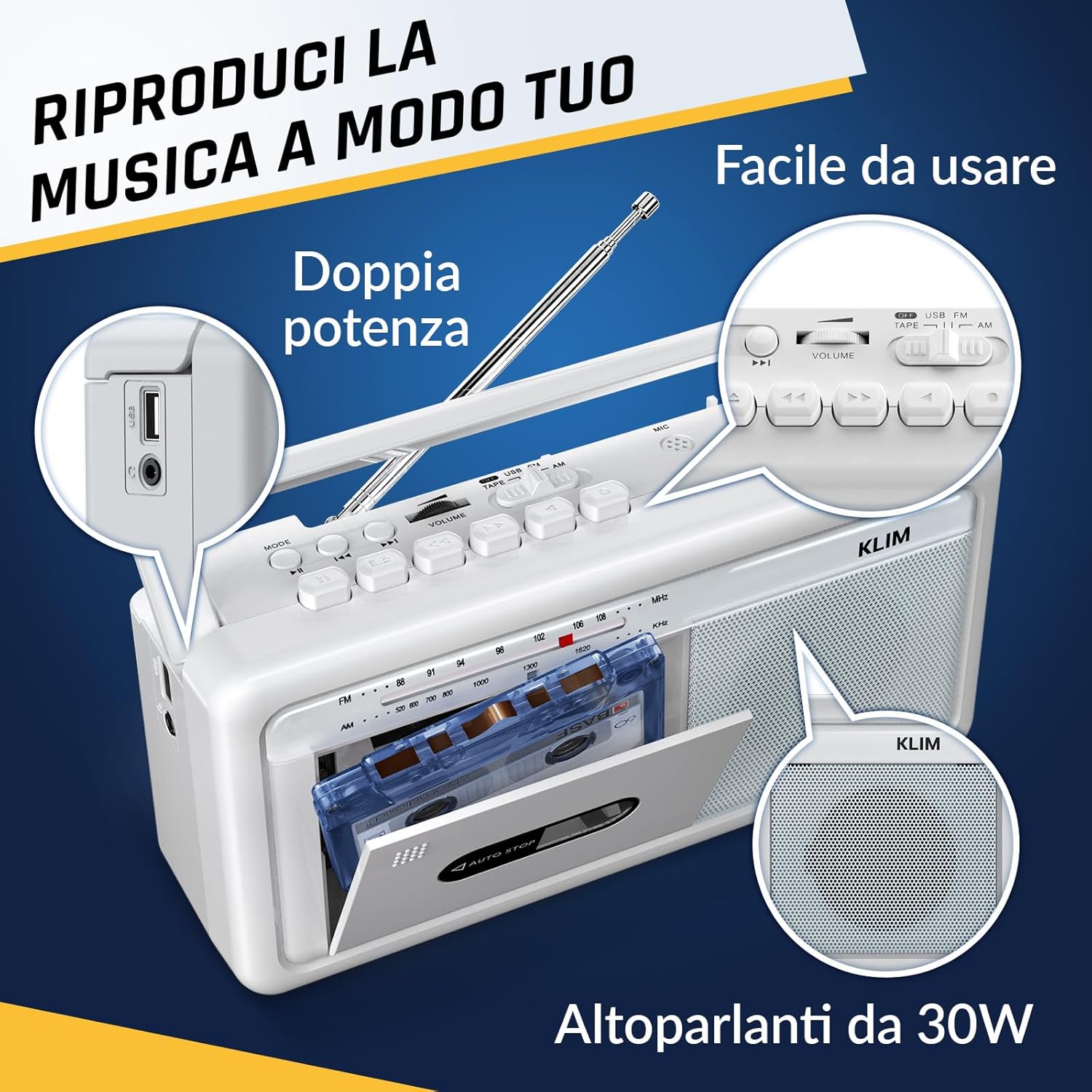
Slika 4: Bočna strana view highlighting the USB port for media playback and recording.
3.5. Korištenje slušalica
Connect standard 3.5mm headphones to the headphone jack for private listening. The internal speakers will automatically mute when headphones are connected.
Video 1: Instructions on how to record a tape to USB using the WTB-795 model. This video demonstrates the USB recording functionality.
Video 2: Krajview of a retro cassette player with USB, Bluetooth, and AM/FM radio features, similar to the KLIM Cassette Player Boombox.
4. Održavanje
- Uređaj održavajte čistim brisanjem mekom, suhom krpom. Izbjegavajte upotrebu tečnih sredstava za čišćenje ili rastvarača.
- Regularly clean the cassette head and pinch rollers with a cotton swab lightly damptretirano izopropilnim alkoholom kako bi se osigurala optimalna kvaliteta zvuka i spriječilo oštećenje trake.
- Keep the device away from direct sunlight, heat sources, and excessive dust or moisture.
- Kada se ne koristi duži period, izvadite baterije kako biste spriječili curenje.
5. Otkrivanje problema
| Problem | Moguće rješenje |
|---|---|
| Nema struje | Check if the AC power cord is securely connected. If using batteries, ensure they are inserted correctly and are not depleted. |
| Nema zvuka iz zvučnika | Increase the volume. Ensure headphones are not connected. Check the function selector is in the correct mode (TAPE, RADIO, BT, USB). |
| Loš radio prijem | Extend the telescopic antenna fully. Adjust the antenna direction. Try moving the unit to a different location. |
| Kaseta se ne reproducira/ne snima | Ensure the tape is inserted correctly. Check if the tape is damaged. Clean the cassette head and pinch rollers. |
| Bluetooth se ne povezuje | Ensure the unit is in Bluetooth mode. Make sure your device's Bluetooth is enabled and within range. Try unpairing and re-pairing the device. |
| Problemi s reprodukcijom s USB-a | Ensure the USB drive is formatted correctly (FAT32) and contains compatible audio files (MP3, WAV, WMA, AAC, FLAC). Try a different USB drive. |
6. Specifikacije
- Brand: KLIM
- Model: Kasetofon
- Dimenzije proizvoda: 25 x 13.1 x 7.6 cm
- Težina artikla: 1 kg
- Kompatibilni uređaji: MP3 plejer, pametni telefon, tablet
- Način audio izlaza: Stereo
- Podržani audio formati: Cassette, Analog Radio, MP3, WAV, WMA, AAC, FLAC, Bluetooth
- Izvor napajanja: Corded Electric (AC) / 4 x C-type Batteries (not included)
- Tehnologija povezivanja: USB, Bluetooth
- Boja: Frost White
- Broj artikla: KLSIN4825
7. Jamstvo i podrška
The KLIM Cassette Player Boombox comes with a 5 godine garancije. For any questions, technical assistance, or warranty claims, please contact KLIM customer support. Our team is available 24/7 to assist you.
Please refer to the contact information provided in your product packaging or visit the official KLIM webstranicu za više detalja.


