1. Uvod
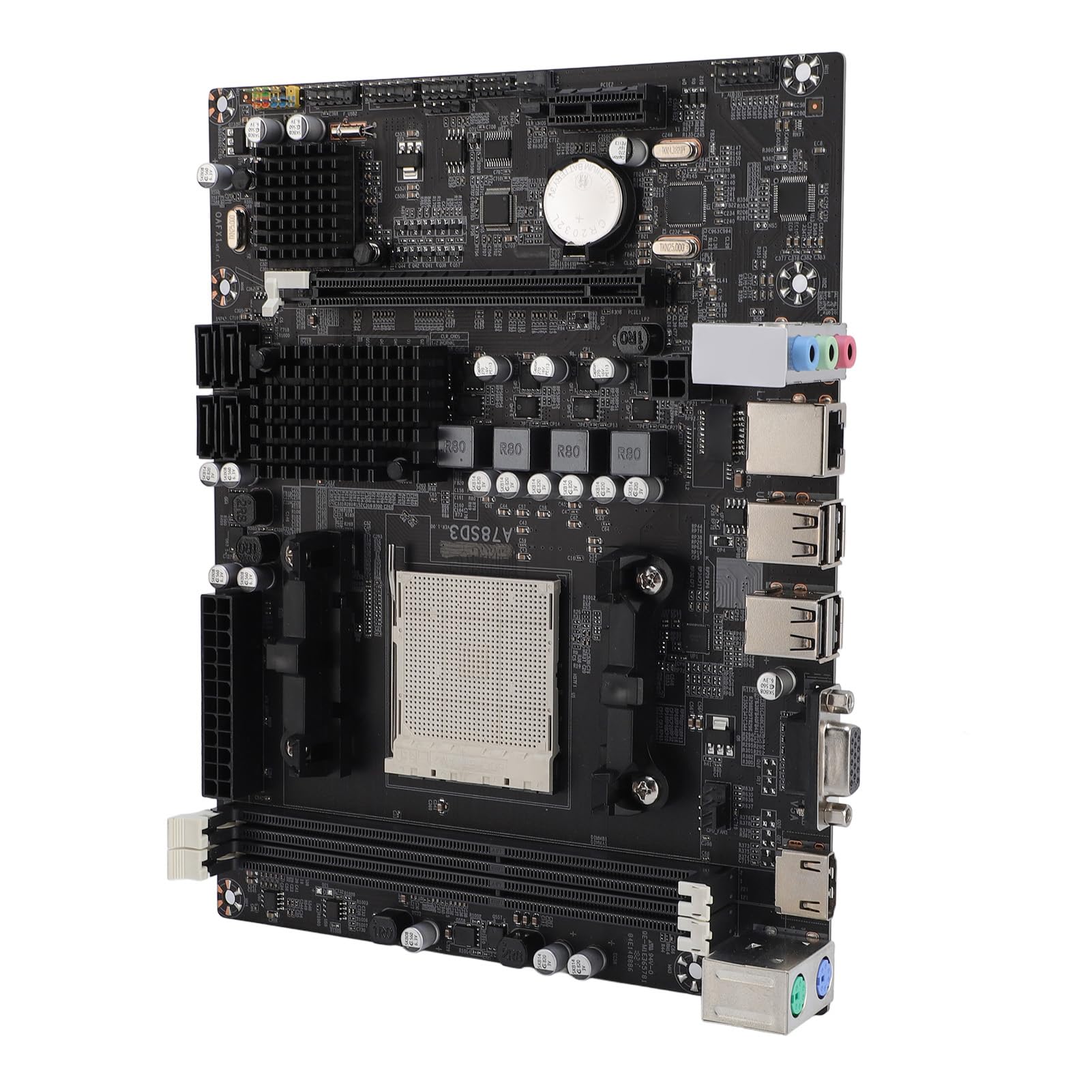
The PUSOKEI A78SD3 is a versatile computer motherboard designed to support AM3 interface APU processors and DDR3 memory. It offers robust performance and extensive connectivity for various computing needs, from gaming to multimedia tasks. This manual provides detailed instructions for installation, operation, and maintenance to ensure optimal performance and longevity of your motherboard.
Ključne karakteristike uključuju:
- Jaka kompatibilnost: Supports AM3 interface APU processors and dual-channel DDR3 memory up to 16GB (8GB per stick).
- High Definition Experience: Equipped with HDMI and VGA video outputs, 100Mbps Ethernet, and 5.1 channel sound for rich multimedia.
- Veliki kapacitet pohrane: Features 4 Serial ATA 3.0 ports for connecting multiple storage devices.
- Stabilne performanse: Multi-phase power design ensures stable operation and optimal performance.
- Versatile Interface Expansion: Includes 4 USB 2.0 ports and various headers for peripheral connectivity.
2. Tehničke specifikacije
The following table details the technical specifications of the PUSOKEI A78SD3 Computer Motherboard:
| Feature | Specifikacija |
|---|---|
| Vrsta stavke | A78SD3 Computer Motherboard |
| Materijal | PCB |
| Čip matične ploče | Integrated Sound Card, Network Card with Integrated Graphics |
| Glavni čipset | for RS780 Series |
| Network Card Chip | Integrated 100Mbps Ethernet |
| Zvučni čip | Integrated 6 Channel Sound Chip |
| Podrška procesora | Supports AM3 Interface for APU Processors |
| CPU Socket | AM3 |
| Vrsta memorije | DDR3 1600/1333/1066MHz |
| Memorijski slotovi | 2 x DDR3 (Max 16GB, 8GB per stick) |
| Slotovi za proširenje | 1 x PCI-E X16 Graphics Card Slot, 1 x COM Serial Port Header, 2 x USB 2.0 Headers, 4 x Serial ATA 3.0 Ports |
| I/O sučelja | PS/2 (Keyboard/Mouse), 1 x RJ45 Ethernet, 1 x VGA, 1 x HDMI, 4 x USB 2.0, Sound Interfaces |
| Veličina matične ploče | Approx. 17x21.3cm / 6.7x8.4in |
| Vrsta baterije | 1 x CR2032L Battery (Included) |
| Priključci za napajanje | 4 Pin and 24 Pin Power Connector |
| Način napajanja | 4 Faza |

3. Komponenta je završenaview
Familiarize yourself with the various components and connectors on the A78SD3 motherboard using the diagram below:

- Podnožje procesora (AM3): For installing compatible AMD AM3 series processors.
- DDR3 Memory Slots: Two slots for DDR3 RAM modules.
- PCIe X16 Slot: For installing a dedicated graphics card.
- SATA 3.0 portovi: Four ports for connecting storage devices like HDDs and SSDs.
- 24-pinski ATX konektor za napajanje: Main power input from the power supply unit (PSU).
- 4-pinski konektor za napajanje procesora: Obezbjeđuje dodatnu snagu CPU-u.
- I/O Panel: Includes PS/2 ports, USB 2.0 ports, RJ45 Ethernet, VGA, HDMI, and audio jacks.
- USB 2.0 Headers: For connecting front panel USB ports or other internal USB devices.
- COM Serial Port Header: For legacy serial port connections.
4. Instalacija i podešavanje
This section guides you through the process of installing your PUSOKEI A78SD3 motherboard and its components.
4.1 Raspakivanje
Carefully unpack the motherboard and check the contents against the packing list:
- 1 x A78SD3 Computer Motherboard
- 1 x I/O Baffle
- 1 x Serial ATA Cable
- 1 x Korisnički priručnik (ovaj dokument)

4.2 Instalacija matične ploče
Slijedite ove korake za pravilnu instalaciju:
- Pripremite slučaj: Ensure your computer case is ready, with standoffs correctly aligned for the motherboard.
- Instalirajte I/O štit: Snap the I/O shield (baffle) into the corresponding opening at the rear of your computer case.
- Instalacija CPU-a:
- Otvorite polugu za utičnicu procesora.
- Pažljivo poravnajte CPU sa utičnicom, pazeći da se trouglasta oznaka na CPU-u poklapa sa oznakom na utičnici. Nemojte silom umetati CPU na mjesto.
- Gently lower the CPU into the socket.
- Zatvorite polugu utičnice kako biste osigurali CPU.

Figure 4.2: Close-up of the AM3 CPU socket on the A78SD3 motherboard, ready for processor installation. - Instalacija hladnjaka za procesor: Nanesite termalnu pastu (ako nije prethodno nanesena) i instalirajte hladnjak procesora prema uputama proizvođača. Spojite kabel ventilatora procesora na CPU_FAN priključak na matičnoj ploči.
- Instalirajte RAM:
- Open the clips on both ends of the DDR3 memory slots.
- Align the notch on the RAM module with the notch in the memory slot.
- Čvrsto pritisnite oba kraja RAM modula dok se kopče ne uklope na svoje mjesto.

Figure 4.3: Close-up of the two DDR3 memory slots on the A78SD3 motherboard, indicating where RAM modules are to be installed. - Montaža matične ploče: Carefully place the motherboard into the case, aligning the screw holes with the standoffs. Secure it with screws.
- Priključite napajanje: Spojite 24-pinski ATX konektor za napajanje i 4-pinski konektor za napajanje procesora sa vašeg napajanja na matičnu ploču.
- Instalirajte grafičku karticu (opciono): If using a dedicated graphics card, insert it into the PCIe X16 slot until it clicks into place. Secure it with a screw to the case. Connect any required PCIe power cables from the PSU to the graphics card.
- Povežite uređaje za pohranu podataka: Use the provided Serial ATA cable to connect your SSDs/HDDs to the SATA 3.0 ports on the motherboard. Connect power cables from the PSU to your storage devices.
- Spojite kablove prednje ploče: Connect the power button, reset button, HDD LED, power LED, and front panel USB/audio cables to their respective headers on the motherboard. Refer to the motherboard diagram (Figure 3.1) and your case manual for correct pin assignments.
- Povežite periferne uređaje: Connect your monitor, keyboard, mouse, and other peripherals to the I/O panel ports.
5. Operacija
Nakon što su sve komponente instalirane i povezane, možete uključiti sistem.
- Početno pokretanje: Press the power button on your computer case. The system should power on, and you should see a display on your monitor.
- Podešavanje BIOS-a/UEFI-ja: During the initial boot sequence, you may need to press a specific key (commonly Del, F2, F10, or F12) to enter the BIOS/UEFI setup utility. Here, you can configure boot order, system time, and other advanced settings.
- Instalacija operativnog sistema: If you are building a new system, you will need to install an operating system (e.g., Windows, Linux) from a bootable USB drive or DVD.
- Instalacija drajvera: After installing the operating system, install the necessary drivers for the motherboard's chipset, integrated graphics (if used), network, and audio. These are typically provided on a CD/DVD with the motherboard or can be downloaded from the PUSOKEI website.
6. Održavanje i njega
Pravilno održavanje osigurava dugotrajnost i stabilne performanse vaše matične ploče.
- Neka bude čisto: Regularly clean dust from inside your computer case using compressed air. Dust can accumulate on components and lead to overheating.
- Uslovi okoline: Operate the motherboard in a well-ventilated area with stable temperature and humidity. Avoid extreme temperatures and direct sunlight.
- Pažljivo rukujte: Always handle the motherboard by its edges to avoid touching sensitive components or static discharge. Use an anti-static wrist strap when working inside your computer.
- Ažuriranja BIOS-a: Periodically check the PUSOKEI website for BIOS updates. Updates can improve stability, compatibility, and performance. Follow update instructions carefully.
- Upravljanje kablovima: Ensure cables inside the case are neatly managed to improve airflow and prevent interference.
7. Otkrivanje problema
Ako naiđete na probleme s matičnom pločom, pogledajte sljedeće uobičajene korake za rješavanje problema:
- Nema napajanja:
- Check if the PSU is switched on and all power cables (24-pin ATX, 4-pin CPU) are securely connected.
- Provjerite je li kabel dugmeta za napajanje na prednjoj ploči ispravno spojen na konektor matične ploče.
- Bez prikaza:
- Verify that the monitor is connected to the correct video output (motherboard's VGA/HDMI or dedicated graphics card).
- Reseat the RAM modules. Try booting with only one RAM stick.
- If using a dedicated graphics card, ensure it is properly seated and has power.
- Clear CMOS (refer to motherboard manual for jumper location or remove/reinsert the CR2032L battery).
- Nestabilnost/Padovi sistema:
- Check CPU and GPU temperatures. Ensure coolers are properly installed and fans are spinning.
- Pokrenite alate za dijagnostiku memorije da biste provjerili da li postoji neispravan RAM.
- Provjerite da li su svi upravljački programi ažurirani.
- Check PSU wattage; it might be insufficient for your components.
- Periferni uređaj nije otkriven:
- Pokušajte spojiti periferni uređaj na drugi priključak.
- Provjerite jesu li instalirani upravljački programi perifernih uređaja.
- Provjerite postavke BIOS-a kako biste bili sigurni da je port omogućen.
8. Garancija i podrška
For warranty information and technical support, please refer to the official PUSOKEI webweb-mjesto ili kontaktirajte prodavača. Sačuvajte dokaz o kupovini za slučaj reklamacije.