1. Uvod
This manual provides detailed instructions for the safe and efficient operation of your Bigme B6 Color Ebook Reader. Please read this manual thoroughly before using the device and retain it for future reference.
Sadržaj paketa
- Bigme B6 čitač e-knjiga
- Zaštitna torbica
- Korisnički priručnik (ovaj dokument)
- Kabel za punjenje

Image 1.1: Bigme B6 Color Ebook Reader and included protective case.
2. Proizvod je gotovview
Familiarize yourself with the components and features of your Bigme B6 device.
Ključne karakteristike
- Prikaz: 6-inch Color E-paper display, 300 PPI resolution.
- procesor: Octa-core CPU for responsive performance.
- Memorija i pohrana: 4GB RAM and 64GB internal storage, expandable via Micro-SD card (up to 1TB).
- Operativni sistem: Android 14, providing access to various applications.
- Povezivanje: Bluetooth and Wi-Fi for wireless communication.
- audio: Integrated Hi-Fi Speakers.
- Dizajn: Ultra-tanki profile at 6.98mm.
- Udobnost za oči: Features Zero Blue Light and Flicker-Free technology, TUV Rheinland certified for reduced eye strain.

Slika 2.1: Gotovoview of the Bigme B6 Ebook Reader's main features.
3. Podešavanje
3.1 Početno punjenje
Before first use, fully charge your Bigme B6. Connect the device to a power source using the provided charging cable. The charging indicator will show the charging status.
3.2 Uključivanje/isključivanje napajanja
- Za uključivanje: Pritisnite i držite dugme za napajanje dok se ekran ne osvijetli.
- To power off: Press and hold the power button, then select "Power Off" from the options.
- To sleep/wake: Briefly press the power button.
3.3 Mrežna veza (Wi-Fi)
- Sa početnog ekrana, idite na Postavke.
- Odaberite Mreža i Internet.
- Prebaci Wi-Fi na ON.
- Odaberite željenu Wi-Fi mrežu s popisa.
- Unesite lozinku ako se to od vas zatraži i dodirnite Povežite se.
3.4 Početna konfiguracija sistema
Upon first power-on or after a factory reset, follow the on-screen prompts to select your language, connect to Wi-Fi, and set up your Google account (optional, for app store access).
4. Uputstvo za upotrebu
4.1 Osnovna navigacija
- Ekran na dodir: Tap to select items, swipe to scroll, pinch to zoom.
- Početni ekran: Displays installed applications and widgets.
- Panel sa obavještenjima: Prevucite prstom prema dolje s vrha ekrana za pristup brzim postavkama i obavještenjima.
- Kontrolni centar: Access system settings like Wi-Fi, Bluetooth, brightness, and refresh modes.
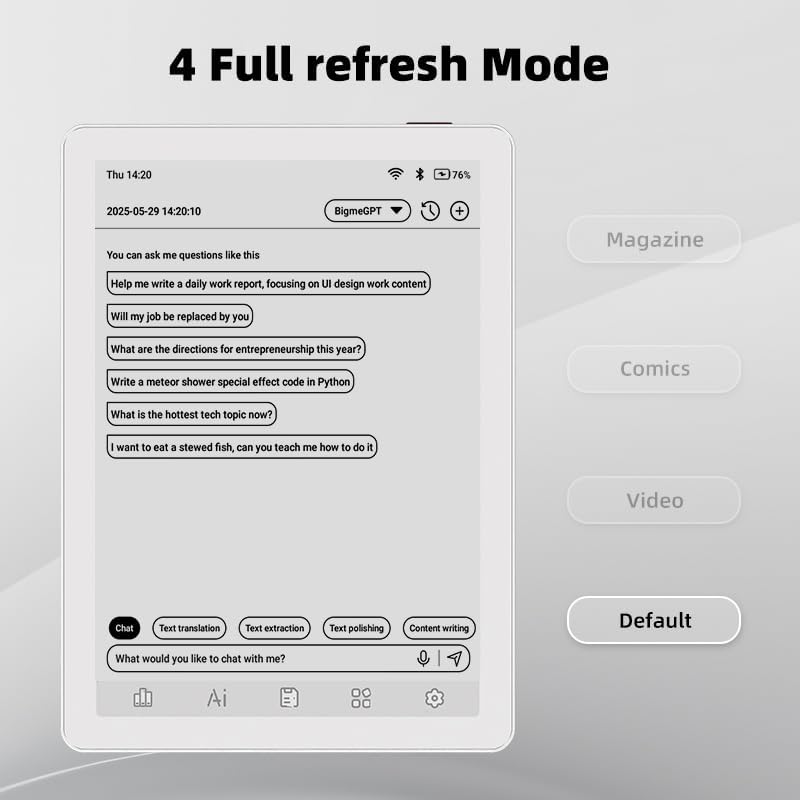
Image 4.1: The Bigme B6 home screen displaying various application icons.

Image 4.2: Accessing the Control Center for quick adjustments to device settings.
4.2 Reading eBooks
The Bigme B6 supports over 19 eBook formats, including PDF, TXT, EPUB, MOBI, and more. You can load books via USB or download them directly through reading applications.
- Open a reading application (e.g., the default reader or a downloaded app like Kindle or Libby).
- Select the book you wish to read from your library.
- Tap the left or right side of the screen to turn pages.
- Tap the center of the screen to access reading options (font size, line spacing, contrast, etc.).
- To highlight text: Press and hold on a word, then drag the selection handles to cover the desired text. Options for highlighting or notes will appear.

Image 4.3: Reading an eBook and highlighting text with color on the Bigme B6.
4.3 Upravljanje aplikacijama
As an Android 14 device, you can install applications from the Google Play Store or other compatible sources.
- Instaliranje aplikacija: Otvorite App Store icon (Google Play Store) on your home screen, search for the desired app, and follow the installation prompts.
- Deinstaliranje aplikacija: Idi na Postavke > Aplikacije, odaberite aplikaciju i dodirnite Deinstaliraj.
4.4 Audiobooks and Media Playback
The device supports audiobook playback through its built-in Hi-Fi speakers or connected Bluetooth headphones.
- Playing Audiobooks: Use a compatible audiobook application.
- Connecting Bluetooth Headphones: Idi na Postavke > Povezani uređaji > Bluetooth, enable Bluetooth, and pair with your headphones.

Image 4.4: The Bigme B6 supports audiobooks, allowing for hands-free listening.
4.5 Display Refresh Modes
The Bigme B6 offers multiple refresh modes to optimize display performance for different content types.
- Access refresh modes from the Control Center or Display Settings.
- Uobičajeni načini uključuju:
- Zadano: Standard reading mode.
- Magazin: Optimized for images and text in magazines.
- Comics: Enhanced for comic book viewing.
- video: Provides a smoother refresh rate for video content (note: e-paper displays have limitations for video).

Image 4.5: Selecting from various refresh modes to suit different content types.
5. Održavanje
5.1 Čišćenje uređaja
- Use a soft, lint-free cloth to gently wipe the screen and body of the device.
- Za tvrdokorne mrlje, lagano dampOperite krpu vodom ili sredstvom za čišćenje ekrana posebno namijenjenim za elektroniku.
- Izbjegavajte upotrebu jakih hemikalija, abrazivnih materijala ili prekomjerne vlage.
5.2 Njega baterija
- Redovno punite uređaj, ali izbjegavajte da ga ostavljate potpuno ispražnjenog duži period.
- Do not expose the device to extreme temperatures, as this can affect battery life.
- Use only the provided or a certified charging cable and adapter.
5.3 Skladištenje
When not in use for extended periods, store the device in a cool, dry place, away from direct sunlight and extreme temperatures. It is recommended to charge the device to about 50% before long-term storage.
6. Otkrivanje problema
| Problem | Mogući uzrok | Rješenje |
|---|---|---|
| Uređaj se ne uključuje. | Slaba baterija; uređaj se zamrznuo. | Punite uređaj najmanje 30 minuta. Izvršite prisilno ponovno pokretanje tako što ćete pritisnuti dugme za napajanje 10-15 sekundi. |
| Screen is unresponsive or slow. | Temporary software glitch; too many apps running. | Restart the device. Close unnecessary background applications. Check for system updates. |
| Nije moguće povezati se na Wi-Fi. | Netačna lozinka; problem s ruterom; Wi-Fi onemogućen. | Ensure Wi-Fi is enabled and the password is correct. Restart your Wi-Fi router. Try connecting to a different network. |
| Baterija se brzo prazni. | High screen brightness; many background apps; frequent Wi-Fi/Bluetooth use. | Reduce screen brightness. Close unused applications. Disable Wi-Fi and Bluetooth when not needed. Adjust refresh mode settings. |
| Applications crash or freeze. | App incompatibility; insufficient memory. | Update the application. Clear the app's cache (Settings > Apps > [App Name] > Storage & cache). If issues persist, uninstall and reinstall the app. |
7. Specifikacije
| Naziv modela | US-B6 |
| Display | 6-inch Color E-paper, Electronic Ink, 300 PPI |
| Operativni sistem | Android 14 |
| RAM | 4GB |
| Interna pohrana | 64GB |
| Proširiva pohrana | Micro-SD card (up to 1TB support) |
| Povezivanje | Bluetooth, WiFi |
| Baterija | 1 nestandardna baterija (uključena) |
| Dimenzije (D x Š x Debljina) | 5.88" x 4.25" x 0.28" (14.94 cm x 10.8 cm x 0.71 cm) |
| Težina artikla | 6.2 unce (175.77 grama) |
| Podržani formati e-knjiga | PDF, TXT, EPUB, EPUB3, HTML, HTM, AZW3, FB2, DOC, DOCX, MOBI, OEB, CBR, RPC, RTF, DJVU, ZIP |
8. Garancija i podrška
8.1 Informacije o garanciji
Please refer to the warranty card included with your product for specific warranty terms and conditions. The warranty typically covers manufacturing defects for a specified period from the date of purchase.
8.2 Korisnička podrška
For technical assistance, troubleshooting not covered in this manual, or warranty claims, please contact Bigme customer support. Contact details can usually be found on the Bigme official webweb-mjestu ili na ambalaži proizvoda.
Također možete posjetiti Bigme Store on Amazon za dodatne informacije o proizvodu i resurse podrške.


