Uvod
This manual provides detailed instructions for the PUSOKEI B0FS1Z75ZP 2G Unlocked Cell Phone. Please read this manual carefully before using your device to ensure proper operation and to maximize its features. This phone is designed for ease of use, featuring large buttons, a loud speaker, and a clear 2.0-inch display, making it suitable for seniors.
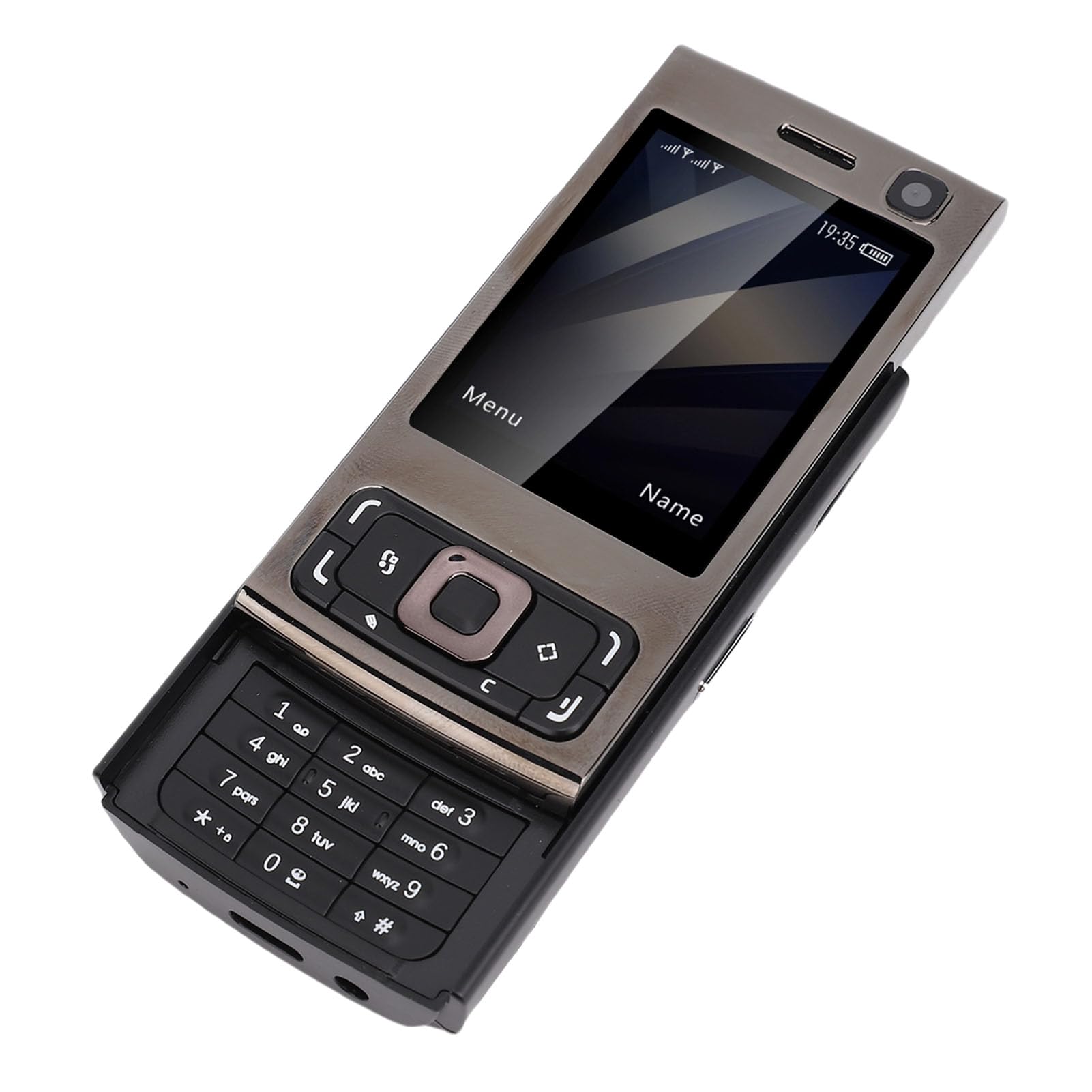
Slika 1: Prednja i zadnja strana view of the PUSOKEI B0FS1Z75ZP Cell Phone.
Sadržaj paketa
Provjerite da li su sve stavke prisutne u paketu:
- 1 x mobilni telefon
- 1 x kabel za punjenje (tip-C)
- 1 x Lanyard
- 1 x Uputstvo za upotrebu
- 1 x 1000mAh litijum-jonska baterija

Figure 2: PUSOKEI B0FS1Z75ZP Cell Phone, charging cable, and lanyard included in the package.
Setup
1. Instalacija SIM kartice i memorijske kartice
The phone supports dual SIM cards (1 standard SIM + 1 Nano SIM) and one memory card (up to 16GB, not included). Ensure your SIM card supports 2G GSM networks (850/900/1800/1900 MHZ).
- Iskljuciti: Before inserting or removing cards, ensure the phone is powered off.
- Uklonite zadnji poklopac: Gently slide or pry open the back cover of the phone.
- Umetnite SIM kartice: Locate the SIM card slots. Insert your standard SIM card and Nano SIM card into their respective slots, ensuring the gold contacts face downwards and the cards are correctly oriented as indicated on the phone.
- Umetnite memorijsku karticu: Locate the memory card slot. Insert a compatible memory card (MicroSD, up to 16GB) into the slot until it clicks into place.
- Zamijenite zadnji poklopac: Carefully reattach the back cover until it is securely closed.
2. Ugradnja i punjenje baterije
The phone comes with a 1000mAh Lithium-ion battery.
- Instalirajte bateriju: If the battery is not pre-installed, remove the back cover and insert the battery into the compartment, aligning the contacts.
- Početna naplata: Connect the Type-C charging cable to the phone's charging port and the other end to a power adapter. Charge the phone fully before first use. The battery indicator on the screen will show charging status.
Uputstvo za upotrebu
1. Uključivanje/isključivanje
- Uključeno: Pritisnite i držite dugme za napajanje/prekid poziva (obično crveno) dok se ekran ne upali.
- Iskljuciti: Press and hold the Power/End Call button until the power off options appear, then select "Power Off" or continue holding until the phone shuts down.
2. Osnovna navigacija
Use the navigation keys (up, down, left, right) and the central selection key to move through menus and confirm selections. The left and right soft keys perform functions indicated on the screen above them.

Slika 3: Prednja strana view of the phone showing the screen, navigation keys, and keypad.
3. Upućivanje i primanje poziva
- Pozivanje: Unesite broj telefona pomoću tastature i pritisnite dugme za pozivanje (obično zeleno).
- Primanje poziva: When the phone rings, press the Call button to answer. Press the End Call button to reject or end a call.
- Zvučnik: The phone features a high-volume speaker for clear audio during calls.
4. Sending and Receiving Text Messages
- Idite na meni "Poruke".
- Select "New Message" to compose a text. Enter the recipient's number and your message.
- Press "Send" to transmit the message.
- Received messages will appear in your inbox.
5. Multimedijalne funkcije
- kamera: Access the camera from the main menu. Use the navigation keys to adjust settings and the central key to capture photos. The phone has an approximate 300,000 pixel camera.
- MP3/MP4 plejer: Store music and video files on a memory card. Access the MP3/MP4 player from the multimedia menu to play your media.
- FM radio: Plug in headphones (3.5mm jack) to use as an antenna, then access the FM Radio feature to listen to local stations.

Figure 4: The phone's screen showing icons for various functions including camera, MP3, and FM radio.
6. Dodatne funkcije
- Bluetooth: Enable Bluetooth from the settings menu to connect to compatible devices like headsets.
- Alarm: Set multiple alarms with custom tones.
- Kalendar: View dates and add reminders.
- svjetiljka: Activate the built-in flashlight for illumination.
- Kalkulator: Izvršite osnovne aritmetičke operacije.
- igre: Access pre-installed games for entertainment.
- Internet Access/Browser: The phone supports basic internet access and a browser. Note that this is a 2G device, so internet speeds will be limited.
- Voice Changing Function: This feature allows you to change your voice to male, female, or child during calls. Access this option from the call menu.
7. Quick Dial for Family
You can set up to 9 family numbers for quick dialing. This allows you to call frequently contacted numbers without navigating through the phonebook.
- Go to "Settings" or "Phonebook" menu.
- Locate "Speed Dial" or "Family Numbers" option.
- Assign a number (e.g., 2-9) to a contact from your phonebook.
- To quick dial, simply press and hold the assigned number key.
8. Slider Mechanism
The phone features a slider design. Slide the top part of the phone upwards to reveal the keypad and unlock the screen. Slide it down to cover the keypad and lock the screen, making it compact and portable.

Figure 5: The phone shown in both closed and open (slider up) positions, highlighting its form factor.
Održavanje
- čišćenje: Za čišćenje ekrana i kućišta telefona koristite meku, suhu krpu. Izbjegavajte upotrebu tečnih sredstava za čišćenje ili abrazivnih materijala.
- Skladištenje: Telefon čuvajte na hladnom i suhom mjestu, dalje od direktne sunčeve svjetlosti i ekstremnih temperatura.
- Održavanje baterije: Do not expose the battery to high temperatures or puncture it. If the phone will not be used for an extended period, charge it partially before storing.
- Izbjegavajte vodu: Ovaj telefon nije vodootporan. Držite ga dalje od vode i visoke vlažnosti.
Rješavanje problema
| Problem | Mogući uzrok / rješenje |
|---|---|
| Telefon se ne uključuje. | Battery may be depleted. Charge the phone for at least 30 minutes. Ensure the battery is correctly installed. |
| Ne mogu upućivati ili primati pozive. |
|
| Loš kvalitet poziva. | Move to an area with better network reception. Ensure the speaker is not obstructed. |
| Ne mogu pristupiti internetu. | Ensure your SIM card has an active data plan for 2G networks. Check network settings. |
| Memorijska kartica nije detektovana. | Ensure the memory card is correctly inserted and formatted. The phone supports up to 16GB. |
Specifikacije
- Veličina ekrana: Approx. 2.0 inches HD display
- Network Format: GSM: 850/900/1800/1900 MHZ (2G GSM only)
- Otvori za SIM kartice: 1 x Standard SIM, 1 x Nano SIM
- Podrška za memorijsku karticu: Up to 16GB (MicroSD, not included)
- Priključak za slušalice: 3.5mm
- Bluetooth: 4.0
- kamera: Approx. 300,000 pixels (0.3 MP)
- MP3/MP4 plejer: Podržano
- baterija: Litijum-jonska baterija 1000mAh
- Port za punjenje: Tip-C
- Jezici: English (Default), French, Spanish, Portuguese, Russian, Arabic, Persian
- Form Faktor: Klizač
- Težina artikla: 6.4 unce
- Dimenzije paketa: 3.94 x 3.94 x 2.36 inča
Product Overview Video
Pogledajte ovaj kratki video za vizualni pregledview of the PUSOKEI Cell Phone for Seniors, showcasinnjegov dizajn i ključne karakteristike.
Video 1: Kratak pregledview of the PUSOKEI Cell Phone for Seniors, demonstrating its physical appearance and slider mechanism.
Garancija i podrška
For warranty information or technical support, please refer to the contact details provided with your purchase or visit the official PUSOKEI webSačuvajte račun kao dokaz o kupovini.