1. Uvod
This manual provides essential instructions for the safe and effective use of your DNT Optics TNC335R ThermNight Thermal & Night Vision Multispectral Scope, bundled with the QDM150 Quick Detach Mount. The TNC335R is an advanced optical device designed for enhanced observation capabilities in various lighting conditions, offering both thermal and night vision functionalities. Please read this manual thoroughly before operating the device.
2. Sigurnosne informacije
- Sigurnost oka: Never look directly at the sun or other intense light sources through the scope, as this can cause permanent eye damage.
- Sigurnost baterije: Use only recommended battery types. Do not mix old and new batteries, or different types of batteries. Dispose of batteries according to local regulations.
- Montaža: Ensure the scope is securely mounted to your firearm using the QDM150 mount. Improper mounting can lead to injury or damage to the device.
- Uslovi okoline: Avoid exposing the device to extreme temperatures, direct impact, or corrosive substances.
- Održavanje: Do not attempt to disassemble or modify the scope. Refer all servicing to authorized DNT Optics personnel.
3. Sadržaj paketa
Provjerite da li se sve stavke nalaze u vašem paketu:
- DNT Optics TNC335R ThermNight Multispectral Scope
- QDM150 Quick Detach Mount
- Poklopci objektiva
- Punjiva baterija
- USB kabl za punjenje
- Krpa za čišćenje leće
- Korisnički priručnik (ovaj dokument)
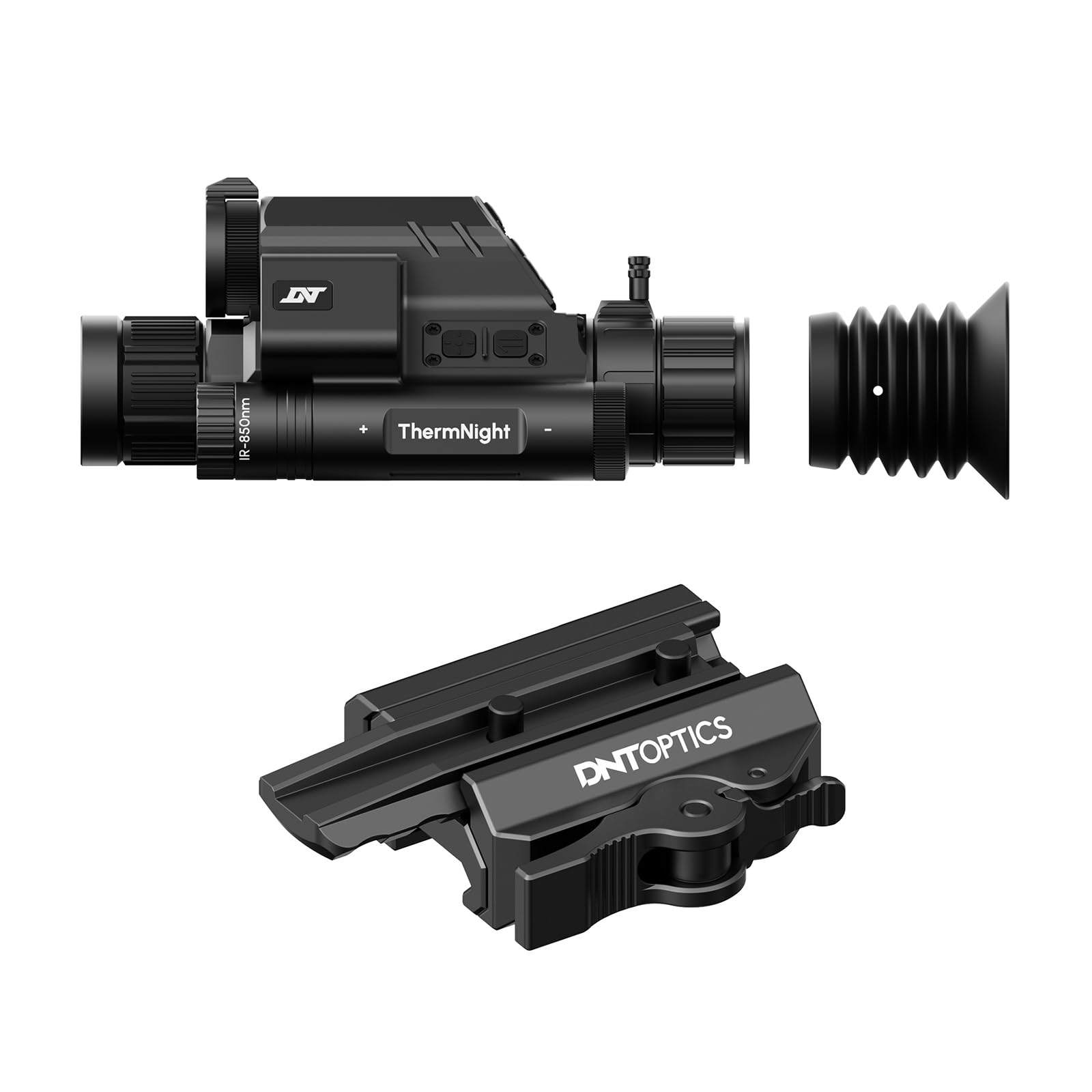
Image 1: DNT Optics TNC335R ThermNight Multispectral Scope with QDM150 mount. This image displays the main scope unit alongside its quick-detach mounting system, providing a visual reference for the product.
4. Podešavanje
4.1 Instalacija baterije
- Locate the battery compartment on the scope.
- Odvrnite poklopac baterije.
- Insert the rechargeable battery, ensuring correct polarity (+/-).
- Čvrsto vratite poklopac baterije.
- Charge the battery fully before first use using the provided USB cable.
4.2 Mounting the QDM150
- Attach the QDM150 mount to the scope according to the mount's specific instructions, ensuring it is firmly secured.
- Position the scope with the QDM150 mount onto your rifle's Picatinny rail.
- Engage the quick-detach levers to lock the mount onto the rail. Verify that the scope is stable and does not wobble.
4.3 Initial Power-On and Zeroing
- Pritisnite i držite dugme za napajanje dok se ekran ne osvijetli.
- Perform initial zeroing of the scope according to standard rifle scope zeroing procedures. Refer to the detailed zeroing guide available on the DNT Optics webstranica za opsežna uputstva.
5. Operativni
5.1 Uključivanje/isključivanje napajanja
- Uključeno: Pritisnite i držite dugme za napajanje otprilike 3 sekunde.
- Iskljuciti: Press and hold the power button for approximately 5 seconds until the display shuts down.
5.2 Odabir načina rada
The TNC335R offers multiple observation modes:
- Termalni način rada: Detects heat signatures. Ideal for low-light or obscured conditions.
- Način rada noćnog vida: Amplifies ambient light for clear viewing in near-darkness.
- Dnevni način rada: Standard optical viewing for daylight conditions.
Press the 'Mode' button to cycle through the available observation modes.
5.3 Reticle Adjustment
Use the directional buttons or rotary dial (depending on model variant) to adjust the reticle's position for precise aiming. Refer to the on-screen menu for specific reticle options and adjustments.
5.4 Brightness and Contrast
Navigate to the 'Display Settings' in the main menu to adjust screen brightness and image contrast for optimal viewu različitim okruženjima.
5.5 Digitalni zum
Press the 'Zoom' button to cycle through available digital magnification levels. Note that higher digital zoom levels may reduce image clarity.
6. Održavanje
6.1 Čišćenje
- sočiva: Use the provided lens cleaning cloth or a soft, lint-free cloth specifically designed for optics. Gently wipe the lens surfaces. For stubborn dirt, use a small amount of lens cleaning fluid.
- tijelo: Obrišite tijelo teleskopa mekom krpomamp krpom. Izbjegavajte abrazivna sredstva za čišćenje ili rastvarače.
6.2 Njega baterija
- Redovno punite bateriju, čak i ako je ne koristite često, kako biste produžili njen vijek trajanja.
- Store the device with a partially charged battery if storing for extended periods.
6.3 Skladištenje
Store the scope in a cool, dry place, away from direct sunlight and extreme temperatures. Use the lens caps to protect the optical surfaces.
7. Otkrivanje problema
| Problem | Mogući uzrok | Rješenje |
|---|---|---|
| Uređaj se ne uključuje. | Low or depleted battery; incorrectly installed battery. | Charge the battery; ensure battery is installed with correct polarity. |
| Slika je mutna ili nejasna. | Lens caps still on; dirty lenses; focus adjustment needed. | Remove lens caps; clean lenses; adjust the focus ring. |
| Dugmad ne reagiraju. | Uređaj se zamrznuo; baterija je prazna. | Perform a soft reset (refer to DNT Optics website for specific instructions); charge battery. |
| QDM150 mount feels loose. | Levers not fully engaged; mounting screws loose. | Ensure quick-detach levers are fully locked; tighten any accessible mounting screws. |
8. Specifikacije
- Brand: DNT Optics
- Naziv modela: TNC335R
- Težina artikla: 29.8 unce
- Materijal: Aluminijum
- Kompatibilni uređaji: Rifle, Shotgun
- noćni vid: Da
- Vrsta končanice: Cross
- Vrsta niti: 1/2"-28
- Boja: Crna
9. Garancija i podrška
DNT Optics products are covered by a limited warranty. For detailed warranty information, product registration, and technical support, please visit the official DNT Optics webweb-mjesto ili kontaktirajte njihovu službu za korisnike. Sačuvajte račun kao dokaz o kupovini za reklamacije u slučaju garancije.
Službeno Webstranica: DNT Optics Store on Amazon


