Uvod
This manual provides comprehensive instructions for the installation, operation, and maintenance of your Imou Cell 3C AIO 5MP Solar Surveillance Camera. Please read this manual thoroughly before use and retain it for future reference.
The Imou Cell 3C AIO is a wireless, rechargeable surveillance camera featuring an integrated 2.2W solar panel for continuous power. It offers 5MP (3K) resolution, IP66 weather resistance, smart color night vision, and advanced human detection with smart tracking. Key features include a built-in siren and spotlight for deterrence, flexible storage options via microSD card or Imou Cloud, and a privacy mode for enhanced security.
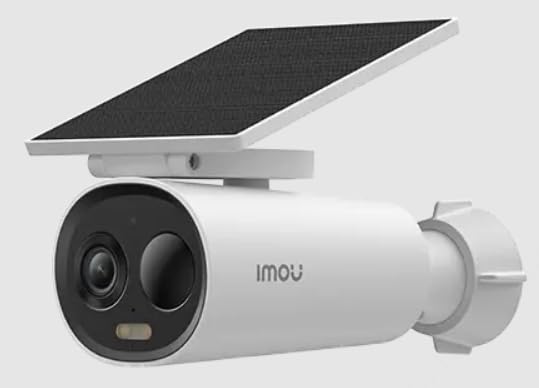
Image of the Imou Cell 3C AIO 5MP Solar Surveillance Camera, showcasing its compact design and integrated solar panel.
Setup
Follow these steps for initial setup of your Imou Cell 3C AIO camera:
- Raspakujte i pregledajte: Carefully remove all components from the packaging and ensure everything is present and undamaged.
- Početna naplata: Although solar-powered, it is recommended to fully charge the camera using a 5V USB adapter (not included) before the first use to ensure optimal performance.
- Preuzmite aplikaciju Imou Life: Download and install the "Imou Life" app from your smartphone's app store (available on iOS and Android).
- Kreiranje računa: Otvorite aplikaciju Imou Life i kreirajte novi račun ili se prijavite na postojeći.
- Dodaj uređaj: Follow the in-app instructions to add your camera. This typically involves scanning a QR code on the camera or its packaging.
- Lokacija montaže: Select a suitable outdoor location for mounting. Ensure the solar panel receives direct sunlight for several hours daily to maintain battery charge. The camera is IP66 weather-resistant, suitable for various outdoor conditions.
- Sigurna montaža: Use the provided mounting hardware to securely attach the camera to the chosen surface. Adjust the camera angle for optimal surveillance coverage.
Uputstvo za upotrebu
Utilize the Imou Life app to access and control your camera's features:
- Uživo View: Open the Imou Life app and select your camera from the device list to view video prijenos u stvarnom vremenu.
- Detekcija pokreta i praćenje: The camera features advanced human detection and smart tracking. Configure detection sensitivity, activity zones, and alert preferences within the app settings.
- noćni vid: The camera supports smart color night vision, which automatically activates in low-light conditions to provide clear, full-color images.
- Sirena i reflektor: The integrated spotlight and siren can be configured to activate automatically upon detection of an intruder, or they can be manually triggered through the Imou Life app to deter potential threats.
- Video pohrana:
- MicroSD kartica: Insert a microSD card (up to 256GB, not included) into the designated slot for local video storage.
- Imou Cloud: Subscribe to Imou Cloud for secure cloud storage of your video recordings. Refer to the app for subscription details and free trial availability.
- Način privatnosti: Activate the privacy mode within the Imou Life app. This feature physically covers the camera lens, ensuring your privacy when desired.
Održavanje
Pravilno održavanje osigurava dugotrajnost i optimalne performanse vašeg fotoaparata:
- čišćenje: Regularly clean the camera lens and the surface of the solar panel with a soft, damp cloth. Avoid using abrasive cleaners or harsh chemicals, as these can damage the components.
- Ažuriranja firmvera: Periodically check for and install firmware updates through the Imou Life app. Updates often include performance improvements, new features, and security enhancements.
- Briga o životnoj sredini: While IP66 rated, extreme environmental conditions (e.g., prolonged exposure to direct salt spray, very high humidity, or temperatures outside the specified operating range) should be minimized to prevent potential damage.
- Zdravlje baterije: Ensure the solar panel receives adequate sunlight daily to maintain the internal battery's charge. If the camera is in a shaded area, occasional manual charging via USB may be required.
Rješavanje problema
Pogledajte ovaj odjeljak za rješenja uobičajenih problema:
- Kamera se ne uključuje:
- Check if the solar panel is obstructed or receiving insufficient sunlight.
- Ensure the internal battery has sufficient charge. If necessary, manually charge the camera via USB.
- Ne mogu se povezati na Wi-Fi:
- Verify that the camera is within range of your Wi-Fi router.
- Double-check the Wi-Fi password entered in the Imou Life app.
- Ponovo pokrenite i kameru i Wi-Fi ruter.
- Loš kvalitet slike:
- Očistite objektiv kamere kako biste uklonili prljavštinu ili mrlje.
- Ensure there is adequate lighting in the surveillance area, especially for optimal color night vision.
- Check your network connection stability, as a weak signal can affect video streaming quality.
- Detekcija pokreta ne radi:
- Verify that motion detection is enabled and configured correctly in the Imou Life app settings.
- Adjust the detection sensitivity and ensure activity zones are properly defined.
- Provjerite da nema fizičkih prepreka koje blokiraju kameru view u području detekcije.
Specifikacije
| Feature | Detalj |
|---|---|
| Broj modela | IPC-K9DC-5M0WEH-V2 |
| Brand | Imou |
| Rezolucija | 5 megapiksela (3K) |
| Integrisani solarni panel | 2.2 Watts |
| Weather Resistance | IP66 certificirano |
| Dimenzije (D x Š x V) | 16.8 x 7.2 x 6 cm |
| Težina | 650 grama |
| Potrošnja energije | 3.5 Watts |
| Voltage | 5 Volts |
| Opcije skladištenja | MicroSD card (up to 256GB), Imou Cloud |
| Karakteristike | Human Detection, Smart Tracking, Smart Color Night Vision, Siren, Spotlight, Privacy Mode |
Garancija i podrška
For detailed warranty information, technical assistance, or customer support, please visit the official Imou website or contact their authorized service centers. Retain your proof of purchase for any warranty claims.


