Uvod
This manual provides essential information for the setup, operation, maintenance, and troubleshooting of your AWOW Mini PC, Model BA7. Please read these instructions carefully before using the device.

Slika: Prekoview of the AWOW BA7 Mini PC, highlighting its compact design and key features.
Sadržaj paketa
Provjerite da li su sve stavke prisutne u paketu:
- AWOW BA7 Mini PC
- Adapter za napajanje
- Montažni vijci
- VESA nosač za montiranje
- HDMI kabl
- Korisnički priručnik (ovaj dokument)

Image: Illustration of the AWOW BA7 Mini PC and its included accessories: power adapter, screws, VESA mount, HDMI cable, and user manual.
Uputstva za postavljanje
- Povežite periferne uređaje: Connect your keyboard, mouse, and monitor(s) to the appropriate ports on the Mini PC.
Slika: Front view of the Mini PC showing the Power Button, Type-C port, USB 3.2 ports, and 3.5mm Audio Jack.

Slika: Stražnja strana view of the Mini PC showing the DC IN, DP1.2, HDMI2.0, USB 2.0 ports, and RJ45 LAN port.
- Priključak za napajanje: Connect the power adapter to the DC IN port on the Mini PC, then plug the adapter into a power outlet.
- Uključeno: Pritisnite dugme za napajanje koje se nalazi na prednjoj strani Mini PC-a. Sistem će se pokrenuti.
- Početno podešavanje: Slijedite upute na ekranu da biste dovršili početno podešavanje sistema Windows 11 Pro, uključujući jezik, regiju, mrežnu vezu i kreiranje korisničkog računa.
- Mrežna veza:
- Ožičeno: Connect an Ethernet cable to the RJ45 LAN port for a stable wired connection.
- bežični: During Windows setup or via Windows settings, connect to your Wi-Fi network using the built-in WiFi 6.
Uputstvo za upotrebu
Basic Operation
- Uključivanje/isključivanje: Press the power button to turn on the PC. To shut down, use the Windows Start menu options (Shut down, Restart, Sleep). A short press on the power button can put the PC to sleep. A long press (approx. 5 seconds) will force a shutdown.
- Izlaz ekrana: The Mini PC supports up to three 4K displays simultaneously via DP, HDMI, and USB-C. Connect your monitors and configure display settings in Windows.

Image: A user working with a triple monitor setup, demonstrating the Mini PC's multi-display capability.
- USB povezivanje: Utilize the USB 2.0 and USB 3.0 ports for connecting external devices such as external hard drives, USB flash drives, printers, and other peripherals. The Type-C port also supports data transfer and display output.
- audio: Spojite slušalice ili zvučnike na 3.5 mm audio priključak.
Napredno korištenje
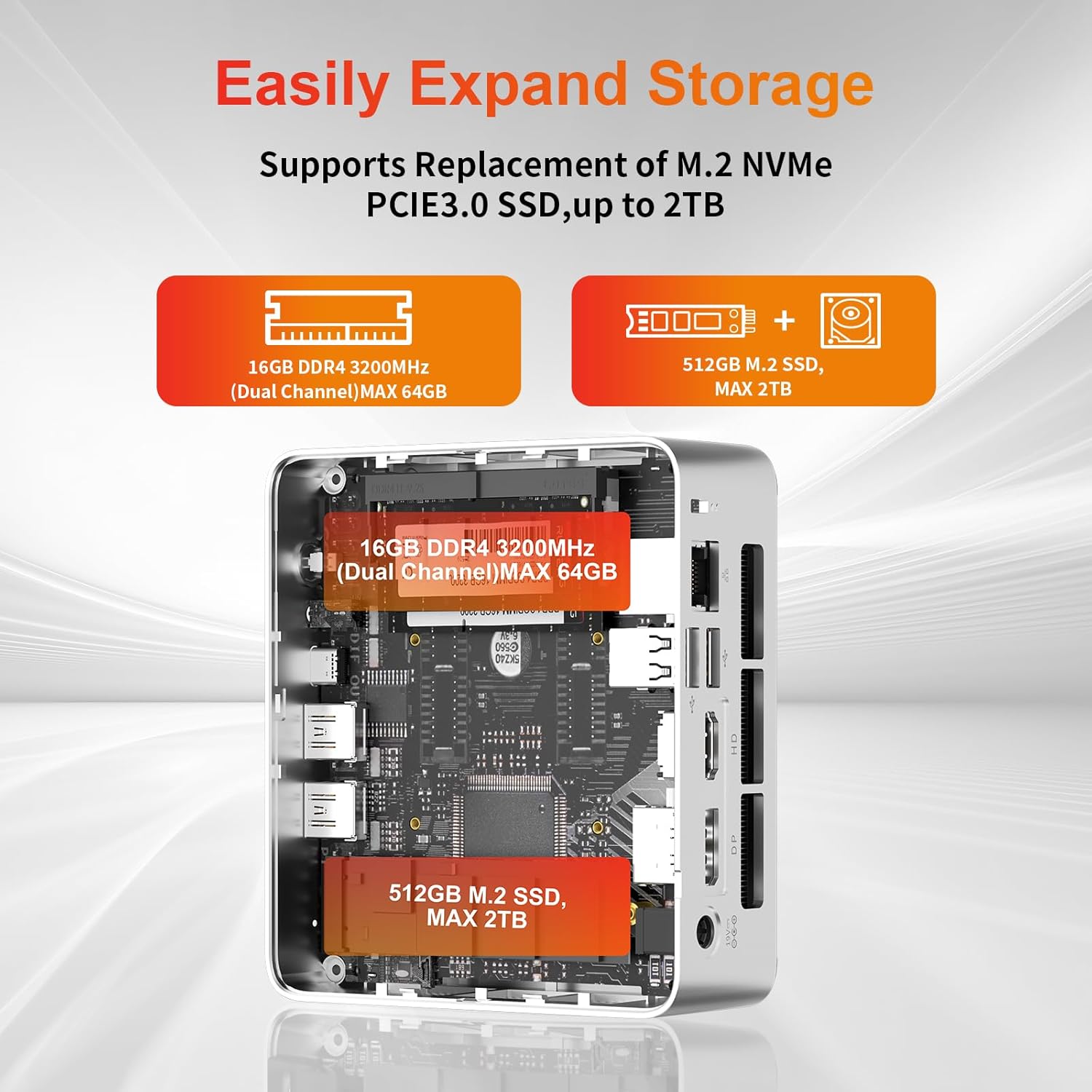
- Proširenje pohrane: The Mini PC supports replacement of the M.2 NVMe PCIe 3.0 SSD up to 2TB. It also supports memory expansion up to 64GB DDR4.

Image: Diagram illustrating the internal components and options for expanding storage (M.2 SSD up to 2TB) and RAM (DDR4 up to 64GB).
- VESA montaža: Use the included VESA mount bracket to attach the Mini PC to the back of a compatible monitor or to a wall mount, saving desk space.
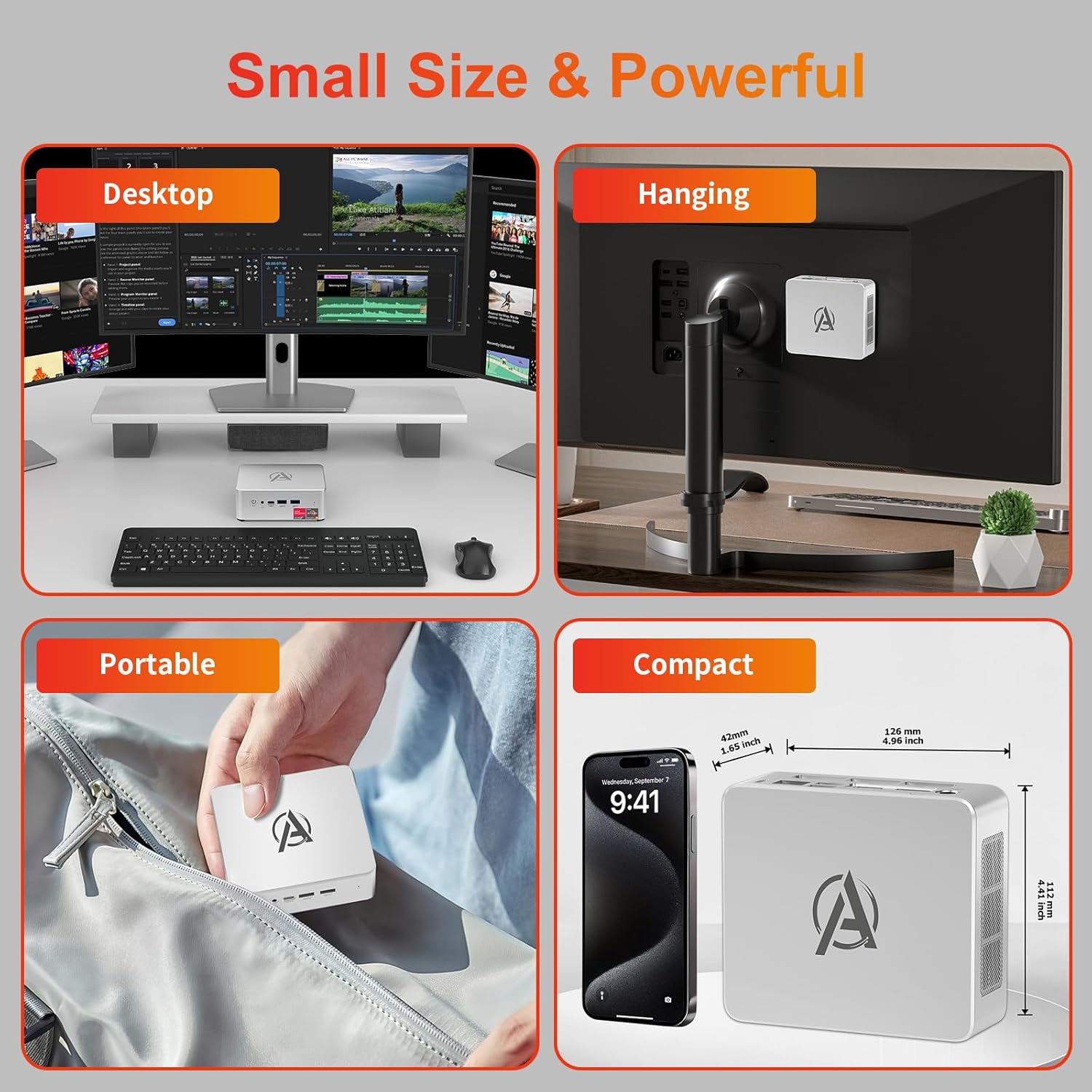
Image: Various usage scenarios for the Mini PC, including desktop, VESA-mounted behind a monitor, portable, and compact size comparison.
Održavanje
- čišćenje: Use a soft, dry cloth to clean the exterior of the Mini PC. Do not use liquid cleaners or aerosols. Ensure ventilation openings are free from dust.
- Ažuriranja softvera: Redovno provjeravajte i instalirajte ažuriranja za Windows i upravljačke programe kako biste osigurali optimalne performanse i sigurnost.
- Upravljanje toplinom: Ensure the Mini PC is placed in a well-ventilated area. Avoid blocking the air vents. The intelligent cooling system is designed for low noise and efficient heat dissipation.

Image: Diagram illustrating the internal cooling fan and heat sink, showing airflow for efficient heat dissipation.
- Upravljanje skladištem: Povremeno čistite nepotrebno filei aplikacije za održavanje performansi sistema.
Rješavanje problema
- Nema napajanja:
- Provjerite je li adapter za napajanje sigurno priključen i na Mini PC i na utičnicu.
- Uvjerite se da je utičnica funkcionalna.
- Pokušajte s drugom utičnicom.
- Bez prikaza:
- Verify that the HDMI/DP/USB-C cable is securely connected to both the Mini PC and the monitor.
- Provjerite je li monitor uključen i postavljen na ispravan ulazni izvor.
- Pokušajte s drugim kabelom za prikaz ili monitorom ako je dostupan.
- Spore performanse:
- Zatvorite nepotrebne aplikacije koje rade u pozadini.
- Provjerite i instalirajte sva ažuriranja za Windows ili upravljačke programe koja su na čekanju.
- Provjerite da li ima dovoljno slobodnog prostora na SSD-u.
- Pratite korištenje CPU-a i RAM-a u Upravitelju zadataka kako biste identificirali procese koji intenzivno koriste resurse.
- Problemi s mrežnom vezom:
- For wired connections, ensure the Ethernet cable is properly connected and the router is working.
- For Wi-Fi, check if the Wi-Fi adapter is enabled and connected to the correct network. Restart your router/modem.
- Zamrzavanje/rušenje sistema:
- Ponovo pokrenite Mini PC.
- Ensure the system is not overheating (check ventilation).
- Run a system diagnostic or check Windows Event Viewer for error messages.
Specifikacije
| Model | AWOW BA7 Mini PC |
| Procesor | AMD Ryzen 5 7430U (6 jezgara, 12 niti, do 4.3 GHz) |
| Grafika | Integrisana AMD Radeon grafika |
| RAM | 16GB DDR4 (proširivo do 64GB) |
| Skladištenje | 512GB PCIe 3.0 M.2 SSD (Expandable up to 2TB) |
| Operativni sistem | Windows 11 Pro |
| Video izlaz | DP1.2 (4K@60Hz), HDMI2.0 (4K@60Hz), USB-C (4K@60Hz) - Supports Triple Display |
| Povezivanje | WiFi 6, Bluetooth 5.2, 1000Mbps RJ45 LAN |
| Luke | 2x USB 3.2, 2x USB 2.0, 1x Type-C (Full Function), 1x DP1.2, 1x HDMI2.0, 1x RJ45 LAN, 1x 3.5mm Audio Jack, 1x DC IN |
| Dimenzije | 126 mm x 112 mm x 42 mm (približno 4.96 x 4.41 x 1.65 inča) |
| Težina | 398 g (samo uređaj) Image: The Mini PC with its dimensions (126mm x 112mm x 42mm) and weight (398g) labeled. |
Garancija i podrška
AWOW pruža sveobuhvatnu podršku za svoje proizvode.
- garancija: This product includes a 12-month service period from the date of purchase, covering manufacturing defects.
- tehnička podrška: Lifetime technical support is available for all AWOW products.
- Kontakt: For technical assistance, warranty claims, or any product-related inquiries, please visit the official AWOW webstranice ili kontaktirajte njihovu korisničku službu.

Image: AWOW brand message emphasizing fulfillment, lifetime technical support, and 12-month service.


