1. Uvod
This manual provides essential information for the safe operation, assembly, maintenance, and troubleshooting of your Varstrom VS10 Electric Scooter. Please read this manual thoroughly before first use to ensure proper function and to prevent injury or damage.
2. Sigurnosne smjernice
Operating an electric scooter carries inherent risks. Adhere to the following safety guidelines:
- Always wear a helmet and appropriate protective gear (knee pads, elbow pads).
- Pridržavajte se svih lokalnih saobraćajnih zakona i propisa.
- Do not ride in wet conditions, heavy rain, or on slippery surfaces.
- Avoid riding at night or in low visibility conditions. If unavoidable, ensure all lights are functional and wear reflective clothing.
- Održavajte sigurnu brzinu i razmak od drugih vozila i pješaka.
- Ne izvodite vratolomije ili nagle manevre.
- Prije svake vožnje provjerite je li skuter potpuno napunjen i da su sve komponente sigurno pričvršćene.
- Maksimalna nosivost je 120 kg. Ne prekoračujte ovu granicu.
- Ovaj skuter je namijenjen samo za upotrebu odraslih.
3. Sadržaj paketa
Provjerite da li su sve stavke prisutne u paketu:
- Varstrom VS10 Electric Scooter
- Punjač
- Korisnički priručnik (ovaj dokument)
4. Proizvod je gotovview
Familiarize yourself with the main components of your Varstrom VS10 Electric Scooter.

Slika: Sa strane view of the Varstrom VS10 Electric Scooter, showcasinnjegov cjelokupni dizajn i komponente.
Ključne karakteristike:
- motor: 500W Brushless DC Motor for efficient power delivery.
- baterija: 48V 15.6Ah Lithium-ion battery for extended range.
- gume: 10-inch puncture-proof solid tires.
- suspenzija: Front dual suspension and rear dual suspension for ride comfort.
- rasvjeta: Integrated headlight, bright rear brake light, and dual handlebar turn signals.
- Prikaz: Intelligent LED screen showing speed, battery level, and riding mode.
- Kontrola: App control via smartphone for various settings.
- prenosivost: Quick folding mechanism for easy storage and transport.
5. Montaža i postavljanje
5.1 Rasklapanje skutera
The scooter is shipped in a folded state. Follow these steps to unfold it:
- Postavite skuter na ravnu površinu.
- Locate the folding mechanism latch near the base of the steering column.
- Release the latch and carefully lift the steering column until it locks into the upright position. Ensure the locking mechanism is fully engaged.
- Raise the handlebars and secure them if they are folded down.

Image: Illustration showing the folded and unfolded dimensions of the Varstrom VS10 Electric Scooter, demonstrating its compact storage capability.
5.2 Početno punjenje
Prije prve vožnje, potpuno napunite bateriju skutera.
- Uvjerite se da je skuter isključen.
- Pronađite priključak za punjenje, obično sa strane platforme.
- Spojite punjač na priključak za punjenje, a zatim ga uključite u standardnu zidnu utičnicu.
- Indikator punjenja na punjaču obično svijetli crveno tokom punjenja, a postaje zelen kada je potpuno napunjen.
- Vrijeme punjenja je otprilike 6-7 sati. Nemojte prepunjavati.

Slika: Detaljna view of the scooter's battery compartment and charging specifications, highlighting the 48V 15.6Ah battery and 6-7 hour charging time.
6. Operacija
6.1 Uključivanje/isključivanje napajanja
- To power on: Press and hold the power button on the LED display until the screen illuminates.
- Za isključivanje: Pritisnite i držite dugme za napajanje dok se ekran ne isključi.
6.2 LED displej i kontrole
The integrated LED display provides real-time information and control options.

Image: Close-up of the scooter's intelligent LED screen, displaying current speed, selected gear (riding mode), and battery level.
- Prikaz brzine: Prikazuje trenutnu brzinu vožnje.
- Prikaz baterije: Označava preostalo napunjenost baterije.
- Gear Shift (Riding Modes): Press the 'Set/Switch' button to cycle through Eco, Drive, and Sport modes.
6.3 Načini vožnje
- Eko način rada: Lowest speed, maximum range, suitable for beginners or crowded areas.
- Način vožnje: Medium speed, balanced performance for daily commuting.
- Sportski način rada: Highest speed, maximum power, for experienced riders on open roads.
6.4 Tempomat
To activate cruise control, maintain a consistent speed for a few seconds. The scooter will beep, and cruise control will engage. To disengage, press the brake lever or accelerate.
6.5 Sistem rasvjete
Skuter je opremljen sveobuhvatnim sistemom osvjetljenja za vidljivost i sigurnost.
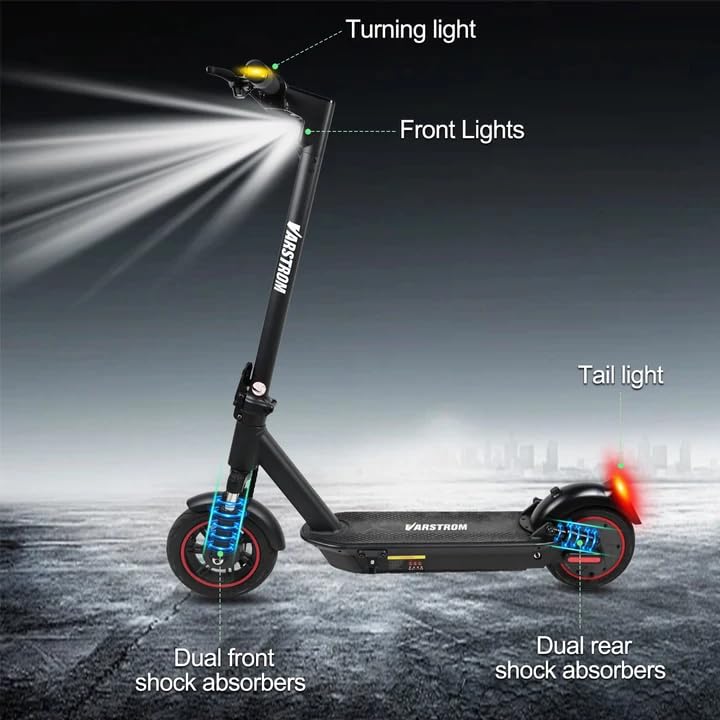
Image: Diagram illustrating the scooter's front lights, turning lights on the handlebars, tail light, and the dual front and rear shock absorbers.
- far: Turn on/off via the app or dedicated button (if available).
- Tail Light/Brake Light: The rear light illuminates when the scooter is powered on and brightens when the brake is applied.
- Žmigavci: Activate turn signals using the controls on the handlebars to indicate your turning direction.
6.6 Kočenje
The scooter features front braking. Apply the brake lever gently to slow down. For emergency stops, apply firm and even pressure to the brake lever. Avoid sudden braking at high speeds.
6.7 Tuya Smart App Control
Enhance your riding experience by connecting your scooter to the Tuya Smart app.

Image: Screenshot of the Tuya Smart App interface, showing options to unlock the scooter, control cruise, turn on/off headlights, switch riding modes, and set speed limits.
- Download the 'Tuya Smart' app from your smartphone's app store.
- Provjerite je li vaš skuter uključen i je li Bluetooth omogućen na vašem telefonu.
- Open the app and follow the instructions to add a new device. You may need to hold the brake and power button simultaneously to activate Bluetooth pairing mode.
- Putem aplikacije možete:
- Unlock/Lock the scooter remotely.
- Adjust lights.
- Promijenite načine vožnje.
- Set cruise control.
- Toggle units (km/mph).
- View real-time ride data.
- Enable/disable zero start (safety feature).
7. Održavanje
7.1 Njega baterija
- Redovno punite bateriju, čak i ako se ne koristi, kako biste održali njeno zdravlje.
- Izbjegavajte potpuno pražnjenje baterije.
- Čuvajte skuter na hladnom i suhom mjestu, dalje od direktne sunčeve svjetlosti i ekstremnih temperatura.
- Koristite samo isporučeni punjač.
7.2 Čišćenje
Obrišite skuter oglasomamp krpu. Ne koristite mlazove vode pod visokim pritiskom niti uranjajte skuter u vodu, jer to može oštetiti električne komponente.
7.3 Pregled guma
Although the tires are puncture-proof solid tires, regularly inspect them for any signs of damage, cracks, or embedded debris.
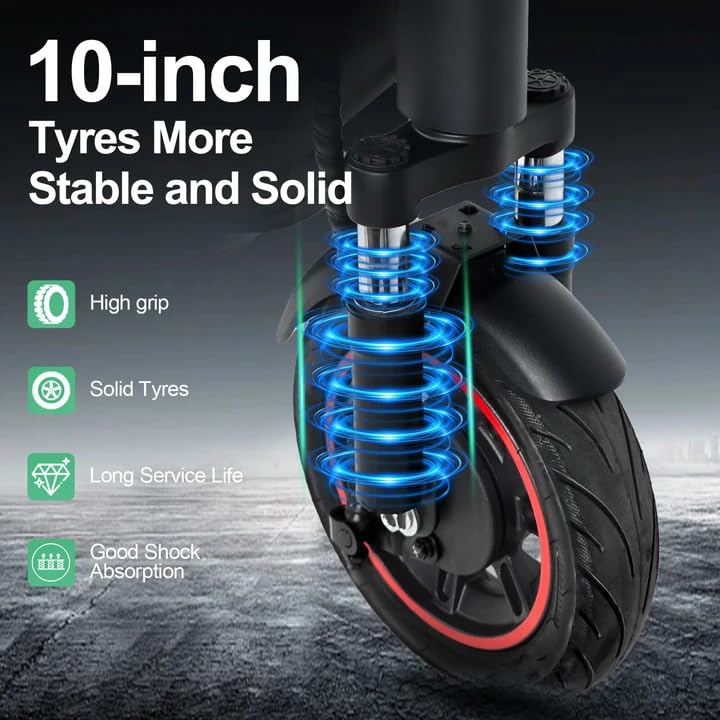
Image: Close-up of the scooter's 10-inch solid tires and dual suspension system, emphasizing stability and shock absorption.
8. Otkrivanje problema
| Problem | Mogući uzrok | Rješenje |
|---|---|---|
| Skuter se ne uključuje | Slaba baterija; Labavi spojevi; Kvar dugmeta za napajanje | Charge the battery; Check all visible connections; Contact support if issue persists. |
| Smanjeni domet ili snaga | Low battery; Overload; Cold weather; Tire damage | Fully charge battery; Ensure load is within limits; Battery performance decreases in cold; Inspect tires. |
| Aplikacija se ne povezuje | Bluetooth off; Scooter not in pairing mode; App issue | Ensure phone Bluetooth is on; Activate scooter's Bluetooth pairing mode (brake + power button); Restart app/phone. |
| Kočnice ne reagiraju | Brake cable loose or damaged | Inspect brake cable and lever; Seek professional service if necessary. |
9. Specifikacije
| Parametar | Vrijednost |
|---|---|
| Motor | 500W Brushless (50N·m torque) |
| Baterija | 48V 15.6Ah Lithium |
| Maks. Domet | Do 60 km s jednim punjenjem |
| Max Speed | 25 km/h |
| Vrijeme punjenja | 6-7 sata |
| Gume | 10-inch Puncture-Proof Solid Tires |
| Suspenzija | Front Dual Suspension + Rear Dual Suspension |
| Max Load | 120 kg |
| Climbing Angle | 15° |
| Unfolding Size (LWH) | 117 x 53 x 120 cm |
| Folding Size (LWH) | 117 x 53 x 56 cm |
| Težina | 19.6 kg |
| Posebne karakteristike | Digital Display, Foldable, Rechargeable, App Control, Cruise Control, Turning Indicator Light |

Slika: Presjek view illustrating the 500W brushless DC motor, highlighting its power and efficiency, alongside key performance metrics.
10. Garancija i podrška
For warranty information, technical support, or service inquiries, please refer to the purchase documentation or contact your retailer. Keep your proof of purchase for warranty claims.


