1. Proizvod je gotovview
The Keychron M6 Silent Wireless Gaming Mouse is designed for optimal comfort and performance across various tasks, from gaming to productivity. It features a lightweight, ergonomic design, versatile connectivity options, and a high-precision optical sensor. This manual provides detailed instructions for setup, operation, and maintenance.

Image: Keychron M6 Silent Wireless Gaming Mouse, showcasing its ergonomic shape and main buttons.
2. Ključne karakteristike
- Ultra-Ergonomic & Lightweight Design: The M6 mouse combines a compact, ergonomic shape with a lightweight 86g body for extended comfort. It includes over ten customizable buttons and an infinite metal scroll wheel.
- Stable Wireless with Ultra-Low Latency: Experience reliable 2.4GHz wireless performance with a 1000Hz polling rate. The M6 also supports Bluetooth 5.3 for multi-device use and flexible switching.
- Visokoprecizni PixArt 3395 senzor: Equipped with the advanced PixArt 3395 optical sensor, the M6 provides up to 26,000 DPI, 650 IPS tracking speed, and pinpoint accuracy.
- Infinite Scroll & Premium Metal Wheel: Features dual scrolling modes: smooth, infinite scroll for fast navigation and tactile mode for precision. The solid metal wheel offers a quiet, premium feel.
- Fully Programmable via Keychron Engine Software: Customize every button with Keychron Engine software on macOS and Windows. Create shortcuts, set macros, adjust DPI, polling rate, and LOD.
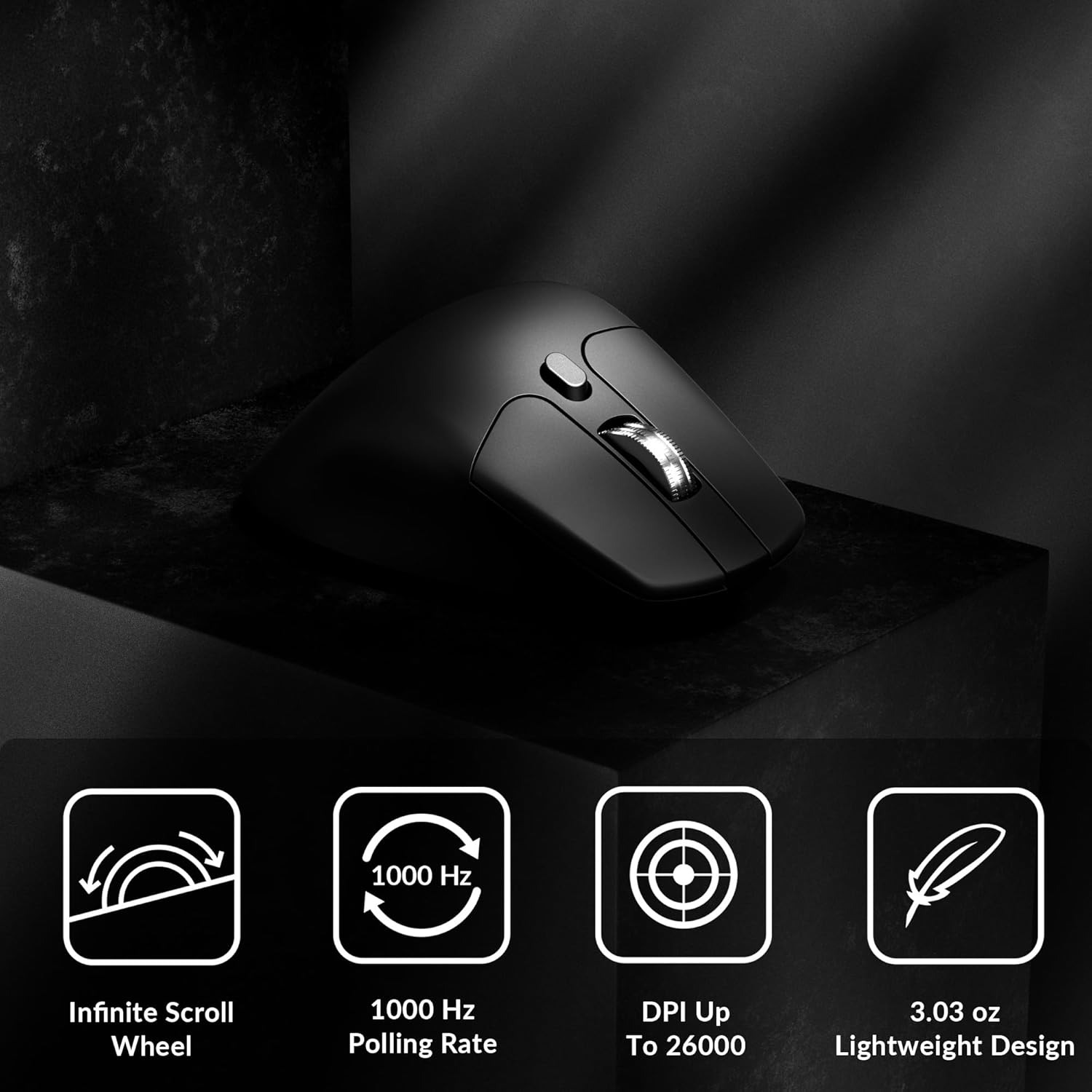
Image: Icons illustrating key features: Infinite Scroll Wheel, 1000 Hz Polling Rate, DPI Up To 26000, and Lightweight Design.
3. Podešavanje
3.1 Sadržaj paketa
Provjerite da li su sve stavke prisutne u paketu:
- 1x Keychron M6 miš
- 1x Type-C do Type-C kabel
- 1x adapter tipa A na tip-C
- 1x produžni adapter za prijemnik
- 1x prijemnik tipa C od 2.4 GHz
- 1x Type-A 2.4 GHz prijemnik
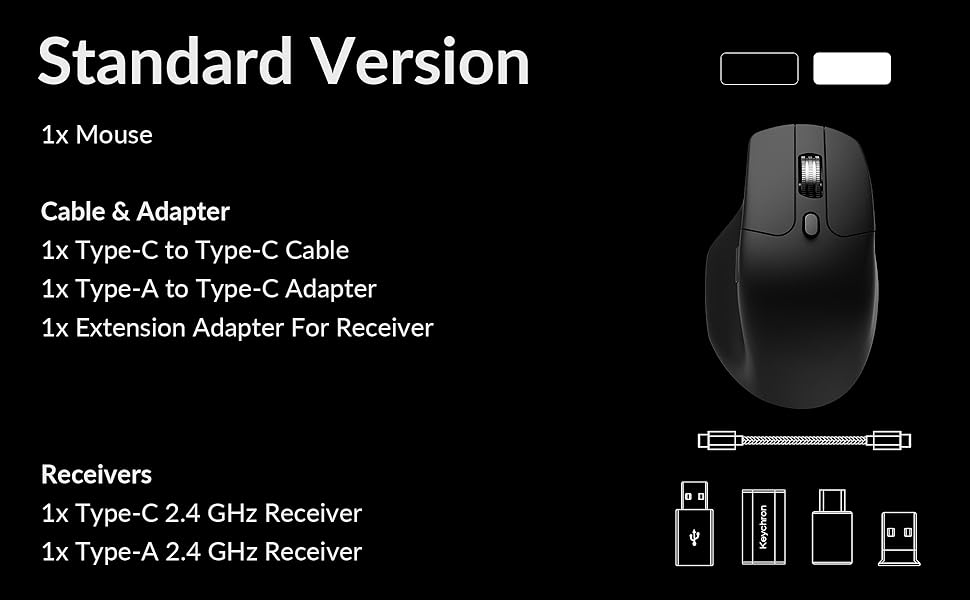
Image: Diagram showing the contents of the Keychron M6 mouse package.
3.2 Početno punjenje
Before first use, it is recommended to fully charge the mouse. Connect the mouse to your computer using the provided Type-C cable. The LED indicator will show charging status.
3.3 Povezivanje miša
The Keychron M6 supports three connection modes: 2.4GHz wireless, Bluetooth 5.3, and wired.
- Bežično 2.4 GHz: Insert the 2.4GHz receiver (Type-A or Type-C) into your computer's USB port. Switch the mode switch on the bottom of the mouse to 'G' (Gaming) mode. The mouse should connect automatically.
- Bluetooth 5.3: Switch the mode switch on the bottom of the mouse to 'B' (Bluetooth) mode. On your computer, search for Bluetooth devices and select 'Keychron M6' to pair.
- Ožičeno: Connect the mouse directly to your computer using the provided Type-C cable. The mouse will function in wired mode and charge simultaneously.

Image: Keychron M6 mouse connected to a laptop via 2.4GHz receiver, with Bluetooth 5.3 icon.
4. Uputstvo za upotrebu
4.1 Osnovne funkcije
- Lijevi/Desni klik: Standardne funkcije tipki miša.
- Točak za pomicanje: Used for vertical scrolling.
- Bočna dugmad: Default to Forward/Backward navigation. Customizable via software.
- Točak palca: Located on the side, used for horizontal scrolling.
4.2 DPI podešavanje
The DPI (Dots Per Inch) button on the bottom of the mouse allows you to cycle through preset sensitivity levels. Each level is indicated by a specific LED color. You can customize these DPI levels using the Keychron Engine software.
4.3 Podešavanje stope anketiranja
The polling rate button on the bottom of the mouse allows you to switch between different polling rates (125Hz, 500Hz, 1000Hz). A higher polling rate provides more responsive tracking, ideal for gaming. The LED indicator will change color to reflect the current polling rate.

Image: Close-up of the polling rate switch and indicator light on the mouse's underside.
4.4 Infinite Scroll Mode
The M6 features a button near the main scroll wheel to toggle between infinite scroll mode and tactile (notched) scroll mode. Infinite scroll allows for rapid navigation through long documents or web stranice.

Image: Diagram showing the infinite scroll button and the horizontal scrolling function of the thumb wheel.
5. Customization with Keychron Engine Software
The Keychron Engine software allows for comprehensive customization of your M6 mouse. It is compatible with macOS and Windows and can be accessed online, eliminating the need for a download.
- Dodjela dugmadi: Remap any of the mouse buttons to perform different functions, including keyboard shortcuts, multimedia keys, or macros.
- Kreiranje makroa: Snimite i dodijelite složene nizove komandi jednom dugmetu.
- DPI/Polling Rate/LOD Adjustment: Fine-tune sensor settings to match your preferences.
Posjetite službeni Keychron website to access the Keychron Engine software.

Image: Screenshot of the Keychron Engine software interface, showing button customization options for the M6 mouse.
6. Načini povezivanja
The M6 mouse offers flexible connectivity to suit various setups:
- Bežično 2.4 GHz: Provides a stable, low-latency connection with a 1000Hz polling rate, ideal for gaming and demanding tasks. Uses a dedicated USB receiver.
- Bluetooth 5.3: Offers seamless connection to multiple devices, allowing for quick switching between systems. Suitable for general use and productivity.
- Žični (USB-C): Connects directly via the USB-C cable, providing a reliable connection and simultaneously charging the mouse.
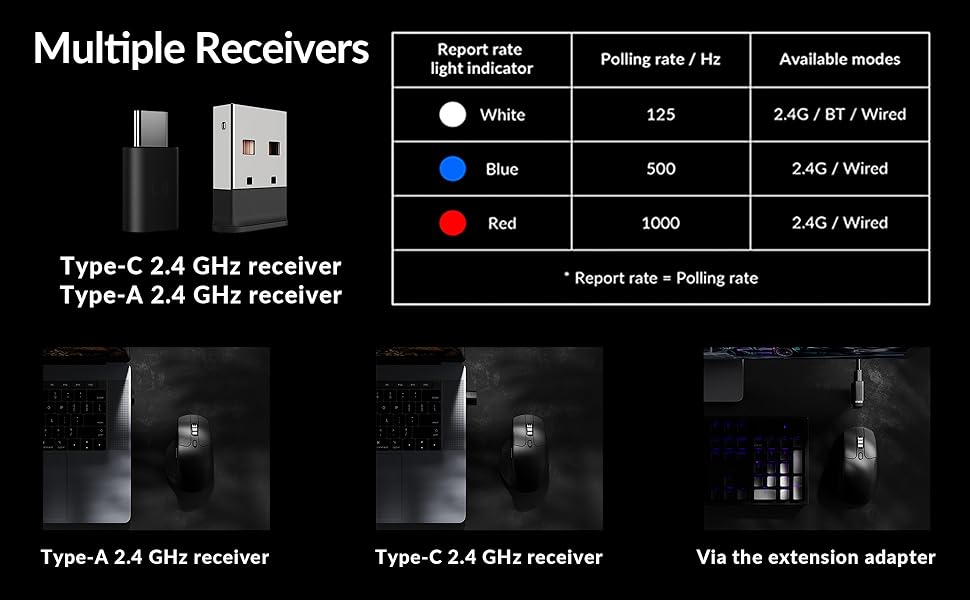
Image: Illustration of the Type-C and Type-A 2.4 GHz receivers, along with a table detailing polling rates and available modes.
7. Specifikacije
| Broj modela | M6S |
| Senzor | PixArt 3395 optički senzor |
| DPI | Do 26,000 |
| IPS Tracking Speed | 650 |
| Polling Rate | 1000Hz (2.4GHz/Wired), 125Hz (Bluetooth) |
| Povezivanje | 2.4 GHz bežično, Bluetooth 5.3, USB-C žičano |
| Težina | 86 g (3.03 unci) |
| Baterija | 800 mAh (Up to 80 hours) |
| Prekidači | Huano 20M Silent Micro Switch |
| Kompatibilnost | Windows, macOS, Linux |
| Dimenzije | 4.82 x 2.97 x 1.97 inča (122.5 x 75.4 x 50 mm) |
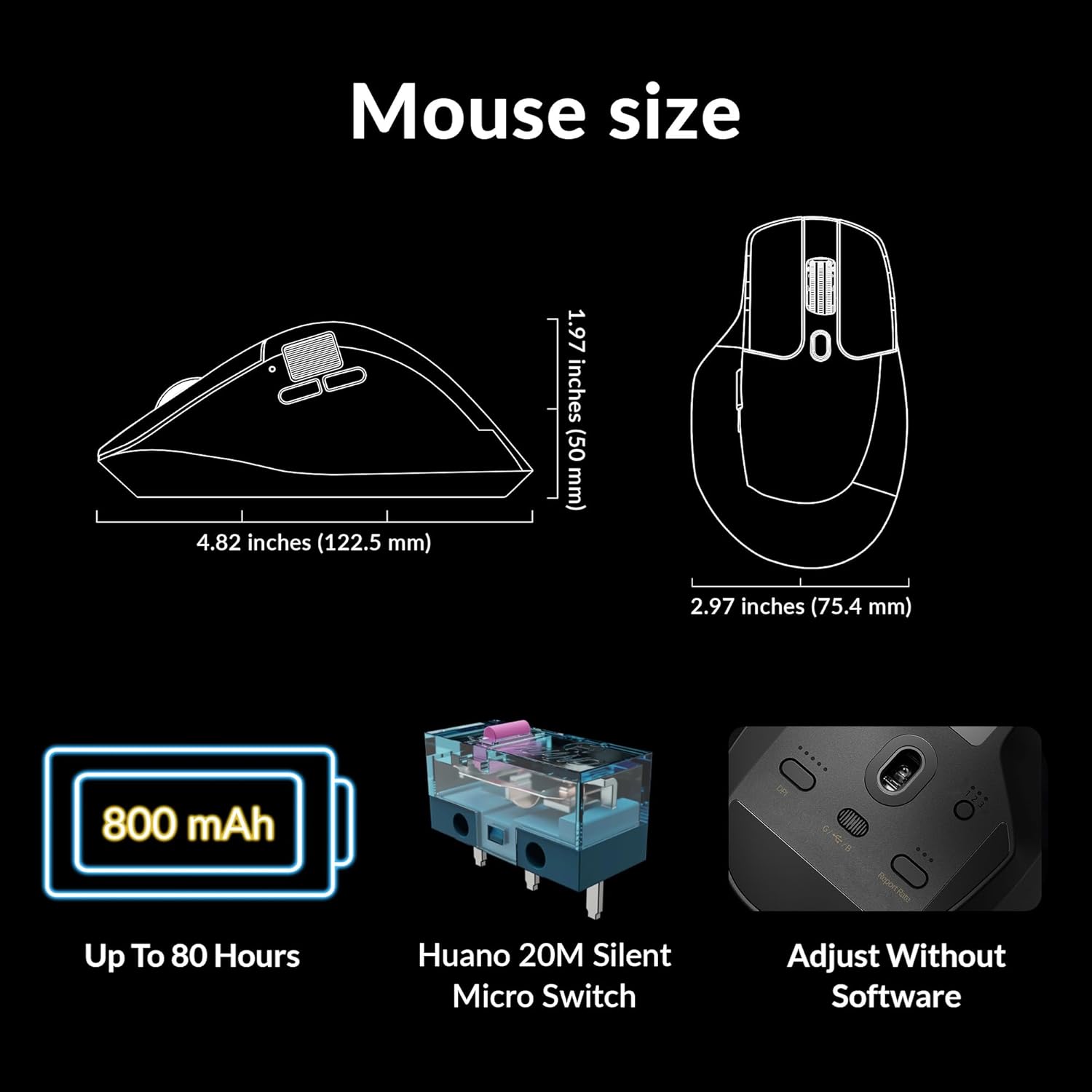
Image: Diagram showing the dimensions of the Keychron M6 mouse, its 800 mAh battery, and Huano 20M Silent Micro Switches.
8. Održavanje
Da biste osigurali dugotrajnost i optimalne performanse vašeg Keychron M6 miša, slijedite ove smjernice za održavanje:
- čišćenje: Koristite meku, suhu krpu za brisanje površine miša. Za tvrdokornu prljavštinu, lagano obrišiteampOperite krpu vodom ili blagim rastvorom za čišćenje. Izbjegavajte jake hemikalije.
- Održavanje senzora: Optički senzor na dnu miša održavajte čistim i bez prašine ili ostataka kako biste osigurali precizno praćenje.
- Održavanje baterije: Avoid fully discharging the battery frequently. For long-term storage, charge the mouse to about 50% and store it in a cool, dry place.
- Skladištenje: When not in use, store the mouse in a safe place to prevent physical damage.
9. Otkrivanje problema
Ako imate problema s mišem Keychron M6, pogledajte sljedeća uobičajena rješenja:
- Miš ne reaguje:
- Provjerite je li miš napunjen.
- Check the connection mode switch (2.4GHz, Bluetooth, Wired) is set correctly.
- For 2.4GHz, ensure the receiver is properly inserted and try a different USB port.
- For Bluetooth, re-pair the device in your computer's Bluetooth settings.
- Pokušajte se povezati putem USB-C kabela kako biste isključili probleme s bežičnom vezom.
- Nedosljedno praćenje:
- Očistite optički senzor na donjoj strani miša.
- Pazite da koristite miš na odgovarajućoj površini (npr. podlozi za miša).
- Adjust the DPI settings to a comfortable level.
- Dugmad ne rade:
- Check Keychron Engine software for custom button assignments that might be interfering.
- Provjerite je li firmver miša ažuriran.
- Problemi sa kotačićem za pomicanje:
- Toggle the infinite scroll button to ensure it's in the desired mode.
- Očistite sve ostatke oko kotačića za pomicanje.
10. Zvanični video proizvoda
Video: Zvaničnik prekoview of the Keychron M6 Silent Wireless Optical Gaming Mouse, highlighting its features and design.
11. Garancija i podrška
Keychron products come with a limited warranty. For detailed warranty information, technical support, and frequently asked questions, please visit the official Keychron webweb-mjesto ili kontaktirajte njihovu korisničku službu. Sačuvajte dokaz o kupovini za slučaj reklamacije.


