1. Uvod
This manual provides detailed instructions for the setup, operation, and maintenance of your POLONO PM220S Label Maker Machine. Please read this manual thoroughly before using the device to ensure proper function and longevity.
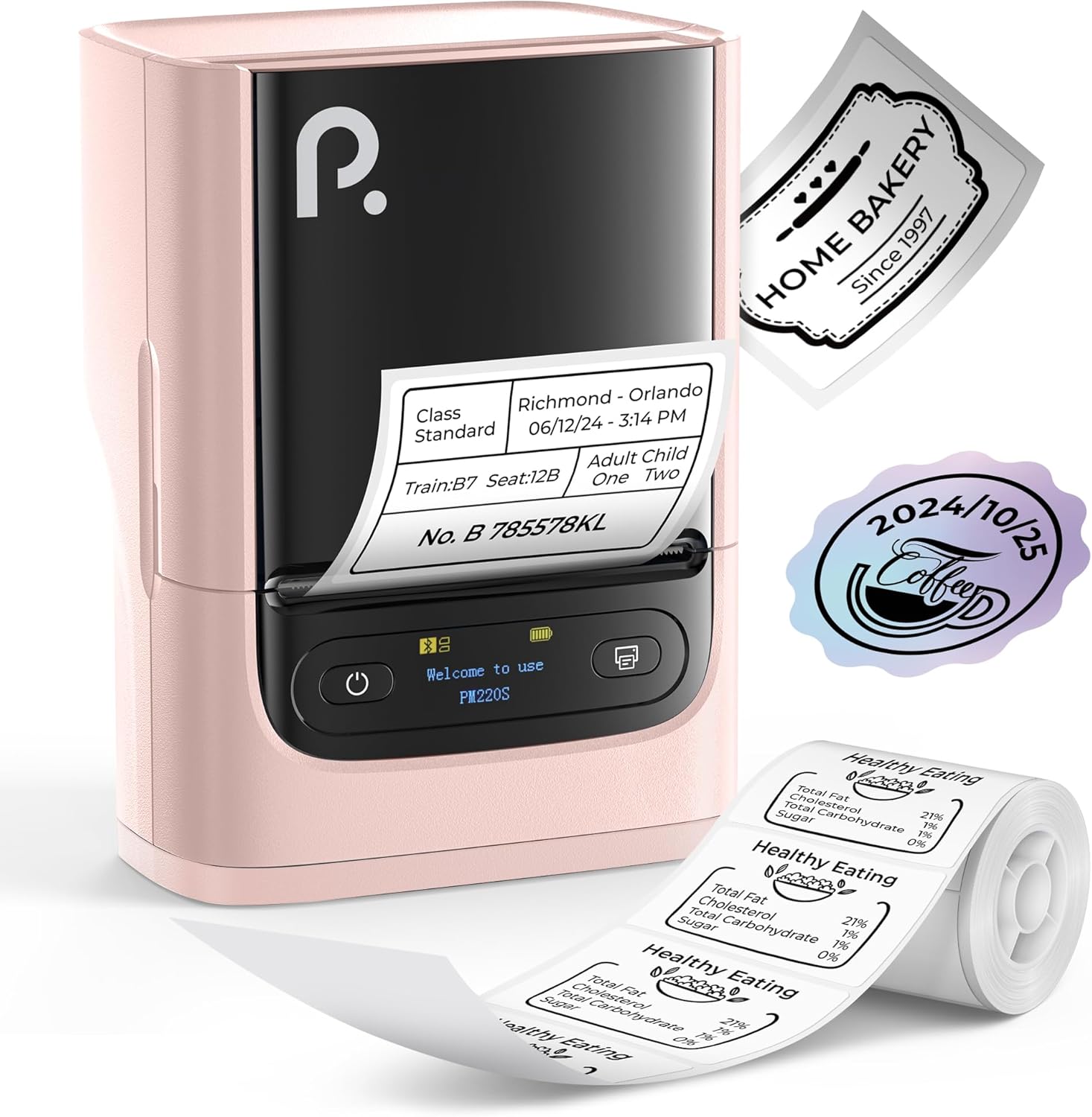
Figure 1: POLONO PM220S Label Maker Machine with sample etikete.
2. Proizvod je gotovview
2.1 Uključene komponente
- POLONO PM220S Label Maker Machine
- Label Tape (50x30mm, pre-installed or included)
- USB kabl za punjenje
- Korisnički priručnik (ovaj dokument)
2.2 Ključne karakteristike
- Bluetooth povezivanje: Seamless connection with iOS, Android, and PC devices.
- Intuitive LED Screen: Displays battery level, Bluetooth connection status, and alerts for paper shortages or timed shutdowns.
- Feature-Rich "Labelnize" App: Offers label templates, supports QR codes, barcodes, tables, text, icons, 90+ fonts, 14+ languages, and 450+ material presets.
- Premium Thermal Printing: BPA-Free Direct Thermal Technology with 203 DPI for high-definition, inkless printing.
- Kompatibilnost široke etikete: Supports label widths from 23-54mm (0.91"-2.12").
- Prijenosni dizajn: Compact and lightweight for easy transport and use in various environments.
3. Upute za postavljanje
3.1 Punjenje uređaja
Before first use, fully charge the label maker using the provided USB cable. The LED screen will indicate charging status.
3.2 App Installation and Driver Download
For mobile devices (iOS/Android), download the "Labelnize" app from your respective app store. For PC users, visit polono.com to download the necessary driver and application.

Figure 2: Universal compatibility with smartphones and laptops for app and driver installation.
3.3 Povezivanje putem Bluetooth-a
- Ensure the PM220S is powered on.
- On your mobile device, open the "Labelnize" app.
- Within the app, search for and connect to the PM220S via Bluetooth. Do not connect directly via your device's Bluetooth settings for mobile devices.
- For PC, ensure the driver is installed, then connect through the downloaded application.
3.4 Loading Label Tape
- Otvorite poklopac odjeljka za etikete.
- Umetnite rolu etiketa sa površinom za štampanje okrenutom prema gore.
- Adjust the paper slot guides to secure the tape according to its width (23-54mm) for precise alignment.
- Zatvorite poklopac.

Figure 3: Proper loading of label tape into the PM220S.
4. Uputstvo za upotrebu
4.1 Using the "Labelnize" App
- Open the "Labelnize" app on your connected device.
- Select from various pre-designed templates or create your own custom labels.
- The app allows you to add text, barcodes, QR codes, tables, icons, and more.
- Customize labels using a selection of over 90 fonts and 14 languages.
- Utilize the 450+ material presets for different label applications.
- Važno: For optimal results, use specialized POLONO labels. Avoid tearing the green back sticker to prevent printing issues.
4.2 Understanding the LED Screen Display
The integrated LED screen provides real-time feedback on the printer's status:
- Nivo baterije: Indicates the current charge of the device.
- Bluetooth veza: Shows if the device is successfully connected via Bluetooth.
- Papir Shortage Upozorenje: Notifies when the label roll is low or empty.
- Isključivanje na vrijeme: Displays countdown for automatic power-off to conserve battery.

Figure 4: LED screen display functions for real-time status monitoring.
4.3 Štampanje etikete
- Design your label within the "Labelnize" app.
- Review oznaka preview kako bi se osigurala tačnost.
- Tap the "Print" button in the app.
- The label maker will print the label using thermal technology.
- Carefully tear off the printed label.
5. Održavanje
5.1 Opšta njega
- Održavajte uređaj čistim i bez prašine i ostataka.
- Izbjegavajte izlaganje uređaja ekstremnim temperaturama ili direktnoj sunčevoj svjetlosti.
- Uređaj čuvajte na suhom mjestu kada se ne koristi.
5.2 Čišćenje glave za štampanje
If print quality degrades, the thermal print head may need cleaning:
- Isključite uređaj za etiketiranje i isključite ga iz bilo kojeg izvora napajanja.
- Otvorite odjeljak za etikete.
- Lagano obrišite termalnu glavu za štampanje pamučnim štapićemampnapunjen izopropil alkoholom.
- Ostavite glavu za štampanje da se potpuno osuši prije nego što zatvorite poklopac i nastavite s upotrebom.
6. Otkrivanje problema
| Problem | Mogući uzrok | Rješenje |
|---|---|---|
| Uređaj se ne uključuje | Problem sa slabo napunjenom baterijom ili napajanjem. | Charge the device fully. Ensure the power button is pressed correctly. |
| Povezivanje putem Bluetooth-a nije moguće | Incorrect connection method or app issue. | Ensure you are connecting through the "Labelnize" app, not directly via phone settings. Restart both the device and the app. For PC, verify driver installation. |
| Poor print quality / Faint printing | Dirty print head, incorrect label type, or low battery. | Clean the print head (see Section 5.2). Ensure you are using thermal labels. Charge the device. |
| Labels are misaligned or jammed | Improper label loading or paper slot adjustment. | Open the cover, remove any jammed labels, and reload the tape ensuring the paper slot guides are adjusted correctly for the label width. Avoid tearing the green back sticker. |
| "Paper Shortage" alert | Label roll is empty or incorrectly loaded. | Replace the label roll or re-seat it correctly. |
7. Specifikacije
| Brand | POLONO |
| Naziv modela | PM220S |
| Tehnologija povezivanja | Bluetooth |
| Tehnologija štampe | Thermal |
| Maksimalna rezolucija ispisa | 203 DPI |
| Maksimalna brzina štampanja (monohromatski) | 45.0 mm/s |
| Podržane veličine medija | 23-54mm (0.91"-2.12") width, 50x30mm included |
| Dimenzije proizvoda | 3.3"D x 4.4"Š x 2.5"V (8.4 x 11.2 x 6.4 cm) |
| Težina artikla | 13.4 unci (380 g) |
| Posebna karakteristika | Portable, Inkless Printing, LED Display |
8. Garancija i podrška
For warranty information, technical support, or to purchase accessories and replacement labels, please visit the official POLONO website at polono.com or contact POLONO customer service directly.
Molimo sačuvajte svoj dokaz o kupovini za zahtjeve u vezi s garancijom.


