1. Uvod
Thank you for choosing the NBD 5K 64MP Digital Camera. This manual provides essential information for setting up, operating, and maintaining your camera to ensure optimal performance and longevity. Please read this manual thoroughly before using your device.
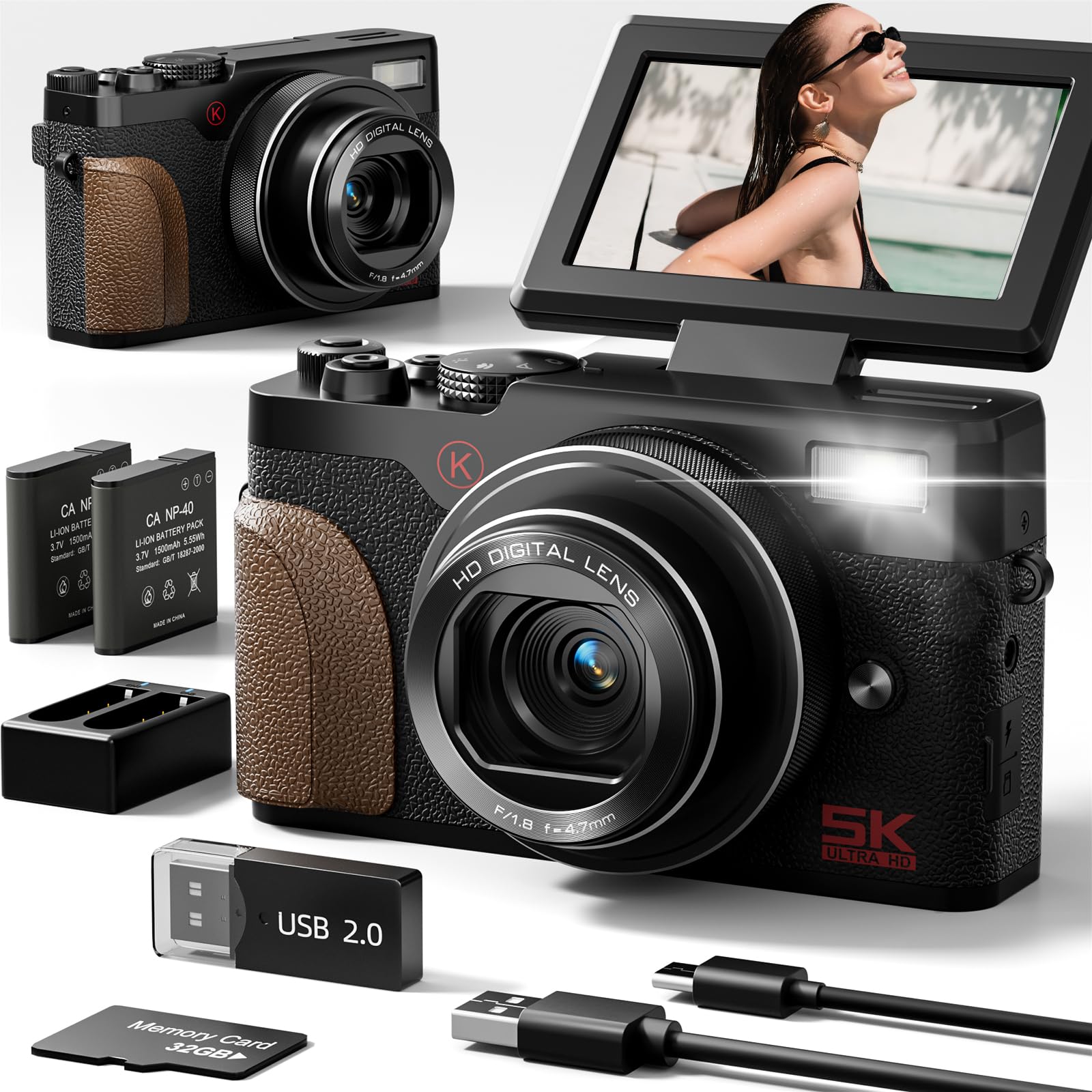
Image: The NBD 5K 64MP Digital Camera, a compact and versatile device for high-resolution photography and videography.

Slika: Prekoview of the NBD 5K 64MP UHD Digital Camera, highlighting its capabilities for capturing perfect moments.
2. Sadržaj paketa
Provjerite da li se sve stavke nalaze u vašem paketu:
- NBD 5K 64MP Digital Camera
- 2 x litijum-jonske baterije
- Punjač baterija
- 32GB TF kartica (unaprijed instalirana ili zasebna)
- USB kabel
- Remen za zapešće
- Poklopac objektiva
- Cloth Cloth
- Korisnički priručnik (ovaj dokument)

Image: A visual representation of the NBD 5K 64MP Digital Camera and its included accessories, such as batteries, charger, TF card, and USB cable.
3. Podešavanje
3.1. Punjenje baterije
- Insert a battery into the provided battery charger.
- Spojite punjač na izvor napajanja pomoću USB kabela.
- The indicator light on the charger will show the charging status. Charge until fully charged.
3.2. Inserting the Battery and TF Card
- Otvorite poklopac pretinca za bateriju na dnu kamere.
- Umetnite napunjenu bateriju prema oznakama polariteta.
- Insert the 32GB TF card into the designated slot until it clicks into place. Ensure the correct orientation.
- Čvrsto zatvorite poklopac odeljka za baterije.
3.3. Pričvršćivanje remena za zapešće
Thread the wrist strap through the strap lug on the side of the camera to prevent accidental drops.
Video: An unboxing and setup guide for the NBD K200 4K Camera, demonstrating battery and memory card installation.
4. Upravljanje kamerom
4.1. Uključivanje/isključivanje
Pritisnite i držite dugme za napajanje koje se nalazi na vrhu kamere da biste je uključili ili isključili.
4.2. Using the Flip Screen
The 3-inch LCD screen can be flipped 180 degrees, making it ideal for selfies and vlogging. Adjust the screen to your desired angle for optimal viewing.

Image: The NBD 5K camera capturing Ultra HD video, showcasing its 180-degree flip screen for versatile shooting angles.
4.3. Snimanje fotografija i videa
Use the physical mode dial to select between various shooting modes:
- Foto mod: Capture 64MP high-resolution images. The camera features autofocus for sharp details.
- Video način rada: Record stunning 5K videos.
- Usporeni snimak: Capture dramatic slow-motion video sequences.
- Time-Lapse: Condense long events into short, captivating videos.
- Kontinuirano snimanje: Snimite više fotografija u brzom slijedu.
- Samookidač: Set a delay before taking a photo, useful for group shots or self-portraits.
- Snimanje u petlji: Continuously record video, overwriting older footage kada je memorijska kartica puna.

Image: The NBD 64MP Digital Camera demonstrating fast and precise autofocus for professional-level photos.

Slika: Bivši/aample of the NBD camera's 18X digital zoom capability, capturing distant subjects with clarity.

Image: A visual guide to the NBD camera's multi-functional modes, including video, time-lapse, continuous shooting, filter mode, macro mode, slow motion, and intelligent scene recognition.
4.4. Korištenje blica
The camera features a built-in flash for illuminating subjects in low-light conditions. Press the flash button to activate or deactivate it, or set it to auto mode.

Image: The NBD camera's anti-shake feature, illustrating how it helps capture clear images even with movement.
4.5. Applying Filters
Enhance your photos and videos with the camera's built-in filters. Navigate through the menu to select from various artistic effects.
Video: A demonstration of the NBD K100 camera's multiple built-in filters for creative photography.
4.6. Wi-Fi Connectivity and Sharing
The camera supports Wi-Fi connectivity for easy transfer of photos and videos to your smartphone or other devices. This allows for quick sharing to social media platforms.
Video: Detaljan pregledview of the NBD 5K Digital Camera, highlighting its Wi-Fi and vlogging capabilities.
4.7. Webcam Mode
Connect the camera to your computer via USB to use it as a high-definition webkamera za prijenos uživo ili video pozive.

Image: The NBD camera functioning in webcam mode, connected to a laptop for online interactions.
5. Održavanje
5.1. Čišćenje kamere
Use the provided cleaning cloth to gently wipe the lens and screen. Avoid using harsh chemicals or abrasive materials that could damage the camera's surfaces.
5.2. Održavanje baterije
Store batteries in a cool, dry place when not in use. Avoid exposing them to extreme temperatures. Fully charge batteries before extended storage and periodically recharge them to maintain their lifespan.
5.3. Skladištenje
When not in use, store the camera in a dry, dust-free environment, preferably in its protective bag, to prevent scratches and damage.
6. Otkrivanje problema
- Kamera se ne uključuje: Provjerite je li baterija potpuno napunjena i pravilno umetnuta.
- Loš kvalitet slike: Check that the lens is clean and free from smudges. Ensure adequate lighting for your shot.
- Greška memorijske kartice: Reinsert the TF card or try a different compatible card. Ensure the card is not full.
- Problemi sa Wi-Fi vezom: Ensure the camera's Wi-Fi is enabled and your device is within range. Refer to the camera's on-screen instructions for connecting to Wi-Fi.
- Camera makes noise: Some operational sounds are normal. If the noise is excessive or unusual, consult the manufacturer's support.
7. Specifikacije
| Feature | Specifikacija |
|---|---|
| Tehnologija foto senzora | CMOS |
| Podržano File Format | MOV |
| Brand | NBD |
| Naziv modela | NBD |
| Maksimum Webcam Rezolucija slike | 64 MP |
| Veličina foto senzora | 1/2.3 inča |
| Form Factor | Compact |
| Efektivna rezolucija mirovanja | 64 MP |
| Posebna karakteristika | Compact |
| Boja | Crna |
| Da li su baterije uključene | Da |
| Proizvođač | NBD |
| File Format | MOV |
| Tehnologija povezivanja | USB |
| Veličina ekrana | 3 inča |
| Display Type | LCD |
| Tip senzora | CMOS |
| Rezolucija foto senzora | 64 MP |
| Video Rezolucija | 5K |
| Težina baterije | 28 grama |
| Tip baterije baterije | Lithium Ion |
| Broj baterija | Potrebna je 2 litijum-jonska baterija. (uključeno) |
8. Garancija i podrška
For warranty information and technical support, please refer to the documentation included with your purchase or visit the official NBD webSačuvajte dokaz o kupovini za eventualne reklamacije.


