1. Uvod
Thank you for choosing the CINMOORE Dummy Camera. This indoor security camera is designed to provide reliable surveillance and peace of mind for your home or office. Featuring advanced AI detection, two-way audio, and clear night vision, it offers comprehensive monitoring capabilities. This manual will guide you through the setup, operation, and maintenance of your device.

Slika: Front view of the CINMOORE Dummy Camera, a white, spherical camera with a dark lens and a blue indicator light, featuring the CINMOORE logo at its base.
2. Šta je uključeno
Molimo Vas da provjerite sadržaj paketa kako biste bili sigurni da su svi artikli prisutni:
- CINMOORE Security Camera × 1
- Mounting Bracket Base × 1
- Adapter za napajanje × 1
- Data Cable × 1
- Screw Anchors × 1
- Korisnički priručnik × 1
3. Podešavanje
The CINMOORE Dummy Camera offers flexible installation options for various indoor environments.
3.1 Opcije montaže
The camera can be installed using the following methods:
- Stropni nosač: Ideal for wide-angle coverage from above.
- Stolni nosač: Simple placement on any flat surface.
- Zidni nosač: Secure installation on a vertical surface.
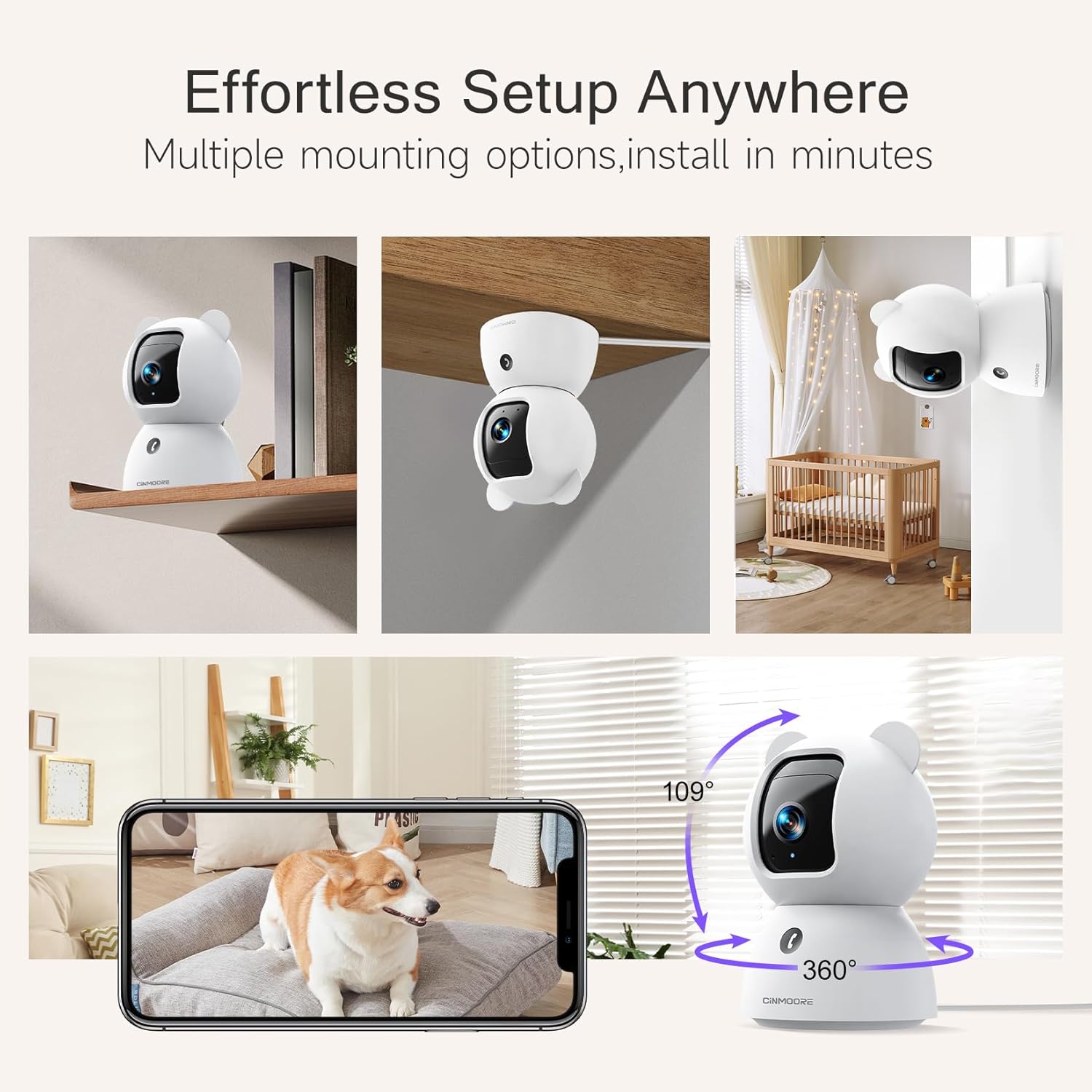
Image: A collage showing the CINMOORE Dummy Camera mounted in various positions: on a shelf, inverted on a ceiling, and on a wall, demonstrating its versatile installation options.
3.2 Početni koraci podešavanja
- Uključeno: Connect the camera to the power adapter using the provided data cable and plug it into a power outlet.
- Preuzmi aplikaciju: Download the official CINMOORE app from your smartphone's app store (iOS/Android).
- Registracija računa: Otvorite aplikaciju i registrujte se za novi račun ili se prijavite ako ga već imate.
- Dodaj uređaj: Slijedite upute u aplikaciji da biste dodali novu kameru. To obično uključuje skeniranje QR koda na kameri ili povezivanje s njenom privremenom Wi-Fi pristupnom tačkom.
- Wi-Fi veza: Connect the camera to your home Wi-Fi network (2.4GHz recommended).
- plasman: Position the camera in your desired location, ensuring it has a clear view područja koje želite nadgledati.
4. Uputstvo za upotrebu
4.1 Video Quality and Viewing
The camera captures video in 2.5K resolution, providing clear and detailed images. You can view the live feed and recorded footage through the CINMOORE app.

Image: A side-by-side comparison demonstrating the superior clarity of 2.5K resolution (left, showing a baby) versus 2K resolution (right, showing a puppy).
4.2 Pan & Tilt (PTZ) Functionality
The camera features PTZ (Pan, Tilt, Zoom) technology, allowing for 360-degree coverage. You can remotely control the camera's viewing angle through the app to monitor different areas of a room.

Image: The CINMOORE Dummy Camera surrounded by icons representing its features: Ultra HD 2.5K, Sound/Crying Alerts, Smart Night Vision, Encrypted Local Storage (up to 256GB), Secure Cloud Storage, Full Duplex Audio, Human/Pet Tracking, One-Touch Call, and Pan & Tilt, emphasizing its 360-degree protection.
4.3 Dvosmjerni audio
Utilize the full-duplex two-way audio feature to communicate with people or pets in the camera's vicinity. This allows for natural, real-time conversations.

Image: A scene depicting a person speaking through a smartphone to a dog via the CINMOORE Dummy Camera, illustrating the two-way audio feature with speech bubbles.
4.4 Noćni vid
The camera is equipped with clear IR night vision, providing 2.5K clarity even in low-light or complete darkness, with a range of up to 33 feet.

Slika: Osoba viewing a black-and-white night vision feed from the CINMOORE Dummy Camera on their smartphone, showing a baby and a dog in a crib, demonstrating clear IR night vision in a dark room.
4.5 AI Alerts and Detection
The camera supports various AI-powered detection features without monthly fees, including:
- Detekcija pokreta: Alerts you to general movement.
- Otkrivanje osobe: Specifically identifies human figures.
- Detekcija kućnih ljubimaca: Recognizes pet activity.
- Detekcija plača: Notifies you of baby crying sounds.

Image: Two children playing near the CINMOORE Dummy Camera, with icons below representing its AI detection capabilities: Person, Pet, Motion, and Crying, highlighting its no-monthly-fee AI alerts.
4.6 Opcije skladištenja
The camera offers flexible and secure storage solutions:
- Pohrana na SD kartici: Supports local storage via an SD card (not included), expandable up to 512GB. Ensure "SD Card Encryption" is enabled in the app for secure viewing.
- Cloud Storage: Offers AWS Cloud Storage with a 30-day free trial, providing bank-level encrypted storage for your recordings.

Image: A diagram showing the CINMOORE Dummy Camera with callouts for its storage features: SD card slot (expandable up to 512GB), Reset Button, and AWS Cloud Storage (30-day free trial), emphasizing encrypted and secure flexible storage.
5. Održavanje
To ensure optimal performance and longevity of your CINMOORE Dummy Camera, follow these maintenance guidelines:
- čišćenje: Pažljivo obrišite objektiv i kućište kamere mekom, suhom krpom. Izbjegavajte upotrebu jakih hemikalija ili abrazivnih materijala.
- plasman: Osigurajte da je kamera postavljena na stabilno mjesto, dalje od direktne sunčeve svjetlosti, ekstremnih temperatura i visoke vlažnosti.
- Ažuriranja firmvera: Regularly check for and install firmware updates through the CINMOORE app to ensure your camera has the latest features and security enhancements.
- Napajanje: Koristite samo originalni adapter za napajanje koji dolazi s kamerom.
6. Otkrivanje problema
If you encounter issues with your CINMOORE Dummy Camera, refer to the following common troubleshooting steps:
- Kamera van mreže: Check your Wi-Fi connection and ensure the camera is within range of your router. Restart the camera by unplugging and re-plugging the power adapter.
- Loš kvalitet videa: Ensure the lens is clean and free from dust. Check your internet speed; a stable connection is crucial for high-resolution streaming.
- Nema zvuka: Verify that the microphone and speaker settings are enabled in the app. Ensure there are no obstructions blocking the microphone or speaker on the camera.
- Detection Not Working: Check the detection sensitivity settings in the app. Ensure the camera's view je čisto i nije zaklonjeno.
- Nije moguće povezivanje s aplikacijom: Ensure you have the latest version of the CINMOORE app. Try resetting the camera (using the reset button, if available) and re-adding it to the app.
For further assistance, please contact CINMOORE customer support.
7. Specifikacije
| Naziv modela | Security Indoor Cam |
| Broj modela stavke | CM-C2LU |
| Brand | CINMOORE |
| Tehnologija povezivanja | Žični, Wi-Fi |
| Rezolucija video snimanja | 2.5K |
| Unutrašnja/vanjska upotreba | Indoor |
| Posebne karakteristike | 2 Way Audio, Cry Detection, HD Resolution, PTZ Technology |
| Noćni vid | 33 stopa |
| Vrsta montaže | Ceiling Mount / Tabletop Mount / Wall Mount |
| Materijal | akrilonitril butadien stiren (ABS) |
| Dimenzije artikla D x Š x V | 7.6 x 7.6 x 11.4 centimetara |
| Težina artikla | 340 g |
| Nivo vodootpornosti | Vodootporan |
| Preporučena upotreba | Baby Monitoring, Pet Monitoring, Indoor Home Security, Office Surveillance |
8. Garancija i podrška
garancija: The CINMOORE Dummy Camera comes with a 1-year warranty from the date of purchase. Please retain your proof of purchase for warranty claims.
Podrška: For technical support, troubleshooting assistance, or warranty inquiries, please visit the official CINMOORE website or contact their customer service team. Refer to the product packaging or the CINMOORE app for specific contact details.


