1. Uvod
This manual provides detailed instructions for the setup, operation, and maintenance of your LIGE EF12 Smart Watch. Please read this manual thoroughly before using the device to ensure proper function and to maximize your user experience. Keep this manual for future reference.
2. Sadržaj paketa
Provjerite da li su sve stavke prisutne u paketu:
- LIGE EF12 Smart Watch (1 unit)
- Kabl za punjenje (1 komad)
- Uputstvo za upotrebu (1 jedinica)
- Strap Adjuster (1 unit)
- Straps (3 units): 1 Steel strap, 2 Silicone straps
3. Proizvod je gotovview
The LIGE EF12 Smart Watch is designed for daily wear and fitness tracking, featuring a 1.75-inch HD display, Bluetooth 5.2 calling, and a 1000mAh battery. It includes health monitoring functions, multiple sports modes, and a built-in LED flashlight.

Slika 3.1: Front view of the LIGE EF12 Smart Watch, showcasing its round display, metal casing, and integrated flashlight. The screen displays time, date, steps, calories, heart rate, and weather information.
Ključne karakteristike:
- Prikaz: 1.75" HD Touchscreen (360x360 resolution)
- Povezivanje: Bluetooth 5.2 for calls and notifications
- baterija: 1000mAh, providing 10-15 days of typical use
- Monitoring zdravlja: Heart Rate, SpO2, Sleep Tracking, Breath Monitor
- Praćenje fitnesa: 120+ Sports Modes, Activity Tracker (steps, calories, distance)
- Posebne karakteristike: Built-in LED Flashlight (3 modes), Custom Watch Faces, Music Control, Camera Control, Weather Forecast, Alarm Clock, Sedentary Alerts, Hydration Reminders, Voice Control
- Otpornost na vodu: IP68
- Kompatibilnost: Android 5.1+ i iOS 9.0+
4. Podešavanje
4.1 Punjenje pametnog sata
Before first use, fully charge your smart watch. Connect the magnetic charging cable to the charging contacts on the back of the watch and plug the USB end into a standard USB power adapter (not included) or a computer USB port. A full charge typically takes approximately 2.5 hours.

Slika 4.1: Illustration highlighting the 1000mAh battery capacity of the LIGE EF12 Smart Watch, indicating longer battery life and faster charging compared to other models.
4.2 Instalacija i uparivanje aplikacije
- Preuzmite aplikaciju: Scan the QR code in the user manual or search for the companion app (e.g., "GloryFit" or similar, typically mentioned in the physical manual) in your smartphone's app store (Google Play Store for Android, Apple App Store for iOS).
- Install and Register: Instalirajte aplikaciju i slijedite upute na ekranu da biste kreirali račun ili se prijavili.
- Omogući Bluetooth: Provjerite je li Bluetooth omogućen na vašem pametnom telefonu.
- Uparite sat: Open the app, navigate to the device section, and search for your LIGE EF12 Smart Watch. Select the watch from the list to initiate pairing. Confirm the pairing request on both your phone and the watch if prompted.
Once paired, the watch will synchronize data with your phone, including time, date, and notifications.
4.3 Ugradnja i podešavanje remena
The LIGE EF12 Smart Watch comes with three interchangeable straps. To attach a strap, align the spring bar with the lug holes on the watch body and slide it into place. Use the provided strap adjuster for the steel strap to remove or add links for a comfortable fit.

Slika 4.2: The LIGE EF12 Smart Watch packaging, showing the watch, charging cable, user manual, strap adjuster, and the three included straps (steel and two silicone).
5. Uputstvo za upotrebu
5.1 Osnovna navigacija
- Touchscreen: Swipe left/right to navigate between main screens (e.g., activity data, heart rate, weather). Swipe up/down to access quick settings or notifications.
- Bočna dugmad: The watch typically has two side buttons. One usually serves as a power/home button, while the other may be a shortcut to sports modes or other functions. Refer to the specific button functions in the app or physical manual.
- Ekran za buđenje: Raise your wrist or press a side button to wake the screen.
5.2 Bluetooth pozivi i obavještenja
Once paired via Bluetooth, you can manage calls and receive notifications directly on your watch.
- Upućivanje/odgovaranje na pozive: Tap the phone icon on the watch screen to access the dial pad or recent calls. When an incoming call arrives, you can answer or reject it from the watch.
- Obavještenja: Ensure app notifications are enabled in your phone's settings and the companion app. Swipe down on the watch face to view recent notifications from apps like WhatsApp, Twitter, Facebook, and InstagRAM.
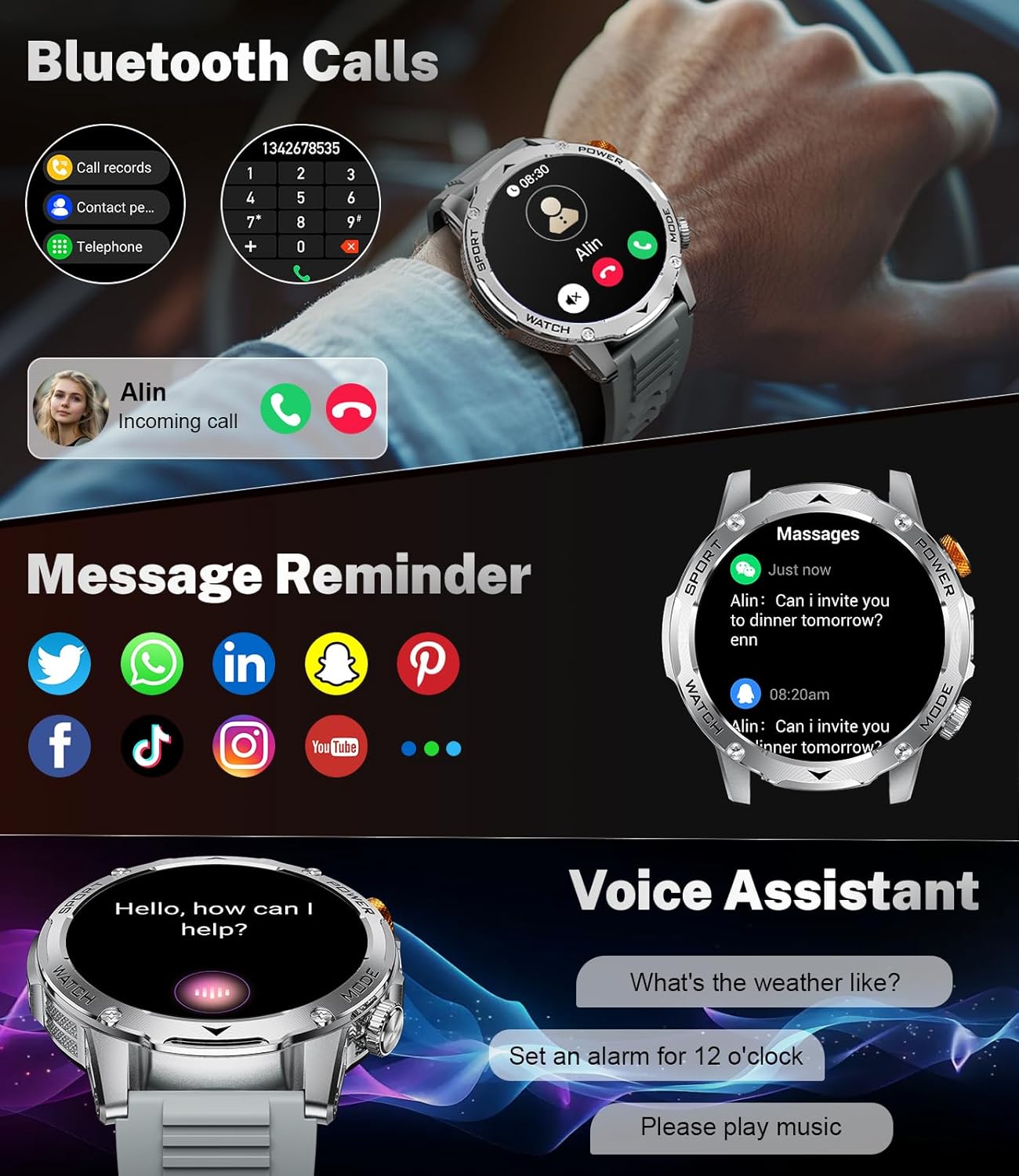
Slika 5.1: The LIGE EF12 Smart Watch displaying an incoming call and various app icons for message reminders, including WhatsApp, Twitter, Facebook, and InstagRAM.
5.3 Built-in LED Flashlight
The watch features an integrated LED flashlight with three modes:
- jako svjetlo: Provides continuous illumination.
- Treperi: Emits a blinking light.
- SOS: Transmits an SOS signal.
To activate, typically a long press on a designated side button or a specific gesture on the screen will toggle the flashlight modes. Refer to your physical manual for the exact activation method.

Slika 5.2: The LIGE EF12 Smart Watch screen, emphasizing its 1.75-inch HD display and illustrating the three flashlight modes: Constant-On, Warning (Flashing), and SOS, shown in different outdoor scenarios.
5.4 Prilagođavanje izgleda sata
The watch supports over 150 watch faces and allows for custom photo uploads. Access watch face settings through the companion app or by long-pressing the watch face on the device itself. You can switch styles to match your preference.
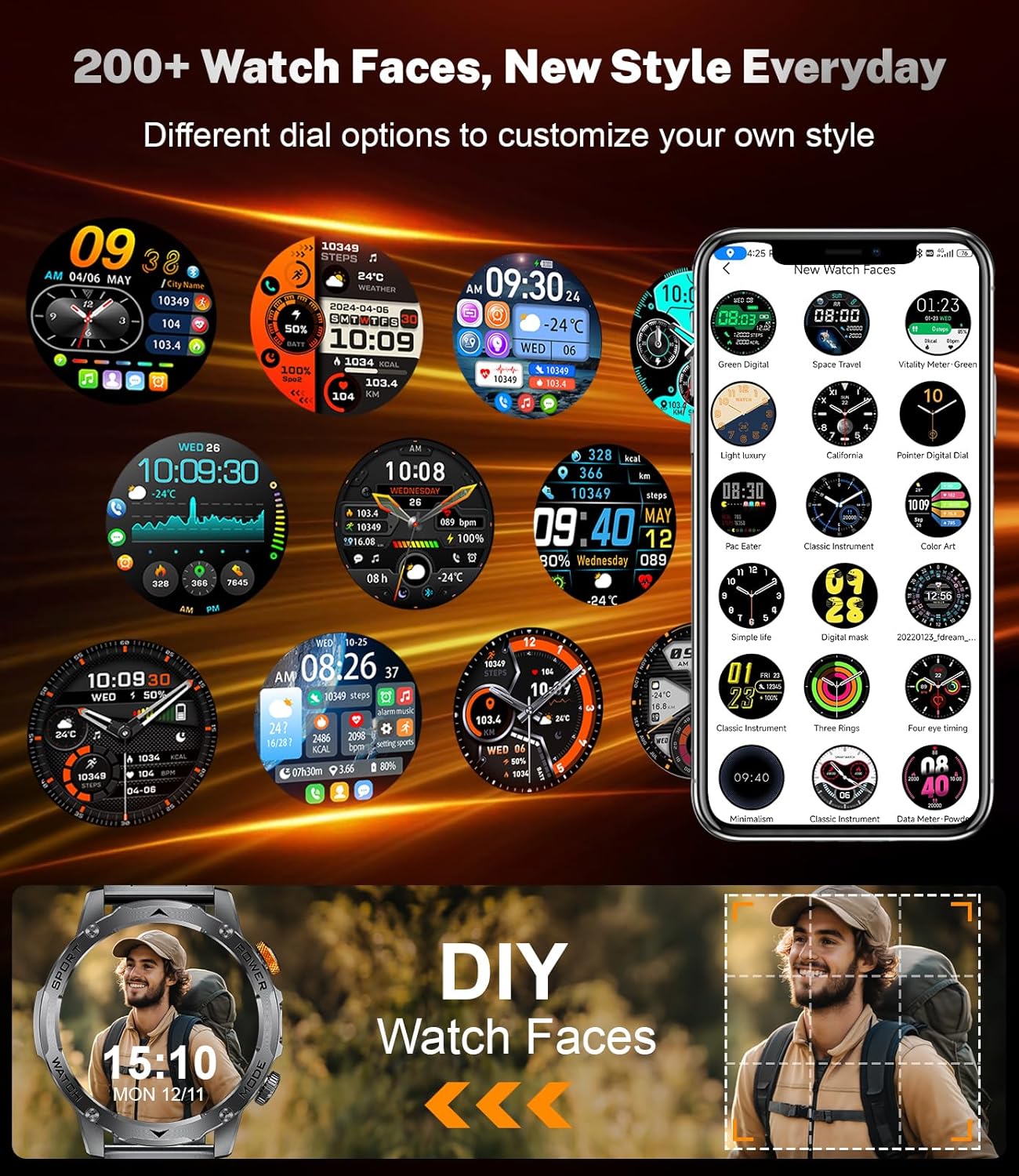
Slika 5.3: A collage of different watch faces available for the LIGE EF12 Smart Watch, along with an illustration of how users can create their own custom watch faces using personal photos.
5.5 Health and Wellness Tracking
The LIGE EF12 Smart Watch continuously monitors several health metrics:
- Otkucaji srca: Praćenje otkucaja srca u realnom vremenu. View historical data in the app.
- SpO2 (kiseonik u krvi): Mjeri nivo kisika u krvi.
- Monitor spavanja: Prati santages (duboki, lagani, REM) i pruža uvid u kvalitet sna.
- Breath Monitor: Guides breathing exercises to help reduce stress.
For accurate readings, ensure the watch is worn snugly on your wrist, about one finger's width above the wrist bone.
5.6 Sportski načini rada i praćenje aktivnosti
The watch supports over 120 sports modes to track your workouts. It records calories burned, steps taken, and distance covered.
- Pristup sportskim načinima rada: Navigate to the sports mode section on the watch or via a dedicated button. Select your desired activity to start tracking.
- Podaci o aktivnostima: View real-time data during your workout and detailed summaries in the companion app after completion.

Slika 5.4: An image showing the LIGE EF12 Smart Watch interface for sports modes, displaying metrics like calories, steps, and distance, along with icons representing various activities such as running, cycling, and hiking.
5.7 Other Smart Tools
- Kontrola muzike: Kontrolirajte reprodukciju muzike na svom pametnom telefonu (reprodukcija, pauza, preskakanje pjesama).
- Kontrola kamere: Koristite sat kao daljinski okidač za kameru vašeg telefona.
- Vremenska prognoza: View current weather and forecasts (requires app synchronization).
- Alarm: Podesite alarme putem aplikacije ili direktno na satu.
- Upozorenja o sjedenju: Primajte podsjetnike za kretanje nakon perioda neaktivnosti.
- Podsjetnici za hidrataciju: Set reminders to drink water.
- Glasovni asistent: Interact with your phone's voice assistant (e.g., "What's the weather like?").

Slika 5.5: The LIGE EF12 Smart Watch displaying various multi-functional features including music control, flashlight, camera control, weather, alarm clock, and drink reminders.
6. Održavanje
6.1 Čišćenje
Regularly clean your smart watch and straps to prevent skin irritation and maintain functionality.
- Wipe the watch screen and body with a soft, lint-free cloth. If necessary, slightly dampi krpu vodom.
- For silicone straps, wash with mild soap and water, then rinse thoroughly and dry.
- For steel straps, use a soft brush to clean crevices and wipe with a dry cloth. Avoid harsh chemicals.
6.2 Otpornost na vodu (IP68)
The LIGE EF12 Smart Watch is IP68 rated, meaning it is resistant to dust and can withstand immersion in water up to 1.5 meters for up to 30 minutes. It is suitable for daily use, such as hand washing, rain, and shallow swimming. However, it is not recommended for hot showers, saunas, or diving, as steam and high water pressure can compromise the seals.
6.3 Njega baterija
- Izbjegavajte često potpuno pražnjenje baterije.
- Charge the watch using the provided cable and a compatible power adapter.
- Čuvajte sat na hladnom i suhom mjestu kada ga ne koristite duži period.
7. Otkrivanje problema
| Problem | Moguće rješenje |
|---|---|
| Sat se ne uključuje. | Provjerite je li sat potpuno napunjen. Povežite ga na punjač najmanje 30 minuta. |
| Nije moguće uparivanje sa pametnim telefonom. |
|
| Obavještenja se ne primaju. |
|
| Netačni zdravstveni podaci. |
|
| Baterija se brzo prazni. |
|
8. Specifikacije
| Feature | Detalj |
|---|---|
| Broj modela | EF12-G |
| Dimenzije proizvoda | 2.36 x 0.79 x 1.18 inča |
| Težina artikla | 10.8 unce |
| Veličina ekrana | 1.75 inča |
| Rezolucija | 360x360 |
| Kapacitet baterije | 1000 Milliamp Sati (litijum-polimer) |
| Povezivanje | Bluetooth 5.2 |
| Kompatibilnost operativnog sistema | Android 5.1+, iOS 9.0+ |
| Ocjena vodootpornosti | IP68 |
| Kapacitet memorije | 128 MB |
| Posebne karakteristike | LED Light, Activity Tracker, Breath Monitor, Distance Tracker, Heart Rate Monitor, Calorie Counter, Multisport Tracker, Music Player, Sleep Monitor, Phone Call, Touchscreen, Voice Control, Alarm Clock, Weather Forecast, Stress Monitor, Stopwatch, Timer, Calculator, Phone Finder |
9. Garancija i podrška
For warranty information and customer support, please refer to the documentation included with your purchase or contact the manufacturer directly. Our dedicated support team aims to reply to inquiries within 24 hours.
For further assistance, visit the official LIGE webstranice ili kontaktirajte njihovu korisničku službu.


