Uvod
This manual provides detailed instructions for the DIERYA DK81E 75% Mechanical Gaming Keyboard. Please read this manual thoroughly before using the product to ensure proper setup and operation. Retain this manual for future reference.
The DIERYA DK81E is a compact 75% layout mechanical keyboard designed for gaming and productivity. It features hot-swappable switches, a gasket-mount design with multi-layer sound dampening, customizable RGB backlighting, a dedicated volume knob, and a powerful web-based driver for advanced customization.
Sadržaj paketa
- DIERYA DK81E Mechanical Keyboard x 1
- USB-C na USB-A kabl x 1
- Izvlakač za ključeve x 1
- Skidač prekidača x 1
- Korisnički priručnik x 1

Setup
- Raspakujte tastaturu: Carefully remove the DIERYA DK81E keyboard and all accessories from the packaging.
- Povežite USB kabl: Insert the USB-C end of the provided cable into the port on the back of the keyboard. Connect the USB-A end to an available USB port on your computer or gaming console.
- Prepoznavanje sistema: Your operating system (Windows, macOS, Linux) should automatically detect and install the necessary drivers. No additional software installation is required for basic functionality.
- Podesite nožice tastature: Tastatura ima dvatage adjustable feet. Flip them out to achieve your preferred typing angle. The anti-slip rubber pads on the bottom ensure stability.


Uputstvo za upotrebu
Osnovne funkcije tastature
The DIERYA DK81E operates as a standard 75% layout keyboard. All keys function as labeled. For keys that are typically present on a full-size keyboard but not on a 75% layout (e.g., F-keys, Page Up/Down, Home, End, Delete), they are accessible via the Function (Fn) key combinations. Refer to the keycap legends for specific Fn key functions.
Multimedia Volume Knob
The dedicated metal knob located on the top right of the keyboard provides convenient control over audio and media playback.
- Rotirajte u smjeru kazaljke na satu: Povećajte jačinu zvuka.
- Okrenite suprotno od smjera kazaljke na satu: Smanjite jačinu zvuka.
- Pritisni: Pusti/pauziraj medije.

RGB kontrola pozadinskog osvjetljenja
The keyboard features vibrant RGB backlighting with 16.8 million colors and over 15 preset lighting effects. Specific key combinations (often involving the Fn key) are used to cycle through effects, adjust brightness, and change colors. Consult the included quick start guide or the web driver for detailed instructions on RGB customization.

Web-Based Driver for Customization
The DIERYA DK81E utilizes a browser-based driver for advanced customization, eliminating the need for software installation and ensuring zero memory footprint. This driver allows for:
- Remapiranje tipki
- Makro snimanje
- Quick shortcuts
- In-depth RGB personalization
Za pristup web driver, open a web browser and navigate to the address provided in the quick start guide or on the manufacturer's website. The driver is compatible with Windows, macOS, and Linux operating systems.

Ključne karakteristike
- Prekidači koji se mogu brzo mijenjati: The DK81E features universal hot-swappable sockets compatible with 3-pin and 5-pin mechanical switches. This allows users to easily change switches without soldering, enabling personalized typing feel and sound.
- Gasket-Mount Design with 6-Layer DampPjena za čišćenje: The advanced gasket-mount structure, combined with six layers of sound-absorbing foam, provides a flexible typing experience and a deeper, more satisfying acoustic profile.
- Prethodno podmazani linearni prekidači: The keyboard comes equipped with factory pre-lubricated linear switches, ensuring a smooth and consistent keystroke experience right out of the box. These switches are rated for 50 million keystrokes.
- Dvostruko pritiskanje tipki: The keycaps are manufactured using a double-shot injection molding process, which ensures legends will not fade or wear off over time, maintaining a pristine look and feel.
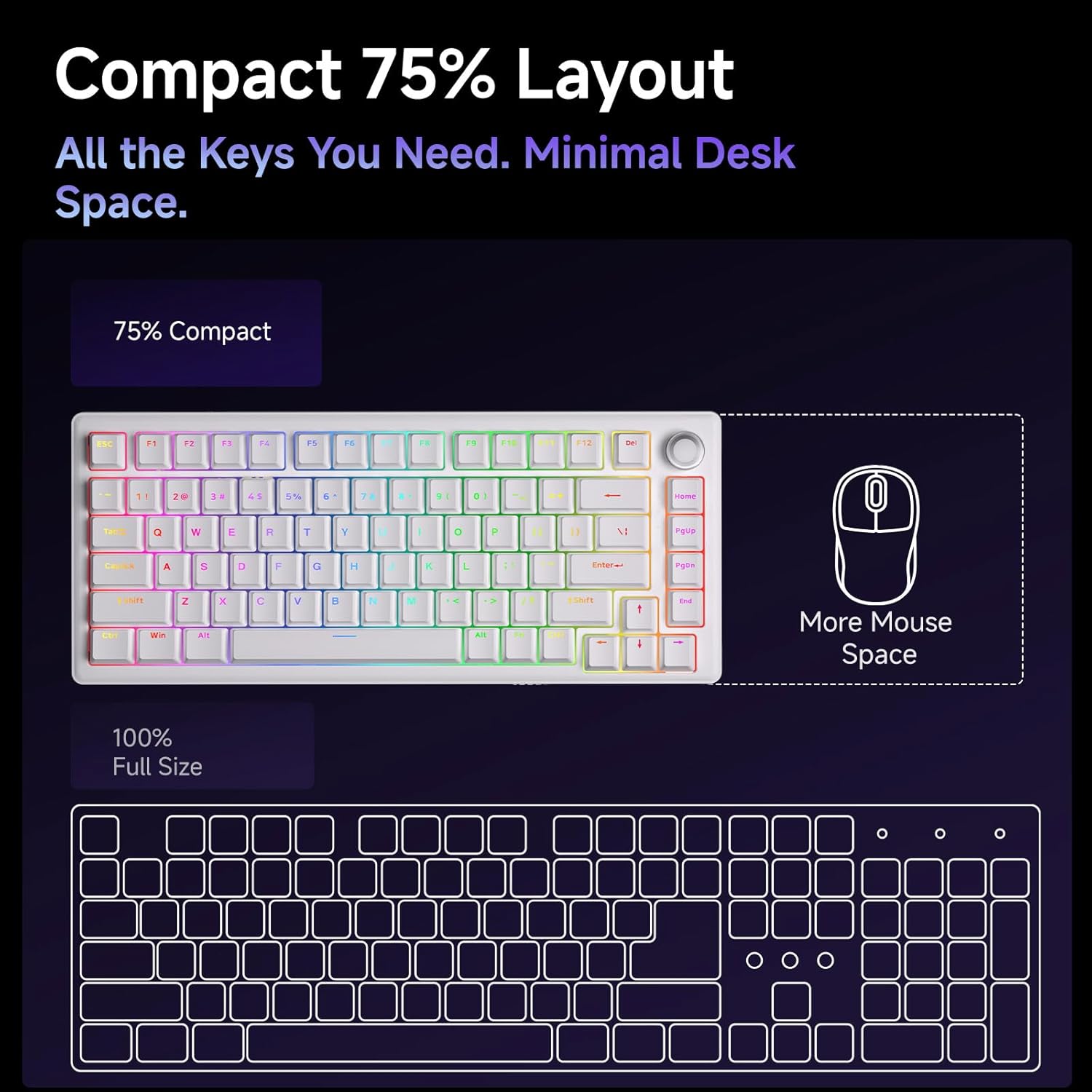
- Kompaktni 75% raspored: The 75% layout provides all essential keys while minimizing desk space, offering more room for mouse movement.



Održavanje
Čišćenje tastature
Redovno čišćenje pomaže u održavanju performansi i izgleda tastature.
- Uklanjanje prašine: Koristite limenku komprimiranog zraka da otpuhate prašinu i ostatke između tipki.
- Čišćenje tipki: Gently remove keycaps using the provided keycap puller. Clean them with a soft cloth dampened with a mild cleaning solution (e.g., isopropyl alcohol diluted with water). Ensure keycaps are completely dry before reattaching.
- Čišćenje površine: Wipe the keyboard's surface with a soft, lint-free cloth. Avoid harsh chemicals or abrasive materials.
Zamjena prekidača i tipki
The hot-swappable design allows for easy replacement of switches and keycaps.
- Uklanjanje kapica sa tastature: Use the keycap puller to carefully grip and lift keycaps straight up.
- Uklanjanje prekidača: Use the switch puller to gently clamp the top and bottom clips of the switch, then pull the switch straight up from the PCB.
- Instaliranje prekidača: Align the pins of the new switch with the holes on the PCB. Press down firmly until the switch clicks into place. Ensure pins are not bent.
- Instaliranje tipki: Align the keycap stem with the switch stem and press down gently until it is securely seated.
Rješavanje problema
- Tastatura ne reaguje:
- Provjerite je li USB-C kabel sigurno povezan i s tastaturom i s računarom.
- Pokušajte povezati tastaturu s drugim USB priključkom na računaru.
- Testirajte tastaturu na drugom računaru kako biste isključili probleme specifične za sistem.
- RGB svjetla ne rade/neispravno su:
- Check the RGB control key combinations (refer to the quick start guide) to ensure brightness is not set to zero or an incorrect mode is selected.
- Pristupite web driver to verify RGB settings and apply changes.
- Ključevi se ne registruju:
- If a specific key is not working, carefully remove its keycap and switch. Inspect the switch pins for any bends or damage. Straighten bent pins or replace the switch if damaged.
- Provjerite da li je prekidač potpuno smješten u PCB ploču.
- Dugme za jačinu zvuka ne funkcioniše:
- Verify that the keyboard is properly connected and recognized by the system.
- Test media playback in different applications.
Specifikacije
| Feature | Detalj |
|---|---|
| Naziv modela | DK81E |
| Brand | DIERYA |
| Layout | 75% |
| Tip prekidača | Mechanical (Pre-lubed Creamy Linear Switch) |
| Mogućnost zamjene vrućim putem | Da (kompatibilno sa 3/5 pinova) |
| Montažni stil | Zaptivka-Nosač |
| Dampening | 6-Layer Sound-Absorbing Foam |
| Pozadinsko osvetljenje | RGB (16.8 Million Colors, 15+ Effects) |
| Kapice | Double-Shot Injection Molded |
| Povezivanje | Wired USB-C (Detachable Cable) |
| Polling Rate | 1000Hz |
| Posebne karakteristike | Volume Knob, Programmable Web Vozač |
| Kompatibilni uređaji | Igraća konzola, računar |
| Operativni sistemi | Windows, macOS, Linux |
| Težina artikla | 1.96 funte |
| Dimenzije paketa | 15.31 x 5.79 x 1.85 inča |
Garancija i podrška
Specific warranty information for the DIERYA DK81E keyboard is not provided in this manual. For detailed warranty terms, technical support, or further assistance, please visit the official DIERYA webweb-mjesto ili direktno kontaktirajte njihovu korisničku službu.
Official DIERYA Webstranica: DIERYA trgovina na Amazonu