1. Uvod
Welcome to the DOOGEE Note 56 user manual. This guide provides essential information to help you set up, operate, and maintain your new smartphone. The DOOGEE Note 56 is an unlocked Android 16 smartphone featuring a powerful Octa-Core processor, a large 6150mAh battery, and a vibrant 6.56-inch 90Hz HD+ display. It is designed for efficient daily use, photography, and connectivity.
2. Šta se nalazi u kutiji
Your DOOGEE Note 56 package includes the following items:
- 1 x DOOGEE Note 56 Mobilni telefon
- 1 x kutija za pakovanje
- 1 x Uputstvo za upotrebu
- 1 x Zaštitna folija (unaprijed nanesena)
- 1 x PIN SIM kartice
- 1 x kabel za Type-C port
- 1 x punjač
- 1 x Garantni list
- 1 x TPU zaštitna futrola
3. Device Overview
Familiarize yourself with the physical components and design of your DOOGEE Note 56.
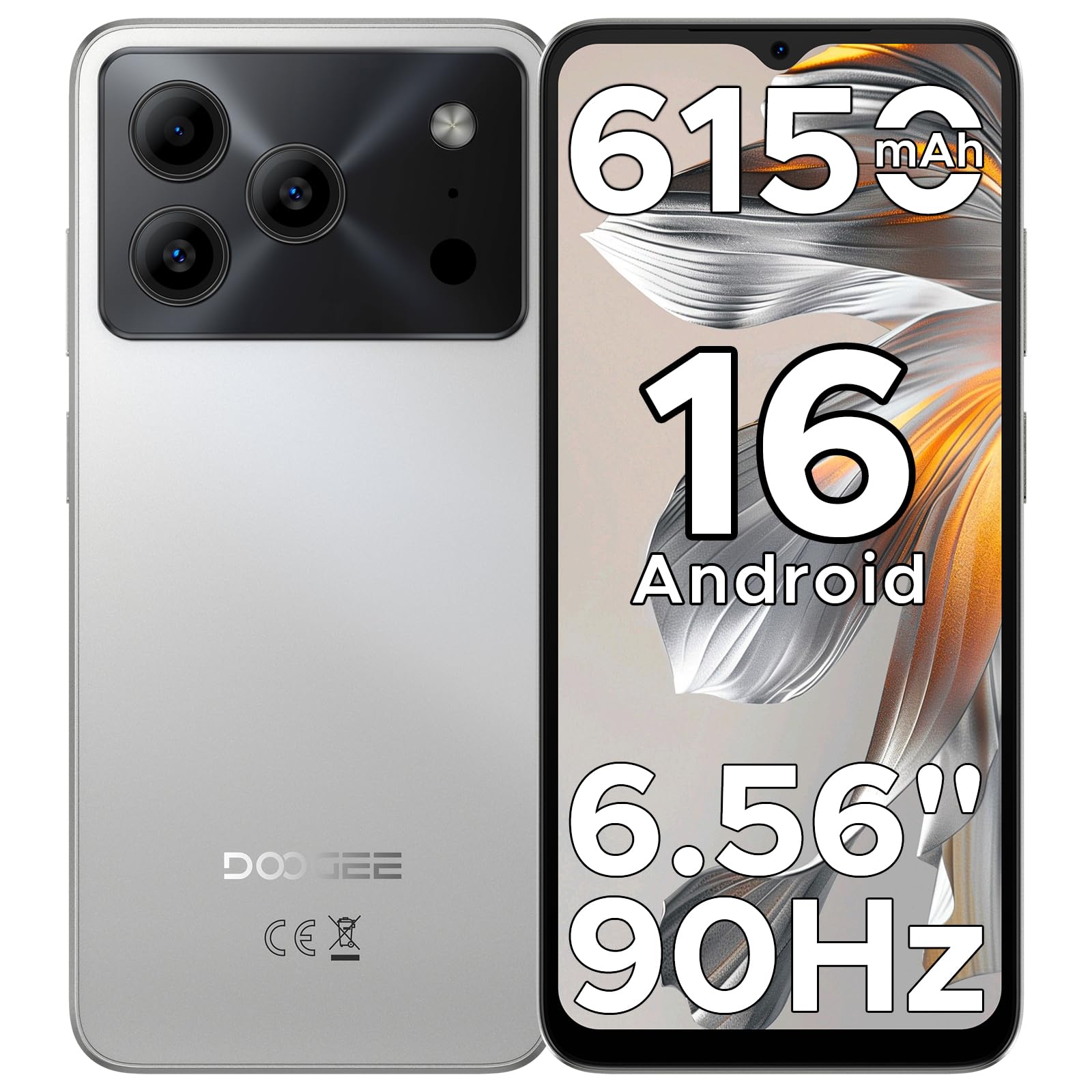
Image: The DOOGEE Note 56 smartphone, showcasing its slim design and key features such as the 8.45mm ultra-slim body, 6150mAh Silicon-Carbon Battery, Up-To-Date Android 16, 6.56" 90Hz Display, AI Scene Recognition, Instant Face Unlock, and 3.5mm Headphone Jack.

Slika: Krupni plan view of the DOOGEE Note 56 highlighting its ultra-slim 8.45mm profile and lightweight 195g design, emphasizing its pocket-friendly and refined appearance.
Fizička dugmad i portovi:
- Dugme za napajanje: Nalazi se sa strane, koristi se za uključivanje/isključivanje uređaja ili buđenje/spavanje ekrana.
- Dugmad za jačinu zvuka: Nalazi se sa strane, koristi se za podešavanje jačine zvuka medija i poziva.
- USB Type-C port: Nalazi se na dnu, koristi se za punjenje i prijenos podataka.
- 3.5 mm priključak za slušalice: Located at the top, for connecting wired headphones.
- Utor za SIM/TF karticu: Located on the side, for inserting SIM cards and a TF (microSD) card.
4. Podešavanje
4.1. Umetanje SIM i TF kartica
- Pronađite utor za SIM/TF karticu sa strane telefona.
- Insert the provided SIM eject tool into the small hole next to the slot to open the tray.
- Place your Nano-SIM card(s) and/or TF card into the tray according to the diagram on the tray.
- Pažljivo gurnite ladicu nazad u utor dok se ne poravna s tijelom telefona.
4.2. Početno uključivanje i podešavanje
- Pritisnite i držite dugme za napajanje dok se ne pojavi DOOGEE logo.
- Slijedite upute na ekranu da biste odabrali jezik, povezali se na Wi-Fi i postavili svoj Google račun.
- Configure security settings, including Face Unlock, for quick and secure access.
5. Uputstvo za upotrebu
5.1. Operativni sistem Android 16
Your DOOGEE Note 56 runs on the latest Android 16 OS, offering an intuitive and secure user experience. Navigate through apps, customize your home screen, and access various features with ease.

Image: A visual representation of the Android 16 operating system interface on the DOOGEE Note 56, showing various app icons and system settings.
5.2. Otključavanje licem
For convenient and secure unlocking, your device supports Face Unlock. To set it up:
- Idi na Postavke > Sigurnost > Otključavanje licem.
- Pratite uputstva na ekranu da registrujete svoje lice.
- Ensure good lighting conditions during registration for optimal performance.

Image: A user demonstrating the Instant Face Unlock feature on the DOOGEE Note 56, highlighting its quick and secure access capabilities.
5.3. Gemini AI Integration
The DOOGEE Note 56 integrates Gemini AI features, enhancing your device's intelligence and responsiveness. This includes smart body sensing, dual system mode, super clipboard, memory expansion, screen optimization, and customizable screen colors.
Video: This video demonstrates how to utilize and upgrade Gemini AI features on a DOOGEE smartphone, showcasing its capabilities within the Android 16 operating system.
6. Karakteristike kamere
Capture memorable moments with the DOOGEE Note 56's advanced camera system.
6.1. Rear Camera (8MP)
The 8MP main camera delivers clear, natural photos. Features include:
- HDR: Poboljšava dinamički raspon za uravnoteženu ekspoziciju u zahtjevnim uvjetima osvjetljenja.
- Pro način rada: Offers manual control over camera settings.
- Noćni način rada: Poboljšava kvalitet fotografija u uslovima slabog osvetljenja.
- Prepoznavanje scene umjetnom inteligencijom: Automatically detects 12 scenes and optimizes settings for stunning shots.
- Portretni način: Stvara efekat dubine polja za portrete profesionalnog izgleda.
- Snimanje osmijeha: Automatski snima fotografiju kada se detektuje osmijeh.
- Panoramas: Capture wide-angle scenic views.
- Burst Shots: Snimite više fotografija u brzom slijedu.
- Fun Filters: Primijenite kreativne filtere na svoje fotografije.

Image: An illustration of the DOOGEE Note 56's camera capabilities, including AI Scene Recognition icons and various sample photos taken with the 8MP main camera and 5MP front camera.
6.2. Front Camera (5MP)
The 5MP front camera is perfect for selfies and video calls, featuring Beauty Mode and Portrait Effect for bright and natural results.
7. Povezivanje
Stay connected with a range of network and wireless options.
- 4G Dvije SIM kartice: Podržava dvije SIM kartice za fleksibilno korištenje mreže.
- Wi-Fi: Povežite se na bežične mreže za pristup internetu.
- Bluetooth 4.2: Za povezivanje s bežičnom dodatnom opremom.
- GPS: Za usluge navigacije i lokacije.
- FM radio: Uživajte u svojim omiljenim radio stanicama.
7.1. Supported Network Bands:
- GSM: B2/3/5/8
- WCDMA: B1/2/4/5/8
- TDD: B38 / 40/41
- FDD: B1/2/3/4/5/7/8/18/19/20/25/26/28A/28B/66
- Podrška: EDGE/GPRS
8. Upravljanje baterijom
The DOOGEE Note 56 is equipped with a large 6150mAh Silicon-Carbon battery for extended usage.

Slika: Interni view of the DOOGEE Note 56 highlighting its 6150mAh Silicon-Carbon Battery, emphasizing its longer lifespan, unmatched durability, 1000 charge cycles, 4 years durable battery, 20% smaller size, and 5W reverse charging capability.
Video: This video highlights the 6150mAh Silicon-Carbon Battery of the DOOGEE Note 56, showcasing its capacity and efficiency.
8.1. OTG obrnuto punjenje
The device supports OTG (On-The-Go) reverse charging, allowing you to use your Note 56 to charge other compatible devices.
8.2. Tips for Extending Battery Life:
- Podesite svjetlinu ekrana na niži nivo.
- Isključite Wi-Fi, Bluetooth i GPS kada ih ne koristite.
- Zatvorite aplikacije u pozadini.
- Omogućite način rada za uštedu baterije u postavkama.

Image: This image illustrates various usage scenarios for the DOOGEE Note 56, demonstrating its extended battery life for web browsing (7 hours), music playing (49.5 hours), video watching (14 hours), and calling (28 hours).
9. Pohrana i performanse
The DOOGEE Note 56 is powered by a UNISOC SC9863A Octa-Core processor, ensuring smooth performance for applications and daily tasks.
- RAM: 24GB (virtual RAM expansion, 8GB physical RAM).
- Interna pohrana: 64GB.
- Proširiva pohrana: Supports up to 2TB via TF (microSD) card (TF card needs to be purchased separately).

Image: A visual representation of the DOOGEE Note 56's internal memory and storage, showing 64GB ROM and 24GB RAM (3GB+21GB virtual expansion), emphasizing smooth multitasking and ample space.
10. Displej
Experience immersive visuals on the 6.56-inch HD+ 90Hz IPS waterdrop screen.
- Veličina: 6.56 inča
- rezolucija: 720 x 1612 piksela
- Brzina osvježavanja: 90Hz
- Omjer širine i visine: 20:9
- PPI: 269

Slika: Izložba ekrana DOOGEE Note 56asing its 6.56-inch HD+ screen with a 90Hz refresh rate, designed for smooth viewing and social media interaction.
11. Održavanje i njega
To ensure the longevity and optimal performance of your DOOGEE Note 56, follow these care guidelines:
- Izbjegavajte izlaganje telefona ekstremnim temperaturama, direktnoj sunčevoj svjetlosti ili prekomjernoj vlazi.
- Koristite samo odobrene punjače i kablove.
- Očistite ekran i kućište mekom krpom koja ne ostavlja dlačice.
- Utilize the provided TPU protective case and pre-applied protective film to guard against scratches and minor impacts.
12. Otkrivanje problema
If you encounter issues with your DOOGEE Note 56, try the following basic troubleshooting steps:
- Uređaj se ne uključuje: Provjerite je li baterija napunjena. Spojite punjač i pričekajte nekoliko minuta prije nego što ponovo pokušate uključiti uređaj.
- Ekran ne reaguje: Restart the device by pressing and holding the Power button for about 10-15 seconds.
- Problemi s mrežom: Check if your SIM card is properly inserted. Verify network settings and ensure you have an active plan with your carrier.
- Padovi aplikacije: Obrišite keš memoriju problematične aplikacije ili je ponovo instalirajte. Provjerite je li softver vašeg uređaja ažuriran.
For more complex issues, refer to the official DOOGEE support websajtu ili kontaktirajte korisničku podršku.
13. Specifikacije
| Feature | Detalj |
|---|---|
| Naziv modela | NAPOMENA56 |
| Operativni sistem | Android 16 |
| Procesor | UNISOC SC9863A Octa-Core (1.6 GHz CPU Speed) |
| RAM | 24 GB (8 GB fizičke + 16 GB virtuelne) |
| Interna pohrana | 64 GB |
| Proširiva pohrana | Do 2 TB putem TF kartice |
| Veličina ekrana | 6.56 inča |
| Rezolucija ekrana | 720 x 1612 (HD+) |
| Refresh Rate | 90 Hz |
| Zadnja kamera | 8 MP |
| Prednja kamera | 5 MP |
| Kapacitet baterije | 6150 Milliamp Sati (Li-Po) |
| Povezivanje | 4G Dual SIM, Wi-Fi, Bluetooth 4.2, GPS, FM Radio, USB Type-C |
| Audio Jack | 3.5 mm |
| Dimenzije | 6.45 x 2.98 x 0.33 inča |
| Težina artikla | 6.9 unci (195 grama) |
| Posebne karakteristike | Dvije SIM kartice, proširiva memorija, podržava USB OTG, otključavanje licem |
14. Garancija i podrška
Your DOOGEE Note 56 comes with a warranty. Please refer to the included Warranty Card in your product package for detailed information on warranty terms, conditions, and duration.
For technical support, service, or further inquiries, please visit the official DOOGEE website or contact their customer service channels. Keep your purchase receipt and warranty card handy for any claims.


