1. Uvod
This manual provides detailed instructions for the operation and maintenance of your NBD 5K Digital Camera. Please read this manual thoroughly before using the camera to ensure proper function and to maximize your photography and videography experience. This camera is designed for capturing high-resolution photos and videos, featuring a 48MP sensor, 5K video recording, 16X digital zoom, and a 180° flip screen.
2. Sadržaj paketa
Provjerite da li se u vašem paketu nalaze sve dolje navedene stavke:
- NBD S100F 5K Digital Camera
- 52mm Wide Angle Lens
- Makro sočivo
- Mikrofon
- Memorijska kartica od 64 GB
- USB kabel
- Punjive baterije (x2)
- Punjač baterija
- Čitač kartica
- Camera Neck Rope (Strap)
- Black Leather Bag
- Krpa za čišćenje leće

Image 2.1: All components included with the NBD 5K Digital Camera.
3. Početno podešavanje
3.1. Umetanje baterije
- Pronađite poklopac pretinca za bateriju na dnu kamere.
- Pomaknite zasun poklopca da biste otvorili pretinac.
- Insert the battery according to the polarity indicators (+/-) inside the compartment.
- Zatvorite poklopac odjeljka za baterije dok ne klikne sigurno.
3.2. Umetanje SD kartice
- Otvorite poklopac utora za SD karticu, koji se obično nalazi sa strane kamere.
- Insert the 64GB SD card with the metal contacts facing the front of the camera until it clicks into place.
- Zatvorite poklopac otvora za SD karticu.
3.3. Pričvršćivanje objektiva
- Align the lens mount with the camera's lens attachment point.
- Gently twist the lens clockwise until it locks into position.
- To attach the macro or wide-angle lens, screw it onto the primary lens.
3.4. Početno uključivanje
Press and hold the power button until the screen illuminates. Follow any on-screen prompts for initial settings such as date and time.
4. Upravljanje kamerom
4.1. Uključivanje/isključivanje
Press the power button to turn the camera on. Press and hold the power button again to turn it off.
4.2. Točkić načina rada
Okrenite birač načina rada da biste odabrali različite načine snimanja:
- Automatski režim: For general photography with automatic settings.
- Scenski način rada: Pre-set modes for specific scenarios (e.g., Portrait, Landscape).
- Način rada efekta: Primijenite kreativne filtere na svoje fotografije.
- Režim prekida: For time-lapse photography.
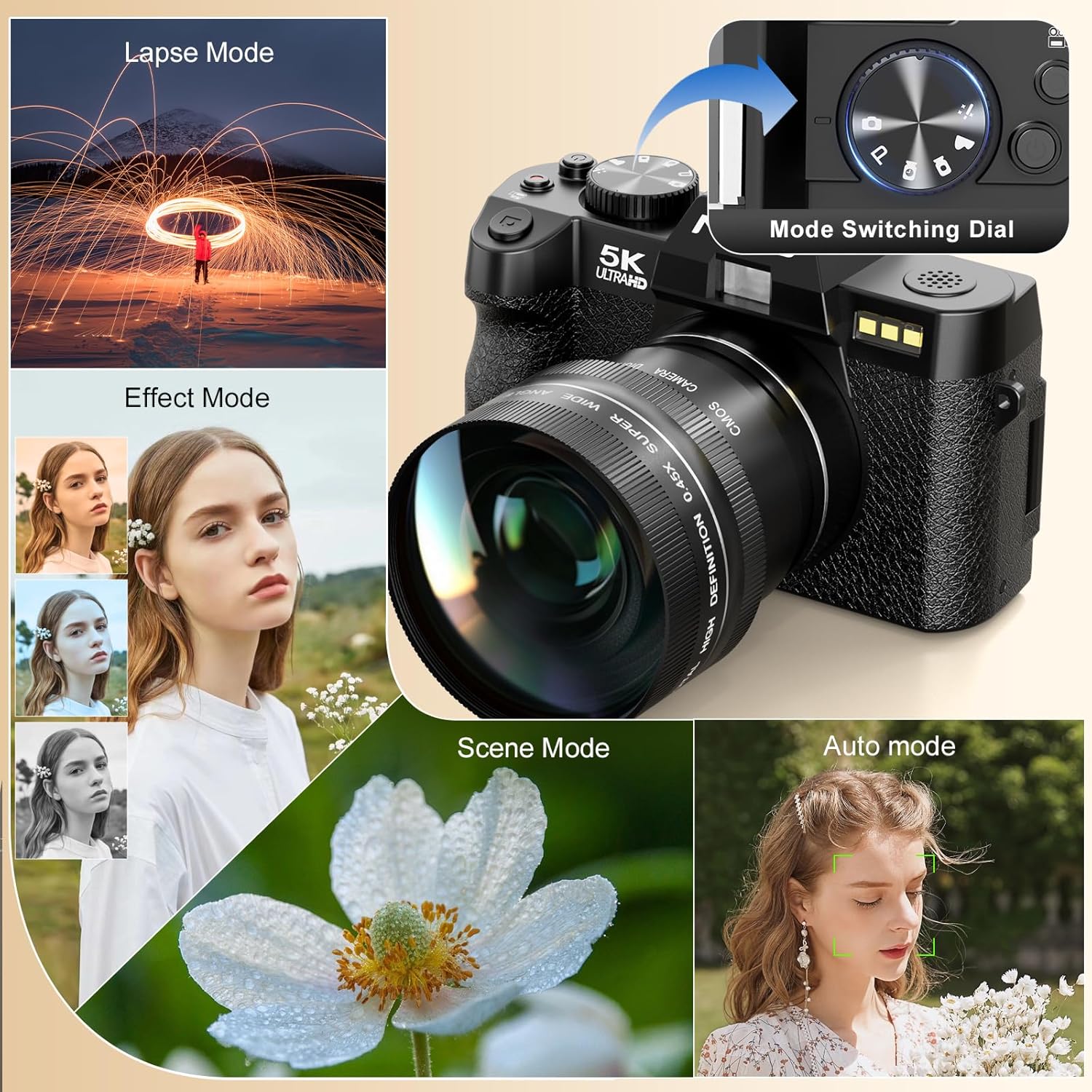
Image 4.1: Camera mode dial and examples of different shooting modes.
4.3. Fotografisanje
The camera features a 48MP sensor for high-resolution images. Utilize the AF (Autofocus) mode for sharp subjects and low-light focusing capabilities for challenging lighting conditions.

Image 4.2: Photo features including 48MP resolution, AF mode, and low-light performance.
4.4. Snimanje video zapisa
Record videos in 5K (5210*2880) or 1080p resolution. Press the dedicated video recording button to start and stop recording.

Image 4.3: Visual representation of 5K video resolution.
4.5. Funkcija zumiranja
The camera supports 16X digital zoom. Use the zoom controls to adjust the magnification for your shots.

Image 4.4: HDR feature and examples of 4x, 8x, and 16x digital zoom.
4.6. Using the 180° Flip Screen and Microphone
The 180° flip screen allows for easy self-recording and vlogging. The included microphone enhances audio quality for video recordings.
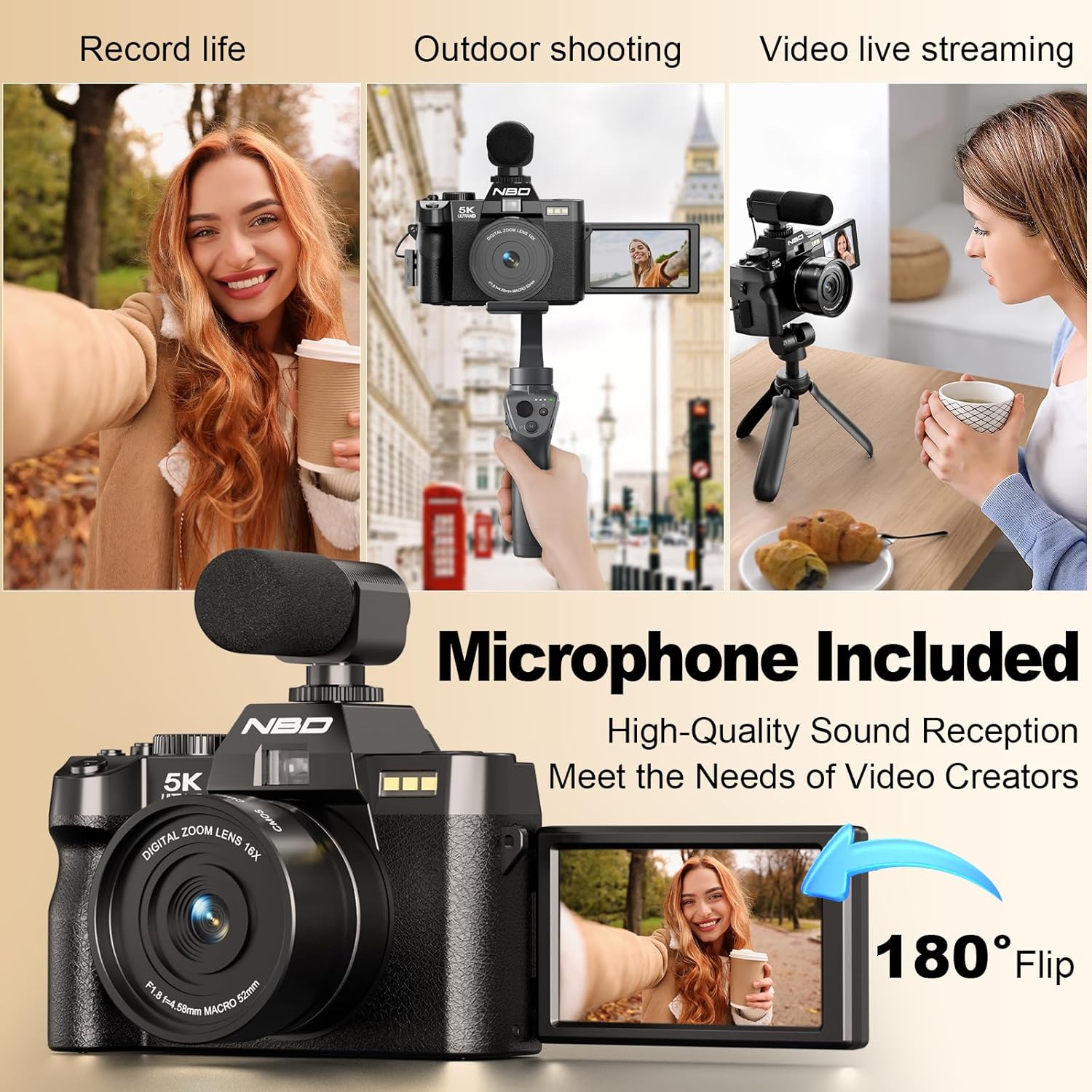
Image 4.5: Demonstrating the 180° flip screen and external microphone for vlogging and live streaming.
4.7. Wi-Fi Connectivity and File Transfer
Connect your camera to a smartphone or tablet via Wi-Fi for remote control and swift image transfer. Download the dedicated mobile application to access these features.
- Wi-Fi veza: Navigate to the camera's settings menu, select Wi-Fi, and follow the on-screen instructions to connect to your device.
- Kontrola aplikacije: Koristite mobilnu aplikaciju za view a live preview, control camera settings, and initiate photo/video capture remotely.
- File Transfer: Transfer photos and videos directly to your connected device for sharing or backup. Alternatively, connect the camera to a computer via the USB cable for file transfer.

Image 4.6: Wi-Fi picture transfer and camera control via a mobile application.

Image 4.7: Options for swift image transfer via USB or Wi-Fi/App.
5. Održavanje
5.1. Čišćenje kamere i objektiva
- Use the provided lens cleaning cloth to gently wipe the lens surface. Avoid using abrasive materials.
- For the camera body, use a soft, dry cloth to remove dust and smudges. Do not use liquid cleaners directly on the camera.
5.2. Održavanje baterije
- Prije prve upotrebe potpuno napunite baterije.
- Čuvajte baterije na hladnom i suvom mestu kada nisu u upotrebi.
- Ne izlažite baterije ekstremnim temperaturama ili direktnoj sunčevoj svjetlosti.
5.3. Skladištenje
When not in use for extended periods, store the camera in the provided black leather bag in a dry, dust-free environment. Remove batteries if storing for several months.
6. Otkrivanje problema
| Problem | Mogući uzrok | Rješenje |
|---|---|---|
| Kamera se ne uključuje. | Baterija je prazna ili nepravilno umetnuta. | Potpuno napunite bateriju. Provjerite da li je baterija umetnuta s ispravnim polaritetom. |
| Slike su mutne. | Nepravilan fokus, podrhtavanje fotoaparata ili prljav objektiv. | Ensure autofocus is engaged. Hold the camera steady or use a tripod. Clean the lens with the provided cloth. |
| Greška SD kartice. | SD card is full, corrupted, or incorrectly inserted. | Check if the SD card is properly inserted. Format the SD card (this will erase all data). Replace with a new SD card if issues persist. |
| Wi-Fi veza ne uspijeva. | Netačna lozinka, van dometa ili problem s aplikacijom. | Verify Wi-Fi password. Ensure camera and device are within range. Restart both camera and mobile device. Reinstall the mobile application. |
7. Specifikacije
| Feature | Detalj |
|---|---|
| Brand | NBD |
| Broj modela | f84c2dbf-b0ce-418b-ab21-37b5d1f304dd |
| Tehnologija foto senzora | CMOS |
| Efektivna rezolucija mirovanja | 48 MP |
| Video Rezolucija | 5K (5210*2880), 1080p |
| Optički zum | 16x (Digital) |
| Stabilizacija slike | Dynamic |
| Veličina ekrana | 3 inča |
| Display Type | LCD (ekran koji se okreće za 180°) |
| Lens Type | Zoom, Macro (F1.8 aperture) |
| Focus Type | Auto Focus (Hybrid) |
| Tehnologija povezivanja | Wi-Fi |
| Podržano File Format | MP4, H.264, AAC (Video); JPEG, RAW (Image) |
| Kapacitet memorije | 32 GB (Included 64GB SD Card) |
| Vrsta baterije | Lithium Ion (x2 included) |
| Tip montaže | Stativ |
| Nivo vodootpornosti | Nije vodootporan |
8. Informacije o garanciji
Please refer to the warranty card included in your product packaging for specific warranty terms and conditions. Typically, NBD products come with a limited manufacturer's warranty covering defects in materials and workmanship for a specified period from the date of purchase. Keep your proof of purchase for warranty claims.
9. Korisnička podrška
For technical assistance, troubleshooting, or any questions regarding your NBD 5K Digital Camera, please contact NBD customer support. Contact information can typically be found on the NBD official webweb-mjestu ili na garantnom listu koji ste dobili uz proizvod.
Online resursi: Visit the official NBD webstranica za često postavljana pitanja, ažuriranja softvera i dodatne materijale za podršku.
10. Zvanični videozapisi proizvoda
U dostavljenim podacima o proizvodu nisu pronađeni službeni videozapisi proizvoda od prodavca.


