1. Proizvod je gotovview
The bmani T16 Wireless Earbuds are designed for active lifestyles, offering an ultra-long 80-hour playtime with their dual LED display charging case. They feature immersive stereo sound with 10mm dynamic drivers, clear calls with dual microphones, and seamless Bluetooth connectivity. The adjustable over-ear hooks ensure a secure and comfortable fit for various activities. Easy button controls provide intuitive management of music and calls.
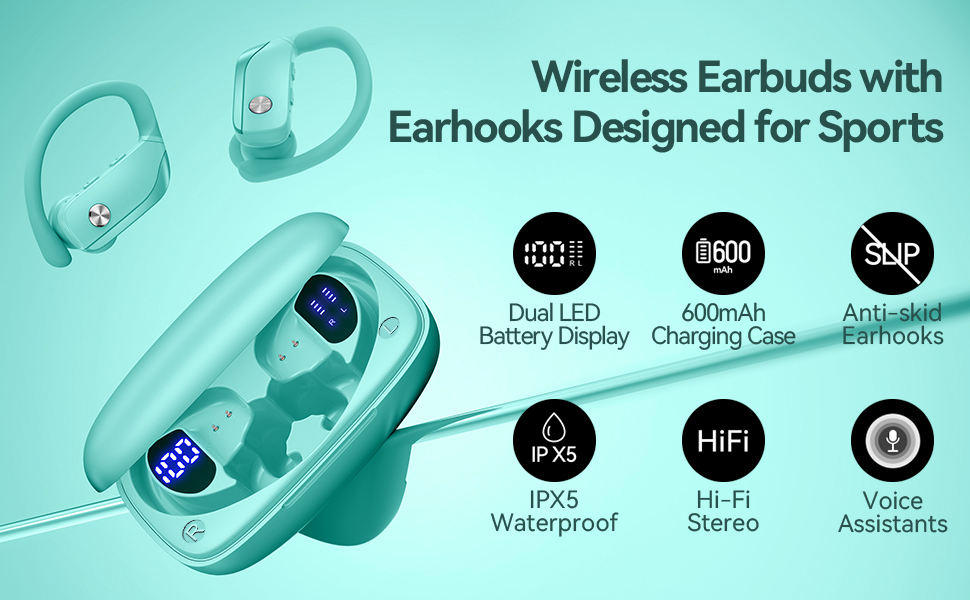
Image: bmani T16 Wireless Earbuds in their charging case, highlighting 80 hours of total playtime and the dual LED battery display.
2. Šta se nalazi u kutiji
- bmani T16 Wireless Earbuds (Left and Right)
- Futrola za punjenje sa LED ekranom
- Naušnice (male, srednje, velike veličine)
- Kabel za punjenje tipa C
- Korisnički priručnik (ovaj dokument)

Image: The bmani T16 Wireless Earbuds, charging case, and various eartip sizes.
3. Podešavanje i uparivanje
The bmani T16 earbuds feature one-step pairing for quick and easy connection to your devices.
- Početno uparivanje: Otvorite kutijicu za punjenje. Slušalice će se automatski uključiti i ući u način rada za uparivanje.
- Na pametnom telefonu, tabletu ili drugom uređaju koji podržava Bluetooth, idite na postavke Bluetootha.
- Traži available devices and select "T16" from the list.
- Kada se povežete, čut ćete glasovni upit koji potvrđuje uspješno uparivanje.
- Automatsko ponovno povezivanje: After the initial pairing, the earbuds will automatically reconnect to the last paired device when removed from the charging case.

Image: Illustration of the one-step pairing process for the bmani T16 earbuds with a smartphone and other compatible devices.
Video: An official seller video demonstrating the features and pairing process of the bmani T16 Wireless Earbuds.
4. Upute za nošenje
For optimal sound quality and a secure fit, follow these steps to wear your bmani T16 earbuds:
- Choose the correct eartip size (S, M, L) that best fits your ear canal.
- Place the flexible ear hook over the back of your ear.
- Nežno umetnite slušalicu u ušni kanal.
- Adjust the earbud and hook by twisting until you achieve a comfortable and secure fit. The ear hooks are designed to adapt to different ear shapes, minimizing slippage during movement.

Image: Visual guide demonstrating how to correctly position the bmani T16 earbuds with their flexible ear hooks for a secure fit.
5. Operativne kontrole
The bmani T16 earbuds feature intuitive physical buttons for easy control of your audio and calls.
- Pusti/pauza: Kliknite jednom na bilo koju slušalicu.
- Sljedeća pjesma: Quick double-click on the Right (R) earbud.
- Prethodni zapis: Quick double-click on the Left (L) earbud.
- Povećavanje glasnoće: Press the "+" button on the earbud.
- Smanjivanje jačine zvuka: Press the "-" button on the earbud.
- Odgovori/Završi poziv: Kliknite jednom na bilo koju slušalicu.
- odbiti poziv: Hold either earbud button.
- Aktivirajte glasovnog asistenta (Siri/Google Assistant): Quick triple-click on either earbud.
- Uključivanje/isključivanje: Hold the button on either earbud.
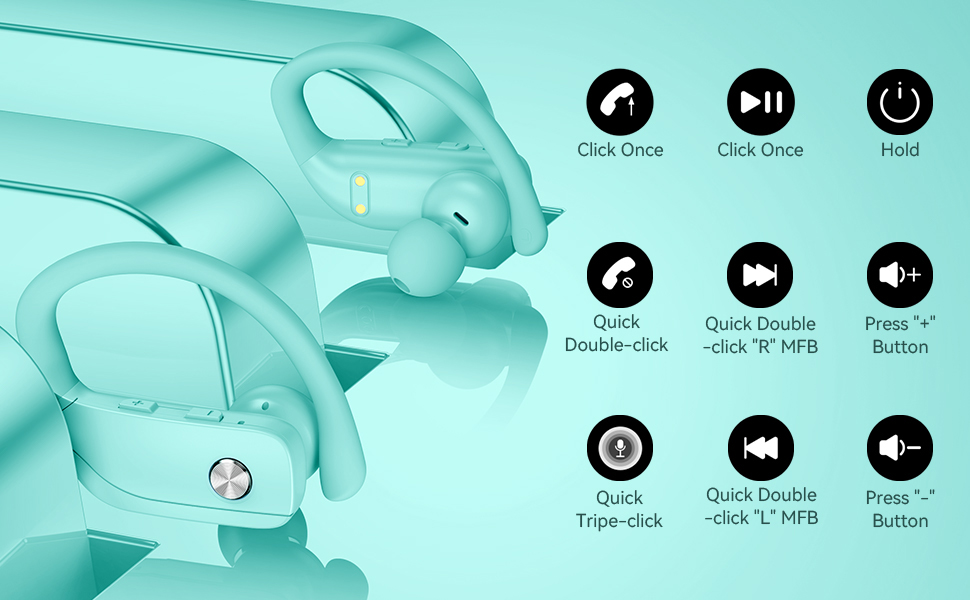
Image: Detailed diagram showing the various button controls on the bmani T16 earbuds for managing audio playback, calls, and voice assistant.
6. Punjenje
The bmani T16 earbuds and charging case provide an impressive 80 hours of total playtime.
- Punjenje slušalica: Place the earbuds back into the charging case. The LED indicators on the case will show the charging status of each earbud. Each earbud offers up to 8 hours of playtime per charge.
- Punjenje kućišta: Connect the provided Type-C charging cable to the charging port on the case and to a USB power source. The digital display on the left side of the case will show the remaining power percentage kućišta za punjenje.
- The charging case can recharge the earbuds multiple times, extending total usage to 80 hours.
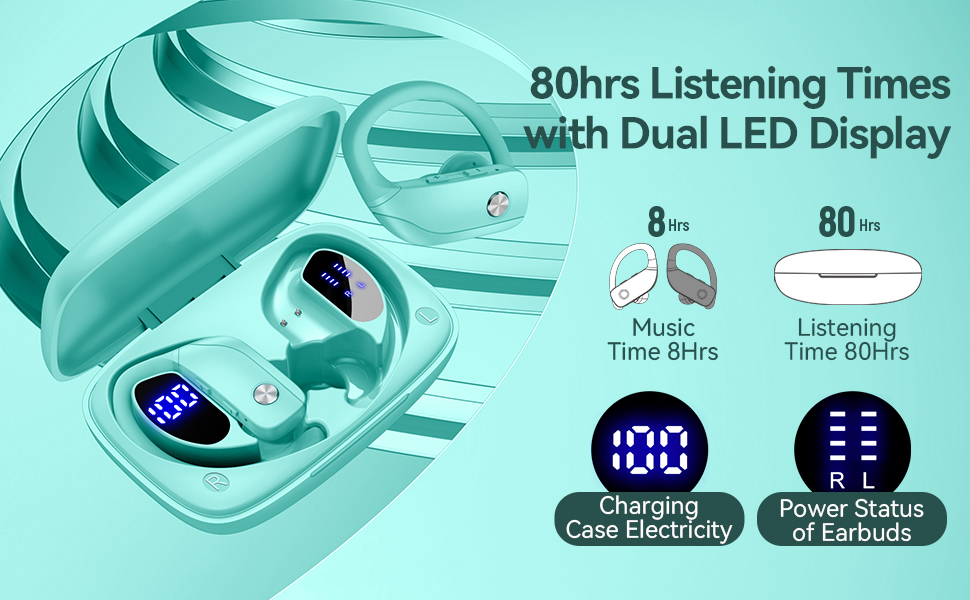
Image: The bmani T16 charging case with its dual LED digital display, indicating the battery percentage kućišta i status punjenja svake slušalice.
Video: Zvanična video prezentacija prodavcaasing the 48-hour playback (note: product features state 80H) and LED display of the bmani T16 Sport Earphones.
7. Održavanje
- Regularly clean the earbuds and charging contacts with a soft, dry cloth to prevent dust and debris buildup.
- Izbjegavajte izlaganje slušalica ekstremnim temperaturama ili direktnoj sunčevoj svjetlosti tokom dužeg perioda.
- Slušalice čuvajte u kutijici za punjenje kada ih ne koristite kako biste ih zaštitili i osigurali da ostanu napunjene.
- The earbuds are sweat-resistant and dust-resistant, but avoid submerging them in water.
8. Otkrivanje problema
- Slušalice se ne uparuju: Ensure both earbuds are removed from the case and are powered on. Turn off Bluetooth on your device and turn it back on. If issues persist, try resetting the earbuds (refer to the full user manual for specific reset instructions).
- Nema zvuka: Provjerite nivo jačine zvuka i na uređaju i na slušalicama. Uvjerite se da su slušalice pravilno povezane s uređajem putem Bluetootha.
- Problemi s punjenjem: Provjerite je li kabel za punjenje sigurno spojen i na kućište i na izvor napajanja. Provjerite jesu li kontakti za punjenje na slušalicama i unutar kućišta čisti i bez prljavštine.
- Nestabilna veza: Ensure your device is within the Bluetooth range (approximately 33 feet/10 meters) and there are no significant obstacles between the earbuds and your device.
9. Specifikacije
| Naziv modela | T16 |
| Tehnologija povezivanja | Bežično (Bluetooth 5.0) |
| Vrijeme reprodukcije (slušalice) | Do 8 sati po punjenju |
| Ukupno vrijeme reprodukcije (s kutijom) | Do 80 sati |
| Vrsta audio drajvera | 10mm dinamički drajver |
| Funkcije kontrole buke | Noise Cancellation (Dual Mics) |
| Nivo vodootpornosti | Sweat-resistant and Dust-resistant |
| Kontrolni metod | Kontrole dugmadi |
| Postavljanje uha | Preko uha |
| Težina artikla | 2 unce |
10. Garancija i podrška
bmani offers a lifetime warranty for permanent replacement of damaged, defective, upgraded, or lost products. Please refer to the warranty card included in your package for activation details and terms. For further assistance, please contact bmani customer support.


