Uvod
The Volkano Galena Series Wireless Keyboard is a compact, versatile input device designed for efficiency and portability. It offers multi-device connectivity and seamless switching, making it suitable for various operating systems including Windows, Android, and MacOS. This manual provides essential information for setting up, operating, maintaining, and troubleshooting your keyboard.
Sadržaj paketa
- Volkano Galena Series Wireless Keyboard
- 2 x AAA baterije
- Uputstvo za upotrebu
Setup
1. Instalacija baterije
The Volkano Galena Series Wireless Keyboard operates on two AAA batteries. These are included in the package.
- Pronađite poklopac pretinca za baterije na donjoj strani tastature.
- Otvorite poklopac.
- Insert the two AAA batteries, ensuring correct polarity (+ and - terminals).
- Čvrsto zatvorite poklopac odeljka za baterije.
2. Uključivanje / isključivanje napajanja
Locate the power switch on the keyboard. Slide it to the 'ON' position to power on the keyboard. Slide it to the 'OFF' position when not in use to conserve battery life. The keyboard features an auto-power saving mode to further extend battery life during periods of inactivity.
3. Bluetooth uparivanje
The keyboard supports Bluetooth 5.0 for a stable wireless connection. It can be paired with up to two devices simultaneously.

Image: The Volkano Galena Series keyboard, illustrating its compact design and key features such as Bluetooth 5.0 + BT 3.0 connectivity, multi-device switching, anti-slip rubber feet, and compatibility with Windows and Android operating systems.
- Uvjerite se da je tastatura uključena.
- On your device (Laptop, PC, Smart TV, Tablet), enable Bluetooth and search for available devices.
- Pritisnite i držite fn+1 key combination for the first device, or fn+2 for the second device, until the corresponding indicator light (usually above the '1' or '2' key) starts blinking, indicating pairing mode.
- Select "Volkano Galena" or a similar name from the list of available Bluetooth devices on your screen.
- Follow any on-screen prompts to complete the pairing process. The indicator light will stop blinking once successfully paired.
Uputstvo za upotrebu
1. Prebacivanje više uređaja
The keyboard allows for quick switching between two paired devices.

Slika: Detaljna view of the Volkano Galena Series keyboard, showcasing its compact form factor and features like Bluetooth device switching, non-slip feet, a dedicated Copilot shortcut key, scissor-structure keycaps, and auto-power saving mode.
- To switch to the first paired device, press fn+1.
- To switch to the second paired device, press fn+2.
2. Function Keys (Fn)
The keyboard includes multimedia and special function keys accessible by pressing the Fn key in combination with the corresponding F-keys or other designated keys.
- Fn+F1-F12: Access various multimedia controls and system functions (e.g., volume, playback, screen brightness). Refer to the icons on the F-keys for specific functions.
- Fn + Q/W/E: Switch between operating system layouts (e.g., Android, Windows, iOS/MacOS).
- Copilot Shortcut Key: A dedicated key for quick access to AI assistant features on compatible operating systems.
3. Iskustvo u kucanju
The keyboard features quiet keys with a scissor structure, providing a comfortable and responsive typing experience suitable for focused environments.
Održavanje
1. Čišćenje
- Prije čišćenja provjerite je li tastatura isključena iz napajanja.
- Use a soft, dry, lint-free cloth to wipe the surface of the keyboard.
- Za tvrdokornu prljavštinu lagano dampOperite krpu vodom ili blagim, neabrazivnim sredstvom za čišćenje. Izbjegavajte prekomjernu vlagu.
- Ne prskajte sredstva za čišćenje direktno na tastaturu.
- Use compressed air to remove debris from between the keys.
2. Skladištenje
- Tastaturu čuvajte na hladnom i suhom mjestu, dalje od direktne sunčeve svjetlosti i ekstremnih temperatura.
- If storing for an extended period, remove the AAA batteries to prevent leakage.
Rješavanje problema
- Tastatura se ne uključuje: Check if the batteries are correctly inserted and fully charged. Replace batteries if necessary. Ensure the power switch is in the 'ON' position.
- Tastatura se ne povezuje putem Bluetootha:
- Provjerite je li Bluetooth omogućen na vašem uređaju.
- Make sure the keyboard is in pairing mode (indicator light blinking).
- Izbrišite prethodna uparivanja na uređaju i pokušajte ponovo upariti uređaje.
- Ensure the keyboard is within the 8-10 meter Bluetooth range of your device.
- Pokušajte ponovo pokrenuti i tastaturu i uređaj.
- Tipke ne reagiraju: Check battery level. Ensure the keyboard is properly connected to your device. Clean any debris from around the keys.
- Kašnjenje ili odloženi unos: Ensure there are no strong interferences (e.g., other wireless devices) nearby. Check battery level.
Specifikacije
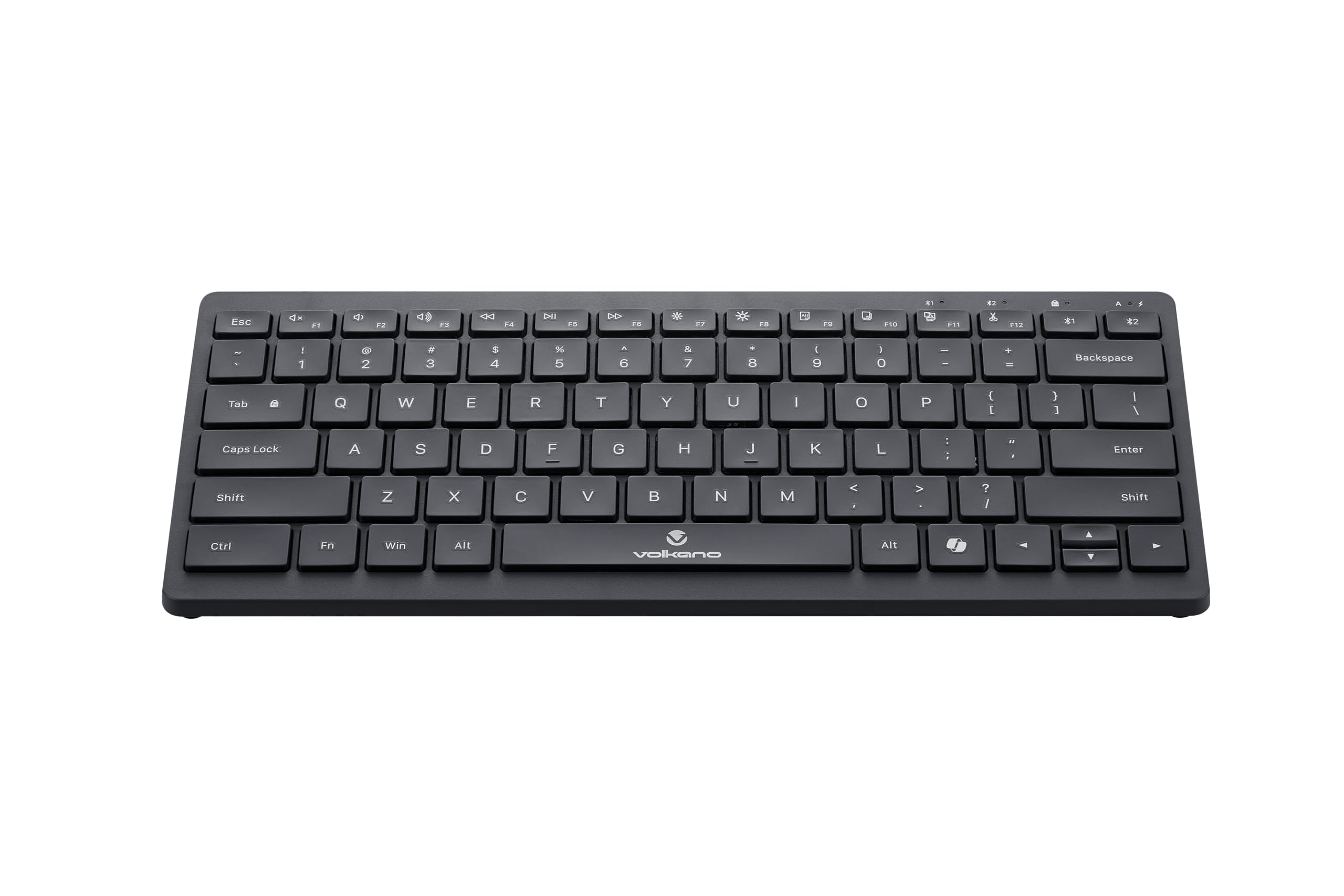
Image: A clear, angled view of the Volkano Galena Series Wireless Keyboard, highlighting its sleek black design and full key layout.
| Feature | Detalj |
|---|---|
| Broj modela | VK-20247-BK |
| Povezivanje | Bluetooth bežična tehnologija |
| Bluetooth verzija | Bluetooth 5.0 + Bluetooth 5.0 (Dual Channel) |
| bežični domet | 8-10 metara |
| Izvor napajanja | 2 x AAA alkalne baterije (uključene) |
| Tip ključa | Scissor Structure Keycaps |
| Posebne karakteristike | Quiet keys, Multi-device pairing, Instant switching, Anti-slip rubber base, Auto-power saving mode, Lightweight, Portable, Copilot Shortcut Key |
| Kompatibilni uređaji | Laptop, PC, Smart TV, Tablet (Windows, Android, MacOS) |
| Dimenzije (D x Š x V) | 29.5D x 12.8W x 2.2H centimetara |
| Materijal | Plastika |
| Boja | Crna |
Garancija i podrška
1. Ograničena garancija
This Volkano product is covered by a 12-Month Limited Coverage from the date of purchase. You can extend this coverage by an additional 12 months, for a total of 24 months, by registering your product with Volkano.
2. Korisnička podrška
For any questions, assistance, or support regarding your Volkano Galena Series Wireless Keyboard, please contact Volkano customer service through their official channels. Refer to the Volkano webkontakt podatke potražite na web-mjestu ili na pakiranju proizvoda.


