1. Uvod
This manual provides detailed instructions for the JTEMAN L41 Cell Phone Stand, which integrates a Bluetooth speaker and wireless charging functionality. Please read this manual thoroughly before use to ensure proper operation and to maximize the product's features.
2. Sadržaj paketa
Provjerite da li se u vašem paketu nalaze sve dolje navedene stavke:
- Audio Wireless Charger (Main Unit)
- USB-C Adapter (Power Adapter)
- USB-C na USB-C kabl
- Uputstvo za upotrebu
3. Proizvod je gotovview
The JTEMAN L41 is a versatile 3-in-1 device designed to streamline your desktop. It combines a stable phone stand, a wireless charging station, and a Bluetooth speaker into one compact unit.
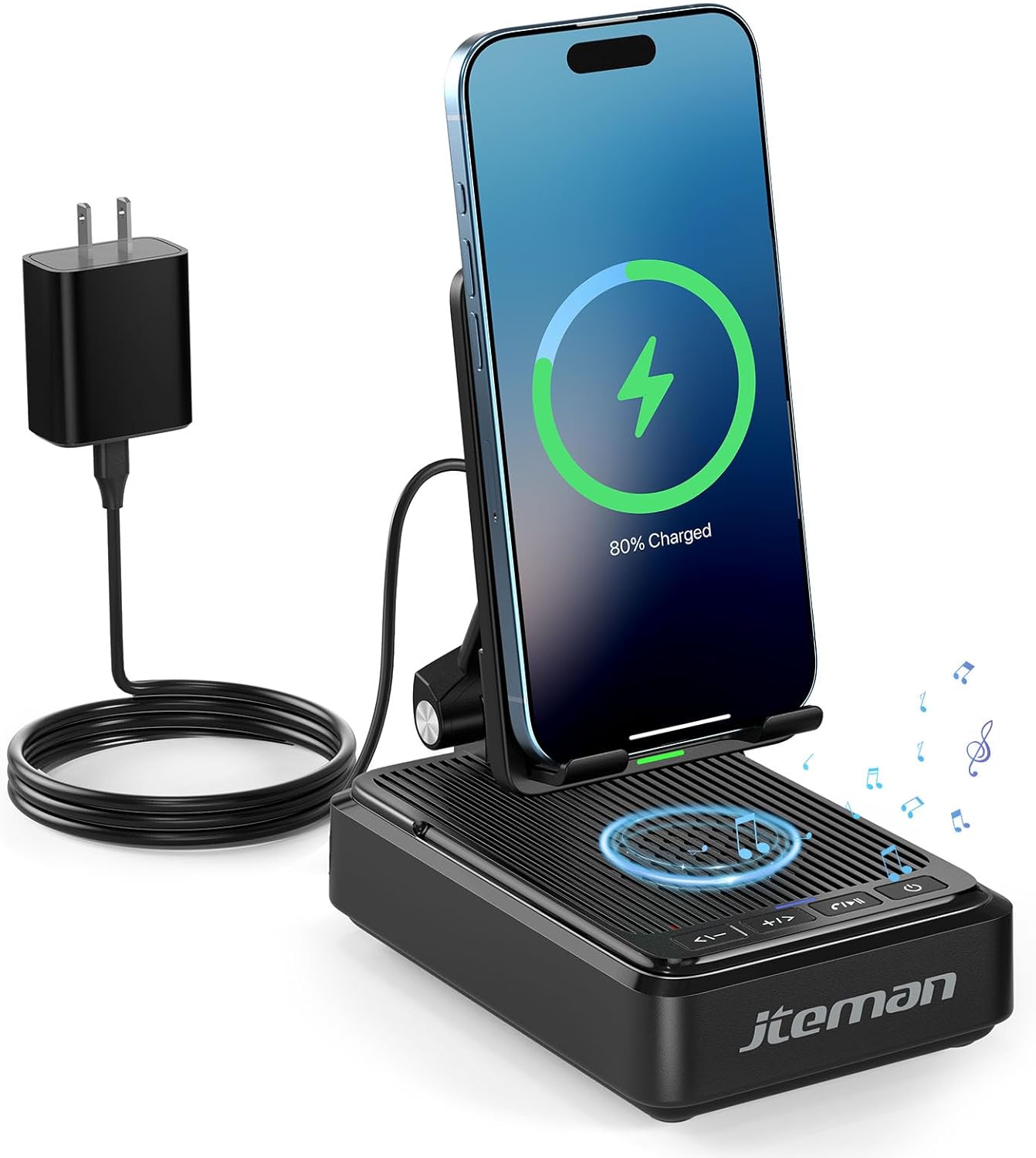
Slika 1: JTEMAN L41 Main Unit with Phone Charging
This image displays the JTEMAN L41 device in black, with a smartphone placed vertically on its stand, actively wirelessly charging. The device is connected to a power adapter via a USB-C cable. Musical notes are depicted around the speaker area, indicating its audio function.
Ključne karakteristike:
- 3-u-1 funkcionalnost: Integrates a phone stand, wireless charger, and Bluetooth speaker.
- Podesivi držač za telefon: Omogućava optimalno viewing angles and supports both horizontal and vertical phone placement.
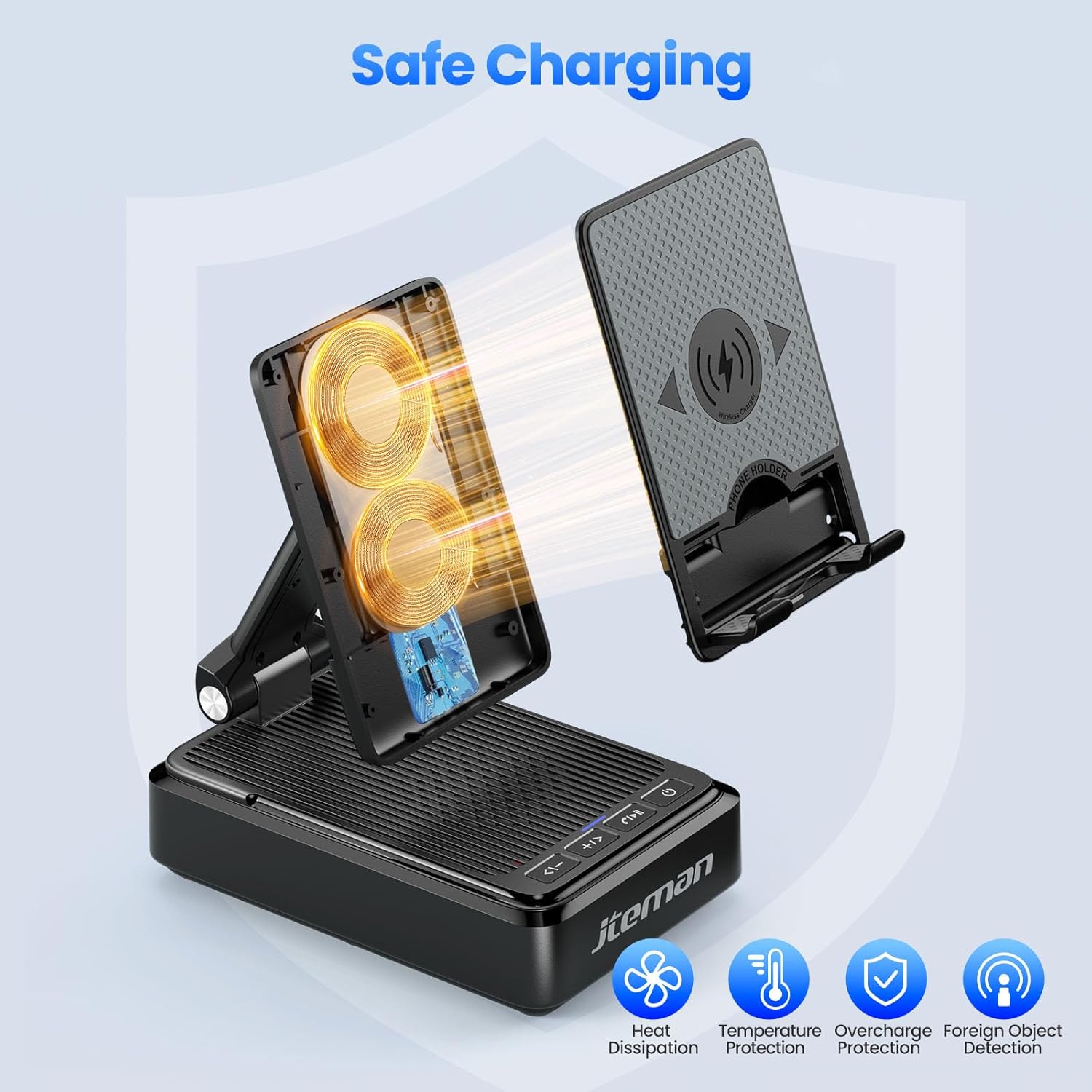
- Stable Wireless Charging: Features dual-coil design for flexible phone positioning and multiple safety protections.
- Bluetooth 5.3 zvučnik: Provides clear sound quality and stable connection for audio playback and hands-free calls.
- Sklopivi dizajn: Enhances portability and saves space.
4. Upute za postavljanje
- Raspakujte uređaj: Pažljivo izvadite sve komponente iz pakovanja.
- Priključite napajanje:
- Connect one end of the provided USB-C to USB-C cable to the USB-C port on the back of the JTEMAN L41 unit.
- Connect the other end of the USB-C cable to the provided USB-C power adapter.
- Uključite adapter za napajanje u standardnu zidnu utičnicu.
Napomena: For optimal wireless charging performance, always use the included 9V2A adapter and USB-C cable.
- Adjust Phone Stand: Unfold the phone stand to your desired viewing angle. The stand is designed to be adjustable for comfortable viewing.
5. Uputstvo za upotrebu
5.1 Bežično punjenje
- Ensure the JTEMAN L41 is connected to a power source.
- Place your wireless charging-compatible smartphone onto the phone stand. The phone can be placed either horizontally or vertically.
- Align your phone's wireless charging coil with the charging area on the stand. Charging will begin automatically, indicated by a charging icon on your phone's screen.

Slika 2: Kompatibilnost bežičnog punjenja
This image illustrates the wireless charging function and its compatibility. It shows a smartphone in a case being wirelessly charged on the stand. Important notes indicate that cases should be ≤ 0.15 inches thick, and cases with metal rings, pockets, or magnets should be avoided for proper charging.
Important Notes for Wireless Charging:
- Supports phone cases with a thickness of ≤ 0.15 inches (approximately 3.8mm).
- Avoid using cases with metal rings, pop sockets, credit cards, or magnets, as these can interfere with wireless charging.
- The dual-coil design allows for flexible placement, but ensure proper alignment for efficient charging.
5.2 Rad Bluetooth zvučnika
- Uključeno: Pritisnite i držite dugme za napajanje (⏻) on the front of the unit to turn on the speaker. A voice prompt or indicator light will confirm it's in pairing mode.
- Uparivanje:
- Na pametnom telefonu ili drugom uređaju s omogućenom Bluetooth vezom idite na postavke Bluetootha.
- Traži available devices and select "JTEMAN41" (or similar name) from the list.
- Once connected, a confirmation sound will be heard.
- Audio reprodukcija: Play music or audio from your connected device. Use the volume controls on the JTEMAN L41 or your device to adjust the sound level.
- Hands-free pozivanje: When a call comes in, press the Play/Pause button (⏸) da biste odgovorili. Pritisnite ponovo da biste prekinuli poziv.

Slika 3: Enjoying Music with the Bluetooth Speaker
This image shows a woman in a kitchen setting, holding a mug and smiling while a smartphone plays music on the JTEMAN L41 stand. Musical notes emanate from the speaker, highlighting its audio playback capability.
5.3 Phone Stand Functionality
The integrated phone stand is adjustable to provide optimal viewuglovi za različite aktivnosti.
- Podesivi ugao: Gently pivot the phone rest up or down to achieve your preferred viewing kut.
- Orijentacija: The stand supports both vertical and horizontal placement of your smartphone, ideal for video calls, watching movies, or browsing.
- Stabilnost: The stable, non-slip base and weighted structure prevent tipping, ensuring your device remains secure.
Slika 4: Adjustable Desktop Charging Stand
This image depicts a man sitting at a desk, interacting with a smartphone placed on the JTEMAN L41 stand. The stand is shown with an adjustable angle feature, and a diagram illustrates how the USB-C charging cable connects to the phone while on the stand.
5.4 Funkcije dugmadi
The control buttons are located on the front of the unit:
| Ikona dugmeta | Funkcija |
|---|---|
| <- | Utišavanje / prethodna pjesma |
| + / > | Pojačavanje / Sljedeća pjesma |
| ⏸ | Pusti / Pauziraj / Odgovori na poziv / Prekini poziv |
| ⏻ | Uključivanje/isključivanje napajanja |
6. Važne informacije o sigurnosti
- Ne izlažite uređaj vodi ili prekomjernoj vlazi.
- Izbjegavajte ekstremne temperature, direktnu sunčevu svjetlost ili izvore toplote.
- Ne rastavljajte, ne popravljajte niti modificirajte uređaj. To će poništiti garanciju.
- Čuvati van domašaja djece.
- Use only the provided power adapter and cable to prevent damage and ensure safe operation.
- Osigurajte odgovarajuću ventilaciju oko uređaja tokom upotrebe.
7. Održavanje
- čišćenje: Obrišite uređaj mekom, suhom krpom. Ne koristite abrazivna sredstva za čišćenje ili rastvarače.
- Skladištenje: When not in use for extended periods, store the device in a cool, dry place. The foldable design allows for compact storage.
8. Otkrivanje problema
| Problem | Mogući uzrok | Rješenje |
|---|---|---|
| Uređaj se ne uključuje. | Not connected to power; Power button not pressed. | Ensure the power adapter is securely plugged into the unit and a working outlet. Press and hold the Power button. |
| Bežično punjenje ne radi. | Phone not aligned; Case too thick; Foreign object; Phone not wireless charging compatible. | Re-align phone; Remove thick/metal cases; Remove foreign objects; Verify phone supports wireless charging. Use the included power adapter. |
| Bluetooth zvučnik se ne povezuje. | Speaker not in pairing mode; Bluetooth off on device; Device too far. | Ensure speaker is on and in pairing mode; Enable Bluetooth on your device; Move device closer to the speaker (within 10 meters). |
| Loša kvaliteta zvuka. | Low battery; Device too far; Obstructions. | Ensure the unit is powered; Move device closer; Remove obstructions between device and speaker. |
9. Specifikacije
| Feature | Detalj |
|---|---|
| Broj modela | L41 |
| Dimenzije proizvoda | 5.59 x 3.78 x 2.32 inča |
| Težina artikla | 14.9 unce |
| Ulazni voltage | 9 Volts |
| Izlazna struja | 2 Amps |
| Tip konektora | USB tip C |
| Bluetooth verzija | 5.3 |
| Materijal | Akrilonitril butadien stiren |
| Kompatibilni uređaji | Smartphones, Tablets (with wireless charging capability) |
| Wireless Charging Case Thickness | ≤ 0.15 inches (3.8mm) |
10. Garancija i podrška
JTEMAN provides the following support for this product:
- Zamjena nakon 12 mjeseci: The product is covered by a 12-month replacement policy from the date of purchase.
- 24-Hour Support: For any inquiries or assistance, please contact JTEMAN customer support.
To contact support, please refer to the contact information provided on the product packaging or the official JTEMAN website.


