1. Uvod
This manual provides essential instructions for the safe and effective operation of your xTool F2 Ultra Single 60W MOPA Fiber Laser Engraver. Please read this manual thoroughly before initial use to ensure proper setup, operation, and maintenance. Retain this document for future reference.
The xTool F2 Ultra is a high-performance fiber laser engraver designed for precision engraving and cutting on various metal materials. It features a 60W MOPA laser, dual 48MP AI cameras, and advanced software capabilities to streamline your projects.
2. Proizvod je gotovview
The xTool F2 Ultra Single 60W MOPA Fiber Laser Engraver is engineered for versatility and efficiency in metal processing. Key features include:
- 60W MOPA Fiber Laser: Capable of 3D embossing, deep engraving, color engraving, and cutting up to 2mm metal. Supports black marking on aluminum, laser cleaning, and thin metal welding.
- Ultra-Fast Engraving: Operates at speeds up to 15,000mm/s for rapid project completion.
- Dual 48MP AI Cameras: Enhances positioning accuracy to 0.2mm and provides precise alignment and detail for complex designs.
- AI-Powered Features: Includes auto-detection of materials, suggested settings, one-click focus, and preview functions for optimized results.
- Velika radna površina: Standard working space of 8.7" x 8.7" (220 x 220 mm), expandable to 8.7" x 19.7" (220 x 500 mm) with an optional auto conveyor for batch processing.
- Zatvoreni dizajn: Provides enhanced safety during operation.

Figure 2.1: The xTool F2 Ultra Single 60W MOPA Fiber Laser Engraver.

Figure 2.2: Feature comparison of xTool F2 Ultra with other laser engravers, emphasizing speed, camera, metal cutting, exclusive technology, working area, and safety.

Slika 2.3: Gotovoview of AI-powered features including auto-ID materials, AI color recognition, AI design, and AI modeling for 3D engraving.
3. Podešavanje
The xTool F2 Ultra is designed for straightforward setup. For detailed, step-by-step instructions, please refer to the Quick Start Guide included with your product packaging or available on the official xTool support website.
3.1 Raspakivanje i postavljanje
- Pažljivo izvadite sve komponente iz pakovanja.
- Place the engraver on a stable, level surface in a well-ventilated area. Ensure adequate space around the machine for operation and heat dissipation.
- Connect the power cable and any necessary accessories as indicated in the Quick Start Guide.
3.2 Instalacija softvera
Download and install the xTool Creative Space software from the official xTool website. Follow the on-screen prompts for installation. This software is essential for controlling the engraver and designing your projects.
3.3 Početna kalibracija
Perform the initial calibration steps as guided by the xTool Creative Space software. This typically involves camera calibration and focus adjustment to ensure precise engraving.
4. Uputstvo za upotrebu
Operating the xTool F2 Ultra involves using the xTool Creative Space software to design, prepare, and execute engraving or cutting tasks.
4.1 Software Interface and Design
The xTool Creative Space software provides an intuitive interface for creating or importing designs. Utilize its features for text, shapes, and image manipulation.

Figure 4.1: The xTool Creative Space software interface, showing design and project management features.
4.2 Material Preparation and Settings
- Place your material securely within the engraver's working area.
- Utilize the dual 48MP AI cameras for precise positioning and preview of your design on the material. The AI can auto-detect materials and suggest optimal settings.
- Select the appropriate material type and adjust laser parameters (power, speed, passes) within the software. For color engraving on metals, refer to the pre-set color files for a wide range of vibrant results.

Slika 4.2: Prample of a color matrix for metal engraving, demonstrating the range of colors achievable with the 60W MOPA laser.
4.3 Executing Engraving/Cutting
- After confirming your design and settings, initiate the engraving or cutting process through the software.
- Monitor the process through the viewing window. Ensure proper ventilation is maintained.
4.4 Auto Streamline Production (with optional conveyor)
For high-volume orders, the optional auto conveyor expands the working area and enables automated batch processing. This feature allows for continuous feeding of materials, significantly increasing produktivnost.
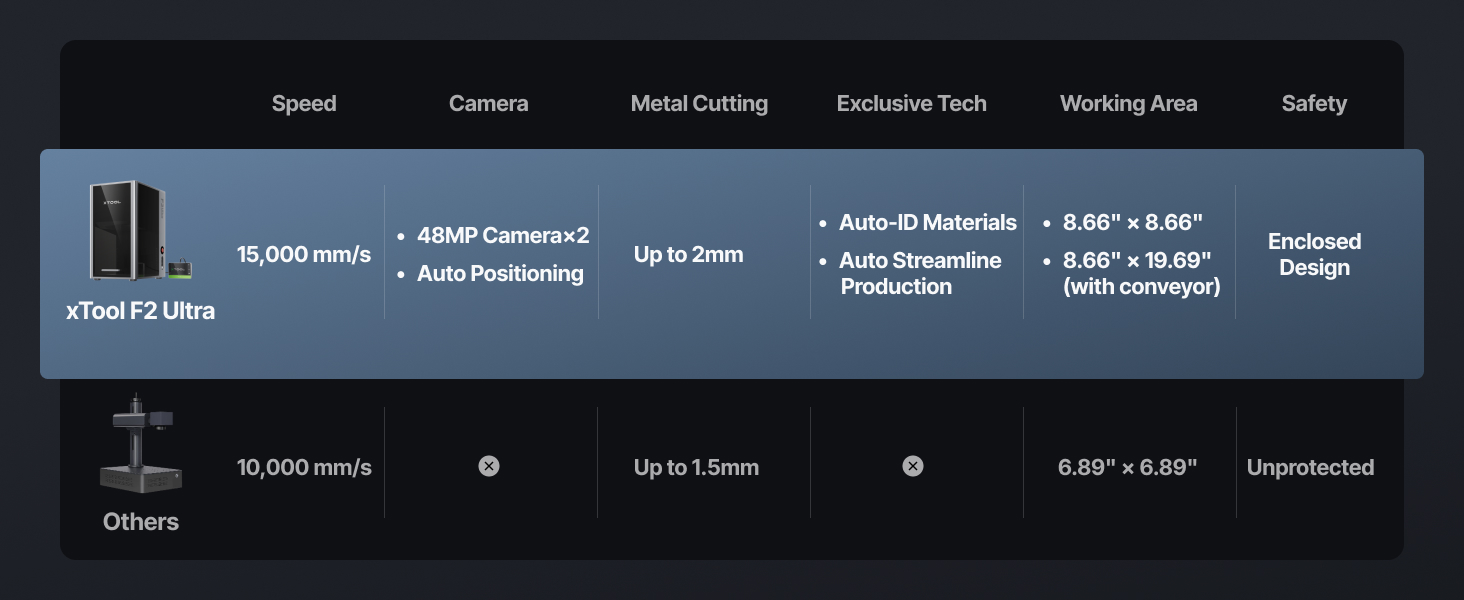
Figure 4.3: The xTool F2 Ultra integrated with an auto conveyor, demonstrating its capability for streamlined batch production.
5. Održavanje
Regular maintenance ensures the longevity and optimal performance of your xTool F2 Ultra. Always power off and unplug the machine before performing any maintenance.
- čišćenje: Regularly clean the interior of the machine, especially the lens and mirrors, using appropriate cleaning solutions and lint-free cloths. Dust and debris can affect laser performance.
- Sistem ventilacije: Ensure the exhaust system is clear and free of obstructions to maintain proper air circulation and fume extraction.
- Ažuriranja firmvera: Periodically check for and install firmware updates for the engraver and software updates for xTool Creative Space to benefit from performance improvements and new features.
6. Otkrivanje problema
This section addresses common issues you might encounter. For more comprehensive troubleshooting, refer to the official xTool support resources.
6.1 Uobičajeni problemi i rješenja
| Issue | Mogući uzrok | Rješenje |
|---|---|---|
| Engraving is inaccurate or misaligned. | Improper camera calibration; material not flat; incorrect focus. | Recalibrate the camera. Ensure material is flat and secured. Perform one-click auto-focus. |
| Laser ne radi ili je izlaz slab. | Laser head obstruction; dirty lens; incorrect power settings. | Check for obstructions. Clean the laser lens. Verify power settings in software. |
| Software connection issues. | USB cable issue; driver not installed; software glitch. | Ensure USB cable is securely connected. Reinstall software drivers. Restart software and engraver. |
| Unexpected material burning or poor results. | Incorrect material settings (power/speed); material not suitable. | Adjust power and speed settings. Consult the material library for recommended parameters. Ensure material compatibility. |
If issues persist, please contact xTool customer support for further assistance.
7. Specifikacije
| Specifikacija | Detalj |
|---|---|
| Dimenzije proizvoda | 16.88 x 11.57 x 20.5 inča |
| Broj modela stavke | MXF-K003-002 |
| Težina artikla | 66.6 funte |
| Laser Type | 60W MOPA Fiber Laser |
| Brzina graviranja | Do 15,000 mm/s |
| Kamere | Dual 48MP AI Cameras |
| Working Area | 8.7" x 8.7" (220 x 220 mm) standard; 8.7" x 19.7" (220 x 500 mm) with optional auto conveyor |
| Proizvođač | Makeblock Co., Ltd. |
8. Informacije o garanciji
For detailed warranty terms and conditions, please refer to the official xTool website or the warranty card included with your product. Warranty coverage typically includes manufacturing defects and specific components for a defined period. Keep your proof of purchase for warranty claims.
9. Podrška
xTool offers comprehensive support for its products. If you require assistance, please utilize the following channels:
- Podrška putem e-pošte: Contact xTool's support team via email for technical inquiries and assistance.
- Live Chat: Access live chat support on the official xTool website for real-time help.
- Telefonska podrška: Contact xTool via phone for direct assistance.
- Online Community/Facebook Group: Join the xTool community for peer support, tips, and shared projects.
- Službeno Webstranica: Posjetite www.xtool.com for FAQs, tutorials, and the latest software/firmware downloads.

Slika 9.1: Gotovoview of xTool's multi-channel customer support options.


