Uvod
Hvala na kupoviniasing the Matbip Multi-Platform Wireless Gaming Controller. This controller is designed to enhance your gaming experience across various platforms, including Nintendo Switch, Android, iOS, and PC. It features advanced functions such as TURBO burst, macro programming, customizable RGB lighting, and HD vibration, providing precise control and immersive feedback. Please read this manual carefully before use to ensure proper operation and to fully utilize all features.
Product Overview
Familiarize yourself with the various components and buttons of your Matbip controller.
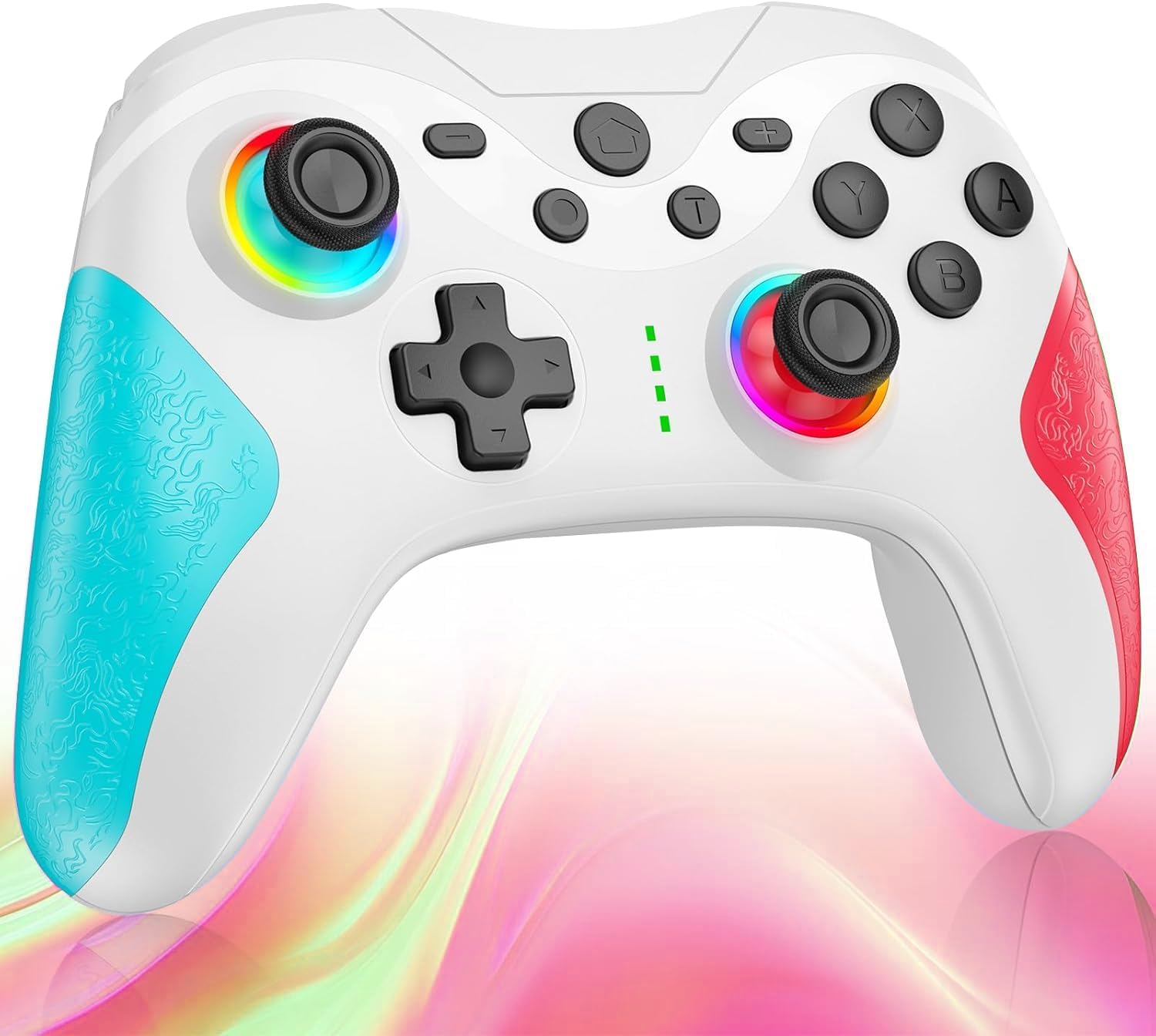
slika: Front view of the Matbip Multi-Platform Wireless Gaming Controller. It features a white body with blue textured grips on the left and red textured grips on the right. The joysticks are illuminated with a rainbow RGB light. Standard buttons (A, B, X, Y), a D-pad, and central function buttons (Home, Plus, Minus, T) are visible.
Ključne komponente:
- Lijeva/desna džojstika: For directional control, with customizable RGB lighting.
- D-Pad: Za precizan smjerni unos.
- Dugmad za akcije (A/B/X/Y): Standardni tasteri za unos u igrama.
- Shoulder Buttons (L/R/ZL/ZR): Top-mounted trigger and bumper buttons.
- Back Buttons: Additional programmable buttons on the rear for strategic gameplay.
- Dugme za početnu stranicu: Vraća se na početni ekran sistema.
- Dugmad Plus (+) / Minus (-): System-specific function buttons.
- T Button (TURBO): Activates and manages the TURBO burst function.
- Port za punjenje: USB-C priključak za punjenje.
- Indikatorska svjetla: Display connection status and battery level.
Setup
1. Punjenje kontrolera
Before first use, fully charge the controller. Connect the provided USB-C cable to the controller's charging port and the other end to a USB power source (e.g., console, PC, or USB wall adapter). The indicator lights will show charging status and turn off when fully charged.
2. Uparivanje sa uređajima
The controller supports Bluetooth wireless connection across multiple platforms.
Za Nintendo Switch:
- On the Switch HOME Menu, select Kontrolori > Promjena Grip/Red.
- Pritisnite i držite Dugme za početak on the Matbip controller for 3-5 seconds until the indicator lights flash rapidly.
- Once paired, the indicator light(s) on the controller will remain solid.
Za Android/iOS uređaje:
- Omogućite Bluetooth na svom Android ili iOS uređaju.
- Pritisnite i držite Dugme za početak on the Matbip controller for 3-5 seconds until the indicator lights flash rapidly.
- On your device's Bluetooth settings, select the controller (e.g., "Matbip Controller") from the list of available devices to pair.
Za računar (Windows):
- Ensure your PC has Bluetooth enabled. Go to Postavke > Uređaji > Bluetooth i drugi uređaji.
- Kliknite Dodajte Bluetooth ili drugi uređaj > Bluetooth.
- Pritisnite i držite Dugme za početak on the Matbip controller for 3-5 seconds until the indicator lights flash rapidly.
- Select the controller from the list of devices to pair.
Uputstvo za upotrebu
TURBO Burst Function:
The TURBO function allows for rapid, automatic button presses, ideal for combat games.
- To activate TURBO: Pritisnite i držite T dugme, then press the desired action button (e.g., A, B, X, Y, L, R, ZL, ZR). The button will now continuously activate when held down.
- Za podešavanje TURBO brzine: Dok držite T dugme, pomaknite right joystick up or down to cycle through 3 different burst speeds.
- To deactivate TURBO: Pritisnite i držite T dugme, then press the same action button again.
Makro funkcija:
Program a sequence of button presses to a single back button for complex actions.
- Specific instructions for macro programming will be detailed in the full manual. Generally, this involves entering a programming mode, pressing the sequence, and assigning it to a back button.
Prilagodljivo RGB osvjetljenje:
The joysticks feature 9-color RGB lighting to enhance your gaming atmosphere.
- To change RGB color/mode: Press a specific button combination (e.g., T + Left Joystick click) to cycle through different colors and lighting effects.
HD Vibration Adjustment:
Adjust the intensity of the HD vibration feedback to your preference (4 levels).
- To adjust vibration: Press a specific button combination (e.g., T + D-Pad Up/Down) to cycle through the 4 vibration levels.
žiroskopski senzor:
The high-precision gyro sensor enables intuitive motion control in supported games.
- The gyro sensor is automatically active when connected to a compatible device (e.g., Nintendo Switch) and used in games that support motion controls.
Sleep Wake-up Function:
The controller supports waking up your Nintendo Switch console from sleep mode.
- When the Switch is in sleep mode, simply press the Dugme za početak on the controller to wake it up and reconnect.
Održavanje
Pravilno održavanje osigurava dugotrajnost i optimalne performanse vašeg kontrolera.
- čišćenje: Koristite meku, suhu krpu za brisanje kontrolera. Za tvrdokornu prljavštinu, laganoampNamočite krpu vodom. Ne koristite jake hemikalije ili abrazivna sredstva za čišćenje.
- Skladištenje: Store the controller in a cool, dry place away from direct sunlight, extreme temperatures, and humidity.
- Održavanje baterije: Avoid fully discharging the battery frequently. If storing for a long period, charge the controller to about 50% every few months.
- Izbjegavajte kapi: Zaštitite kontroler od padova i udaraca, koji mogu oštetiti unutrašnje komponente.
Rješavanje problema
If you encounter issues with your controller, please refer to the following common solutions:
| Problem | Moguće rješenje |
|---|---|
| Kontroler se ne uključuje. | Ensure the controller is charged. Connect it to a power source using the USB-C cable. |
| Controller does not pair. | Ensure Bluetooth is enabled on your device. Make sure the controller is in pairing mode (flashing lights). Try restarting both the controller and the device. |
| Input lag or disconnection. | Ensure there are no strong wireless interferences nearby. Move closer to the device. Re-pair the controller. |
| Dugmad ili džojstici ne reaguju. | Try resetting the controller (refer to the full manual for reset instructions, usually a small pinhole button). Ensure no debris is obstructing the buttons. |
| Vibracija ne radi. | Check if vibration is enabled in the game or system settings. Adjust the vibration intensity on the controller. |
Specifikacije
| Feature | Detalj |
|---|---|
| Dimenzije proizvoda | 10 x 15 x 6.5 cm |
| Težina | 300 g |
| Povezivanje | Bluetooth bežični |
| Kompatibilnost | Nintendo Switch, Android, iOS, PC (Windows) |
| Posebne karakteristike | TURBO Burst, Macro Function, 9-Color RGB Lighting, 4-Level HD Vibration, Gyro Sensor, Back Buttons, Sleep Wake-up |
| ASIN | B0FHWRK7CQ |
| Datum izlaska | 16. jul 2025 |
Garancija i podrška
Matbip is committed to providing high-quality products and customer satisfaction. This product comes with a standard manufacturer's warranty. For detailed warranty information, please refer to the documentation included with your purchase or contact Matbip customer support.
If you require further assistance, have questions, or encounter issues not covered in this manual, please contact our customer support team. A Japanese instruction manual is included with the product to ensure ease of use for first-time users.
Kontakt informacije: Please refer to the packaging or the official Matbip webstranicu za najnovije kontakt podatke za korisničku podršku.


