1. Važna sigurnosna uputstva
Molimo vas da pažljivo pročitate sva uputstva prije upotrebe ovog uređaja. Sačuvajte ovaj priručnik za buduću upotrebu.
- Osigurajte voltage specified on the rating label matches your mains voltage.
- Ne uranjajte ventilator, utikač ili kabel u vodu ili druge tekućine.
- Unplug the fan from the outlet when not in use, before cleaning, or before moving.
- Do not operate the fan with a damaged cord or plug. Contact authorized service personnel for repair.
- Keep fingers and other objects away from the fan blades and openings.
- Do not use the fan near windows, in bathrooms, or in wet environments.
- Ovaj uređaj nije namijenjen za upotrebu od strane osoba (uključujući djecu) sa smanjenim fizičkim, senzornim ili mentalnim sposobnostima, ili nedostatkom iskustva i znanja, osim ako im je dat nadzor ili upute o korištenju uređaja od strane osobe odgovorne za njihovu sigurnost .
- Djeca trebaju biti pod nadzorom kako bi se osiguralo da se ne igraju s uređajem.
2. Proizvod je gotovview
The Mistral MFD4389DRW is a 43-inch DC Turbo Tower Fan designed for efficient air circulation. It features a DC brushless motor, 12 speed settings, and multiple operating modes. Control options include a full touch screen, remote control, and Wi-Fi with online voice control capabilities. The fan also offers a unique height conversion feature and 60-degree left-right oscillation.

Slika 2.1: Prednja strana view of the Mistral MFD4389DRW DC Turbo Tower Fan, showcasinsvojim elegantnim dizajnom i kontrolnom pločom osjetljivom na dodir.

Slika 2.2: Bočna strana view of the Mistral MFD4389DRW DC Turbo Tower Fan, highlighting its slim profile.

Slika 2.3: Natrag view of the Mistral MFD4389DRW DC Turbo Tower Fan, showing the air intake grille.
3. Sadržaj paketa
Provjerite da li su sve komponente prisutne u pakovanju:
- Mistral MFD4389DRW DC Turbo Tower Fan Unit
- Daljinski upravljač
- Korisnički priručnik (ovaj dokument)
- Base components (if not pre-assembled)
- Height extension component (for convertible height models)
4. Montaža
The Mistral MFD4389DRW fan features simple assembly. Typically, this involves attaching the base to the main fan unit. For models with height conversion, an additional extension piece may need to be secured.
- Pažljivo izvadite sve komponente iz pakovanja.
- Place the main fan unit upside down on a soft, flat surface to avoid scratching.
- Align the base with the bottom of the fan unit. Ensure the power cord passes through the designated opening in the base.
- Secure the base to the fan unit using the provided screws (if applicable).
- For height conversion, insert the extension component between the base and the main unit, ensuring it clicks securely into place or is fastened as per instructions.
- Place the fan upright on a stable, level surface.
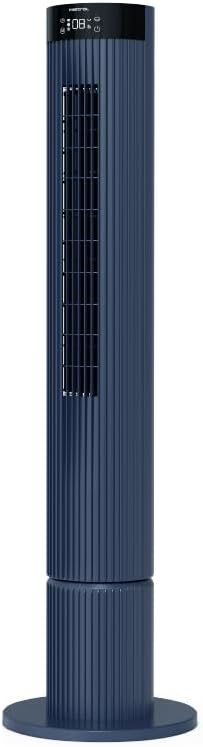
Figure 4.1: The fan demonstrating its convertible height feature, allowing adjustment between two different heights.
5. Postavljanje i početna upotreba
After assembly, position the fan in your desired location. Ensure it is on a stable, flat surface and away from curtains or objects that could obstruct airflow.
- Plug the power cord into a suitable electrical outlet (220-240V~, 50-60Hz).
- The fan will enter standby mode. The touch screen display may illuminate briefly.
- To power on, touch the power icon on the control panel or press the power button on the remote control.
6. Uputstvo za upotrebu
The fan can be operated via the full touch screen control panel on the unit or the included remote control.
6.1 Funkcije kontrolne table
The touch screen control panel provides access to all fan functions:
- Dugme za napajanje: Uključuje ili isključuje ventilator.
- Podešavanje brzine: Cycles through 12 fan speeds.
- Odabir načina rada: Switches between Turbo, One-key Cycle, and Baby modes.
- Oscilacija: Activates or deactivates 60-degree left-right oscillation.
- Tajmer: Sets the pre-set On/Off timer for up to 12 hours.
- Wi-Fi indikator: Prikazuje status Wi-Fi veze.
6.2 Daljinski upravljač
The remote control duplicates all functions available on the touch screen panel for convenient operation from a distance.
- Uvjerite se da daljinski upravljač ima ispravne baterije.
- Point the remote control towards the fan's control panel for optimal signal reception.
6.3 Načini rada
- Turbo način rada: Omogućava maksimalan protok zraka za brzo hlađenje.
- One-key Cycle Mode: Automatically cycles through different fan speeds to simulate natural breeze.
- Način bebe: Operates at a gentle, quiet speed suitable for nurseries or light sleeping.
7. Wi-Fi and Online Voice Control
The Mistral MFD4389DRW fan can be connected to your home Wi-Fi network for smart control via a mobile application and online voice commands.
7.1 Wi-Fi veza
- Download the official Mistral smart home application from your device's app store.
- Registrujte se ili prijavite na svoj račun unutar aplikacije.
- Provjerite je li vaš mobilni uređaj povezan na 2.4GHz Wi-Fi mrežu.
- Follow the in-app instructions to add a new device. This typically involves putting the fan into pairing mode (refer to the app or fan display for specific instructions, often by holding a Wi-Fi button).
- Once connected, the Wi-Fi indicator on the fan's control panel will illuminate steadily.
7.2 Online Voice Control
After successful Wi-Fi connection, you can link your fan to compatible smart home voice assistants (e.g., Google Assistant, Amazon Alexa) through the Mistral app settings.
- Open the Mistral app and navigate to the 'Integrations' or 'Voice Control' section.
- Select your preferred voice assistant and follow the prompts to link your Mistral account.
- Nakon povezivanja, možete koristiti glasovne komande kao što su:
- "Turn on the fan."
- "Set fan speed to 5."
- "Turn off oscillation."
- "Change fan mode to Baby."
8. Održavanje
Redovno čišćenje pomaže u održavanju performansi ventilatora i produžava njegov vijek trajanja.
8.1 Čišćenje
- Uvijek isključite ventilator iz električne utičnice prije čišćenja.
- Koristite meku, damp krpu za brisanje vanjskih površina ventilatora. Ne koristite abrazivna sredstva za čišćenje ili rastvarače.
- Koristite usisivač sa nastavkom za četku da biste uklonili prašinu sa rešetki za usis i izlaz zraka.
- Prije ponovnog uključivanja i rada provjerite je li ventilator potpuno suh.
8.2 Skladištenje
If storing the fan for an extended period, unplug it, clean it thoroughly, and store it in its original packaging or a dust-free environment.
9. Otkrivanje problema
Ako naiđete na probleme s ventilatorom, pogledajte sljedeće uobičajene probleme i rješenja:
| Problem | Mogući uzrok | Rješenje |
|---|---|---|
| Ventilator se ne uključuje. | Nema napajanja. | Provjerite je li kabel za napajanje sigurno uključen u ispravnu utičnicu. |
| Slab protok vazduha. | Air intake/outlet blocked; Fan speed too low. | Clean grilles to remove dust. Increase fan speed. |
| Ventilator proizvodi neobičan zvuk. | Obstruction; Loose parts. | Unplug and check for any foreign objects. Ensure base is securely attached. |
| Daljinski upravljač ne radi. | Prazne baterije; Prepreka. | Replace remote control batteries. Ensure no objects are blocking the signal path. |
| Wi-Fi veza ne uspijeva. | Incorrect Wi-Fi password; Router issues; Fan too far from router. | Verify Wi-Fi password. Ensure fan is within range of a 2.4GHz Wi-Fi network. Restart router and fan. |
Ako problem i dalje postoji nakon isprobavanja ovih rješenja, obratite se korisničkoj podršci.
10. Specifikacije
| Feature | Specifikacija |
|---|---|
| Model | MFD4389DRW |
| Voltage | 220-240V~, 50-60Hz 1.3A |
| Wattage | 40W |
| Zapremina zraka | 29.54 m³ / min |
| Max Air Flow | 4.26 m/s |
| Noise Level (Lowest Speed) | 33.2dB |
| Noise Level (Highest Speed) | 68.3dB |
| Dimenzije proizvoda (D*Š*V) | 168 * 300 * 900 OR 1104 mm |
| Neto težina | 4.46 KGS |
| Sigurnosna oznaka | 250467-11 |
| Posebne karakteristike | Remote Controlled, Timer, Wi-Fi Enabled |
| Broj brzina | 12 |
11. Garancija i podrška
This Mistral MFD4389DRW DC Turbo Tower Fan comes with a comprehensive warranty:
- Opšta garancija: 1 godina od datuma kupovine.
- Garancija na motor: An additional 3 Years for the motor only, totaling 4 years for the motor.
For warranty claims, technical support, or service inquiries, please contact your local Mistral authorized service center or refer to the contact information provided on the official Mistral website.


