Uvod
Welcome to the Lockly Vision Smart Door Lock user manual. This guide provides detailed instructions to help you set up, operate, and maintain your new smart lock. The Lockly Vision combines advanced security features with convenience, offering multiple unlocking methods, an integrated HD video doorbell, and remote access capabilities.
Your Lockly Vision Smart Door Lock is designed to enhance your home security with features such as a fingerprint sensor, a patented PIN Genie® keypad, and real-time monitoring through the Lockly app. Please read this manual thoroughly before installation and use to ensure proper functionality and safety.
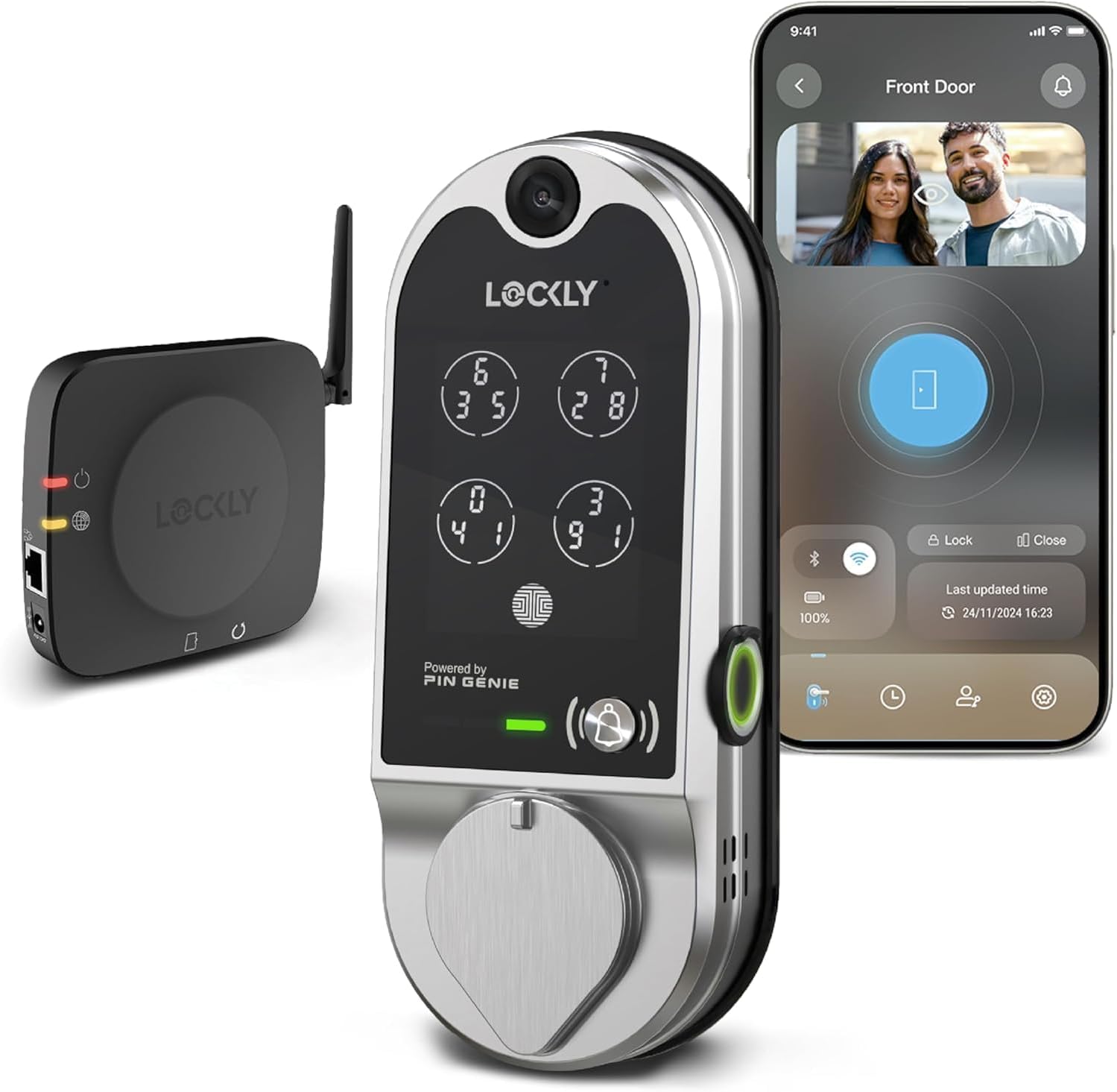
Image: The Lockly Vision Smart Door Lock, showing the exterior unit with keypad, the interior unit, and the accompanying Wi-Fi hub, alongside a smartphone displaying the Lockly app interface with live video feed and lock controls.
Ključne karakteristike
- Više metoda otključavanja: Unlock your door using fingerprint, the Lockly app, patented PIN Genie® keypad, voice control (Alexa/Google), or physical key.
- Smart Camera and Two-Way Audio: Integrated HD video doorbell allows remote monitoring and two-way communication with visitors via the Lockly app.
- 3D Biometric Fingerprint Sensor: Quick and secure access with fingerprint recognition in less than 0.3 seconds, storing up to 99 fingerprints.
- Real-Time Monitoring and Alerts: Monitor lock status, receive notifications, and manage access codes from anywhere.
- Patented PIN Genie® Keypad: Numbers on the keypad shuffle after each use, preventing code guessing and fingerprint residue analysis.
- Offline Access Codes: Generate single-use or limited-use access codes that work without internet connection.
- Programmable Auto-Lock: Customize the auto-lock duration from 5 to 300 seconds for added security and convenience.
- Način dobrodošlice: Preset your door to unlock for expected guests or service crews.

Slika: Prekoview of the Lockly Vision's integrated security features, including night vision HD camera, PIN Genie® Digital Keypad, 3D Biometric Fingerprint Access, Doorbell with 2-way talk, and App Control with no monthly fee for cloud storage or remote control.

Image: Demonstrates the Lockly Vision's hack-proof keypad with patented PIN Genie technology, showing how the digits dynamically shuffle their locations after every use to prevent password guessing.

Image: Highlights the Lockly Vision's 3D Biometric Fingerprint sensor, capable of recognizing fingerprints in 0.3 seconds and storing up to 99 fingerprints, with AI learning to improve speed and accuracy.
Postavljanje i instalacija
Before beginning installation, ensure your door meets the compatibility requirements. The Lockly Vision is designed for standard door thicknesses and backsets.
Provjera kompatibilnosti vrata
Verify your door dimensions against the following specifications:
- Door Thickness: 1 3/8" - 2" (35mm - 50mm)
- Backset: 2 3/8" or 2 3/4" (60mm or 70mm)
- Cross Bore Hole Diameter: 2 1/8" (54mm)
- Edge Bore Hole Diameter: 1" (25mm)

Image: A diagram illustrating the necessary door measurements for Lockly Vision installation, including door thickness (1 3/8" - 2"), cross bore (2 1/8"), edge bore (1"), and backset (2 3/8" or 2 3/4"). Also shows the dimensions of the Lockly Vision unit itself.
Koraci instalacije (prekoview)
- Prepare the Door: Ensure existing hardware is removed and the door is clean.
- Install the Deadbolt: Insert the deadbolt into the door edge and secure it.
- Install the Exterior Assembly: Mount the exterior keypad unit, ensuring the cable passes through the door.
- Install the Interior Mounting Plate: Secure the mounting plate to the exterior assembly.
- Connect Cables and Install Interior Assembly: Connect the cable from the exterior unit to the interior unit and mount the interior assembly.
- Install Batteries: Insert the required batteries (1 Lithium Polymer battery included).
- Install Wi-Fi Hub: Plug in the Wi-Fi hub within range of your lock and home router.
- Calibrate the Lock: Follow the instructions in the Lockly app to calibrate the lock for proper operation.
For detailed step-by-step installation instructions, please refer to the Lockly Vision Quick Start Guide included in your product packaging or visit the official Lockly support website.
Uputstvo za upotrebu
Otključavanje vrata
- Otisak prsta: Place your registered finger on the biometric sensor. The lock will unlock instantly.
- PIN Genie® Keypad: Touch the screen to activate. Enter your 6-8 digit access code. The numbers will shuffle after each digit entry. Press the Lockly button to confirm.
- Lockly App: Open the Lockly app on your smartphone. Tap the unlock icon.
- Fizički ključ: Use the provided physical key as a backup.
- upravljanje glasom: Use compatible voice assistants like Amazon Alexa or Google Assistant to lock/unlock your door (requires integration setup in the app).
Zaključavanje vrata
- Automatsko zaključavanje: If enabled, the lock will automatically re-lock after a set period (5-300 seconds).
- Ručno zaključavanje: Press the Lockly button on the keypad or use the thumb-turn on the interior unit.
- Lockly App: Open the Lockly app and tap the lock icon.
Using the Video Doorbell and Two-Way Audio
When a visitor presses the doorbell button on the Lockly Vision, you will receive a notification on your smartphone via the Lockly app. You can then view the live video feed and engage in two-way audio communication with the visitor from anywhere.

Image: A person interacting with a visitor at their door via the Lockly Vision's two-way audio feature, displayed on a smartphone screen, allowing remote communication and unlocking.
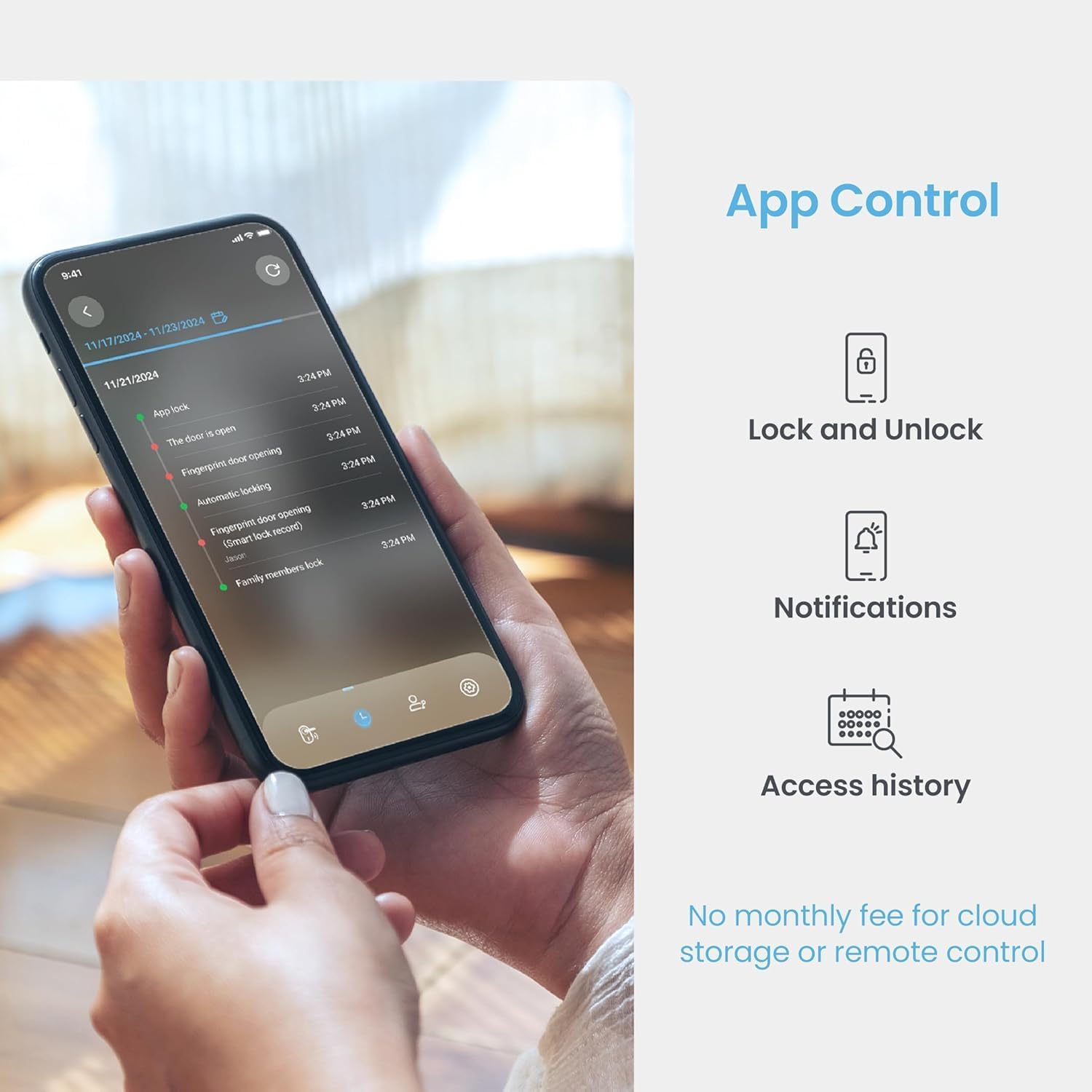
Image: A smartphone displaying the Lockly app interface, showing options for locking/unlocking, notifications, and access history, emphasizing remote control capabilities.
Održavanje
Zamjena baterije
The Lockly Vision uses 1 Lithium Polymer battery (included). When the battery level is low, you will receive alerts via the Lockly app and audible warnings from the lock. To replace the battery:
- Skinite poklopac baterije na unutrašnjoj jedinici.
- Carefully disconnect and remove the old battery.
- Insert the new Lithium Polymer battery, ensuring correct polarity.
- Vratite poklopac baterije.
The lock also features an emergency 9V battery power supply port on the exterior unit for temporary power if the main battery is completely drained.

Image: Illustrates the Lockly Vision's battery features, including the 9V emergency power supply port and the typical battery life of up to 12 months with low battery alerts.
Čišćenje i njega
- Clean the keypad and fingerprint sensor regularly with a soft, dry, lint-free cloth.
- Izbjegavajte upotrebu abrazivnih sredstava za čišćenje, rastvarača ili hemijskih sprejeva, jer oni mogu oštetiti završnu obradu i elektronske komponente.
- Ensure the lock is protected from extreme weather conditions where possible, although it is designed to be weatherproof (IP54 rated).
Rješavanje problema
| Problem | Mogući uzrok | Rješenje |
|---|---|---|
| Brava ne reaguje na tastaturu/otisak prsta. | Low battery; incorrect code/fingerprint; sensor obstruction. | Check battery level and replace if necessary. Re-enter code carefully. Clean fingerprint sensor. Re-register fingerprint if needed. |
| Nije moguće povezati se na Wi-Fi. | Wi-Fi hub out of range; incorrect Wi-Fi password; network issue. | Move Wi-Fi hub closer to the lock and router. Verify Wi-Fi password. Restart router and hub. |
| Video doorbell not showing feed. | Poor Wi-Fi signal; app issue; camera obstruction. | Ensure strong Wi-Fi connection. Restart Lockly app. Check camera lens for obstructions. |
| Automatsko zaključavanje se ne aktivira. | Auto-lock feature disabled; incorrect settings. | Verify auto-lock settings in the Lockly app are enabled and configured correctly. |
If you encounter issues not listed here or require further assistance, please contact Lockly customer support.
Specifikacije
| Feature | Detalj |
|---|---|
| Brand | Lockly |
| Naziv modela | 798SN |
| Tip brave | Deadbolt |
| Materijal | legirani čelik |
| Boja | Satin nikal |
| Dimenzije artikla (D x Š x V) | 7 x 3 x 1.5 inča |
| Težina artikla | 5.79 funte |
| Posebne karakteristike | Fingerprint, HD Video Doorbell Lock |
| Kontrolni metod | App |
| Baterije | 1 litijum-polimerska baterija (uključena) |
| Weatherproof Rating | IP54 |
| Test izdržljivosti | 72 Hours Salt Spray Test, 250,000 Cycles Deadbolt Test |
| UPC | 810055606580 |

Image: Highlights the robust construction and testing of the Lockly Vision, including IP54 weatherproof rating, 72-hour salt spray test, and 250,000 deadbolt cycles, emphasizing its durability.
Garancija i podrška
Lockly offers comprehensive support for your product:
- Garancija na mehaniku i završnu obradu: 5 godine
- Garancija za elektroniku: 2 godine
- tehnička podrška: Doživotna tehnička podrška
Our dedicated team is available 24/7 to assist you. You can contact Lockly support via phone, email, or live chat for any technical assistance or warranty claims.
For the most up-to-date support information and contact details, please visit the official Lockly webweb-mjesto ili pogledajte garantni list koji ste dobili uz proizvod.


