Uvod
This manual provides detailed instructions for the installation, operation, and maintenance of your Reidsport Ceiling Fan Remote Control. Please read this manual thoroughly before use to ensure proper function and safety.
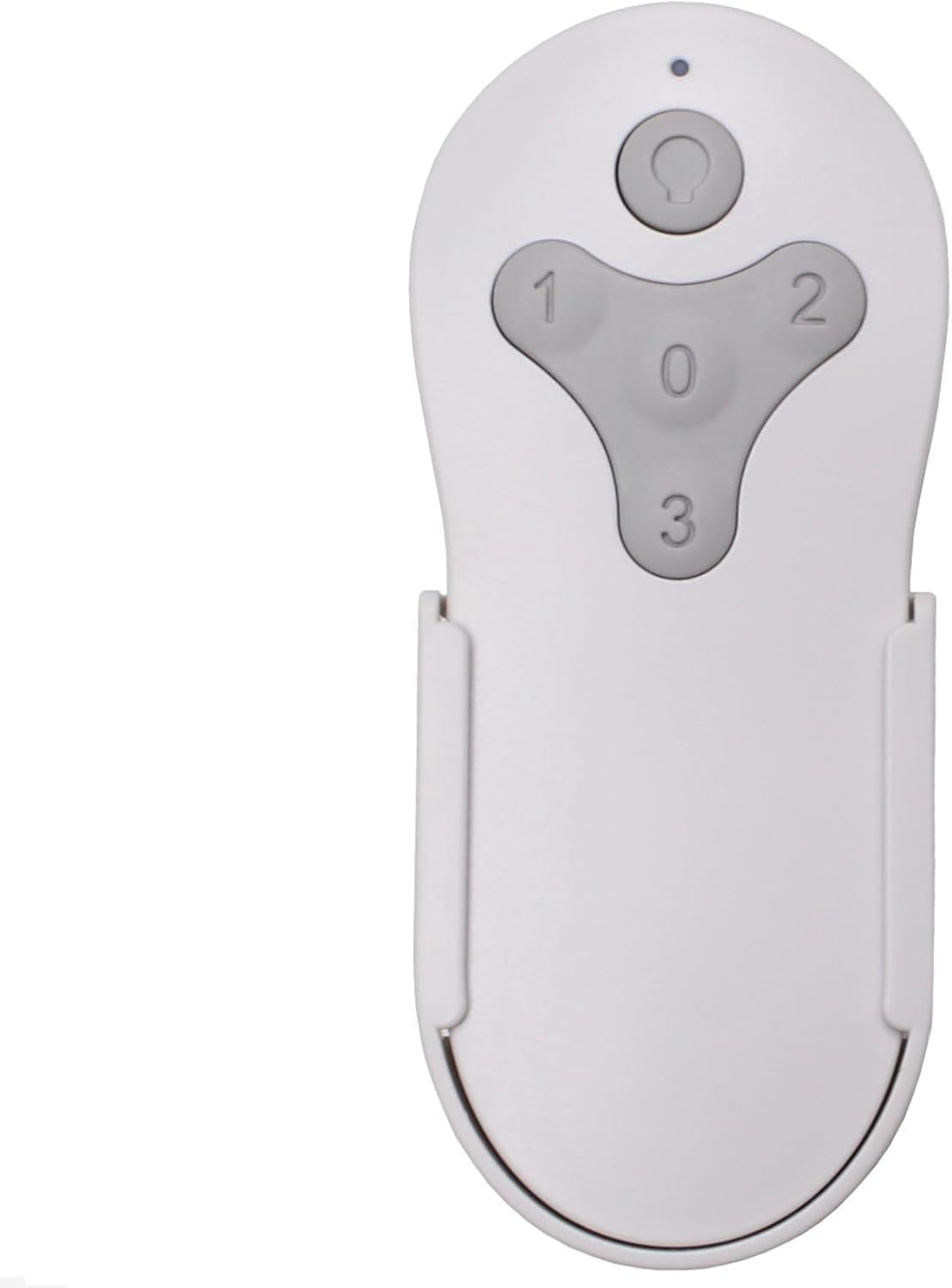
Slika: Front view of the Reidsport Ceiling Fan Remote Control, showing the power button and fan speed buttons (0, 1, 2, 3).
Sigurnosne informacije
Uvijek poštujte sljedeće sigurnosne mjere:
- Ensure power is turned off at the circuit breaker before performing any installation or maintenance.
- Ne izlažite daljinski upravljač vodi ili prekomjernoj vlazi.
- Use only the specified battery type (12V 23A).
- Držite baterije van domašaja dece.
Sadržaj paketa
Provjerite da li su sve stavke prisutne u paketu:
- Reidsport Ceiling Fan Remote Control
- Zidni držač
- Vijci za montažu (2)

Image: The remote control, its wall mount holder, and two mounting screws, indicating the complete package contents.
Specifikacije
| Feature | Detalj |
|---|---|
| Broj modela | CDTR214D |
| Dimenzije proizvoda | 2 x 1 x 4 inča |
| Težina artikla | 6 unce |
| Vrsta baterije | 1 x 12V 23A (not included) |
| Kompatibilni uređaji | Harbor Breeze Reidsport Ceiling Fans (RDS44MBK5LR, RDS44BNK5LR, RDS44MW5LR, RDS52MBK6LR, RDS52BNK6LR, RDS52MW6LR) |
| Posebna karakteristika | Radiofrequency (RF) Control |
Podešavanje i uparivanje
1. Instalacija baterije
The remote control requires one 12V 23A battery (not included).
- Pronađite odeljak za baterije na poleđini daljinskog upravljača.
- Pomaknite poklopac baterije prema dolje da biste ga otvorili.
- Insert one 12V 23A battery, ensuring the correct polarity (+ and -).
- Gurnite poklopac baterije na svoje mjesto dok ne škljocne sigurno.

Slika: Stražnja strana view of the remote control with the battery compartment open, showing where to insert the 12V 23A battery.
2. Pairing with Ceiling Fan Receiver
Follow these steps to pair the remote control with your existing ceiling fan receiver:
- Turn Power Off To Fan: Locate the circuit breaker or wall switch that controls power to your ceiling fan and turn it OFF. Ensure the fan is completely powered down.

Image: A hand turning off a wall light switch, illustrating the first step of cutting power to the fan.
- Turn Power Back On To Fan: After a few seconds, turn the power back ON to the ceiling fan.
- Press and Hold "0" Key: Within 30 seconds of restoring power, press and hold the "0" key on the remote control for 5 seconds. The fan light should blink or the fan should respond, indicating successful pairing.

Image: A close-up of the remote control, with the "0" button highlighted, indicating the button to press for pairing.
If pairing is unsuccessful, repeat the steps. Ensure the remote control is within range of the fan receiver during the pairing process.

Image: The remote control securely placed in its wall mount holder, positioned on a wall near a ceiling fan, illustrating the ease of access after setup.
Uputstvo za upotrebu
The remote control provides comprehensive control over your ceiling fan's functions.
- Power Button (Top Button): Press to turn the fan light ON or OFF. Press and hold to dim the fan light.
- Fan Speed Buttons (1, 2, 3, 0):
- "1": Postavlja brzinu ventilatora na nisku.
- "2": Postavlja brzinu ventilatora na srednju.
- "3": Postavlja brzinu ventilatora na visoku.
- "0": Isključuje ventilator.

Image: The remote control displayed alongside icons and text describing its functions: full speed control, light control, dimming, and compatibility with multiple fan models.
Održavanje
Da biste osigurali optimalne performanse i dugotrajnost vašeg daljinskog upravljača:
- čišćenje: Obrišite daljinski upravljač mekom, suhom krpom. Ne koristite abrazivna sredstva za čišćenje ili rastvarače.
- Zamjena baterije: Replace the 12V 23A battery when the remote's range decreases or it becomes unresponsive. Dispose of old batteries according to local regulations.
- Skladištenje: Store the remote control in a cool, dry place when not in use for extended periods.
Rješavanje problema
| Problem | Mogući uzrok | Rješenje |
|---|---|---|
| Daljinski upravljač ne reaguje. | Prazna ili nepravilno instalirana baterija. | Replace the 12V 23A battery, ensuring correct polarity. |
| Remote control not pairing with fan. | Incorrect pairing procedure or power interruption. | Repeat the pairing steps carefully (Power Off, Power On, Hold "0" for 5 seconds). Ensure power is completely cycled. |
| Ograničeni domet ili povremena kontrola. | Slaba baterija ili smetnje. | Replace battery. Ensure no major obstructions between remote and fan receiver. |
| Fan light not dimming. | Fan receiver or light kit does not support dimming. | Verify your ceiling fan's specifications for dimming compatibility. |
Garancija i podrška
Ovaj proizvod dolazi sa a 1 godine garancije proizvođača.
For technical support or warranty claims, please contact Comfort Direct customer service. Refer to your purchase documentation for contact details or visit the official Comfort Direct website.
Napomena: The warranty does not cover damage caused by improper installation, misuse, or unauthorized modifications.


