1. Uvod
This manual provides detailed instructions for the setup, operation, and maintenance of your NETUM NT-1200 and CS7501 QR Industrial Bluetooth Barcode Scanners. Please read this manual thoroughly before using the devices to ensure proper functionality and to maximize their lifespan. These scanners are designed for efficient and reliable barcode reading in various environments, supporting both 1D and 2D barcodes from physical labels and digital screens.
2. Proizvod je gotovview
2.1 Ključne karakteristike
- Skeniranje visoke rezolucije: Equipped with a megapixel (1280×800) CMOS sensor, the CS7501 scans 1D and 2D barcodes (QR, PDF417, Data Matrix, etc.) from paper or digital screens.
- Svestrano povezivanje: Offers 3-in-1 connection options: Bluetooth, 2.4GHz Wireless Adapter, and Wired USB Connection for compatibility with smartphones, computers, POS systems, iPhones, iPads, and laptops.
- Produženi vijek trajanja baterije: Features a 2400mAh high-capacity battery for up to 12 hours of continuous operation, with real-time battery level indicators.
- Izdržljiva konstrukcija: Built with ABS plastic and reinforced with TPU material, capable of withstanding drops from up to 4.92 feet (1.5 meters). Ergonomic design for comfortable, extended use.
- Višestruki načini skeniranja: NT-1200 offers manual trigger, continuous scanning, and auto-sensing scanning modes.
- Način pohrane: Supports storage of up to 100,000 barcodes when out of wireless range.
2.2 Komponente proizvoda
The package typically includes the barcode scanner(s), a charging dock (for NT-1200), a 2.4GHz wireless adapter, and USB cables.

Figure 1: NETUM NT-1200 (right, with dock) and CS7501 (left) Barcode Scanners.

Figure 2: NETUM CS7501 Barcode Scanner, showing its compact design, USB-C cable, and 2.4GHz wireless dongle.

Figure 3: NETUM NT-1200 Barcode Scanner securely placed in its charging and communication dock.
3. Podešavanje
3.1 Početno punjenje
Before first use, fully charge your scanner. Connect the USB cable to the scanner (CS7501) or its charging dock (NT-1200) and then to a power source (e.g., computer USB port, USB wall adapter). The battery indicator will show charging status.
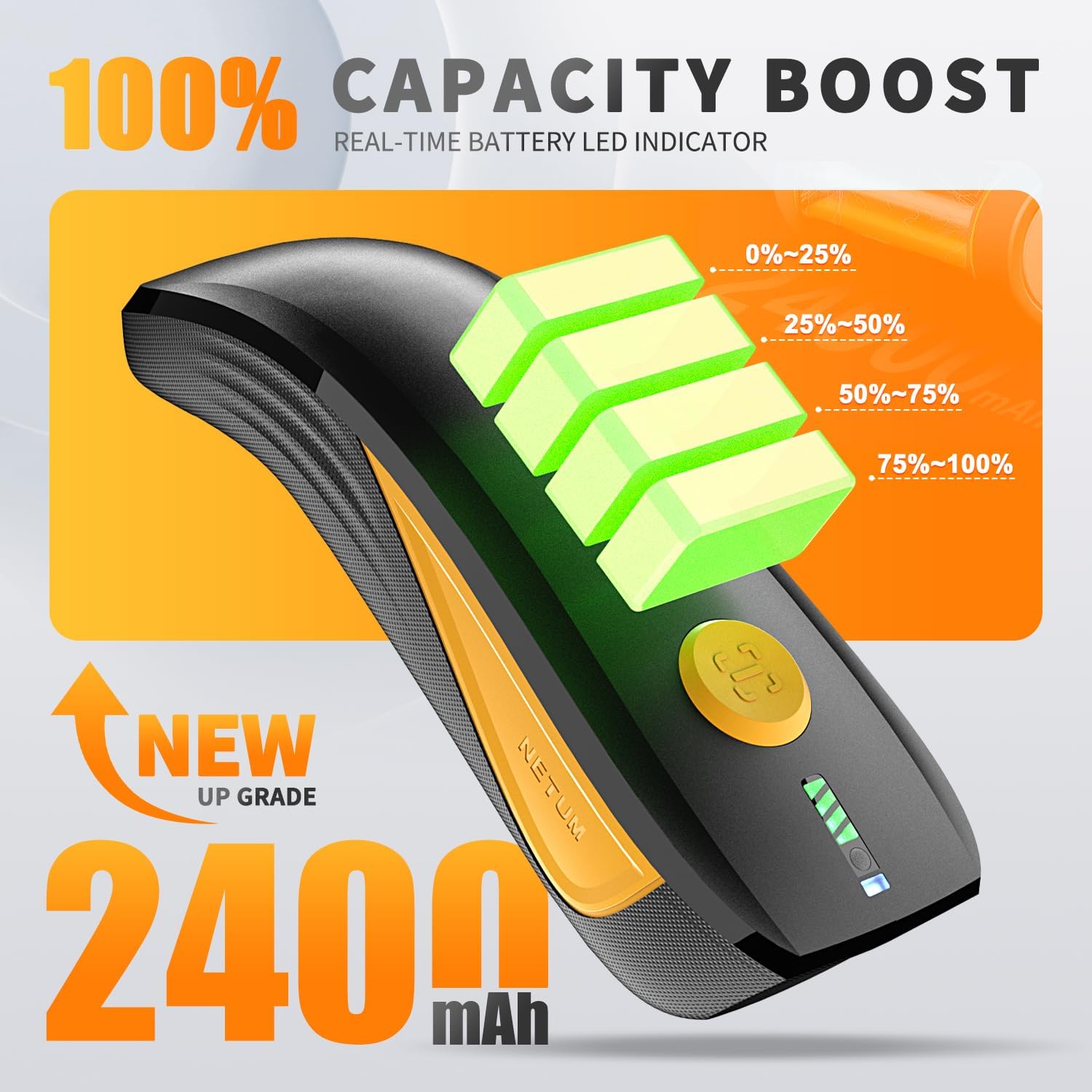
Figure 4: CS7501 scanner displaying real-time battery level indicators (0-25%, 25-50%, 50-75%, 75-100%).
3.2 Opcije povezivanja
Both scanners offer multiple connectivity options. Ensure the scanner is powered on before attempting to connect.
3.2.1 Bluetooth veza
- Turn on the scanner and switch to Bluetooth mode (refer to the switch button image below).
- Na vašem glavnom uređaju (pametnom telefonu, tabletu, računaru) omogućite Bluetooth i potražite dostupne uređaje.
- Select the scanner (e.g., "NETUM Barcode Scanner" or similar) from the list to pair.
- Uspješno povezivanje bit će naznačeno specifičnim zvukom ili LED svjetlom na skeneru.

Figure 5: The switch button on the CS7501 scanner, allowing selection between Bluetooth and 2.4GHz wireless connection modes. Bluetooth offers a range of up to 10m/33ft.
3.2.2 Bežična veza od 2.4 GHz
- Plug the 2.4GHz wireless adapter (dongle) into an available USB port on your computer.
- Turn on the scanner and switch to 2.4GHz wireless mode (refer to the switch button image above).
- The scanner should automatically connect to the adapter. A successful connection will be indicated by a specific sound or LED light. This mode typically offers a longer range, up to 100m/330ft.
3.2.3 Žičana USB veza
Connect the scanner directly to your computer using the provided USB cable. The scanner will function as a USB HID keyboard device, and no additional drivers are usually required. This mode also charges the scanner.
3.3 Initial Configuration (NT-1200)
For the NT-1200, specific settings like scanning modes or data transmission options may require scanning configuration barcodes found in the separate NT-1200 manual. Always refer to the dedicated manual for the NT-1200 for detailed setup barcodes.
4. Uputstvo za upotrebu
4.1 Skeniranje barkodova
Point the scanner's window at the barcode you wish to scan. Press the trigger button (for manual mode) or allow the scanner to detect the barcode automatically (in auto-sensing mode). A successful scan is usually indicated by a beep and/or a green LED light.

Figure 6: The CS7501 scanner demonstrating its 1MP high-resolution sensor's ability to capture various 1D and 2D barcodes, including QR codes, from different surfaces.
4.2 Scanning Modes (NT-1200)
- Ručni način okidanja: Pritisnite okidač da biste skenirali svaki barkod.
- Način kontinuiranog skeniranja: Skener kontinuirano emituje liniju skeniranja, čitajući barkodove dok prolaze kroz polje view bez potrebe za pritiskanjem okidača.
- Način skeniranja s automatskim detektiranjem: Skener automatski detektuje barkod u svom polju view and scans it without manual trigger activation.
To switch between these modes, you will need to scan specific configuration barcodes provided in the NT-1200's dedicated manual.
4.3 Režim skladištenja
When the scanner is out of Bluetooth or 2.4GHz wireless range, it can store scanned barcodes internally. The NT-1200 supports storage of up to 100,000 barcodes. To upload stored data, reconnect the scanner to your host device and scan the "Upload Data" configuration barcode (if applicable, refer to your specific model's manual).
5. Održavanje
- čišćenje: Use a soft, dry cloth to clean the scanner's exterior. For the scanning window, use a lens cleaning cloth and a mild, non-abrasive cleaner if necessary. Avoid harsh chemicals or abrasive materials.
- Skladištenje: Čuvajte skener na hladnom i suhom mjestu, dalje od direktne sunčeve svjetlosti i ekstremnih temperatura.
- Održavanje baterije: Za optimalan vijek trajanja baterije, izbjegavajte često potpuno pražnjenje baterije. Ako je skladištite duži period, napunite bateriju do oko 50% i punite je svakih nekoliko mjeseci.
- Zaštita od pada: While designed to be rugged (withstanding drops up to 4.92 feet / 1.5 meters), avoid unnecessary drops to prolong the device's life.

Figure 7: The CS7501 scanner's robust construction, featuring ABS+TPU materials for enhanced durability and drop protection.
6. Otkrivanje problema
- Skener se ne povezuje:
- Provjerite je li skener uključen i potpuno napunjen.
- Verify the correct connectivity mode (Bluetooth, 2.4GHz, USB) is selected on the scanner.
- For Bluetooth, ensure your host device's Bluetooth is enabled and the scanner is paired.
- Za 2.4 GHz, provjerite je li adapter sigurno priključen.
- Pokušajte ponovo pokrenuti i skener i glavni uređaj.
- Cannot Scan Barcodes:
- Provjerite da li je barkod čist, neoštećen i dobro osvijetljen.
- Provjerite udaljenost i ugao između skenera i barkoda.
- Verify the scanner is in the correct scanning mode (e.g., manual trigger if required).
- Ensure the barcode type is supported by the scanner (1D/2D).
- Očistite prozor za čitanje na skeneru.
- Scanned Data Not Appearing:
- Confirm the scanner is successfully connected to your host device.
- Ensure the cursor is in a text input field on your host device.
- Check if the scanner is in storage mode; if so, upload the data.
- Kratko trajanje baterije:
- Ensure the scanner is fully charged before use.
- Check the battery health indicators.
- Reduce screen brightness or disable unnecessary features if applicable.
7. Specifikacije
| Feature | Detalj |
|---|---|
| Brojevi modela | NT-1200, CS7501 |
| Sensor (CS7501) | Megapixel CMOS (1280×800) |
| Kompatibilnost barkodova | 1D and 2D (QR, PDF417, Data Matrix, GS1 Code128, Aztec, Maxi, etc.) |
| Tehnologija povezivanja | Bluetooth, 2.4GHz Wireless, USB |
| Bluetooth domet | Do 10m / 33ft |
| 2.4GHz Wireless Range | Do 100m / 330ft |
| Kompatibilni uređaji | Computer, Laptop, POS, Smartphone, iPad, iPhone |
| Izvor napajanja | Battery Powered |
| Battery Capacity (CS7501) | 2400mAh |
| Continuous Operation (CS7501) | Do 12 sati |
| Zaštita od pada | Withstands drops from up to 4.92 feet (1.5 meters) |
| Storage Capacity (NT-1200) | Do 100,000 barkodova |
8. Garancija i podrška
NETUM products are designed for reliability and performance. For specific warranty details, please refer to the warranty card included with your product or visit the official NETUM website. For technical support, troubleshooting assistance, or service inquiries, please contact NETUM customer support through the contact information provided on their official weblokacija ili ambalaža proizvoda.


