Uvod
Welcome to the world of digital photography with your new Vivitar Snapshot Digital Camera, Model VES124. This lightweight and user-friendly camera is designed for both spontaneous and planned shoots, allowing you to capture vibrant 44MP photos and crystal-clear 1080p videos with ease. Its compact design, 3x digital zoom, 2.4-inch preview screen, and rechargeable lithium-ion battery make it an ideal companion for all your creative adventures.
Šta je uključeno
Your Vivitar Snapshot Digital Camera package includes the following items:
- Vivitar Snapshot Digital Camera (Model VES124)
- USB kabl za punjenje
- Two (2) Rechargeable Lithium-ion Batteries
- 32GB Micro SD kartica
- Traka za kameru
- Cloth Cloth
- Uputstvo za upotrebu
Početak: Početno podešavanje
- Napunite bateriju: Insert one of the provided rechargeable lithium-ion batteries into the camera's battery compartment. Connect the camera to a power source using the USB charging cable. The charging indicator light will show the charging status. Ensure the battery is fully charged before first use.
- Umetnite SD karticu: Open the memory card slot cover. Gently insert the 32GB Micro SD card into the slot until it clicks into place. Ensure it is inserted in the correct orientation.
- Attach Camera Strap: Securely attach the camera strap to the designated loop on the camera body to prevent accidental drops.
- Uključeno: Press and hold the power button located on the top of the camera until the screen illuminates.

Slika: Nazad view of the Vivitar Snapshot Digital Camera, highlighting the screen and control buttons.
Upravljanje kamerom
Snimanje fotografija
- Point and Shoot: Frame your subject using the 2.4-inch preview screen. The camera features autofocus with face detection to ensure sharp images.
- Snimiti: Press the shutter button located on the top of the camera to take a 44MP photo.
- Digitalni zum: Use the 'W' (Wide) and 'T' (Telephoto) buttons to adjust the 3x digital zoom for closer shots.
- Selfi način rada: The camera features a front screen for easy self-portraits. Switch to selfie mode to view yourself on the front display.
Snimanje video zapisa
- Započni snimanje: Switch the camera to video mode (refer to the menu for mode selection). Press the shutter button to begin recording 1080p videos at 30 frames per second.
- Anti-Shake: The built-in anti-shake feature helps stabilize your footage, especially when filming handheld or while moving.
- Zaustavi snimanje: Pritisnite dugme zatvarača ponovo da zaustavite snimanje.
Reviewi upravljanje medijima
- Reprodukcija: Use the playback button (often indicated by a play icon) to view your captured photos and videos on the 2.4-inch screen.
- Izbriši: While in playback mode, select the unwanted media and use the delete button (trash can icon) to remove it.
Podešavanje postavki
Access the camera's menu to customize various settings:
- rezolucija: Podesite rezoluciju fotografija i videa.
- Balans bijele boje: Choose from Auto, Cloudy, Daylight, Flash torch, Fluorescent, Incandescent.
- Efekti boja: Apply various filters like Color, Gray, Negative, Antique, Red.
- ISO: Adjust light sensitivity (ISO 100-3200).
- Režimi scene: Select from Automatic, Landscape, Portrait, Sports for optimized shooting.
- Samookidač: Postavite odgodu prije snimanja fotografije.
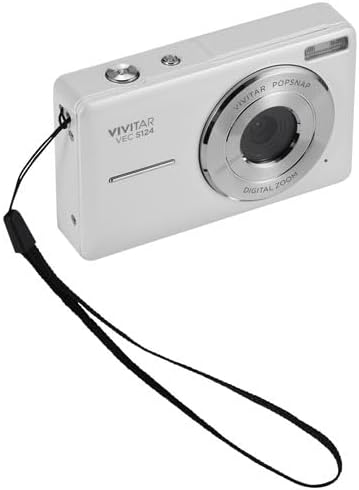
Slika: Front view of the Vivitar Snapshot Digital Camera, showing the lens and wrist strap.
Njega i održavanje
- čišćenje: Use the provided cleaning cloth to gently wipe the lens and screen. Avoid abrasive materials or harsh chemicals.
- Održavanje baterije: Store batteries in a cool, dry place. Do not expose them to extreme temperatures. Fully charge batteries before extended storage.
- Skladištenje: When not in use, store the camera in a protective case to prevent dust and scratches.
- Otpornost na vodu: Ova kamera je Nije vodootporanIzbjegavajte izlaganje vodi ili visokoj vlažnosti.
Rješavanje uobičajenih problema
- Kamera se ne uključuje: Provjerite je li baterija potpuno napunjena i pravilno umetnuta.
- "No Image" or "Card Error": Check if the SD card is properly inserted and not full. Try reformatting the card (this will erase all data).
- Blurry Photos: Ensure the lens is clean. Allow the autofocus to lock onto the subject before fully pressing the shutter button.
- Kratko trajanje baterije: Ensure batteries are fully charged. Consider carrying a spare charged battery.
Tehničke specifikacije
| Feature | Detalj |
|---|---|
| Naziv modela | Snapshot (VES124) |
| Efektivna rezolucija mirovanja | 44 MP |
| Video Rezolucija | 1080p pri 30fps |
| Optički zum | 3x digitalni zum |
| Veličina ekrana | LCD od 2.4 inča |
| Tehnologija foto senzora | CMOS |
| Focus Features | Autofocus with Face Detection |
| Stabilizacija slike | No (features anti-shake for video) |
| Vrsta baterije | Litijum jonski (punjivi) |
| Tehnologija povezivanja | USB |
| Nivo vodootpornosti | Nije vodootporan |
| Materijal | Plastika/kompozit |
Garancija i podrška
Your Vivitar Snapshot Digital Camera (Model VES124) comes with a 30-dnevna ograničena garancija from the manufacturer, Sakar International Inc. Please retain your proof of purchase for warranty claims.
For further assistance, technical support, or warranty inquiries, please refer to the contact information provided in your product packaging or visit the official Vivitar website.


