1. Uvod
This manual provides detailed instructions for the setup, operation, and maintenance of your Dierya M1 Wireless Gaming Mouse. Please read this manual thoroughly before using the product to ensure proper functionality and to maximize your user experience.

Figure 1: Dierya M1 Wireless Gaming Mouse and 2.4G USB Receiver.
2. Značajke proizvoda
- Optički senzor od 24,000 DPI: Adjustable DPI range from 200 to 24,000, with 6 preset levels (400-6400 DPI). Features a 125-1000 Hz polling rate, 300 IPS tracking speed, and 35G acceleration.
- Trostruka povezanost: Supports ultra-fast 2.4 GHz wireless (1000 Hz polling rate), energy-efficient Bluetooth 5.2 (125 Hz polling rate), and stable USB-C wired connection (1000 Hz polling rate).
- Produženi vijek trajanja baterije: Equipped with a 1000 mAh battery, providing up to 180 hours of use in ECO mode or 48 hours with RGB lighting enabled. Fully recharges in approximately 1 hour via USB-C. Includes an automatic power-saving mode after 1-5 minutes of inactivity.
- Lagan i ergonomski dizajn: Weighs 90g with a breathable honeycomb shell. Symmetrical design (125x63x41 mm) suitable for various grip styles.
- Izdržljive komponente: Features Huano switches rated for 20 million clicks and 100% PTFE feet for smooth gliding.
- Programabilna dugmad: Six customizable buttons for macros and reassignments.
- Dinamičko RGB osvjetljenje: 13 integrated dynamic RGB lighting effects with 16.8 million customizable colors.
- Kompatibilnost sistema: Compatible with Windows, macOS, Linux, and Chrome OS.
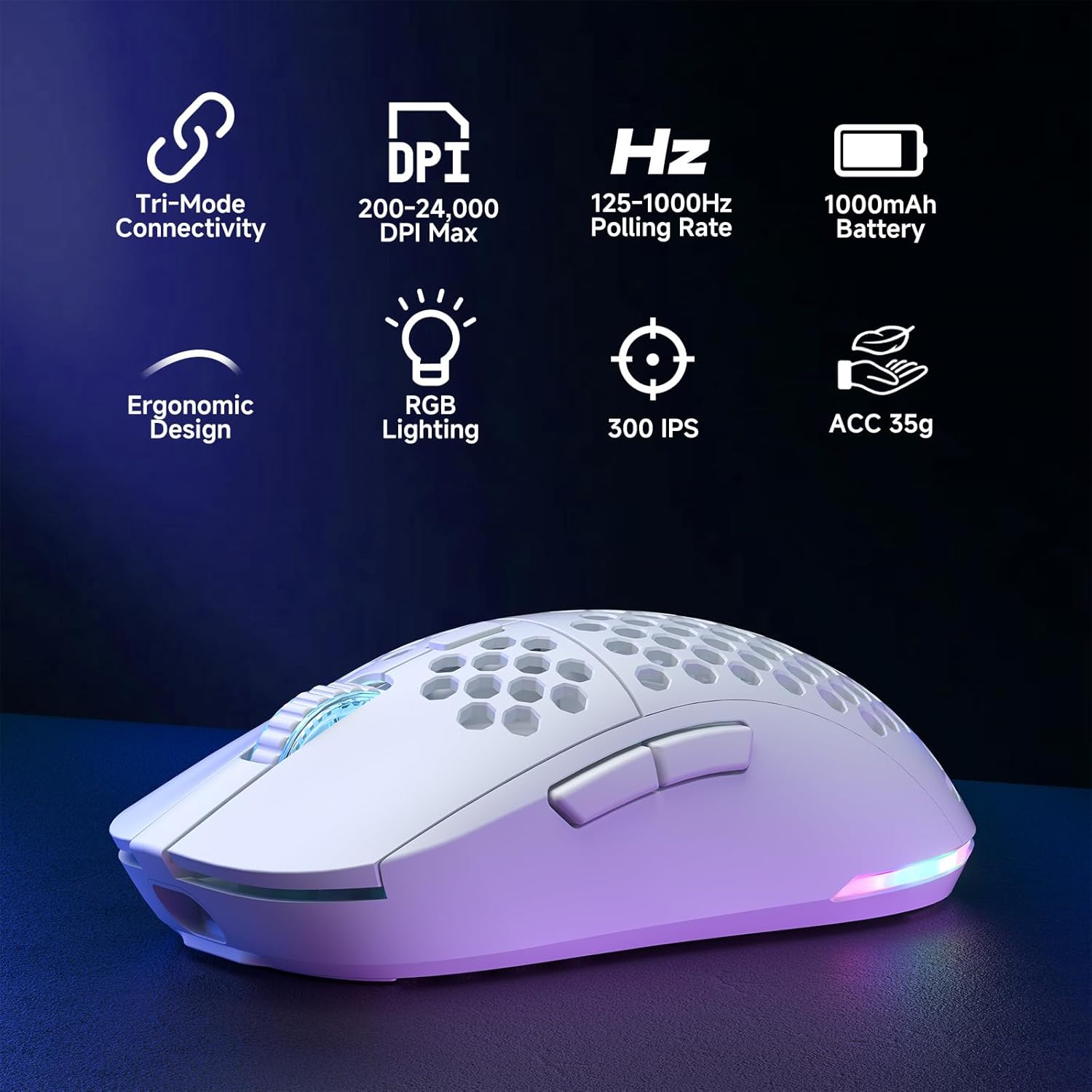
Figure 2: Key features of the Dierya M1 Wireless Gaming Mouse.
3. Dijagram proizvoda i komponente
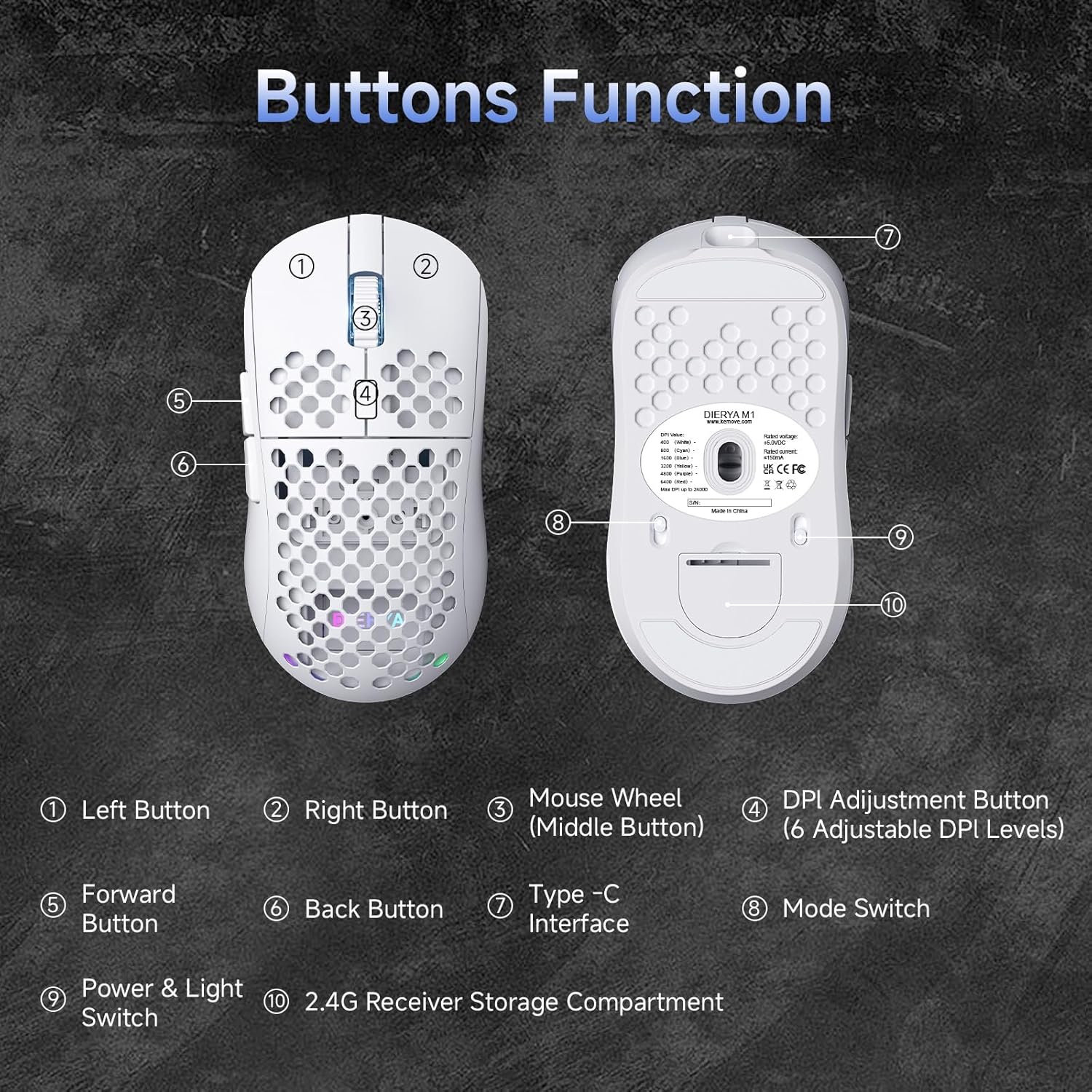
Slika 3: Gornji i donji dio view of the Dierya M1 mouse with labeled components.
- Lijevo dugme
- Desno dugme
- Mouse Wheel (Middle Button)
- DPI Adjustment Button (6 Adjustable DPI Levels)
- Dugme naprijed
- Dugme za povratak
- Interfejs Type-C
- Mode Switch (2.4G / Bluetooth / Wired)
- Power & Light Switch
- 2.4G Receiver Storage Compartment
4. Podešavanje i povezivanje
The Dierya M1 mouse offers three connection modes: 2.4 GHz Wireless, Bluetooth 5.2, and USB-C Wired.

Slika 4: Gotovoview of the three connection modes.
4.1. Bežična veza od 2.4 GHz
- Locate the 2.4G USB receiver in the storage compartment on the bottom of the mouse.
- Uključite USB prijemnik u slobodan USB port na vašem računaru.
- Set the mode switch on the bottom of the mouse to the '2.4G' position.
- Miš bi se trebao automatski povezati.
4.2. Bluetooth 5.2 veza
- Set the mode switch on the bottom of the mouse to the 'Bluetooth' position.
- Na računaru ili uređaju otvorite postavke Bluetootha.
- Traži new devices and select 'Dierya M1' from the list.
- Pratite sve upite na ekranu da dovršite proces uparivanja.
4.3. Žičana USB-C veza
- Connect the provided USB-C cable to the Type-C interface on the front of the mouse.
- Drugi kraj USB-C kabla priključite na dostupan USB port na računaru.
- Set the mode switch on the bottom of the mouse to the 'Wired' position.
- Miš će funkcionirati kao žični miš i istovremeno se puniti.
5. Uputstvo za upotrebu
5.1. DPI podešavanje
The DPI Adjustment Button (4) on the top of the mouse allows you to cycle through preset DPI levels. Each DPI level is indicated by a specific color on the scroll wheel LED for a few seconds after adjustment.
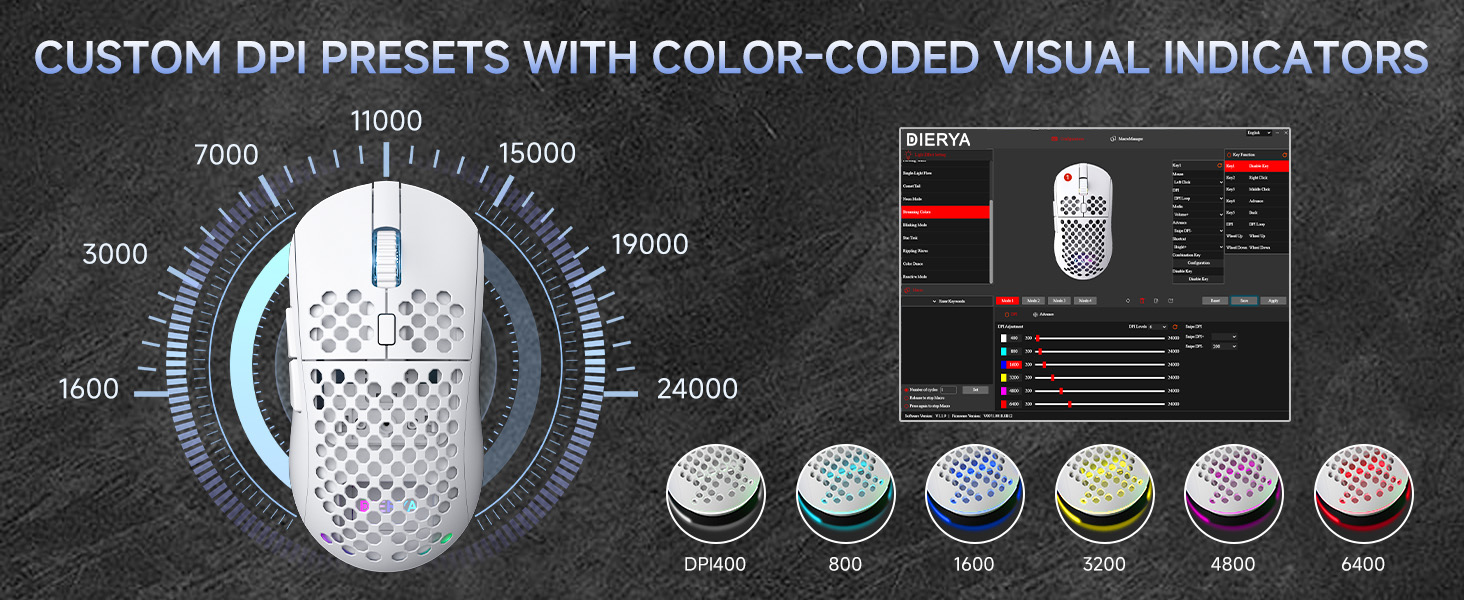
Figure 5: DPI levels and their corresponding scroll wheel LED colors.
- Press the DPI button to switch between 6 preset DPI levels.
- Default presets: 400 DPI (Red), 800 DPI (Green), 1600 DPI (Blue), 3200 DPI (Yellow), 4800 DPI (Purple), 6400 DPI (Cyan).
- For custom DPI settings and a wider range (200-24,000 DPI), use the M1 Driver Software (Windows only).
5.2. Kontrola RGB osvjetljenja
The mouse features 13 dynamic RGB lighting effects. You can control the lighting directly on the mouse or customize it further with the software.
- To cycle through RGB effects: Press and hold the DPI Adjustment Button (4) for 3 seconds.
- To turn RGB lighting On/Off: Use the Power & Light Switch (9) on the bottom of the mouse.
- For advanced customization of colors and effects, use the M1 Driver Software (Windows only).
5.3. Programabilni tasteri
The Dierya M1 has 6 programmable buttons (Left, Right, Middle, DPI, Forward, Back). These buttons can be customized for various functions, macros, or key reassignments using the M1 Driver Software.
6. Punjenje i upravljanje baterijom
The Dierya M1 mouse is equipped with a 1000 mAh rechargeable battery.

Figure 6: Charging the Dierya M1 mouse and battery life indicators.
- Punjenje: Connect the mouse to your computer using the provided USB-C cable. The mouse will charge while in wired mode or when connected to a power source. A full charge takes approximately 1 hour.
- Trajanje baterije: Expect up to 180 hours of use in ECO mode (RGB off) and up to 48 hours with RGB lighting enabled.
- Cuvanje energije: The mouse automatically enters a power-saving sleep mode after 1-5 minutes of inactivity. This duration can be adjusted via the M1 Driver Software.
- Indikator slabe baterije: The RGB lighting or a specific LED will indicate when the battery is low. Charge the mouse promptly to avoid interruption.
7. M1 Driver Software (Windows Only)
The M1 Driver Software allows for advanced customization of your mouse settings. This software is currently available for Windows operating systems only.

Figure 7: M1 Driver Software interface.
7.1. Softverske karakteristike
- Ključni zadatak: Customize the function of all 6 buttons.
- Urednik makronaredbi: Kreirajte i dodijelite složene makroe.
- DPI podešavanje: Fine-tune DPI settings from 200 to 24,000 in increments.
- Stopa glasanja: Adjust the polling rate (125-1000 Hz).
- RGB prilagođavanje: Personalizirajte svjetlosne efekte, boje i svjetlinu.
- Vrijeme spavanja: Configure the automatic power-saving sleep mode duration.
- Profile Menadžment: Save and load different profiles for various applications or games.
7.2. Instalacija
Download the latest M1 Driver Software from the official Dierya website. Follow the on-screen instructions to install the software on your Windows computer.
8. Održavanje
- čišćenje: Za čišćenje miša koristite meku, suhu krpu. Za tvrdokornu prljavštinu, laganoamp Može se koristiti krpa, pazeći da tekućina ne uđe u miš.
- Skladištenje: Čuvajte miša na hladnom i suhom mjestu, dalje od direktne sunčeve svjetlosti i ekstremnih temperatura.
- Održavanje baterije: Avoid fully discharging the battery frequently. For long-term storage, charge the mouse to about 50% and store it in a cool, dry place.
9. Otkrivanje problema
- Miš ne reaguje:
- Uvjerite se da je miš uključen.
- Check the connection mode switch (2.4G, Bluetooth, Wired) is set correctly.
- Za 2.4G, provjerite je li USB prijemnik sigurno priključen.
- For Bluetooth, re-pair the device.
- Try connecting via USB-C cable to check if it works in wired mode.
- Charge the mouse; the battery might be depleted.
- Kašnjenje ili povremena veza:
- Ensure the mouse is within range of the receiver/device (for wireless connections).
- Smanjite smetnje od drugih bežičnih uređaja.
- Uvjerite se da je baterija dovoljno napunjena.
- Update mouse drivers if available (Windows only).
- RGB osvjetljenje ne radi:
- Check the Power & Light Switch (9) on the bottom of the mouse.
- Ensure the mouse is not in ECO mode or a low-power state.
- If using the software, verify RGB settings.
- Podešavanje DPI-ja ne radi:
- Ensure you are pressing the correct DPI Adjustment Button (4).
- If using custom settings, check the M1 Driver Software.
10. Specifikacije
| Feature | Specifikacija |
|---|---|
| Brand | Dierya |
| Naziv modela | M1 |
| Boja | Bijelo |
| Tehnologija povezivanja | 2.4 GHz bežično, Bluetooth 5.2, USB-C žičano |
| Senzorna tehnologija | Optički |
| Raspon DPI-ja | 200 - 24,000 DPI |
| Polling Rate | 125-1000 Hz |
| Brzina praćenja | 300 IPS |
| Ubrzanje | 35G |
| Broj dugmadi | 6 (Programabilno) |
| Prekidači | Huano (20 Million Clicks) |
| Feet Material | 100% PTFE |
| Kapacitet baterije | 1000 mAh (litijum-jonska) |
| Battery Life (ECO Mode) | Do 180 sati |
| Battery Life (RGB Mode) | Do 48 sati |
| Vrijeme punjenja | Pribl. 1 sat |
| Težina | 90 grama |
| Dimenzije | 125 x 63 x 41 mm |
| Kompatibilnost operativnog sistema | Windows, macOS, Linux, Chrome OS |
11. Garancija i podrška
The Dierya M1 Wireless Gaming Mouse comes with a 1-godišnja garancija proizvođača. Ova garancija pokriva nedostatke u materijalu i izradi pod normalnom upotrebom.
For warranty claims, technical support, or further inquiries, please contact Dierya customer service through the official website or your point of purchase. Please have your product model number (M1) and proof of purchase ready when contacting support.