1. Uvod
Thank you for choosing the Dierya DK68 65% Wireless Mechanical Gaming Keyboard. This manual provides detailed instructions on how to set up, operate, and maintain your keyboard, ensuring optimal performance and longevity. The DK68 features a compact 65% layout, tri-mode connectivity (Bluetooth 5.0, 2.4G wireless, and USB-C wired), customizable RGB backlighting, and durable mechanical switches.
2. Sadržaj paketa
Molimo Vas da provjerite paket za sljedeće stavke:
- Dierya DK68 Wireless Mechanical Gaming Keyboard
- USB-C kabl
- Izvlakač ključeva
- Korisnički priručnik (ovaj dokument)
3. Proizvod je gotovview
The Dierya DK68 is a compact 68-key mechanical keyboard designed for both gaming and productivity. It offers a minimalist design while retaining essential functionality through FN key combinations. The keyboard supports multiple connection types and features vibrant RGB lighting.

Image: The Dierya DK68 Wireless Mechanical Gaming Keyboard in white, showcasinzbog svog kompaktnog rasporeda i RGB pozadinskog osvjetljenja.

Slika: Prekoview of the Dierya DK68's key features, including BT5.0/2.4G/Wired connectivity, 60% compact layout, RGB Backlit, 3000mAh battery, Mechanical Switches, Double-Shot Keycaps, Full N-Key Rollover (NKRO), and Detachable Cable.

Image: Illustration of the keyboard's tri-mode connection options: Type-C wired, Bluetooth 5.0, and 2.4GHz wireless, compatible with Windows, Mac, iOS, Android, Xbox, PC, Laptop, and Tablet devices.
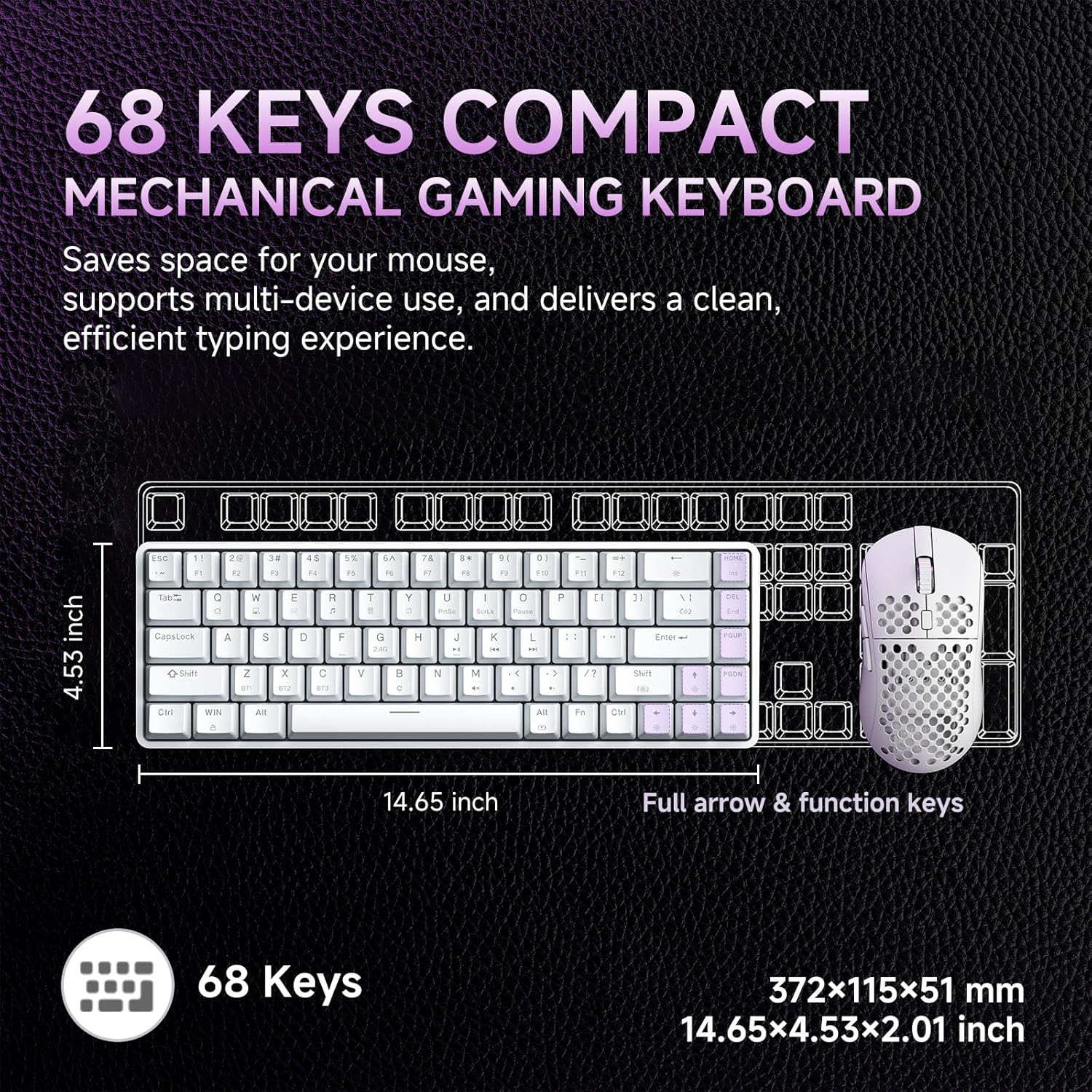
Image: Diagram showing the compact 68-key layout of the Dierya DK68, highlighting its dimensions (14.65 inches length, 4.53 inches width) and its space-saving design.

Slika: Krupni plan view of the mechanical blue switches, detailing their clicky feel, tactile feedback, 60gf actuation force, 2.3mm travel, and 50 million keystroke lifespan. The image also indicates pre-lubed switches.

Image: Visual representation of the keyboard's 3000 mAh high-capacity lithium battery, showing usage times: 12 hours with light on, 333 hours with light off, 3 minutes auto stop, and Type-C charging.

Image: Diagram illustrating the FN key combinations for controlling the vibrant RGB backlighting, including turning the light on/off (Fn + Backspace), switching light colors (Fn + Shift), switching light modes (Fn + |), and adjusting brightness/speed (Fn + Arrow keys).

Image: Details of the keyboard's design, including OEM double-shot keycaps for durability, two-stage feet for dual tilt options, and anti-slip pads for secure positioning.

Image: A detailed diagram showing the exact dimensions of the Dierya DK68 keyboard: 372 x 115 x 51 mm (14.65 x 4.53 x 2.01 inches) and a weight of 820g.
4. Podešavanje
4.1 Žičano povezivanje
- Spojite priloženi USB-C kabel na USB-C priključak tastature.
- Drugi kraj USB-C kabla priključite na dostupan USB port na računaru.
- Vaš sistem će automatski prepoznati tastaturu i ona će biti spremna za upotrebu.
4.2 2.4G bežična veza
- Pronađite 2.4G USB prijemnik (obično se nalazi u odjeljku na tastaturi).
- Priključite 2.4G USB prijemnik u dostupan USB port na računaru.
- Uključite tastaturu. Tastatura bi se trebala automatski povezati s prijemnikom.
4.3 Bluetooth veza
The keyboard supports Bluetooth 5.0 and can connect to up to three devices.
- Uključite tastaturu.
- Pritisnite i držite FN + Z, FN + X, ili FN + C for 3-5 seconds to enter Bluetooth pairing mode for BT1, BT2, or BT3 respectively. The corresponding key's backlight will flash rapidly.
- Na vašem uređaju (PC, Mac, tablet, pametni telefon) omogućite Bluetooth i potražite nove uređaje.
- Select "Dierya DK68" from the list of available devices to pair.
- Once paired, the key's backlight will stop flashing and remain steadily lit for a few seconds.
- Za prebacivanje između uparenih Bluetooth uređaja, pritisnite FN + Z, FN + X, ili FN + C ukratko.
4.4 Punjenje tastature
Connect the USB-C cable to the keyboard and a power source (e.g., computer USB port, USB wall adapter). The keyboard has a 3000 mAh battery. A low battery indicator may flash, and the backlight may dim when charging is required. The backlight will indicate charging status and turn off or change color when fully charged.
5. Uputstvo za upotrebu
5.1 Kombinacije FN tipki
The DK68 utilizes FN key combinations to access various functions due to its compact layout:
- FN + Backspace: Turn RGB backlight on/off.
- FN + |: Switch between different RGB lighting modes (21 effects available).
- FN + Shift: Adjust RGB lighting colors.
- FN + ↑: Povećajte svjetlinu pozadinskog osvjetljenja.
- FN + ↓: Smanjite svjetlinu pozadinskog osvjetljenja.
- FN + ←: Smanjite brzinu pozadinskog osvjetljenja.
- FN + →: Povećajte brzinu pozadinskog osvjetljenja.
- FN + Z/X/C: Switch between Bluetooth devices BT1/BT2/BT3.
- FN + Q/W/E/R/T/Y: (Specific media or function keys, refer to keycaps for exact labels if present).
5.2 Prilagođavanje RGB osvjetljenja
The keyboard offers 16.8 million colors and 21 lighting effects. Use the FN key combinations described above to cycle through modes, adjust colors, and control brightness and speed. For advanced customization, including macro programming and custom shortcut keys, download the official Dierya software from the manufacturer's website.
6. Održavanje
To ensure the longevity and performance of your Dierya DK68 keyboard, follow these maintenance guidelines:
- Čišćenje: Use a soft, dry cloth to wipe the keyboard surface. For deeper cleaning, use a can of compressed air to remove dust and debris from between the keycaps.
- Keycap Removal: Use the provided keycap puller to carefully remove keycaps for cleaning or replacement. Gently pull straight up to avoid damaging the switch.
- Održavanje prekidača: The mechanical switches are designed for durability. Avoid spilling liquids on the keyboard. If a switch feels inconsistent, it may require cleaning or replacement.
- Skladištenje: When not in use for extended periods, store the keyboard in a cool, dry place away from direct sunlight and extreme temperatures.
7. Otkrivanje problema
If you encounter issues with your Dierya DK68 keyboard, refer to the following common solutions:
- Tastatura ne reaguje (žična)Provjerite je li USB-C kabel sigurno povezan i s tastaturom i s računarom. Pokušajte s drugim USB priključkom ili kabelom.
- 2.4G Wireless Connection Issues: Ensure the 2.4G receiver is properly plugged in and the keyboard is turned on. Try plugging the receiver into a different USB port. Ensure there are no strong interferences nearby.
- Neuspješno uparivanje putem Bluetootha: Make sure the keyboard is in pairing mode (key flashing). Ensure Bluetooth is enabled on your device and it's within range. Try unpairing and re-pairing the device.
- Ključevi se ne registruju: Check for physical obstructions under the keycap. If using wireless, ensure the battery is charged. Try connecting via USB-C to rule out wireless issues.
- RGB Backlight Not Working: Ensure the backlight is turned on (FN + Backspace). Adjust brightness (FN + ↑/↓). If issues persist, try resetting the keyboard (if a reset function is available, consult the manufacturer's webweb lokacija).
- Baterija se brzo prazni: Reduce backlight brightness or turn off RGB when not needed. Ensure the keyboard is fully charged.
For further assistance, please contact Dierya customer support.
8. Specifikacije
| Feature | Detalj |
|---|---|
| Brand | Dierya |
| Broj modela | DK68 |
| Boja | Bijelo |
| Opis tastature | Bežična tastatura za igre |
| Tehnologija povezivanja | Bluetooth/2.4G/Type-C |
| Kompatibilni uređaji | Laptop, PC, Tablet |
| Dimenzije (D x Š x V) | 31.3 x 10.4 x 4.4 cm (14.65 x 4.53 x 2.01 inča) |
| Težina | 820 g |
| Kapacitet baterije | 3000 mAh |
| Battery Life (Light Off) | Do 90 sati |
| Battery Life (RGB On) | Do 8 sati |
| Vrijeme pripravnosti | 360 sati |
| Pozadinsko osvetljenje | RGB (21 efekata, 16.8 miliona boja) |
| Tip prekidača | Mechanical (Blue/Red options) |
| Prebacite životni vek | 60 miliona pritisaka na tastere |
| Materijal | Plastika |
| Uključene komponente | USB Cable, Keycap Puller |
9. Garancija i podrška
The Dierya DK68 keyboard typically comes with a manufacturer's warranty. Please refer to the warranty card included with your purchase or visit the official Dierya webstranicu za detaljne uslove i odredbe garancije.
For technical support, troubleshooting assistance, or any product-related inquiries, please contact Dierya customer service through their official webweb-mjesto ili kontakt informacije navedene u pakovanju vašeg proizvoda.