Uvod
The Xech Eon Max is a multi-functional device designed to serve as a digital alarm clock, Bluetooth speaker, and a comprehensive charging station. It features a retro design and integrates several modern functionalities including dual alarms, adjustable display brightness, multiple audio playback options, and wireless charging capabilities. This manual provides detailed instructions for setting up, operating, and maintaining your Xech Eon Max.

Image: The Xech Eon Max functions as a fast wireless charger, a wireless speaker, and a digital alarm clock. The image displays these three primary features in a collage format.
Product Overview
Familiarize yourself with the components and controls of your Xech Eon Max.

Image: Detailed diagrams illustrating the display panel, button functions, and various ports located on the back and side of the Xech Eon Max.
Display Panel (Front)
- AM indikator: Lights up when time is AM.
- PM indikator: Lights up when time is PM.
- BT Mode Indicator: Lights up when Bluetooth mode is active.
- Indikator FM moda: Lights up when FM radio mode is active.
- TF Mode Indicator: Lights up when TF card playback mode is active.
- AUX Mode Indicator: Lights up when AUX input mode is active.
- Alarm Clock 1 Indicator: Lights up when Alarm 1 is set.
- Alarm Clock 2 Indicator: Lights up when Alarm 2 is set.
- HH:MM Display: Shows current time in hours and minutes.
- Podloga za bežično punjenje: Area for wireless charging compatible devices.
- Vodič za dugmad: Refers to the control buttons below the display.
- Antena: Extendable antenna for FM radio reception.
- Bluetooth zvučnik: Integrated speaker for audio output.
Kontrolna dugmad
- Volume Knob (A): Rotate to adjust volume. Press to confirm settings.
- SET / Brightness Button (B): Press to enter time/alarm setting mode. Long press to adjust display brightness.
- On/Off / Mode Button (C): Long press to power on/off. Short press to cycle through modes (Bluetooth, FM, TF, AUX).
- Next / FM Radio Button (D): Short press for next track/station. Long press to auto-scan FM stations.
- Previous / Bluetooth Pairing Button (E): Short press for previous track/station. Long press to enter Bluetooth pairing mode.
Back and Side Ports
- USB-C Charging Port (a): For connecting the power adapter to charge the device.
- USB-C Output Port (b): For charging external devices via USB-C cable.
- TF Card Slot (c): For inserting a TF (MicroSD) card for audio playback.
- AUX Port / Antenna Port (d): For connecting external audio devices via AUX cable or for external antenna.
- USB-A Output Port (e): For charging external devices via USB-A cable.
- Lanyard Slot (f): For attaching a lanyard.
Setup
1. Powering On and Initial Charge
- Spojite priloženi USB-C kabel na USB-C Charging Port (a) na poleđini uređaja.
- Plug the other end of the USB-C cable into a power adapter (not included). For optimal performance, especially for fast wireless charging, use a 20W/18W (5V4A / 9V2A) adapter or higher.
- Dugo pritisnite On/Off / Mode Button (C) da uključite uređaj.
2. Podešavanje vremena i datuma
- Pritisnite SET / Brightness Button (B) jednom. Cifre za sate će početi treptati.
- Rotirajte Volume Knob (A) to adjust the hour. Press the Volume Knob (A) za potvrdu.
- The minute digits will start flashing. Rotate the Volume Knob (A) to adjust the minutes. Press the Volume Knob (A) za potvrdu.
- Nastavite ovaj postupak da biste podesili godinu, mjesec i dan.
- After setting the date, you can select 12-hour or 24-hour format. Rotate the Volume Knob (A) to choose and press to confirm.
3. Postavljanje alarma
The Xech Eon Max supports two independent alarms.
- Pritisnite SET / Brightness Button (B) repeatedly until the Alarm 1 indicator (7) or Alarm 2 indicator (8) starts flashing.
- The hour digits for the selected alarm will flash. Rotate the Volume Knob (A) to set the hour and press to confirm.
- The minute digits will flash. Rotate the Volume Knob (A) da podesite minute i pritisnite za potvrdu.
- After setting the time, you can choose the alarm sound (if applicable) or enable/disable the alarm. Rotate the Volume Knob (A) to select and press to confirm.
- To activate or deactivate an alarm, ensure its respective indicator (7 or 8) is lit on the display.
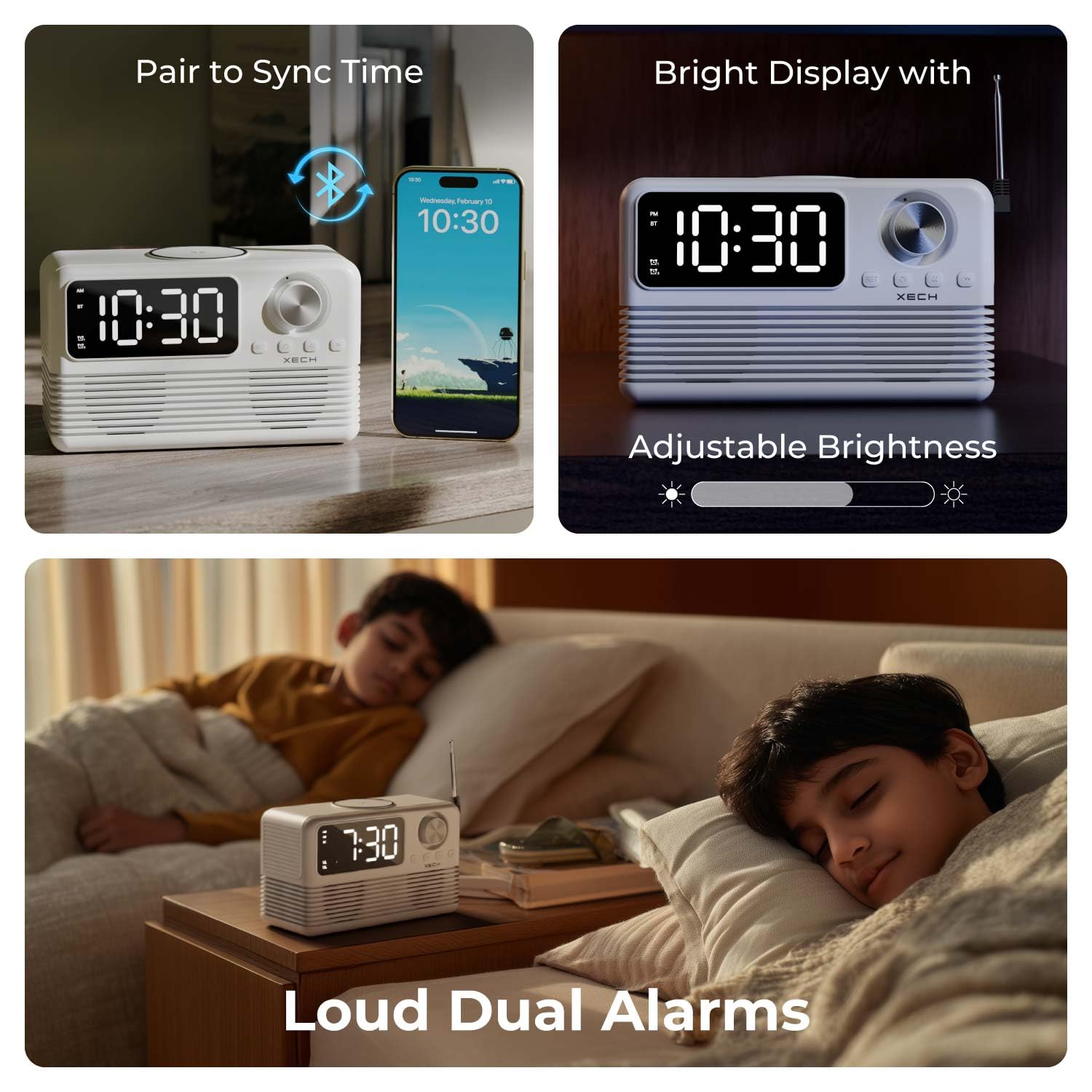
Image: The Xech Eon Max can sync time with a phone, features adjustable display brightness, and supports loud dual alarms for effective waking.
Uputstvo za upotrebu
1. Funkcije sata i alarma
- Prikaz vremena: The current time is shown on the HH:MM Display (9).
- Funkcija odgode: When an alarm sounds, press any button (except the On/Off button) to activate snooze. The alarm will sound again after 5 minutes.
- Podešavanje svjetline ekrana: Dugo pritisnite SET / Brightness Button (B) to cycle through different brightness levels for the display.
2. Audio Playback Functions
Pritisnite On/Off / Mode Button (C) to cycle through available audio modes: Bluetooth, FM Radio, TF Card, and AUX.
- Bluetooth režim:
- Odaberite Bluetooth način rada pomoću Dugme za način rada (C). The BT Mode Indicator (3) will light up and flash, indicating pairing mode.
- On your mobile device, search for "Xech Eon Max" in the Bluetooth settings and pair.
- Once paired, the BT Mode Indicator (3) will stop flashing. You can now play audio wirelessly.
- Koristite Previous / Bluetooth Pairing Button (E) i Next / FM Radio Button (D) to skip tracks. Rotate the Volume Knob (A) za podešavanje jačine zvuka.
- FM radio režim:
- Odaberite FM radio način rada pomoću Dugme za način rada (C). The FM Mode Indicator (4) will light up.
- Produžite antena (12) za bolji prijem.
- Dugo pritisnite Next / FM Radio Button (D) to auto-scan and save available FM stations.
- Kratko pritisnite Previous / Bluetooth Pairing Button (E) or Next / FM Radio Button (D) to navigate through saved stations.
- Režim TF kartice:
- Umetnite TF (MicroSD) karticu sa zvukom files into the TF Card Slot (c).
- Select TF Card mode using the Dugme za način rada (C). The TF Mode Indicator (5) will light up. Playback will begin automatically.
- Koristite Previous / Bluetooth Pairing Button (E) i Next / FM Radio Button (D) za preskakanje pjesama.
- AUX mod:
- Povežite eksterni audio uređaj (npr. MP3 plejer, pametni telefon) na AUX Port (d) pomoću audio kabla od 3.5 mm (nije uključen).
- Odaberite AUX način rada pomoću Dugme za način rada (C). The AUX Mode Indicator (6) will light up.
- Control playback from your external device. Volume can be adjusted using the Volume Knob (A).

Image: An exploded diagram of the Xech Eon Max speaker system, highlighting its internal components designed for powerful bass and dual dynamic drivers.
3. Funkcije punjenja

Image: The Xech Eon Max supports 15W fast wireless charging with auto device detection and can charge up to three devices simultaneously using its wireless pad, USB-A, and USB-C ports.
- Bežično punjenje:
- Place your Qi-enabled smartphone or other compatible device on the Wireless Charging Pad (10) on top of the Xech Eon Max.
- Ensure the device is centered on the pad for optimal charging. The display may show a charging indicator.
- Note: For 15W fast wireless charging, a 20W/18W (5V4A / 9V2A) power adapter or higher is required for the Xech Eon Max itself.
- Wired Charging (Multi-Device):
- Povežite svoje uređaje na USB-A Output Port (e) or USB-C Output Port (b) on the back of the Xech Eon Max using appropriate charging cables.
- You can charge multiple devices simultaneously (e.g., one wirelessly, two via USB ports).
4. Ugrađeni mikrofon

Image: The Xech Eon Max features an infinity knob for control, a USB-C port for recharging its internal battery, and a built-in microphone for hands-free communication.
The Xech Eon Max includes a built-in microphone, allowing for hands-free calls when connected to a smartphone via Bluetooth. When a call comes in, you can answer/end it using the device's controls (refer to specific button functions in the Product Overview ako je dostupno).
Održavanje
- Čišćenje: Use a soft, dry cloth to clean the surface of the device. Do not use abrasive cleaners or solvents.
- SkladištenjeUređaj čuvajte na hladnom i suhom mjestu, dalje od direktne sunčeve svjetlosti i ekstremnih temperatura.
- Battery Care: The device contains a Lithium Ion battery. For optimal battery life, avoid fully discharging the battery frequently and recharge it regularly.
- Izloženost vodi: This device is not waterproof. Avoid exposure to water or high humidity.
Rješavanje problema
- Uređaj se ne uključuje: Ensure the USB-C charging cable is securely connected to both the device and a working power adapter. Check if the power outlet is functional.
- Wireless charging is slow or not working: Ensure your device is Qi-enabled and correctly centered on the wireless charging pad. Verify that the Xech Eon Max is powered by a 20W/18W (5V4A / 9V2A) adapter or higher for fast wireless charging.
- Loš FM radio prijem: Fully extend the antenna (12) on the back of the device. Try repositioning the device for better signal.
- Alarm se ne oglašava ili je previše tih: Check if the alarm is activated (Alarm 1/2 indicator lit). Ensure the volume is not set to minimum.
- Bluetooth uređaj se ne uparuje: Ensure the Xech Eon Max is in Bluetooth pairing mode (BT Mode Indicator flashing). Make sure your mobile device's Bluetooth is enabled and within range (typically 10 meters). Try restarting both devices.
- Nema zvuka iz zvučnika: Check the volume level on both the Xech Eon Max and the connected audio source. Ensure the correct mode (Bluetooth, FM, TF, AUX) is selected.
Specifikacije
| Feature | Detalj |
|---|---|
| Brand | Šeh |
| Broj modela | X-605 |
| Display Type | Digitalna LED |
| Stil | Retro |
| Dimenzije proizvoda | 18Š x 8.4V centimetara |
| Težina artikla | 0.86 kilograma (860 g) |
| Izvor napajanja | Battery Powered (1 Lithium Ion battery included), Electrical (via USB-C) |
| Tehnologija povezivanja | Bluetooth 5.3, AUX, USB-C, TF Card |
| Posebne karakteristike | Bluetooth, Charging Station (15W Wireless, USB-A, USB-C), LED Display, Large Display, Loud Dual Alarms, FM Radio, Built-in Mic |
| Materijal | akrilonitril butadien stiren (ABS) |
| Unutrašnja/vanjska upotreba | Unutarnji, vanjski |
Informacije o garanciji
The Xech Eon Max comes with a Ograničena garancija. For specific details regarding the warranty period, coverage, and terms and conditions, please refer to the warranty card included with your product packaging or visit the official Xech webSačuvajte račun kao dokaz o kupovini u slučaju bilo kakvih reklamacija.
Korisnička podrška
For further assistance, technical support, or inquiries regarding your Xech Eon Max, please contact the manufacturer:
Proizvođač: XECH Technologies Pvt Ltd
Adresa: MIDC, Andheri East, Mumbai
Please visit the official Xech webstranicu za najnovije kontakt informacije i resurse podrške.


