Uvod
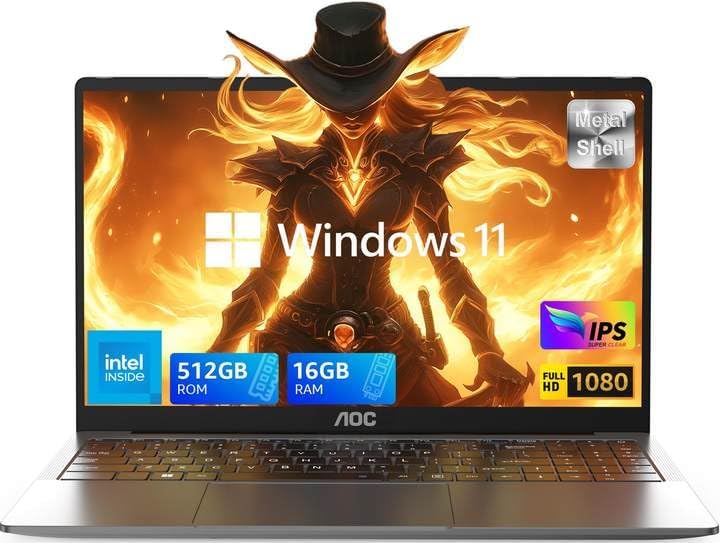
This user manual provides detailed instructions for the setup, operation, maintenance, and troubleshooting of your AOC AX15 15.6-inch Portable Laptop. Please read this manual thoroughly before using your device to ensure optimal performance and longevity.
Sadržaj paketa
Provjerite da li se sve stavke nalaze u kutiji:
- AOC Laptop ×1
- Adapter za napajanje × 1
- Uputstvo za upotrebu ×1
Setup
Initial Setup
- Raspakivanje: Carefully remove the laptop and all accessories from the packaging. Place the laptop on a stable, flat surface.
- Priključak za napajanje: Connect the power adapter to the laptop's charging port (Type-C DC Jack) and then plug the adapter into a power outlet. It is recommended to fully charge the laptop before first use.
- Prvo pokretanje: Open the laptop lid and press the power button, typically located on the keyboard or side. The laptop will power on and begin the initial setup process for Windows 11.
- Windows postavka: Follow the on-screen prompts to complete the Windows 11 setup, including selecting your region, language, connecting to a Wi-Fi network, and creating a user account.
Upravljanje laptopom
Ključne karakteristike i performanse
The AOC AX15 is designed for efficient performance and versatile use. Below are its core operational aspects:
Procesor i performanse
Equipped with the Intel 12th Gen Alder Lake-N N97 processor, the AX15 delivers enhanced performance for daily tasks, entertainment, and business applications. Its 4 cores and 3.6GHz Turbo Boost frequency ensure smooth operation.

Memorija i pohrana
The laptop features 16GB DDR4 RAM and a 512GB SSD, providing ample space and speed for data handling, application loading, and multitasking. The storage is expandable up to 2TB.

Kvalitet prikaza
Experience clear and vibrant visuals on the 15.6-inch Full HD (1920x1080) IPS display. The screen offers a bright view and incorporates eye protection features for comfortable long-term use.

Povezivanje
The laptop provides a comprehensive set of ports for connecting various peripherals and external displays, including multiple USB 3.2 ports, HDMI, and a Type-C port for data transfer and charging.

Trajanje baterije
Equipped with a 5000mAh lithium-ion polymer battery, the AX15 is designed for extended use, reducing the need for frequent recharging and supporting productivity on the go.

Audio i kamera
The laptop features a built-in HD camera and a digital high-definition microphone, along with symmetric stereo speakers, ensuring clear communication and an immersive audio experience for video calls and multimedia.


Multitasking Capabilities
With its powerful processor and ample RAM, the AOC AX15 is designed for effortless multitasking, allowing users to run multiple applications simultaneously without significant slowdowns.


Portability and Versatility
The lightweight design and robust battery make the AOC AX15 an ideal companion for various environments, from office work to travel and educational settings.


Održavanje
Čišćenje laptopa
- Koristite meku krpu koja ne ostavlja dlačiceampvodom ili sredstvom za čišćenje ekrana da biste obrisali ekran.
- Za tastaturu i kućište koristite meku krpu. Izbjegavajte jake hemikalije ili abrazivne materijale.
- Periodically use compressed air to clear dust from vents and ports to maintain optimal cooling.
Ažuriranja softvera
Regularly check for and install Windows updates to ensure system stability, security, and access to the latest features. You can find updates in Windows Settings > Windows Update.
Storage Management
To maintain optimal performance, periodically manage your storage by deleting unnecessary files, uninstalling unused applications, and utilizing cloud storage for large files.
Rješavanje problema
Uobičajeni problemi i rješenja
| Problem | Moguće rješenje |
|---|---|
| Laptop se ne uključuje. | Provjerite je li adapter za napajanje sigurno priključen i na laptop i na ispravnu utičnicu. Provjerite je li utičnica funkcionalna. Pokušajte držati dugme za napajanje 10-15 sekundi da biste izvršili hard reset. |
| Spore performanse. | Close unnecessary applications running in the background. Check for and install Windows updates. Run a disk cleanup to free up space. Ensure adequate ventilation to prevent overheating. |
| Problemi s Wi-Fi vezom. | Restart your router and modem. Disable and re-enable Wi-Fi on your laptop. Update network drivers. Ensure you are within range of the Wi-Fi signal. |
| Displej ne radi. | Ensure the laptop is powered on. Try connecting an external monitor to check if the issue is with the laptop's display or the graphics output. Adjust brightness settings. |
Specifikacije
Detailed technical specifications for the AOC AX15 Portable Laptop:
| Feature | Detalj |
|---|---|
| Veličina ekrana u stojećem položaju | 15.6 inča |
| Procesor | 3.6 GHz Intel N97 (Alder Lake-N, 4 Cores) |
| RAM | 16 GB DDR4 |
| Hard Drive | 512 GB SSD (Expandable up to 2TB) |
| Marka čipsa | Intel |
| Opis grafičke kartice | Integrisano |
| Broj USB 3.0 portova | 3 (USB 3.2 x2, USB 2.0 x1) |
| Operativni sistem | Windows 11 |
| Težina artikla | 1 funte |
| Dimenzije proizvoda | 20 x 10 x 0.7 inča |
| Boja | Gray N97 |
| Baterija | 5000mAh litijum-jonska polimerna baterija |
Garancija i podrška
AOC provides comprehensive support for your AX15 laptop:
- Garantni period: The product comes with a one-year effective warranty period, including free return or exchange service for eligible issues.
- tehnička podrška: Lifetime technical support is available for all your tech needs.
- Služba za korisnike: For any product-related matters, you can consult via telephone or email. Offline maintenance services are also provided.
Please refer to the contact information provided with your purchase or visit the official AOC webstranicu za detaljne opcije podrške.


