1. Uvod
Hvala na kupoviniasing the AIKELA ZJ-027 5-in-1 Induction Bluetooth Speaker. This versatile device combines a wireless induction speaker, Bluetooth speaker, power bank, phone stand, and LED light, designed to enhance your audio and mobile experience. Please read this manual carefully to ensure proper use and optimal performance.
2. Sigurnosne informacije
- Držite uređaj dalje od vode, vlage i ekstremnih temperatura.
- Ne pokušavajte sami rastaviti ili popraviti uređaj. Obratite se korisničkoj podršci za pomoć.
- Koristite samo priloženi kabel za punjenje ili njegov certificirani ekvivalent.
- Izbjegavajte postavljanje teških predmeta na uređaj.
- Čuvati van domašaja djece.
3. Sadržaj paketa
Provjerite da li se sve stavke nalaze u vašem paketu:
- AIKELA 5-in-1 Induction Speaker (Model: ZJ-027) x 1
- Type-C kabl za punjenje x 1
- Korisnički priručnik x 1
- Vodič za brzi početak x 1

Image: What you will receive with your AIKELA ZJ-027 speaker.
4. Proizvod je gotovview
The AIKELA ZJ-027 is a multifunctional device designed for convenience and enhanced audio. It features:
- Induction Speaker: Play audio by simply placing your phone on the stand, no Bluetooth pairing needed.
- Bluetooth zvučnik: Connect wirelessly via Bluetooth 5.3 for stable, high-quality audio.
- postolje za telefon: Adjustable 360° vertical rotation for optimal viewing angles.
- Power bank: Built-in 3500mAh battery for emergency phone charging.
- LED svjetlo: Colorful ambient lighting with multiple modes.

Image: The AIKELA ZJ-027 5-in-1 Induction Speaker in use, highlighting its multiple functions.

Slika: Detaljna view of the speaker driver, illustrating its capability for massive, booming sound with crystal-clear quality.
5. Podešavanje
5.1 Punjenje zvučnika
Before first use, fully charge the speaker. Connect the provided Type-C cable to the charging port on the speaker and the other end to a USB power adapter (not included). A full charge takes approximately 2 hours and provides 5-8 hours of playtime, depending on volume levels.

Image: Battery life and charging time information.
5.2 Adjusting the Phone Stand
The integrated phone stand can be rotated 360° vertically to achieve your desired viewing angle. Ensure the non-slip silicone on the base, back, and slot keeps your phone secure.
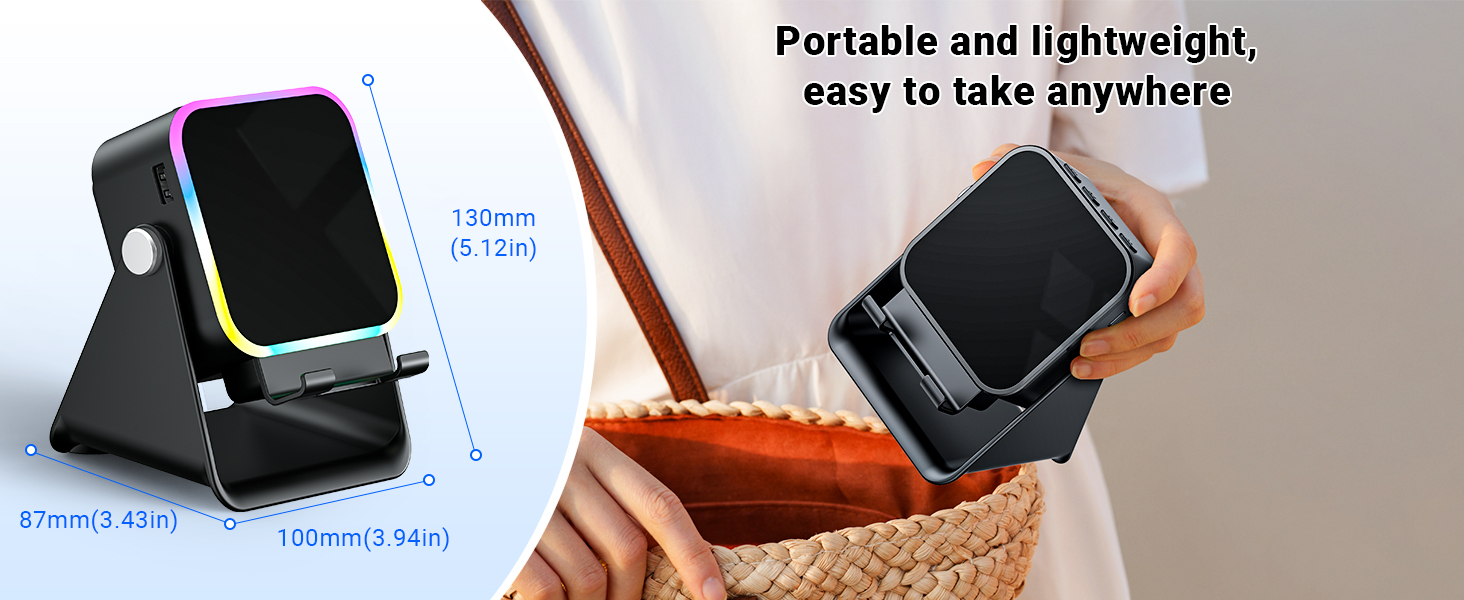
Image: Adjustable stand with 360° rotation and non-slip base for stability.
6. Operacija
6.1 Uključivanje/isključivanje napajanja
Dugo pritisnite dugme za napajanje (⏻) da biste uključili ili isključili uređaj.
6.2 Switching Modes (Induction / Bluetooth)
After powering on, the device will typically start in Induction Mode. To switch between Induction Mode and Bluetooth Mode, short press the 'M' button.
Video: Demonstrates how to use both Induction and Bluetooth modes, including switching between them and proper phone placement.
6.3 Indukcijski način rada
In Induction Mode, no Bluetooth connection is required. Simply place your smartphone correctly on the stand. The speaker's inductive chip will capture and amplify audio directly from your phone.
- Položaj telefona: Ensure your phone is placed correctly on the stand, typically in portrait orientation, for optimal sound transfer.
- Podešavanje jačine zvuka: Adjust your phone's volume to 50% or higher for the best playback experience. You can also use the volume buttons on the speaker.
- Kompatibilnost: Induction mode is primarily compatible with smartphones. It does not support iPads or tablets.
- automatsko isključivanje: The speaker will automatically turn off after 10 minutes of standby in Induction Mode.

Image: Guide on how to correctly place your phone and adjust volume for Induction Mode.
6.4 Bluetooth režim
For wireless audio streaming, switch to Bluetooth Mode:
- Dugo pritisnite dugme za napajanje da biste uključili zvučnik.
- Short press the 'M' button to switch to Bluetooth Mode (you will hear an audible prompt).
- On your phone or tablet, go to Bluetooth settings and search for "ZJ-027".
- Select "ZJ-027" to pair. For Android devices, enable "Sync volume with phone" in Bluetooth settings after pairing for optimal control.
- Once connected, you can play audio from your device through the speaker.
In Bluetooth mode, you can place your phone horizontally or vertically on the stand. The Bluetooth range is approximately 10 meters.

Image: Visual representation of Induction Mode (no Bluetooth) and Bluetooth Mode (10m range).
6.5 Funkcije LED svjetla
The speaker features colorful LED lights:
- Prebacivanje načina osvjetljenja: Single-click the 'M' button to cycle through different light colors and patterns.
- Uključivanje/isključivanje svjetla: Long-press the 'M' button to turn the LED lights on or off.

Image: Multiple light strip patterns to choose from.
6.6 Power Bank Function (Emergency Charge)
The speaker can act as an emergency power bank for your phone. Connect your phone's charging cable (not included) to the USB-A output port on the speaker and to your phone. This is a wired charging function, not wireless charging.
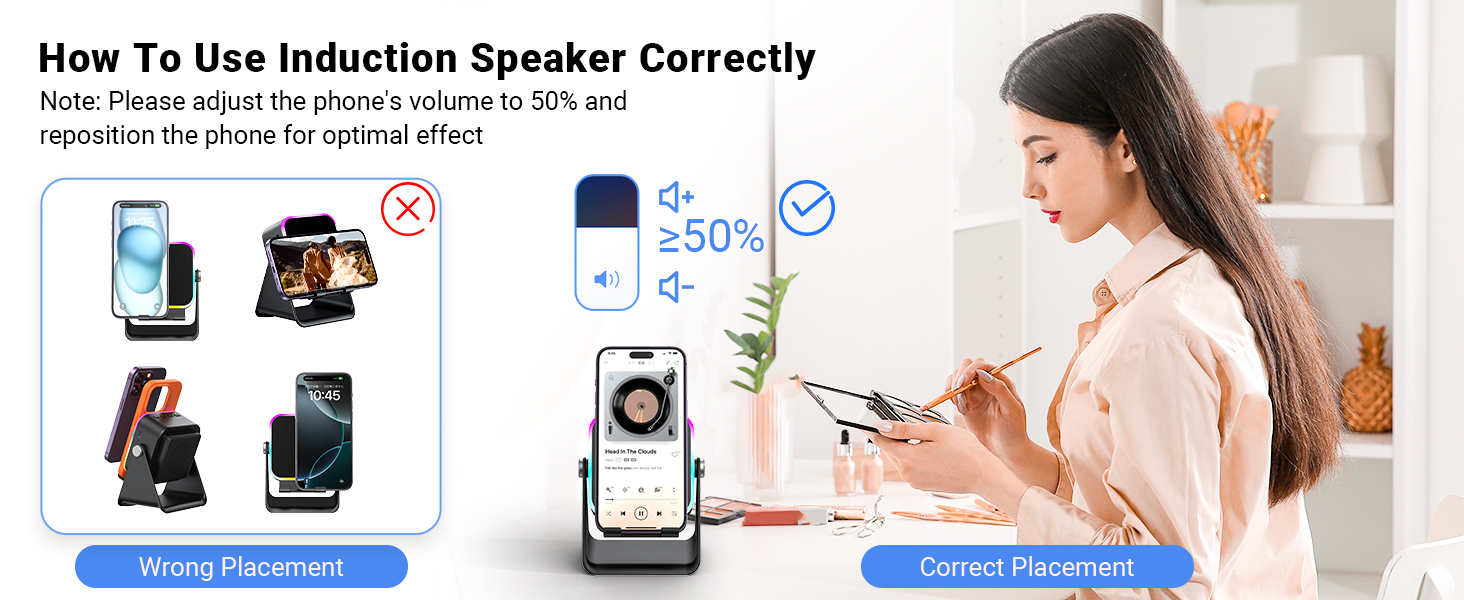
Image: The speaker's 3500mAh power bank function for emergency charging.
7. Održavanje
- Uređaj čistite mekom, suhom krpom. Ne koristite abrazivna sredstva za čišćenje ili rastvarače.
- Izbjegavajte izlaganje uređaja direktnoj sunčevoj svjetlosti u dužem vremenskom periodu.
- Čuvajte uređaj na hladnom i suvom mestu kada se ne koristi.
8. Otkrivanje problema
Q1: What should I do if the volume is too low?
- If in Induction mode, place the phone correctly on the holder, and then adjust the phone's volume to 50% or higher.
- If you are using an Android device and using Bluetooth mode, first pair the Bluetooth device. Then enable "Sync volume with phone" in your phone's Bluetooth settings.
Q2: What should I do if the sound cuts in and out in Induction mode?
- Ensure the phone is correctly placed on the holder.
- The working principle of Induction mode is that the speaker's inductive chip captures audio from the phone and amplifies it through the speaker. The louder the phone's volume, the louder the speaker's output. Therefore, we recommend setting the phone's volume to 50% or higher to ensure uninterrupted playback.
9. Specifikacije
| Feature | Detalj |
|---|---|
| Naziv modela | ZJ-027 |
| Vrsta zvučnika | Prenosivi zvučnik |
| Posebne karakteristike | Bluetooth Speaker, Built-In Powerbank, Induction Speaker, LED Light, Phone Stand |
| Kompatibilni uređaji | Android Phone, iPad, iPhone |
| Boja | Crna |
| Dimenzije proizvoda | 5"D x 2"Š x 3"H |
| Težina artikla | 0.34 kilograma (12 unci) |
| Maksimalni Bluetooth domet | 10 metara |
| Baterija | Potrebna je 1 baterija (uključena) |
| Proizvođač | AIKELA |
| Maksimalna izlazna snaga zvučnika | 1 Watts |
| Tehnologija povezivanja | Bluetooth, Induction |
| Materijal | akrilonitril butadien stiren (ABS) |
10. Jamstvo i podrška
AIKELA provides 12 months of support for your Phone Amplifier Speaker. If you encounter any issues or have questions, please contact customer service. You can typically find contact information by navigating to 'Find Order' on the platform where you purchased the product.


