1. Uvod
The NYXI Warrior Wireless Switch Controller is a versatile gaming peripheral designed for enhanced gameplay across multiple platforms. It features advanced technologies such as Hall Effect Joysticks and Triggers for precision and longevity, micro mechanical switch buttons for rapid response, HD Rumble for immersive feedback, and a 6-axis gyroscope for motion sensing. This controller is compatible with Nintendo Switch, Nintendo GameCube (NGC), Wii, and PC.

Image: NYXI Warrior controllers in various colors, highlighting the product line.
2. Sadržaj paketa
- NYXI Warrior Wireless Switch Controller
- USB bežični prijemnik
- USB-C kabl za punjenje
- Korisnički priručnik (ovaj dokument)

Image: The NYXI Warrior controller and its wireless receiver.
3. Vodič za postavljanje
3.1 Punjenje kontrolera
Before first use, fully charge the controller. Connect the supplied USB-C charging cable to the controller's USB-C port and the other end to a USB power source (e.g., console, PC, or USB wall adapter). The indicator lights on the controller will show charging status and turn off when fully charged. A full charge typically takes approximately 2-3 hours.
3.2 Povezivanje na uređaje
3.2.1 Nintendo Switch Connection
- Uključite svoju Nintendo Switch konzolu.
- U izborniku HOME odaberite Kontrolori, onda Promjena Grip/Red.
- Pritisnite i držite Dugme za uparivanje on the top of the NYXI Warrior controller for 3 seconds until the indicator lights begin to flash rapidly.
- Nakon povezivanja, odgovarajuća indikatorska lampica(e) plejera na kontroleru će ostati stalno upaljena.
3.2.2 PC/NGC/Wii Connection (via USB Wireless Receiver)
- Insert the USB Wireless Receiver into an available USB port on your PC, NGC, or Wii console.
- Ensure the NYXI Warrior controller is powered on.
- The controller should automatically connect to the receiver. The indicator light on the receiver and controller will become solid once a connection is established.
- For PC, additional driver installation may be required depending on the operating system. Refer to your PC's documentation for USB device setup.

Image: The NYXI Warrior controller connected to a laptop via its USB receiver, demonstrating PC compatibility.

Image: The NYXI Warrior controller with a Nintendo Wii console, illustrating Wii compatibility.
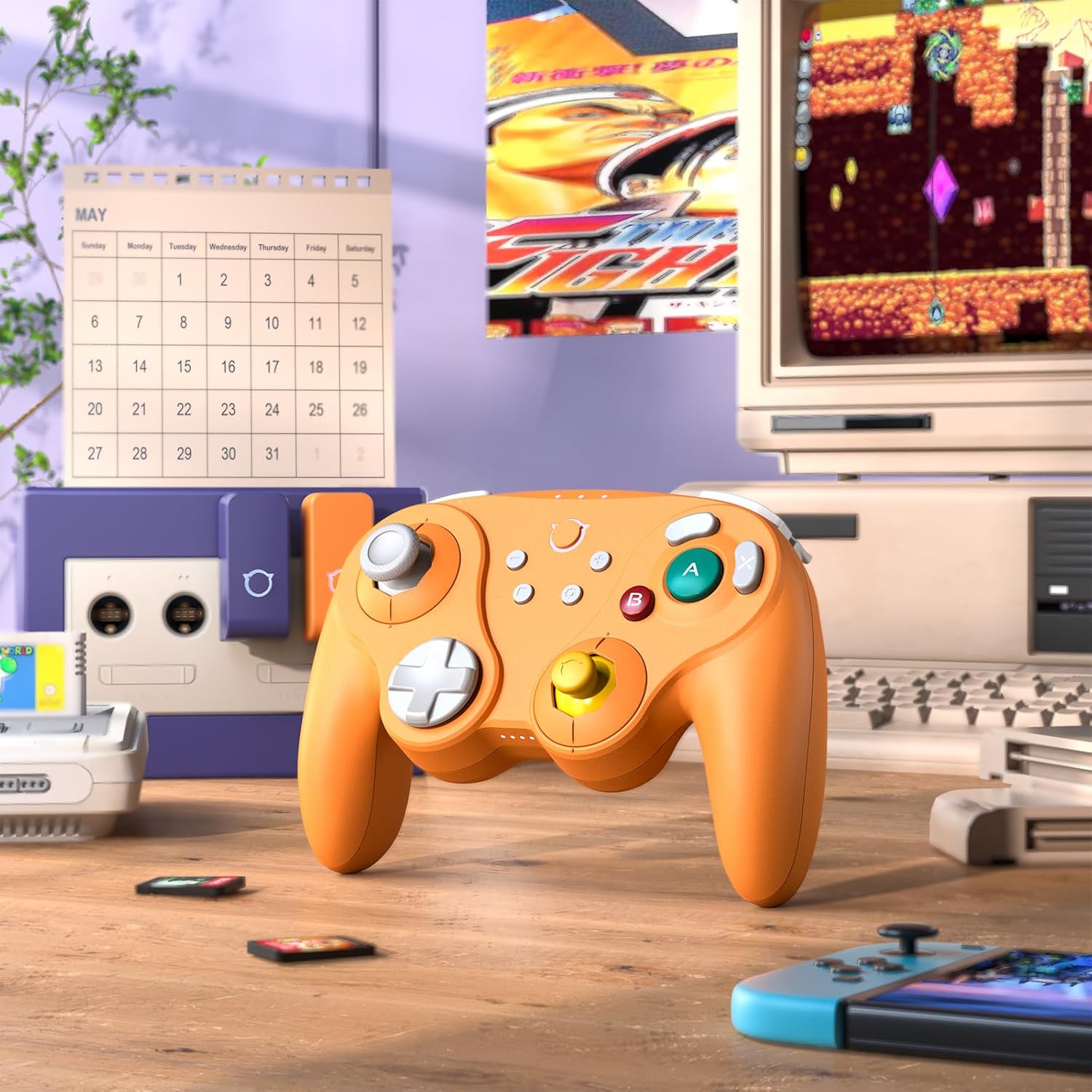
Image: The NYXI Warrior controller with a retro gaming setup, illustrating GameCube compatibility.
4. Uputstvo za upotrebu
4.1 Raspored i funkcije dugmadi
The NYXI Warrior controller features a comprehensive button layout for various gaming needs:
- Lijeva analogna palica: Za kretanje i kontrolu kamere.
- D-Pad: Usmjereni ulaz.
- Desna analogna palica: For camera control or specific in-game actions.
- Dugmad A/B/X/Y: Action buttons with micro mechanical switches for precise and rapid input.
- L/R dugmad: Dugmad za ramena.
- ZL/ZR Triggers: Hall Effect analog triggers for precise input, adjustable for different gameplay styles.
- +/- dugmad: Start/Select or Menu functions.
- Dugme za početnu stranicu: Returns to the console's home screen.
- Dugme za snimanje ekrana: Pravi snimke ekrana.
- Programmable Back Paddles (M1/M2): Located on the underside, these can be assigned to various button functions.

Slika: Front view of the NYXI Warrior controller, illustrating its button layout.

Slika: Nazad view of the NYXI Warrior controller, highlighting the programmable back paddles.

Slika: Gornja prednja strana view of the NYXI Warrior controller, showing triggers and charging port.

Image: Two users playing with NYXI Warrior controllers, demonstrating in-game use.
4.2 Napredne funkcije
4.2.1 Hall Effect Joysticks and Triggers
The controller utilizes Hall Effect technology for its joysticks and triggers. This magnetic sensing technology prevents stick drift and ensures precise, long-lasting input. The triggers are also adjustable, allowing users to fine-tune their activation distance based on personal preference or game requirements.

Image: Illustration of the Hall Effect Joystick technology.

Image: Adjustable Hall Sensing Triggers feature.
4.2.2 Micro Mechanical Switch Buttons
The A/B/X/Y buttons and D-pad utilize micro mechanical switches, offering a short travel distance of approximately 0.3mm and a response speed of 0.2ms. This design provides tactile feedback and minimal latency, crucial for competitive gaming.

Image: Microswitches for A/B/X/Y buttons and D-pad.
4.2.3 6-Axis Gyroscope
The integrated 6-axis gyroscope supports motion sensing, particularly useful for games on the Nintendo Switch that utilize tilt or motion controls.

Image: 6-Axis Gyroscope feature illustration.
4.2.4 HD Rumble
The controller features HD Rumble, providing enhanced vibration feedback that can convey a wider range of sensations, from subtle tremors to powerful impacts, enriching the gaming experience.

Image: HD Rumble feature illustration.
4.2.5 Programmable Back Paddles and Turbo Function
The interchangeable back paddles (M1 and M2) can be programmed to replicate other button inputs, offering additional customization and ergonomic advantages. The controller also supports a turbo function for rapid, repeated button presses. Refer to the specific programming instructions provided with the controller for detailed steps on assigning functions to the back paddles and activating turbo mode.

Image: Interchangeable Back Paddle Design.
5. Održavanje
- čišćenje: Koristite meku, suhu krpu za čišćenje površine kontrolera. Za tvrdokornu prljavštinu, lagano je očistiteampIsperite krpu vodom. Izbjegavajte upotrebu jakih hemikalija ili abrazivnih materijala.
- Skladištenje: Kontroler čuvajte na hladnom i suhom mjestu, dalje od direktne sunčeve svjetlosti i ekstremnih temperatura.
- Održavanje baterije: To prolong battery life, avoid fully discharging the controller frequently. If storing for an extended period, charge the battery to approximately 50% every few months.
- Rukovanje: Izbjegavajte ispuštanje kontrolera ili izlaganje jakim udarcima, jer to može oštetiti unutrašnje komponente.
6. Otkrivanje problema
6.1 Kontroler se ne povezuje
- Provjerite da li je kontroler dovoljno napunjen.
- Verify the USB Wireless Receiver is securely plugged into the console/PC.
- For Switch, ensure you are in the "Change Grip/Order" menu.
- Try re-pairing the controller by pressing the pairing button.
- Restart your console/PC and the controller.
6.2 Input Lag or Unresponsive Buttons
- Provjerite da u blizini nema jakih izvora bežičnih smetnji (npr. Wi-Fi rutera, drugih bežičnih uređaja).
- Približite se konzoli/računaru.
- Check if the controller's battery is low.
- Perform a controller reset (refer to manufacturer's specific reset procedure if available, typically a small pinhole button).
6.3 Kalibracija džojstika
While Hall Effect joysticks are designed to prevent drift, if you experience any unusual behavior, you may need to recalibrate them through your console's system settings (e.g., Nintendo Switch System Settings > Controllers and Sensors > Calibrate Control Sticks).
7. Specifikacije
| Broj modela | Warrior |
| ASIN | B0FB9577L9 |
| Dimenzije paketa | 7.64 x 7.52 x 3.58 inča |
| Težina artikla | 1.54 funte |
| Baterije | 1 litijum-jonska baterija (uključena) |
| Datum prve dostupnosti | 24. marta 2025 |
8. Garancija i podrška
For information regarding warranty coverage, technical support, or replacement parts, please refer to the official NYXI website or contact the retailer from whom the product was purchased. Keep your proof of purchase for warranty claims.
Official NYXI Store: NYXI Store on Amazon


