Uvod
Thank you for choosing the GOBOULT Soniq Over Ear Bluetooth Headphones. These headphones are designed to provide a superior audio experience with features like 70 hours of playtime, 40mm bass drivers, Zen™ ENC microphone, Type-C fast charging, and dual device pairing. This manual will guide you through the setup, operation, and maintenance of your new headphones to ensure optimal performance.
Šta je u kutiji
Molimo Vas da provjerite sadržaj paketa kako biste bili sigurni da su svi artikli prisutni:
- Soniq Headphone
- Kabel za punjenje tipa C
- Uputstvo za upotrebu
- Jastučići za uši (unaprijed instalirani)
- Garantni list
Karakteristike proizvoda Gotovoview
The GOBOULT Soniq headphones come equipped with several advanced features:
- Produženo vrijeme igranja: Do 70 sati reprodukcije zvuka s jednim punjenjem.
- Prilagodljivi EQ režimi: Podesite zvučnu profesionalnu postavkufiles for bass boost, balanced audio, or vocal clarity.
- Poništavanje buke iz okoline (ENC): Poboljšava jasnoću poziva smanjenjem pozadinske buke.
- Uparivanje dva uređaja: Besprijekorno povezivanje i istovremeno prebacivanje između dva uređaja.
- Powerful Audio Drivers: 40mm bass-boosted drivers for rich sound.
- Najnovija Bluetooth tehnologija: Bluetooth 5.4 for faster pairing and stable connections.
- Udoban dizajn: Lightweight build with cushioned earcups for prolonged wear.
- Otpornost na vodu: IPX5 rating for splash, rain, and sweat protection.
- Taktilne kontrole: Easy-to-use physical buttons for volume, playback, and mode switching.
- Podrška za AI glasovnog asistenta: Compatible with Google Assistant and Siri.

Slika: Prekoview of key features including 70H battery, EQ modes, ENC, dual pairing, 40mm drivers, and Bluetooth 5.4.

Image: Close-up of the GOBOULT Soniq headphone earcup highlighting the 40mm power-packed bass neodymium drivers with BoomX™ Technology and Memory Foam.
Vodič za postavljanje
1. Punjenje slušalica
Before first use, fully charge your GOBOULT Soniq headphones. Use the provided Type-C charging cable to connect the headphones to a compatible USB power source.
- Potpuno punjenje omogućava do 70 sati reprodukcije.
- Fast charging feature: 10 minutes of charge provides approximately 8 hours of playtime.
- The LED indicator will show charging status and turn off or change color when fully charged.

Image: GOBOULT Soniq headphones connected via Type-C cable, illustrating 70 hours playtime and fast charging capability.
2. Uključivanje / isključivanje napajanja
To power on, press and hold the Power button for approximately 3 seconds until the LED indicator lights up. To power off, press and hold the Power button again for 3 seconds until the LED indicator turns off.
3. Bluetooth uparivanje
Slijedite ove korake da biste uparili slušalice s uređajem koji podržava Bluetooth:
- Provjerite jesu li slušalice potpuno napunjene i isključene.
- Pritisnite i držite dugme za napajanje 5-7 sekundi dok LED indikator ne počne naizmjenično treperiti crveno i plavo, što označava režim uparivanja.
- Na svom uređaju (pametnom telefonu, tabletu, laptopu) omogućite Bluetooth i potražite dostupne uređaje.
- Select "GOBOULT Soniq" from the list of found devices.
- Nakon povezivanja, LED indikator će polako treptati plavo ili će ostati stalno plavo.

Image: GOBOULT Soniq headphones highlighting Bluetooth 5.4 for fast and stable connection.
Uputstvo za upotrebu
1. Osnovne kontrole
The headphones feature tactile buttons for easy control:
- Dugme za napajanje: Pritisnite i držite za uključivanje/isključivanje. Kratki pritisak za reprodukciju/pauzu.
- Jačina zvuka (+): Kratki pritisak za povećanje jačine zvuka. Dugi pritisak za sljedeću pjesmu.
- Stišavanje (-): Kratki pritisak za smanjenje jačine zvuka. Dugi pritisak za prethodnu pjesmu.
- Multi-function Button (often combined with Power or a dedicated button): Answer/End calls, activate voice assistant.

Image: Close-up of the right earcup showing tactile button controls for volume and play/pause.
2. EQ režimi
Customize your audio experience with multiple EQ modes. Press the dedicated EQ button (or a specific combination, refer to quick start guide if available) to cycle through modes:
- Režim pojačanja basa: Enhances low frequencies for a deeper bass sound.
- Uravnoteženi način rada: Pruža neutralan zvuk profesionalnofile suitable for various genres.
- Vokalni način rada: Optimizuje srednje frekvencije za jasnije vokale.
- Način igre: Reduces latency for a more synchronized gaming audio experience (60ms ultra-low latency).
- Muzički način rada: Standardni audio profesionalacfile za opšte slušanje muzike.
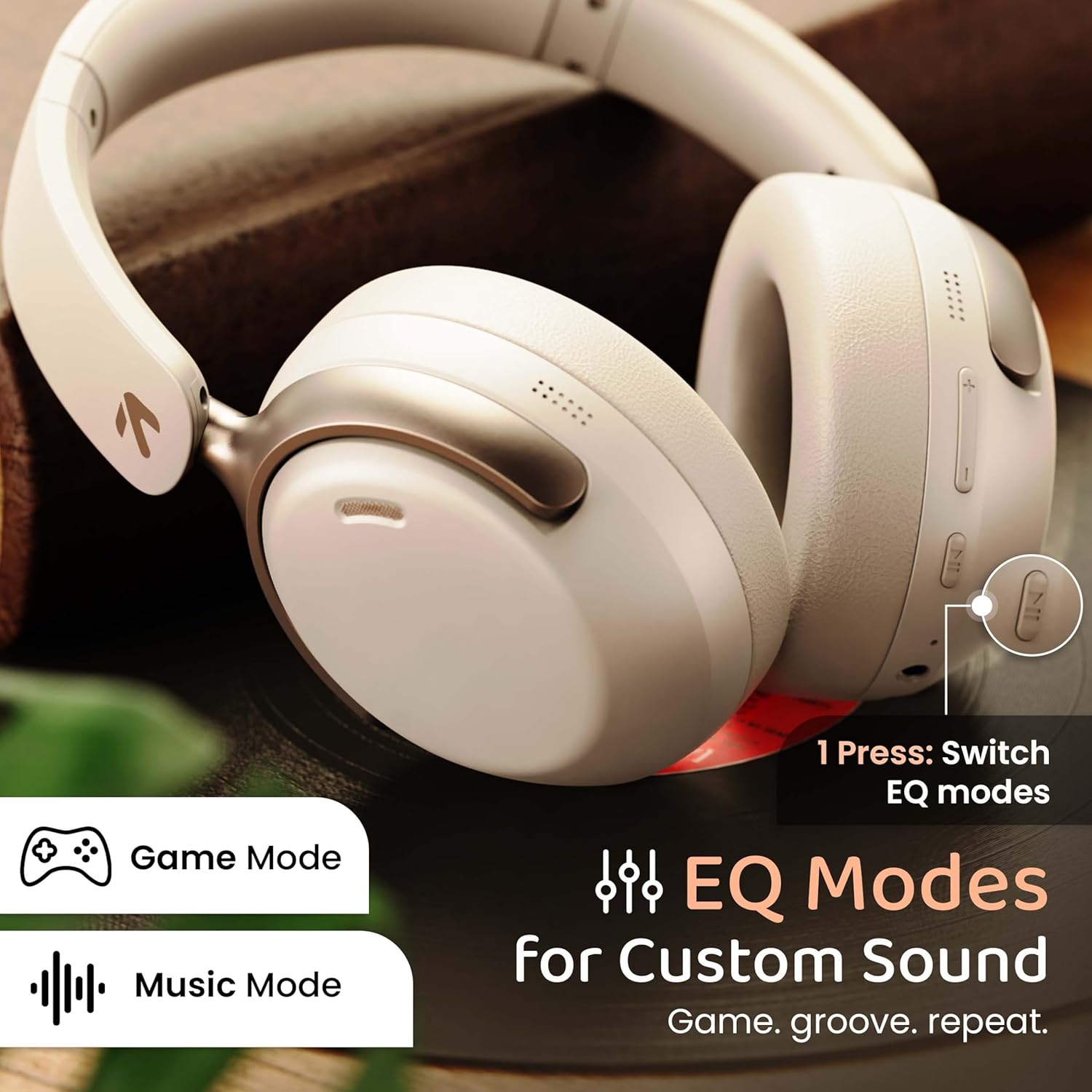
Image: GOBOULT Soniq headphones illustrating the EQ modes for custom sound, including Game Mode and Music Mode.

Image: GOBOULT Soniq headphones highlighting Combat™ Gaming Mode with 60ms ultra-low latency, tailored for mobile gaming and real-time sound accuracy.
3. Uparivanje dva uređaja
The headphones support dual device pairing, allowing you to connect to two devices simultaneously and switch between them seamlessly.
- Uparite slušalice s prvim uređajem kao što je opisano u odjeljku "Uparivanje putem Bluetootha".
- Isključite Bluetooth na prvom uređaju.
- Uparite slušalice sa drugim uređajem.
- Ponovo omogućite Bluetooth na prvom uređaju. Slušalice bi se trebale automatski povezati s oba uređaja.
- Audio will play from the device currently active. To switch, pause audio on the first device and start playing on the second.

Image: GOBOULT Soniq headphones demonstrating dual device connectivity with a laptop and a smartphone.
4. Wired Mode (AUX)
For a wired connection, use a standard 3.5mm AUX cable (not included) to connect the headphones to your audio source. In wired mode, the headphones operate passively, and the built-in microphone will not function.

Image: GOBOULT Soniq headphones showing the option for wireless mode and an optional wired mode via AUX cable, noting that the mic is off in wired mode.
5. Environmental Noise Cancellation (ENC) for Calls
The Zen™ ENC microphone technology helps reduce ambient noise during calls, ensuring clearer conversations. This feature is automatically active during phone calls.

Image: Close-up of the GOBOULT Soniq headphone earcup highlighting the Zen™ ENC Mic for processed calling, ambient noise isolation, enhanced call experience, and sharper voice clarity.
6. Glasovni asistent
Activate your device's voice assistant (Google Assistant or Siri) by pressing the multi-function button (or specific button, refer to quick start guide) for approximately 2 seconds.

Image: GOBOULT Soniq headphones with icons for Google Assistant and Siri, indicating personalized AI assistant support.
Održavanje i njega
- čišćenje: Obrišite slušalice mekom, suhom krpom. Ne koristite abrazivna sredstva za čišćenje ili rastvarače.
- Otpornost na vodu: The headphones are IPX5 water resistant, meaning they are protected against splashes, rain, and sweat. Do not submerge them in water or expose them to strong jets of water.
- Skladištenje: Kada se ne koriste, slušalice čuvajte na hladnom i suhom mjestu, dalje od direktne sunčeve svjetlosti i ekstremnih temperatura. Sklopivi dizajn omogućava kompaktno skladištenje.
- Održavanje baterije: Da biste produžili vijek trajanja baterije, izbjegavajte često potpuno pražnjenje slušalica. Redovno ih punite, čak i ako ih ne koristite stalno.
Image: GOBOULT Soniq headphones illustrating IPX5 water resistance, indicating protection against splash, rain, and sweat.

Image: GOBOULT Soniq headphones showcasing their adjustable headband, foldable design, and movable earcups for maximum comfort and portability.
Rješavanje problema
| Problem | Moguće rješenje |
|---|---|
| Slušalice se ne uključuju. | Provjerite jesu li slušalice napunjene. Povežite ih na izvor napajanja pomoću Type-C kabla. |
| Nije moguće uparivanje s uređajem. |
|
| Nema zvuka ili je jačina zvuka niska. |
|
| Mikrofon ne radi u žičanom režimu. | The built-in microphone is not active when using the AUX wired connection. This is normal operation. |
| Povremena veza. |
|
Specifikacije
| Feature | Detalj |
|---|---|
| Naziv modela | AirBass |
| Tehnologija povezivanja | Bluetooth, Wired, Wireless |
| Bežična komunikacijska tehnologija | Bluetooth 5.4 |
| Bluetooth domet | 10 metara |
| Veličina audio drajvera | 40 milimetara |
| Vrsta audio drajvera | Dynamic Driver |
| Trajanje baterije | 40 sata |
| Port za punjenje | Type-C Fast Charging Jack |
| Kontrola buke | Ukidanje buke iz okoliša (ENC) |
| Nivo vodootpornosti | IPX5 (Splash, Rain, Sweat Proof) |
| Audio kašnjenje | 60 milisekunde (režim igre) |
| Oblik slušalice | Preko uha |
| Materijal | Memory Foam (Ear Cushions) |
| Težina artikla | 227 grama |
| Dimenzije proizvoda (DxŠxV) | 17 x 5.5 x 19 centimetara |
| Tip kontrolera | Button, Google Assistant |
| Impedansa | 32 Ohma |
| Osjetljivost | 118 dB |
Garancija i podrška
Your GOBOULT Soniq Over Ear Bluetooth Headphones come with a 1-godišnja garancija proizvođača from the date of purchase. This warranty covers manufacturing defects and ensures the reliability of your product.
For warranty claims, technical support, or any inquiries, please refer to the contact information provided on the warranty card included in your package or visit the official GOBOULT support website.
Molimo sačuvajte račun kao dokaz o kupovini radi provjere garancije.


