1. Uvod
Thank you for choosing the NIMO 17.3" IPS FHD Laptop. This manual provides essential information for setting up, operating, maintaining, and troubleshooting your device. Please read it carefully to ensure optimal performance and longevity of your laptop.
The NIMO N171 laptop features a 17.3-inch Full HD IPS display, powered by an Intel Core i3-1215U processor, 8GB of DDR4 RAM, and a 256GB PCIe SSD. It comes pre-installed with Windows 11 Home and includes a backlit keyboard with a fingerprint reader for enhanced security and convenience.

Image: NIMO 17.3 inch IPS FHD Laptop, showcasinnjegov veliki ekran i elegantan dizajn.
2. Podešavanje
2.1 Raspakivanje i početni pregled
Pažljivo izvadite sve komponente iz ambalaže. Provjerite da li su sljedeće stavke prisutne:
- 1 x Nimo N171 laptop
- 1 x brzi punjač tipa C 65W PD
- 1 x Korisnički priručnik (ovaj dokument)
- Windows 11 Home (unaprijed instaliran)
Inspect the laptop for any physical damage. If any damage is found, contact customer support immediately.
2.2 Charging the Laptop
Before first use, fully charge the laptop battery. Connect the provided 65W Type-C PD Fast Charger to the laptop's Type-C charging port and then to a power outlet. The charging indicator light will illuminate.

Image: The 65W Type-C PD Charger, illustrating its compact design and compatibility with various devices.
2.3 Početno uključivanje i podešavanje Windowsa
Press the power button located on the laptop. The laptop will boot up and guide you through the Windows 11 Home setup process. Follow the on-screen instructions to configure language, region, network, and user accounts.
3. Uputstvo za upotrebu
3.1 Prikaz i vizualni elementi
The NIMO N171 features a 17.3-inch Full HD (1920x1080) IPS anti-glare display, offering wide viewing angles and vibrant colors. Adjust brightness using the function keys (Fn + Fx keys, refer to keyboard layout for specific keys).

Image: The 17.3-inch FHD IPS display, highlighting its immersive viewing experience with narrow bezels.
3.2 Tastatura i unos
The laptop is equipped with a full-size backlit keyboard and a numeric keypad. The backlight can be toggled or adjusted using dedicated function keys. The touchpad supports multi-touch gestures for navigation.

Image: Close-up of the backlit keyboard and integrated fingerprint reader on the touchpad.
3.3 Čitač otiska prsta
For secure and quick login, utilize the built-in fingerprint reader located on the touchpad. Configure your fingerprint in Windows Settings > Accounts > Sign-in options.
3.4 Webcam Privacy Shield
Integrisani webcam features a physical privacy shield. Slide the cover to the left to open the camera and to the right to close it, ensuring your privacy when the camera is not in use.
3.5 Portovi za povezivanje
The laptop offers a variety of ports for connecting peripherals and external displays:
- USB 3.2 Gen1: Prijenos podataka velikom brzinom.
- USB 2.0: Standardna USB povezivost.
- USB Type-C: For data transfer and charging (65W PD).
- Standard HDMI 1.4: Connect to external monitors or TVs.
- Utor za mikro SD karticu: Expand storage or transfer files memorijskih kartica.
- Audio Jack: Povežite slušalice ili spoljne zvučnike.
- Utor za Kensington Lock: Za fizičku sigurnost.

Image: Diagram illustrating the various connectivity ports on the NIMO laptop.
3.6 Upravljanje baterijom
The laptop is equipped with a large capacity battery, providing up to 7 hours of usage. For optimal battery health, avoid frequently draining the battery completely and store the laptop in a cool, dry place.

Image: Visual representation of the laptop's battery capacity and typical usage scenarios.
4. Održavanje
4.1 Čišćenje
Use a soft, lint-free cloth to clean the screen and exterior surfaces. For stubborn smudges, dampen the cloth slightly with water or a screen-safe cleaner. Avoid harsh chemicals or abrasive materials.
4.2 Ažuriranja softvera
Regularly check for and install Windows updates to ensure your system has the latest security patches and performance improvements. You can find updates in Windows Settings > Windows Update.
4.3 Upravljanje skladištem
Periodično review and manage your 256GB SSD storage. Delete unnecessary files, deinstalirajte nekorištene aplikacije i razmislite o pohrani u oblaku za velike files kako bi se održale optimalne performanse sistema.
5. Otkrivanje problema
This section addresses common issues you might encounter with your NIMO laptop.
- Laptop se ne uključuje: Ensure the charger is properly connected and the battery has sufficient charge. Try holding the power button for 10-15 seconds to perform a hard reset.
- Ekran je prazan ili treperi: Restart the laptop. If connected to an external display, try disconnecting and reconnecting the HDMI cable.
- Problemi s Wi-Fi ili Bluetooth povezivošću: Check if Wi-Fi/Bluetooth is enabled in Windows settings. Restart your router or the laptop. Update network drivers if necessary.
- Spore performanse: Zatvorite nepotrebne aplikacije. Provjerite ima li pozadinskih procesa koji troše mnogo resursa (Upravitelj zadataka). Osigurajte dovoljno slobodnog prostora na SSD-u.
- Tastatura ili touchpad ne reaguje: Restart the laptop. Ensure no external devices are interfering.
Ako naiđete na stalne probleme koji nisu ovdje obuhvaćeni, pogledajte odjeljak Garancija i podrška za pomoć.
6. Specifikacije
Detailed technical specifications for the NIMO N171 Laptop:
| Feature | Specifikacija |
|---|---|
| Brand | NIMO |
| Naziv modela | Nimo N171G |
| Veličina ekrana | 17.3 inča |
| Rezolucija ekrana | 1920 x 1080 piksela (FHD) |
| Procesor | Intel Core i3-1215U (6 jezgara, do 4.4 GHz) |
| RAM | 8 GB DDR4 (3200 MHz) |
| Hard Drive | 256 GB PCIe SSD |
| Grafički koprocesor | Integrisana grafika (Intel) |
| Operativni sistem | Windows 11 Home |
| Bežični tip | 802.11a/b/g/n/ac (Wi-Fi 6) |
| Bluetooth | Bluetooth 5.2 |
| USB portovi | 1x USB 2.0, 3x USB 3.0, 2x USB Type-C (1 for PD charging) |
| HDMI port | HDMI 2.1 |
| Webcam | 2 MP zadnja Webcam Resolution (with privacy shield) |
| Posebne karakteristike | Fingerprint Reader, Backlit Keyboard, HD Audio, Memory Card Slot, Numeric Keypad |
| Prosječno trajanje baterije | 5-7 sati |
| Težina artikla | 4.6 funte |
| Dimenzije proizvoda | 15.66 x 9.99 x 0.74 inča |
7. Garancija i podrška
NIMO is committed to providing high-quality products and customer satisfaction.
7.1 Garancija proizvođača
Vaš NIMO laptop je pokriven sveobuhvatnom 2-godišnja garancija proizvođača from Nimo Direct Inc. This warranty covers defects in materials and workmanship under normal use. Please retain your proof of purchase for warranty claims.

Image: Illustration of NIMO's 2-year support commitment.
7.2 90-Day Hassle-Free Returns
Nimo Direct Inc. offers a 90-dnevna politika povrata. If you are not satisfied with your purchase, you may return the product within 90 days from the date of purchase. Please refer to the return policy details provided at the time of purchase or contact customer support.
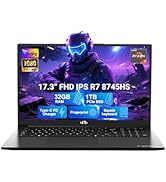
Image: Visual representation of the 90-day return policy.
7.3 Pomoć korisnicima
For any product-related questions, technical support, or warranty claims, please contact our professional customer service team:
- Email: service@nimopc.com
- Telefon: Refer to your product packaging or NIMO's official website for current phone support numbers.
- Online: Posjetite službeni NIMO webstranica za često postavljana pitanja i dodatne resurse podrške.
Our dedicated support team is available to assist you and resolve any issues promptly.

Image: Depiction of NIMO's professional customer assistance team.


