1. Uvod
Ovaj priručnik pruža bitne informacije za pravilnu instalaciju, rad i održavanje vašeg DIGITUS Cat 8.1 LAN kabla, model DK-1843-005. Dizajniran za brzi prijenos podataka, ovaj kabl osigurava pouzdanu mrežnu povezanost za zahtjevne aplikacije. Pažljivo pročitajte ova uputstva kako biste osigurali optimalne performanse i dugotrajnost vašeg proizvoda.

Slika 1: DIGITUS Cat 8.1 LAN kabel s RJ45 konektorima. Ova slika prikazuje cjelokupni dizajn kabela, ističući njegovu robusnu konstrukciju i zaštićene konektore.
2. Značajke proizvoda
DIGITUS Cat 8.1 LAN kabel nudi napredne funkcije za vrhunske mrežne performanse:
- Prijenos podataka velikom brzinom: Podržava brzine prijenosa podataka do 25 Gbps ili 40 Gbps, idealno za brzine optičkog interneta u serverskim sobama i aplikacijama s velikom propusnošću.
- Izuzetna propusnost: Radi na maksimalnoj propusnosti od 2000 MHz (2 GHz), osiguravajući odlična svojstva povezivanja za gigabitne mreže u podatkovnim centrima ili korporativnim okruženjima.
- Široka kompatibilnost: Opremljen RJ45 konektorima, kompatibilan je s postojećim mrežama koje koriste CAT.5e, CAT.6, CAT.6A i CAT.7 kablove.
- Podrška za napajanje preko Etherneta (PoE++): Podržava PoE++ tip 4 (IEEE 802.3bt), omogućavajući isporuku napajanja do 100W kompatibilnim uređajima, unatrag kompatibilan sa PoE i PoE+.
- Poboljšani integritet signala: Sadrži štampanu ploču (PCB) integriranu u RJ45 konektor kako bi se smanjile elektromagnetske smetnje (EMI) i poboljšala kvaliteta signala.
- Izdržljiva i sigurna konstrukcija: Ima LSZH (Low Smoke Zero Halogen) vanjski omotač za usporavanje plamena i nisku emisiju dima. Unutrašnji provodnik je napravljen od bakra (Cu). Konektori uključuju zatezno rasterećenje, zaštitu od preklapanja i polugu za zaključavanje.

Slika 2: Ilustruje različite primjene Cat 8.1 kabla, uključujući podatkovne centre, brzo igranje igara i 4K/8K UHD streaming. Ovo ističe svestranost kabla u različitim zahtjevnim okruženjima.
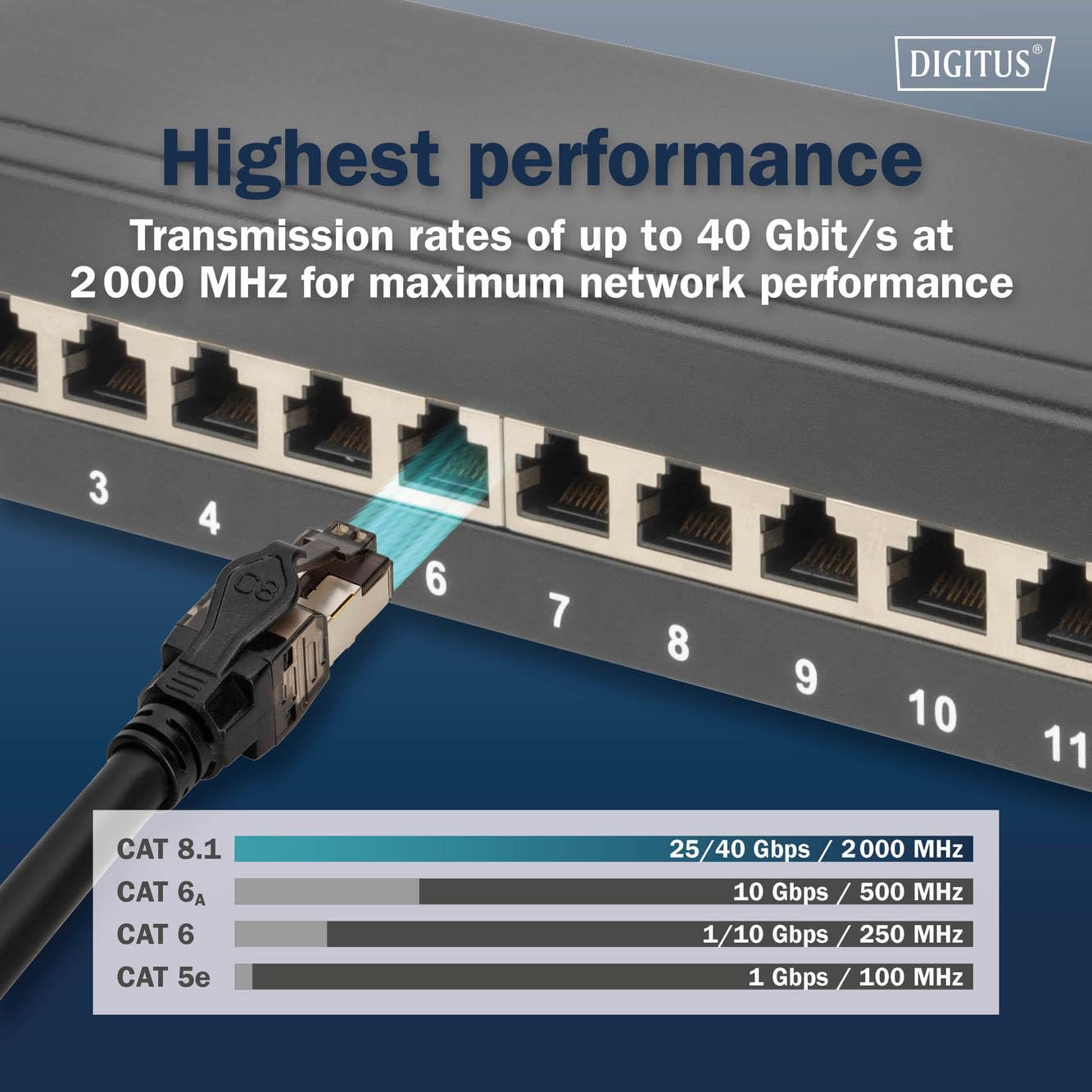
Slika 3: Uporedni grafikon koji prikazuje superiorne brzine prenosa i propusni opseg Cat 8.1 kablova u poređenju sa starijim kategorijama kao što su Cat 6A, Cat 6 i Cat 5e. Ovo vizuelno predstavlja karakteristiku "Najviše performanse".
3. Upute za postavljanje
Slijedite ove korake da biste pravilno povezali svoj DIGITUS Cat 8.1 LAN kabel:
- Identifikujte portove: Pronađite Ethernet portove na vašim mrežnim uređajima (npr. ruter, prekidač, računar, server, igraća konzola, Smart TV). To su obično RJ45 portovi.
- Spoji prvi kraj: Pažljivo umetnite jedan kraj DIGITUS Cat 8.1 LAN kabla u Ethernet port vašeg prvog uređaja dok ne čujete klik, što ukazuje da je sigurno zakačen.
- Spoji drugi kraj: Umetnite drugi kraj kabla u Ethernet port vašeg drugog uređaja. Pazite da i on klikne na svoje mjesto.
- Potvrdite vezu: Većina mrežnih uređaja ima indikatorske lampice pored Ethernet porta. Neprekidno ili trepćuće svjetlo obično ukazuje na uspješnu vezu i aktivnost podataka.
- Provođenje kablova: Pažljivo provucite kabel kako biste izbjegli oštre savijanja, uvrtanja ili prekomjerno zatezanje, što može oštetiti kabel i smanjiti performanse.
RJ45 konektori kabla su dizajnirani za sigurne i pouzdane veze, sa zaštitom od slučajnog prekidanja kako bi se spriječilo slučajno isključivanje.

Slika 4: Detaljan prikaz Cat 8.1 RJ45 konektora, koji prikazuje robusnu zaštitu i integriranu PCB ploču za poboljšani integritet signala. Ova slika ističe kvalitet i dizajn spojnih tačaka.
4. Upravljanje kablom
Nakon povezivanja, DIGITUS Cat 8.1 LAN kabel radi pasivno kako bi olakšao prijenos podataka između vaših mrežnih uređaja. Za njegov rad nije potrebna posebna interakcija korisnika osim pravilne veze.
4.1. Brzo umrežavanje
Ovaj kabel je konstruiran da podrži izuzetno visoke brzine prijenosa podataka, što ga čini pogodnim za:
- Data centri i serverske sobe koji zahtijevaju 25/40 Gigabit Ethernet.
- Visokoperformansno računarstvo i cloud okruženja.
- Igraće postavke gdje su niska latencija i visoka propusnost ključni.
- Strimovanje 4K/8K UHD sadržaja bez baferovanja.
4.2. Napajanje preko Etherneta (PoE++)
Ako vaši povezani uređaji i mrežna oprema podržavaju PoE++ (IEEE 802.3bt), ovaj kabel može prenositi i podatke i napajanje do 100 W. Ovo eliminira potrebu za odvojenim kablovima za napajanje kompatibilnih uređaja kao što su IP kamere, VoIP telefoni i bežične pristupne tačke.

Slika 5: Prikazuje različite uređaje koji mogu imati koristi od optimalne stabilnosti signala Cat 8.1 kabla, uključujući desktop računare, rutere, igraće konzole, prekidače, pametne televizore i servere. Ovo ilustruje širok spektar kompatibilnih aplikacija.
5. Održavanje
DIGITUS Cat 8.1 LAN kabl je dizajniran za izdržljivost i zahtijeva minimalno održavanje. Pridržavanje sljedećih smjernica će vam pomoći da osigurate njegove dugoročne performanse:
- Izbjegavajte fizički stres: Nemojte oštro savijati kabel, krimpovati ga ili stavljati teške predmete na njega. Prekomjerno savijanje može oštetiti unutrašnje provodnike i zaštitu, što dovodi do smanjenja performansi.
- Pravilno rukovanje: Prilikom isključivanja, uvijek pritisnite jezičak za otpuštanje na RJ45 konektoru prije povlačenja. Nikada ne povlačite direktno sam kabel, jer to može oštetiti konektor ili unutrašnje ožičenje kabela.
- čistoća: Držite konektore čistim od prašine i ostataka. Ako je potrebno, nježno očistite metalne kontakte suhom krpom koja ne ostavlja dlačice ili komprimiranim zrakom.
- Uslovi okoline: Kabl čuvajte i koristite na suhom mjestu, dalje od ekstremnih temperatura i direktne sunčeve svjetlosti. LSZH omotač pruža zaštitu, ali se i dalje preporučuju odgovarajući uslovi okoline.
- inspekcija: Povremeno provjeravajte kabel i konektore na znakove habanja, oštećenja ili korozije. Zamijenite kabel ako primijetite bilo kakva oštećenja.

Slika 6: Spiralni LAN kabel Cat 8.1, demonstrirajući njegovu fleksibilnost, istovremeno naglašavajući važnost pravilnog rukovanja i skladištenja kako bi se spriječila oštećenja.
6. Otkrivanje problema
Ako naiđete na probleme s mrežnom vezom, razmotrite sljedeće korake za rješavanje problema:
- Nema mrežne veze:
- Provjerite da li su oba kraja kabla sigurno priključena u odgovarajuće portove. Osluškujte zvuk "klik".
- Provjerite indikatorska svjetla na mrežnim uređajima. Ako su isključena, pokušajte s drugim priključkom ili uređajem.
- Testirajte kabel s drugim uređajem za koji znate da je ispravan ili ga zamijenite drugim Ethernet kabelom kako biste isključili mogućnost neispravnog kabela.
- Ponovo pokrenite ruter/modem i povezani uređaj.
- Mala brzina mreže:
- Provjerite da li sve mrežne komponente (ruter, prekidač, mrežni adapter) podržavaju željenu brzinu (npr. 10 Gbps ili 40 Gbps). Cat 8.1 kabl će raditi samo brzinom najsporije komponente u lancu.
- Provjerite da kabel nije savijen, uvijen ili oštećen. Fizička oštećenja mogu značajno smanjiti performanse.
- Provjerite izvore elektromagnetskih smetnji (EMI) u blizini kabela, iako su S/FTP zaštita i PCB u konektoru dizajnirani da ih ublaže.
- Ažurirajte upravljačke programe mrežnog adaptera na računaru.
- Intermitentna veza:
- Provjerite da li su konektori čisti i bez prljavštine.
- Provjerite ima li labavih spojeva.
- Ako je moguće, testirajte s drugim kabelom kako biste utvrdili je li problem u kabelu ili drugom mrežnom hardveru.
Za uporne probleme, pogledajte dokumentaciju za vaše mrežne uređaje ili kontaktirajte tehničku podršku.
7. Tehničke specifikacije
| Feature | Detalj |
|---|---|
| Broj modela | DK-1843-005 |
| Brand | Digitus |
| Vrsta kabla | Cat 8.1 Ethernet (S/FTP) |
| Tip konektora | RJ45 |
| Brzina prijenosa podataka | Do 40 Gbps |
| Bandwidth | 2000 MHz (2 GHz) |
| Conductor Gauge | AWG 24/7 |
| PoE podrška | PoE++ tip 4 (IEEE 802.3bt) do 100W |
| Materijal jakne | LSZH (Malo dima, nula halogena) |
| Materijal unutrašnjeg provodnika | bakar (Cu) |
| Posebne karakteristike | Integrisana PCB u RJ45 konektoru za smanjenje EMI-ja, zatezno ublažavanje, zaštitu od preklapanja, polugu za pritiskanje. |
| Kompatibilni uređaji | Priključna stanica, štampač, ruter, server, igraće konzole, pametni televizori, prekidači |
| Kompatibilnost | Povratno kompatibilan sa Cat 5e, Cat 6, Cat 6A, Cat 7 mrežama. |
8. Garancija i podrška
Za informacije o garanciji, tehničku podršku ili daljnja pitanja u vezi s vašim DIGITUS Cat 8.1 LAN kabelom, obratite se službenom Digitusovom webweb-mjesto ili kontaktirajte njihov odjel za korisničku podršku. Detalji se obično mogu pronaći na pakovanju proizvoda ili na službenim online resursima proizvođača.
Prilikom kontaktiranja podrške za bržu pomoć, obavezno imajte pri ruci broj modela vašeg proizvoda (DK-1843-005).