1. Proizvod je gotovview
The E-ACE 4.3-inch Dual Lens Car DVR Rearview Mirror Dash Cam is designed to enhance driving safety by providing comprehensive video recording of your journeys. This device integrates a front-facing camera and supports an optional rear-facing camera, offering a wide field of view and continuous recording capabilities. Its sleek design replaces your existing rearview mirror, providing a discreet and integrated solution for vehicle surveillance.
Key features include a 4.3-inch high-definition display, dual-lens recording, night vision, loop recording, and a G-sensor for automatic incident detection.

Image: The E-ACE rearview mirror dash cam displaying both front and rear camera feeds on its integrated screen.
2. Sadržaj paketa
Molimo Vas da provjerite paket za sljedeće stavke:
- E-ACE Rearview Mirror Dash Cam Unit
- Car Charger
- Fixed Bandages (for mounting)
- Uputstvo za upotrebu
- Čitač kartica
- Optional: Rear View Camera + Cable (6M or 10M, depending on variant)
- Optional: Buck Line (for parking monitoring power)
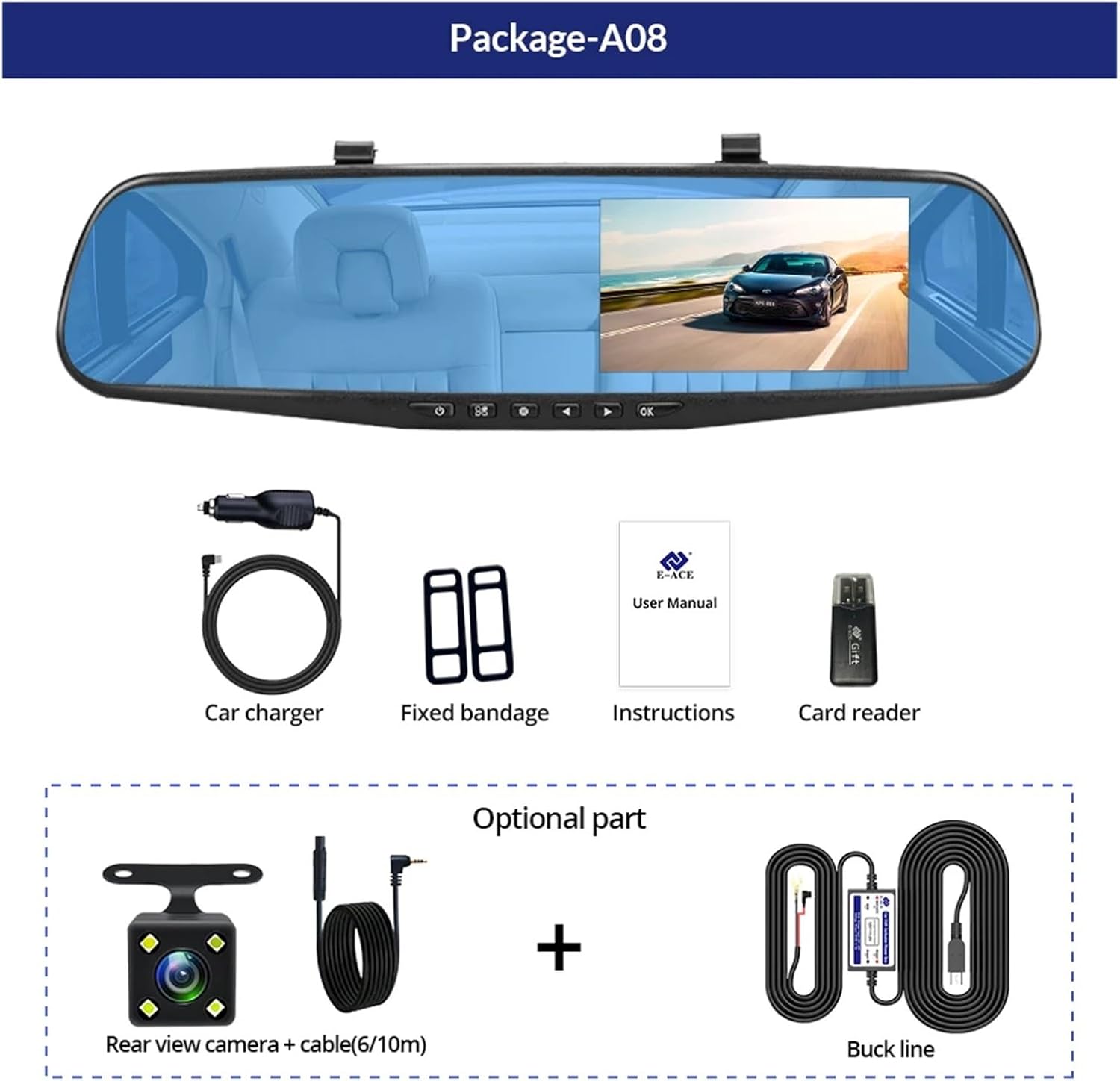
Image: A visual representation of the items included in the E-ACE dash cam package, showing the main unit and accessories.
3. Značajke proizvoda
- 4.3-inch High-Definition Display: Provides clear visibility for real-time monitoring and playback.
- Dizajn dvostrukih sočiva: Captures both front and rear footage simultaneously for comprehensive coverage.
- Built-in Night Vision Technology: Ensures clear recordings in low-light conditions.
- Instalacija prilagođena korisniku: Sleek rearview mirror design integrates seamlessly into your vehicle.
- Snimanje u petlji: Automatski prepisuje najstariji footage kada je memorijska kartica puna, osiguravajući kontinuirano snimanje.
- G-Sensor Feature: Detects sudden movements or impacts and automatically locks the current video file kako bi se spriječilo njegovo prepisivanje.
- Nadgledanje parkinga: Records video when motion or impact is detected while the vehicle is parked (requires buck line connection).
- Široki ugao od 170 stepeni: Pruža širok view puta ispred nas.
- Reverzna slika: Displays the rear camera view sa smjernicama za parkiranje prilikom vožnje unazad.
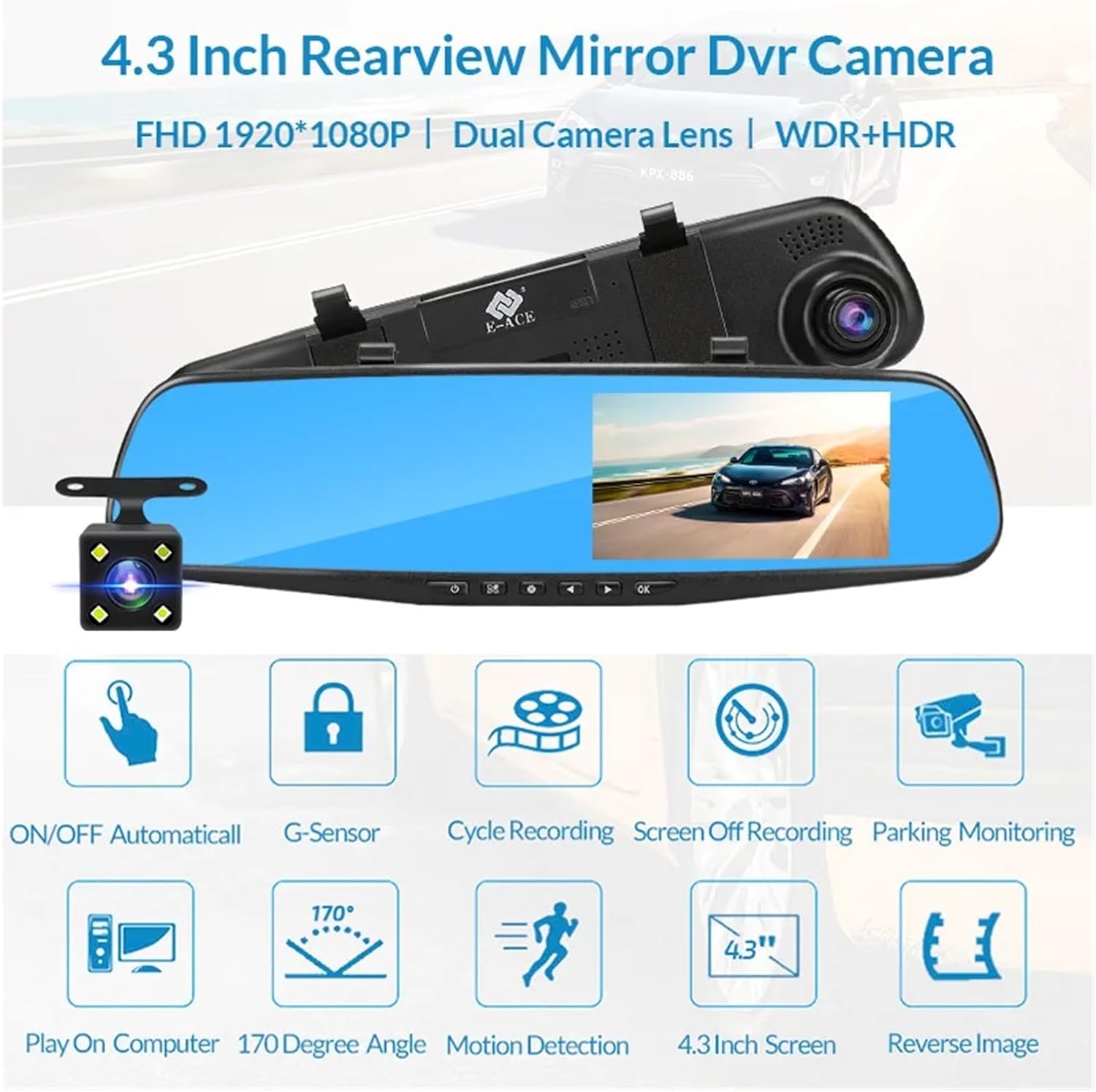
Image: An illustration highlighting the various functional features of the E-ACE dash cam.
4. Identifikacija komponente
Familiarize yourself with the various parts and controls of your E-ACE dash cam:

Image: A detailed diagram identifying the buttons, ports, and features on the E-ACE dash cam unit.
- Dugme za uključivanje/isključivanje: Uključuje ili isključuje uređaj.
- Dugme menija: Pristupa postavkama i opcijama.
- Dugme za način rada: Switches between video recording, photo, and playback modes.
- Dugme GORE: Navigates up in menus or adjusts settings.
- Dugme prema dolje: Navigates down in menus or adjusts settings.
- Dugme OK: Confirms selections or starts/stops recording.
- Utor za TF karticu: Insert your MicroSD (TF) card here.
- AV-IN priključak: Povezuje zadnju kameru.
- USB port: Za napajanje i prenos podataka.
- Dugme za resetiranje: Resets the device to factory settings (use a thin pin).
- mikrofon: Snima zvuk unutar vozila.
5. Postavljanje i instalacija
5.1 Umetanje memorijske kartice
Before installation, insert a high-speed MicroSD (TF) card (Class 10 or higher, up to 64GB recommended) into the TF Card Slot (7) with the contacts facing the screen. Ensure the card is inserted correctly until it clicks into place.
5.2 Montiranje kamere za automobil
- Attach the fixed bandages to the back of the dash cam unit.
- Securely strap the dash cam over your vehicle's existing rearview mirror using the fixed bandages. Ensure it is centered and stable.
5.3 Povezivanje napajanja
- Connect the car charger to the USB Port (9) on the dash cam.
- Drugi kraj auto punjača priključite na utičnicu za upaljač u vozilu.
- Uredno provucite kabel za napajanje duž ukrasa vjetrobranskog stakla kako biste izbjegli ometanje view.
5.4 Installing the Rear Camera (Optional)
- Connect the rear camera cable to the AV-IN Port (8) on the dash cam.
- Route the rear camera cable from the dash cam to the rear of your vehicle. This typically involves tucking the cable under the headliner and along the side pillars.
- Mount the rear camera on the rear windshield or near the license plate using its adhesive or screws. Ensure it has a clear view puta iza.
- If using the reverse image function, connect the red wire from the rear camera cable to your vehicle's reverse light power supply.
6. Uputstvo za upotrebu
6.1 Uključivanje/isključivanje napajanja
- automatski: The dash cam will automatically power on and start recording when your vehicle's ignition is turned on (if connected to a switched power source).
- Priručnik: Press and hold the ON/OFF Button (1) to manually power the device on or off.
6.2 Osnovni rad
- Prebacivanje načina rada: Press the Mode Button (3) to cycle between Video Recording, Photo, and Playback modes.
- Pristupni meni: In any mode, press the Menu Button (2) to enter the settings menu. Use the UP (4) and Down (5) buttons to navigate, and OK (6) to select.
- Pokreni/Zaustavi snimanje: In Video Recording mode, press the OK Button (6) to manually start or stop recording.
6.3 Načini prikaza
While recording, you can typically switch between different display views by pressing the UP or Down buttons:
- Front Camera Only
- Rear Camera Only
- Picture-in-Picture (Front main, Rear sub-window)
- Picture-in-Picture (Rear main, Front sub-window)
6.4 Snimanje u petlji
Set the loop recording duration (e.g., 1, 3, or 5 minutes) in the settings menu. When the memory card is full, the oldest unlocked files će biti prepisani novim snimcima.
6.5 G-senzor
The G-sensor automatically detects collisions or sudden braking. When triggered, it locks the current video file, preventing it from being overwritten by loop recording. Adjust sensitivity in the settings.
6.6 Parking Monitoring (Optional)
If the buck line is installed, the dash cam can monitor your vehicle while parked. When motion or impact is detected, it will automatically record a short video. Enable this feature in the settings.
6.7 Podešavanje datuma i vremena
It is important to set the correct date and time in the system settings for accurate timestampna vašim snimcima.
7. Održavanje
- čišćenje: Use a soft, dry cloth to clean the lens and screen. Avoid abrasive cleaners or solvents.
- memorijska kartica: Format the MicroSD card regularly (e.g., once a month) within the dash cam's settings to maintain optimal performance and prevent data corruption. Back up important files prije formatiranja.
- temperatura: Avoid exposing the device to extreme temperatures, as this can affect battery life and component integrity.
- Ažuriranja firmvera: Provjerite proizvođača website periodically for firmware updates that may improve performance or add features.
8. Otkrivanje problema
| Problem | Mogući uzrok | Rješenje |
|---|---|---|
| Kamera za automobil se ne uključuje. | No power supply; faulty charger; loose connection. | Check car charger connection and vehicle's cigarette lighter. Try a different USB cable/charger. |
| Snimanje se automatski zaustavlja. | Memory card full; slow memory card; G-sensor sensitivity too high. | Format the memory card. Use a Class 10 or higher MicroSD card. Lower G-sensor sensitivity in settings. |
| Video footage je mutno. | Zaštitna folija na objektivu; prljav objektiv; nepravilan fokus. | Remove any protective film. Clean the lens with a soft cloth. |
| Zadnja kamera ne prikazuje sliku. | Labava veza; neispravan kabel/kamera. | Check the AV-IN connection. Ensure the rear camera is properly installed. |
| Uređaj se zamrzava ili ruši. | Software issue; memory card error. | Press the Reset Button (10) with a thin pin. Format the memory card. |
9. Specifikacije
- Naziv modela: DMMRUTXB
- Prikaz: 4.3 inča
- kamera: Dual Lens (Front & Rear support)
- Video rezolucija: FHD 1920x1080P (Front)
- Karakteristike: Loop Recording, G-Sensor, Night Vision, Parking Monitoring, 170-degree wide angle
- Skladištenje: Supports MicroSD (TF) card, Class 10 or higher (up to 64GB)
- Povezivanje: USB, AV-IN (for rear camera)
- Težina artikla: Otprilike 1.76 unci (50 grama)
- Dimenzije paketa: Približno 0.39 x 0.39 x 0.39 inča
- Proizvođač: DMMRUTXB
10. Garancija i podrška
For warranty information and technical support, please refer to the documentation provided with your purchase or contact the retailer/manufacturer directly. Keep your purchase receipt as proof of purchase.