1. Uvod
This manual provides detailed instructions for the setup, operation, and maintenance of your Transformers GK01 Wireless Mechanical Keyboard. The GK01 is a versatile keyboard featuring tri-mode connectivity (Bluetooth 5.0, 2.4GHz wireless, and USB-C wired), a 101-key layout, RGB backlighting, and hot-swappable switches for a customizable typing experience.

Figure 1.1: Transformers GK01 Wireless Mechanical Keyboard.
2. Sadržaj paketa
Molimo Vas da provjerite da li se u Vašem paketu nalaze sve dolje navedene stavke:
- Transformers GK01 Wireless Mechanical Keyboard
- USB-C na USB-A kabel
- 2.4 GHz bežični USB adapter
- 2-u-1 poklopac za tipke i prekidač za izvlačenje
- Korisnički priručnik (ovaj dokument)
- Rezervni prekidači (2 komada)
- Poklopac tastature
3. Podešavanje i povezivanje
3.1. Tri-Mode Connection Overview
The GK01 keyboard supports three connection modes: USB-C wired, 2.4GHz wireless, and Bluetooth 5.0. You can connect to up to five devices simultaneously and switch between them seamlessly.

Figure 3.1: Tri-Mode Connection Capabilities.
3.2. Žičana USB-C veza
- Pronađite USB-C priključak na tastaturi.
- Spojite jedan kraj priloženog USB-C kabla na tastaturu.
- Drugi kraj USB-C kabla priključite na slobodni USB-A port na računaru.
- Tastatura će biti automatski prepoznata i spremna za upotrebu.
3.3. Bežična veza od 2.4 GHz
- Locate the 2.4GHz wireless USB dongle.
- Uključite adapter u dostupan USB-A port na računaru.
- On the keyboard, ensure the mode switch (usually on the side or back) is set to 2.4GHz mode.
- Tastatura bi se trebala automatski povezati. Ako ne, pritisnite Fn + R da započnete uparivanje.

Figure 3.2: USB-C Port and 2.4GHz Dongle Location.
3.4. Bluetooth 5.0 veza
The keyboard supports connecting to up to three Bluetooth devices (BT1, BT2, BT3).
- On the keyboard, set the mode switch to Bluetooth mode.
- Da biste ušli u način uparivanja za određeni Bluetooth kanal, pritisnite i držite Fn + Q (za BT1), Fn + W (za BT2), ili Fn + E (for BT3) for 3-5 seconds until the indicator light flashes rapidly.
- On your device (PC, tablet, smartphone), open Bluetooth settings and search for new devices.
- Select "Transformers GK01" from the list of available devices.
- Nakon povezivanja, indikatorska lampica na tastaturi će prestati treptati.
- Za prebacivanje između uparenih Bluetooth uređaja, jednostavno pritisnite Fn + Q, Fn + W, ili Fn + E.
4. Osnovni rad
4.1. Keyboard Layout and Anti-Ghosting
The GK01 features a 101-key layout, providing a full set of keys including a numeric keypad. All keys are equipped with anti-ghosting technology, ensuring that every keystroke is registered accurately, even when multiple keys are pressed simultaneously.
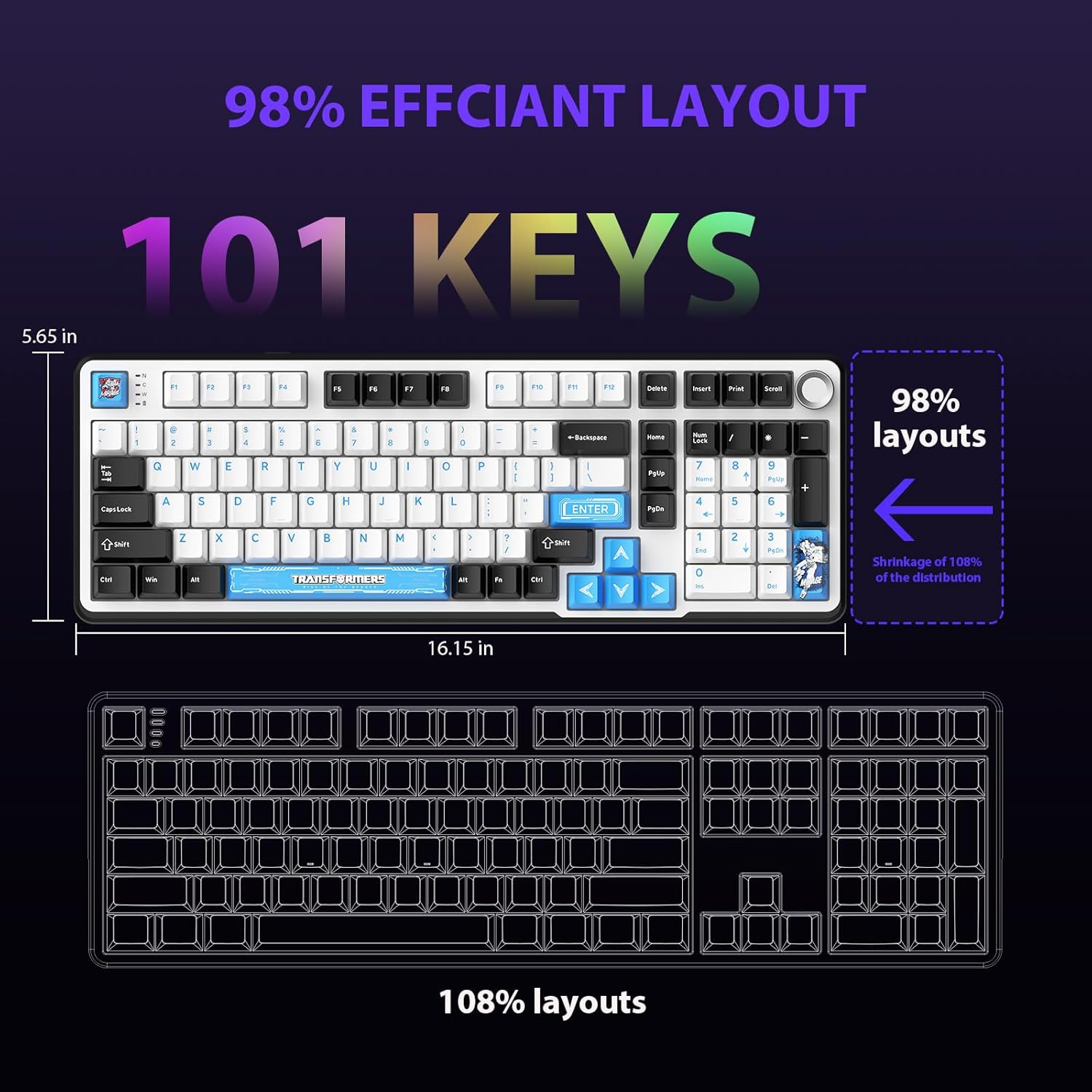
Figure 4.1: 101-Key Layout.
4.2. Dugme za upravljanje multimedijom
The dedicated knob located on the top right of the keyboard provides convenient multimedia control:
- Rotirajte u smjeru kazaljke na satu: Povećajte jačinu zvuka.
- Okrenite suprotno od smjera kazaljke na satu: Smanjite jačinu zvuka.
- Pritisni: Isključivanje/uključivanje zvuka.
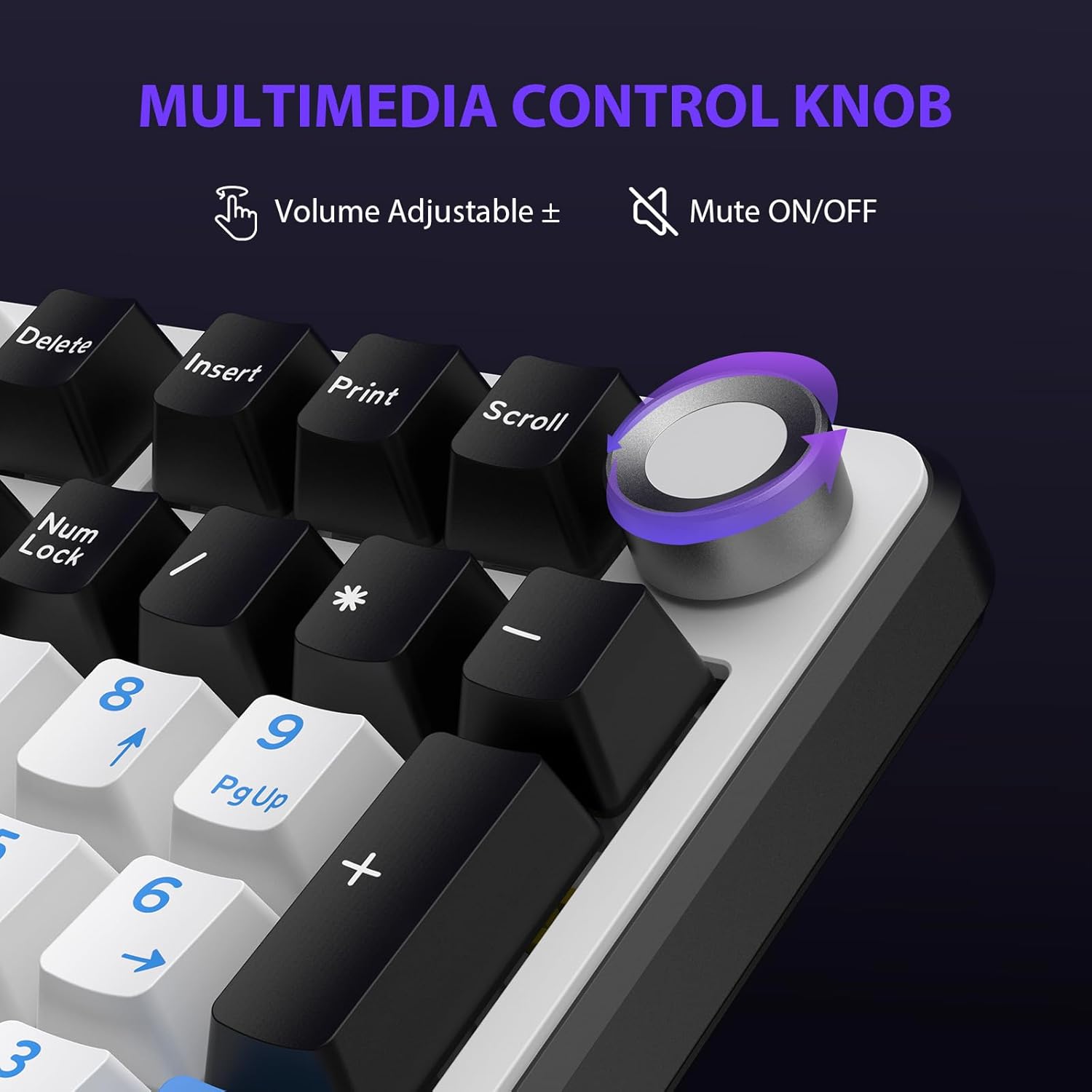
Figure 4.2: Multimedia Control Knob.
4.3. Kontrola RGB pozadinskog osvjetljenja
The GK01 keyboard features 16.8 million color RGB backlighting with various effects.
- Fn + [Right Arrow]: Adjust 5 brightness levels.
- Fn + [Left Arrow]: Adjust 5 speed levels for dynamic effects.
- Fn + [Insert]: Switch between 20 different backlight modes.
- Fn + [Enter]: Switch color order within certain modes.
- Fn + [X]: Turn off light / activate power-saving mode.
- Fn + [Backspace]: Switch color order within certain modes.

Figure 4.3: RGB Backlight Controls.
5. Napredne funkcije
5.1. Prekidači koji se mogu zamjenjivati tokom rada
The GK01 keyboard is equipped with pre-lubricated Cybertron linear switches and supports solder-free hot-swapping. This allows you to easily replace switches with compatible 3-pin or 5-pin mechanical switches without soldering.
Za zamjenu prekidača:
- Using the provided 2-in-1 keycap and switch puller, gently remove the keycap from the desired switch.
- Insert the switch puller onto the switch, ensuring it grips the top and bottom clips of the switch.
- Lagano povucite prekidač ravno prema gore da biste ga uklonili s PCB ploče.
- Poravnajte pinove novog prekidača s otvorima na PCB-u. Provjerite jesu li pinovi ravni kako biste izbjegli savijanje.
- Čvrsto pritisnite novi prekidač na mjesto dok ne klikne.
- Ponovo pričvrstite poklopac tipke.

Figure 5.1: Hot-Swappable Switch Replacement.
5.2. Programabilni softver
The GK01 supports custom software for advanced customization, including key remapping, macro creation, and detailed RGB lighting effects.
- The software is compatible only with the Windows operating system.
- The keyboard must be connected via USB-C wired mode to use the software.
- For driver download, please visit the official Transformers Keyboard website or refer to the link provided in the product packaging.
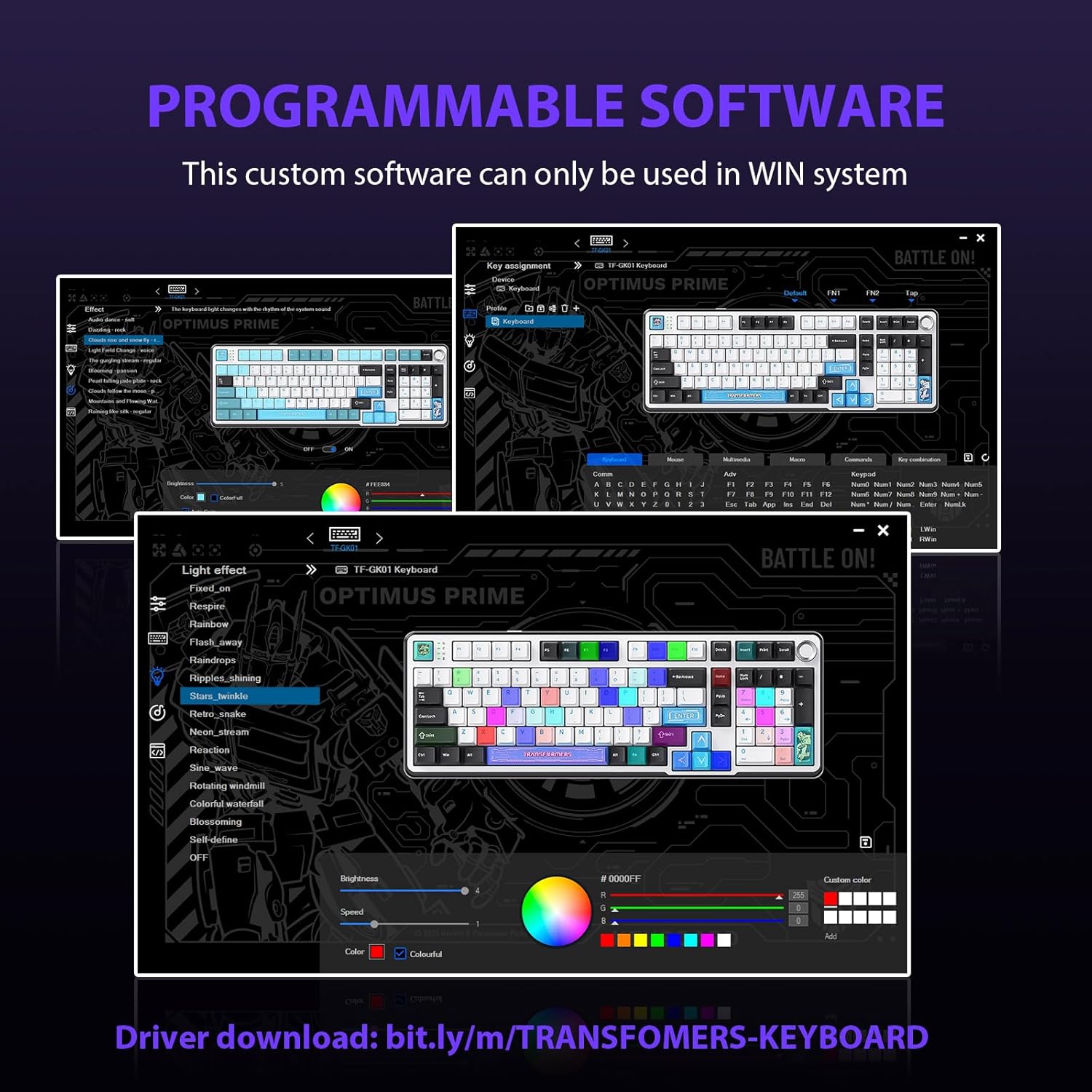
Slika 5.2: Programabilni softverski interfejs.
5.3. Gasket Mounted Structure
The keyboard features a five-layer sound-absorbing and shock-absorbing gasket mounted structure. This design effectively reduces hollow noise and provides a softer, more consistent typing feel by isolating the plate from the case.
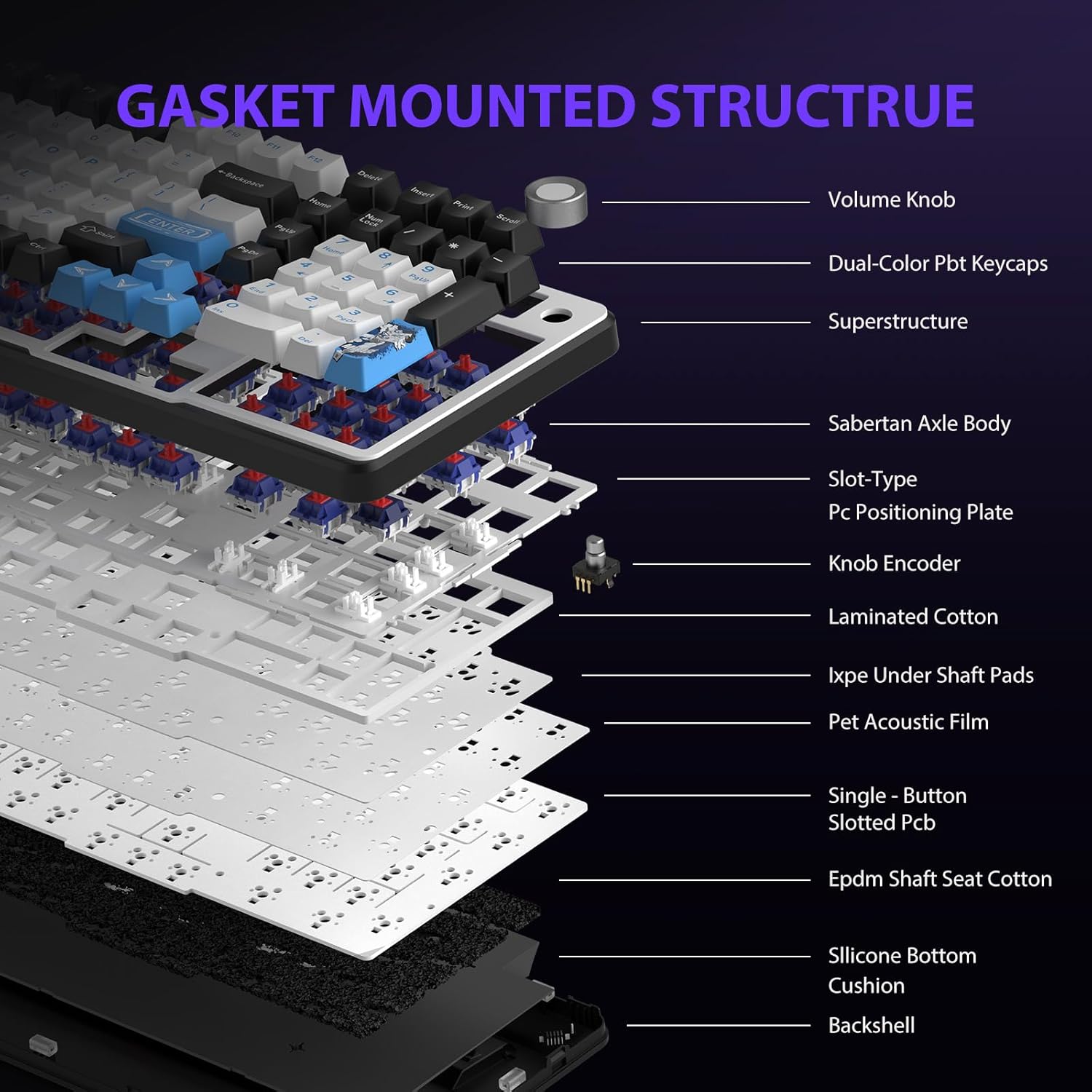
Figure 5.3: Gasket Mounted Structure Components.
6. Upravljanje baterijom
The GK01 keyboard is equipped with a 4000mAh rechargeable battery.
- Punjenje: Connect the keyboard to a USB power source using the provided USB-C cable. The indicator light will show charging status.
- Trajanje baterije: A fully charged battery provides extended usage time. Actual battery life may vary based on usage patterns and RGB lighting intensity.
- Cuvanje energije: The keyboard will enter a power-saving sleep mode after a period of inactivity to conserve battery. Press any key to wake it up.
7. Održavanje
7.1. Čišćenje tastature
- Prije čišćenja isključite tastaturu iz svih izvora napajanja.
- Koristite meku krpu koja ne ostavlja dlačiceampvodom ili blagim sredstvom za čišćenje obrišite tipke i kućište.
- Za prašinu i nečistoće između tipki koristite komprimirani zrak ili malu četku.
- Izbjegavajte korištenje jakih kemikalija ili abrazivnih materijala.
7.2. Keycap and Switch Care
- The PBT keycaps are designed for durability and fade resistance.
- Refer to Section 5.1 for instructions on safely removing and replacing keycaps and switches.
- Ensure the keyboard feet are clean and free of debris for stable placement.

Figure 7.1: Adjustable Keyboard Feet.
8. Otkrivanje problema
| Problem | Mogući uzrok | Rješenje |
|---|---|---|
| Tastatura ne reaguje u bežičnom režimu. | Low battery, incorrect mode selected, dongle not connected, Bluetooth not paired. | Charge the keyboard. Ensure the mode switch is set correctly (2.4GHz or BT). Re-insert the 2.4GHz dongle. Re-pair Bluetooth connection. Try wired mode to confirm keyboard functionality. |
| Tipke se ne registruju ili se tipkaju dvaput. | Loose switch, software issue, debris under keycap. | Ensure switches are fully seated. Clean under keycaps. If using programmable software, ensure it's updated or try resetting keyboard settings. |
| RGB pozadinsko osvjetljenje ne radi ili je zaglavljeno. | Backlight turned off, software conflict. | Pritisnite Fn + X to toggle backlight. Check programmable software settings. |
| Nije moguće povezivanje putem Bluetootha. | Tastatura nije u režimu uparivanja, Bluetooth uređaja isključen, smetnje. | Provjerite je li tastatura u načinu rada za uparivanje putem Bluetootha (Fn + Q/W/E long press). Ensure device Bluetooth is on and discoverable. Move closer to the device. |
9. Specifikacije
| Feature | Detalj |
|---|---|
| Broj modela | TF-GK01 |
| Povezivanje | Bluetooth 5.0, 2.4GHz bežični, USB-C žični |
| Tip tastature | Mehanički |
| Layout | 101 Keys (Full-size) |
| Prekidači | Pre-lubed Cybertron Linear Switches, Hot-Swappable (3-pin/5-pin compatible) |
| Kapice | Heat-sublimated PBT |
| Pozadinsko osvetljenje | RGB (16.8 Million Colors, 20 modes, music rhythm effects via driver) |
| Kapacitet baterije | 4000mAh |
| Dimenzije proizvoda | 16.15 x 5.65 x 1.63 inča (41.02 x 14.35 x 4.14 cm) |
| Težina artikla | 2.24 funte (1.02 kg) |
| Kompatibilni uređaji | Laptop, PC, pametni telefon, tablet |
| Posebne karakteristike | Anti-Ghosting (all keys), Multimedia Control Knob, Programmable Keys (via software), Rechargeable |
10. Garancija i podrška
For information regarding warranty coverage, technical support, or service inquiries, please refer to the warranty card included with your product or visit the official Transformers Keyboard website.
Proizvođač: Transformatori


