Uvod
This manual provides detailed instructions for the HOU Combo Keyboard Case, designed to enhance your iPad experience with a detachable keyboard, multi-touch trackpad, and comprehensive protection. Please read this manual thoroughly before using the product to ensure proper operation and longevity.
Kompatibilnost
The HOU Combo Keyboard Case is compatible with the following 10.2-inch iPad models:
- iPad 9th Generation (2021): Model Numbers A2602, A2603, A2604, A2605
- iPad 8th Generation (2020): Model Numbers A2270, A2428, A2429, A2430
- iPad 7th Generation (2019): Model Numbers A2200, A2197, A2198

Figure 1: Visual guide to compatible iPad models.
Karakteristike proizvoda
- Dizajn s magnetskim odvojivim elementom: The keyboard connects magnetically to the case, allowing for easy attachment and detachment. This enables independent use of the case and keyboard.
- Rotirajući stalak od 360°: The integrated stand supports both landscape and portrait viewing modes, with adjustable angles from 90° to 170°.
- Sveobuhvatna zaštita: Constructed from high-strength silicone, the case provides 360° all-around protection for your iPad, including reinforced corners.
- Integrated Pencil Holder: An elastic rear pen holder and magnetic pencil slot secure your Apple Pencil, preventing loss.
- High-Performance Keyboard: Features a 78-key layout with high-resilience keys for a comfortable typing experience.
- 7-bojno pozadinsko osvjetljenje: The keyboard includes a 7-color backlight with three adjustable brightness levels for various lighting conditions.
- Responsive Multi-Touch Trackpad: A large, high-precision touchpad supports full iOS gestures for fluid navigation and multitasking.
- Ultra lagan i prenosiv: The entire unit is designed for portability, with the case weighing only 290g and the total weight around 590g.
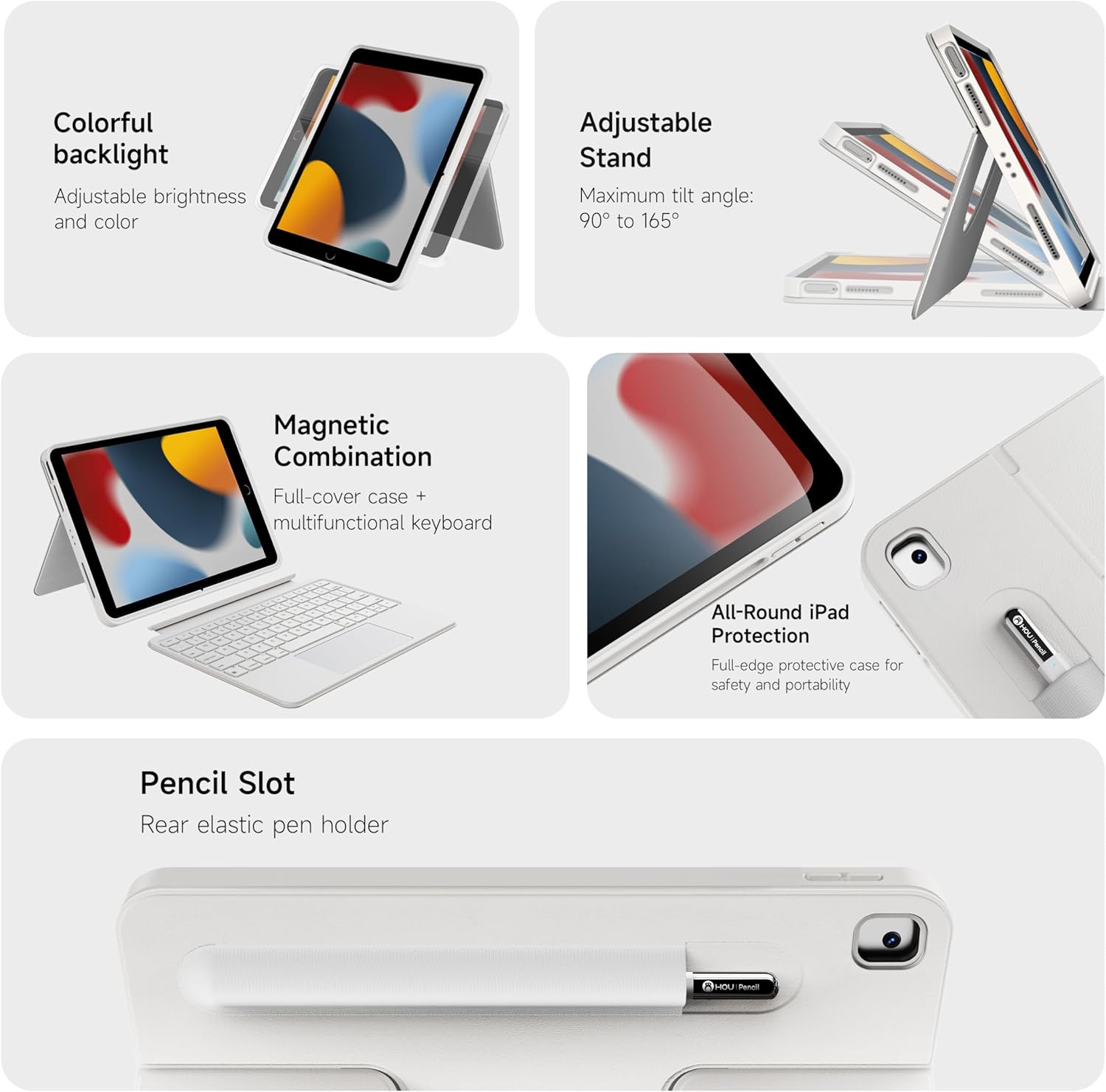
Slika 2: Gotovoview ključnih karakteristika proizvoda.

Slika 3: Detaljno view of keyboard and touchpad features.

Figure 4: The 78-key keyboard layout.
Uputstva za postavljanje
- Napunite tastaturu: Before first use, fully charge the keyboard using the provided USB-C cable. The charging port is located on the side of the keyboard.
- Umetnite iPad u futrolu: Carefully place your iPad into the protective silicone case, ensuring all ports and buttons align correctly with the case cutouts. The reinforced corners provide a snug fit and enhanced protection.
- Attach Keyboard (Optional): The keyboard attaches magnetically to the case. Simply align the keyboard with the bottom edge of the iPad case until it snaps into place.
- Uključivanje tastature: Locate the power switch on the side of the keyboard and slide it to the "On" position. A small indicator light will illuminate.
- Bluetooth uparivanje:
- Na vašem iPadu idite na "Postavke" > "Bluetooth".
- Provjerite je li Bluetooth uključen.
- The iPad will search for nearby devices. Select "HOU Keyboard" (or similar name) from the list of available devices.
- Follow any on-screen prompts to complete the pairing process. Once paired, the keyboard will automatically connect to your iPad when powered on and within range.
Video 1: Demonstrates the setup and features of the HOU Combo Keyboard Case, including magnetic detachment, stand functionality, and keyboard operation.
Uputstvo za upotrebu
- Korištenje trackpada: The large multi-touch trackpad supports various iOS gestures for navigation, scrolling, and app control. Refer to your iPad's iOS settings for a full list of supported gestures.
- Adjusting Keyboard Backlight: Press the dedicated backlight key (often indicated by a light bulb icon) to cycle through 7 different colors and three brightness levels.
- Utilizing the 360° Rotating Stand: The integrated stand allows you to position your iPad in both landscape and portrait orientations. The stand can rotate 360 degrees and adjust angles from 90° to 170° for optimal viewing.
- Detaching the Keyboard: To use your iPad as a tablet, simply pull the keyboard away from the magnetic connection. The case can be used independently.
- Securing Apple Pencil: Place your Apple Pencil in the elastic holder or magnetic slot on the back of the case for secure storage.

Slika 5: Pramples of the keyboard case in use for productivity and leisure.

Figure 6: The ultra-light design of the keyboard case emphasizes its portability.

Figure 7: The keyboard case transforms your iPad into a functional laptop.
Održavanje
- čišćenje: Koristite meku, damp cloth to wipe down the case and keyboard. Avoid harsh chemicals or abrasive materials. Ensure the keyboard is powered off before cleaning.
- Održavanje baterije: Da biste produžili vijek trajanja baterije, izbjegavajte često potpuno pražnjenje tastature. Redovno je punite, posebno ako će se skladištiti duži period.
- Skladištenje: Kada se ne koristi, futrolu za tastaturu čuvajte na hladnom i suhom mjestu, dalje od direktne sunčeve svjetlosti i ekstremnih temperatura.
Rješavanje problema
- Tastatura se ne povezuje:
- Provjerite je li tastatura uključena i potpuno napunjena.
- Provjerite Bluetooth postavke na vašem iPadu kako biste potvrdili da je tastatura uparena i povezana. Ako nije, pokušajte ponovo upariti uređaj.
- Ponovo pokrenite i iPad i tastaturu.
- Trackpad ne reaguje:
- Provjerite je li tastatura povezana putem Bluetootha.
- Provjerite postavke iPada za funkcionalnost trackpad-a.
- Očistite površinu dodirne pločice kako biste uklonili sve nečistoće.
- Tipke ne reagiraju:
- Verify the keyboard is powered on and connected.
- Provjerite da baterija tastature nije kritično niska.
Specifikacije
| Feature | Detalj |
|---|---|
| Brand | HOU |
| Kompatibilni uređaji | iPad 9th, 8th, 7th Generation (10.2 inch) |
| Tehnologija povezivanja | Bluetooth |
| Opis tastature | Multimedija |
| Posebne karakteristike | Backlit, Detachable Case, Hotkeys and Media Keys, Portable, Trackpad, 360° Rotatable Stand |
| Boja | White (RGB Backlighting) |
| Materijal | Silikon |
| Težina artikla | 1.98 funte (otprilike 0.9 kg) |
| Case Weight (approx.) | 0.64 funti (približno 290 g) |
| Uključene komponente | Keyboard, Case |
Garancija i podrška
For warranty information and customer support, please refer to the product packaging or contact HOU customer service directly. Keep your purchase receipt for warranty claims.


