1. Uvod
The ALIGATOR AZA930B is a mobile phone designed with ease of use in mind, particularly for seniors. It features a large keypad, a clear 2.8-inch color display, and essential safety functions such as an SOS button and SOS locator. This manual provides detailed instructions on how to set up, operate, maintain, and troubleshoot your device to ensure optimal performance and safety.
2. Sigurnosne informacije
Molimo vas da pažljivo pročitate ovaj odjeljak prije upotrebe telefona kako biste osigurali siguran i ispravan rad.
- Sigurnost baterije: Use only ALIGATOR approved batteries and chargers. Do not short-circuit, puncture, or expose the battery to extreme temperatures. Dispose of batteries properly.
- Punjenje: The phone does not include a charger. Use a compatible USB-C charger (recommended model ALIGATOR CHA0047) with a power output of 2.5-3W. Avoid charging in damp uslovima.
- Zaštita sluha: Izbjegavajte dugotrajno slušanje muzike na visokim nivoima jačine zvuka kako biste spriječili oštećenje sluha.
- Sigurnost u vožnji: Always prioritize driving safety. Use hands-free accessories and obey all local laws and regulations regarding mobile phone use while driving.
- medicinski uređaji: Maintain a safe distance between the phone and medical devices such as pacemakers. Consult your physician and the medical device manufacturer for specific guidelines.
- Otpornost na vodu: Ovaj telefon nije vodootporan. Izbjegavajte izlaganje tekućinama.
3. Sadržaj paketa
Provjerite da li se u paketu vašeg proizvoda nalaze svi artikli:
- ALIGATOR AZA930B Mobile Phone
- Dock za punjenje
- Korisnički priručnik (ovaj dokument)
- Napomena: Punjač nije uključen u cijenu i mora se kupiti zasebno.
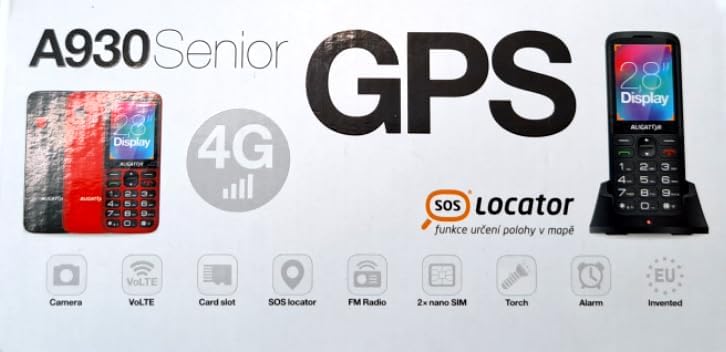
Figure 3.1: Product packaging illustrating the phone, charging dock, and various features such as 4G connectivity, GPS, SOS Locator, camera, VoLTE, card slot, FM radio, torch, and alarm. The box also indicates the 2.8-inch display.
4. Podešavanje
4.1. Umetanje SIM kartice
The ALIGATOR AZA930B supports Dual SIM (2 x Nano SIM) functionality. To insert SIM cards:
- Isključite telefon.
- Skinite zadnji poklopac i bateriju.
- Locate the SIM card slots. Insert your Nano SIM cards into the designated slots, ensuring the gold contacts face down and the cut corner aligns correctly.
- Zamijenite bateriju i stražnji poklopac.
4.2. Umetanje Micro SD kartice
The phone supports a Micro SD memory card up to 256 GB for additional storage.
- Follow steps 1 and 2 from "4.1. Inserting SIM Cards".
- Locate the Micro SD card slot. Insert the Micro SD card with the gold contacts facing down until it clicks into place.
- Zamijenite bateriju i stražnji poklopac.
4.3. Početno punjenje
Before first use, fully charge the phone's 1700 mAh Li-ion battery.
- Connect the USB-C cable (not included) to the phone's USB-C port or place the phone in the charging dock.
- Connect the other end of the cable to a compatible charger (e.g., ALIGATOR CHA0047, 2.5-3W) or a powered USB port.
- The charging indicator will illuminate. A full charge may take several hours.

Figure 4.1: The ALIGATOR AZA930B phone placed in its dedicated charging dock. The phone's screen shows the current time and network signal indicators.

Figure 4.2: Detail from the product box, explicitly showing an icon indicating that a charger is not included and specifying a recommended charger power of 2.5-3W.
5. Uputstvo za upotrebu
5.1. Uključivanje/isključivanje
- Za uključivanje: Pritisnite i držite dugme za uključivanje/isključivanje/prekid poziva (crveno dugme) dok se ekran ne upali.
- Za isključivanje: Pritisnite i držite dugme za uključivanje/isključivanje/prekid poziva dok se ne pojave opcije za isključivanje, a zatim odaberite "Isključivanje".
5.2. Osnovne funkcije poziva
- Pozivanje: Enter the phone number using the large keypad and press the Call button (green button).
- Odgovaranje na poziv: When the phone rings, press the Call button (green button).
- Završetak poziva: Press the Power/End Call button (red button).
- Hands-free: During a call, activate hands-free mode via the on-screen option or a dedicated button if available.
5.3. SOS Button and SOS Locator
The SOS button is a critical safety feature, allowing quick contact in emergencies.
- SOS dugme: Located on the back of the phone (often red). Press and hold this button to activate the emergency sequence.
- SOS Presets: You can set up to 5 preset emergency contacts. When the SOS button is pressed, the phone will automatically call these numbers in sequence and send an emergency SMS.
- SOS Locator: This function sends the phone's location via SMS to the emergency contacts after the SOS button is pressed. The recipient can then view the location on a map via a web link provided in the SMS. This feature utilizes both GSM and GPS for location accuracy.

Slika 5.1: Pozadi view of the ALIGATOR AZA930B, showing the prominent red SOS button and the speaker grille for clear audio.

Slika 5.2: Nagnuti zadnji dio view of the ALIGATOR AZA930B, demonstrating the activated flashlight feature.
5.4. "Zachranka" Rescue Application
The "Zachranka" application is a mobile emergency call application pre-installed on the device.
- It provides quick contact with emergency medical services or mountain rescue.
- The application is valid in Austria, Hungary, the Czech Republic, and in the territories of the Slovak mountains.
- For more information, refer to the "Zachranka" app's official resources.

Slika 5.3: Prednja i zadnja strana views of the ALIGATOR AZA930B, accompanied by the "Zachranka" rescue application logo, indicating its integration with the device.
5.5. Ostale karakteristike
- Imenik: Sačuvajte do 500 kontakata.
- slanje poruka: Send and receive SMS messages (memory for 100 SMS). Supports sending photos via MMS.
- multimedija:
- FM radio: Slušajte FM radio stanice.
- Media Player: Reprodukcija zvuka i videa files stored on the phone or Micro SD card.
- Diktafon: Snimite glasovne bilješke.
- svjetiljka: Activate the built-in flashlight for illumination.
- Alati: Includes Alarm, Calculator, and SIM toolkit support.
- Bluetooth: Connect to Bluetooth headsets or other devices.
- Vibracioni alarm: Set the phone to vibrate for incoming calls or notifications.
- melodije: Choose from 10+1 pre-installed melodies.
- Automatsko podešavanje vremena: The phone can automatically adjust its time.

Slika 5.4: Prednja strana view of the ALIGATOR AZA930B, highlighting its user-friendly large keypad and vibrant color display.
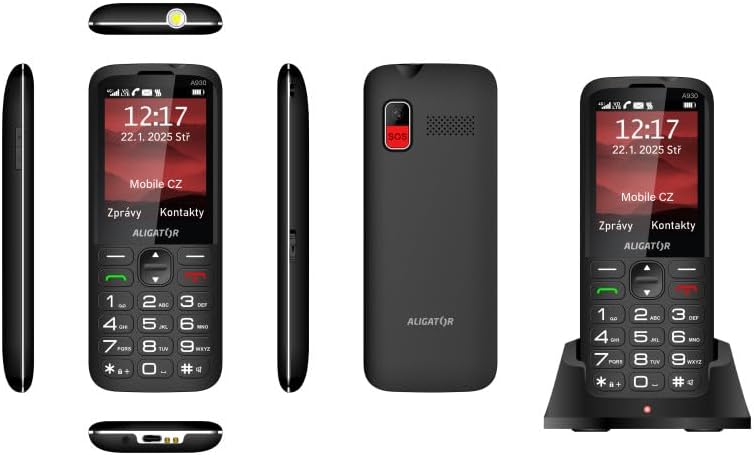
Figure 5.5: Comprehensive views of the ALIGATOR AZA930B, illustrating its design from the top, sides, front, back, and when seated in its charging dock.
6. Održavanje
- čišćenje: Koristite meku, suhu krpu za čišćenje površine telefona. Izbjegavajte upotrebu jakih hemikalija ili abrazivnih materijala.
- Održavanje baterije: To prolong battery life, avoid fully discharging the battery frequently. Store the phone in a cool, dry place if not used for extended periods.
- Skladištenje: Držite telefon dalje od ekstremnih temperatura, direktne sunčeve svjetlosti i prašnjavih okruženja.
7. Otkrivanje problema
| Problem | Mogući uzrok | Rješenje |
|---|---|---|
| Telefon se ne uključuje. | Baterija je prazna ili nije pravilno umetnuta. | Napunite bateriju. Provjerite da li je baterija pravilno umetnuta. |
| Nema mrežnog signala. | SIM kartica nije pravilno umetnuta ili je izvan dometa mreže. | Ponovo umetnite SIM karticu. Premjestite se u područje s boljom pokrivenošću mrežom. |
| Ne mogu upućivati ili primati pozive. | No credit, SIM card issue, or network problem. | Check your account balance. Verify SIM card insertion. Contact your network provider. |
| SOS dugme ne radi. | SOS numbers not set up or incorrect. | Ensure SOS numbers are correctly configured in settings. Check network signal. |
| Baterija se brzo prazni. | High usage, background apps, or aging battery. | Reduce screen brightness. Close unnecessary applications. Consider replacing the battery if it's old. |
8. Specifikacije
| Feature | Detalj |
|---|---|
| Broj modela | AZA930B |
| Display | 2.8-inčni TFT ekran u boji |
| Utori za SIM kartice | Dual SIM (2 x Nano SIM) |
| Podrška za memorijsku karticu | Micro SD do 256 GB |
| Baterija | 1700 mAh Li-ion |
| Vrijeme razgovora | Do 480 minuta |
| Vrijeme pripravnosti | Do 10 dana |
| Kamera | 1.9 MP |
| Povezivanje | 4G/LTE/VoLTE, Bluetooth |
| Port za punjenje | USB-C |
| Priključak za slušalice | 3.5 mm |
| Dimenzije | 14.3 x 5.8 x 1.36 cm |
| Težina | 95 g |
| Operativni sistem | Symbian 9.1 |
| Boja | Crna |
Napomena: Specifikacije su podložne promjenama bez prethodne najave.
9. Garancija i podrška
ALIGATOR products are designed and manufactured to the highest quality standards. For detailed warranty information, including terms, conditions, and duration, please refer to the warranty card included with your product or visit the official ALIGATOR website.
For technical support, service, or inquiries regarding your ALIGATOR AZA930B mobile phone, please contact ALIGATOR customer service or visit their official support channels. Keep your purchase receipt and product serial number (IMEI) handy when seeking support.
- IMEI 1: 357140835088496
- IMEI 2: 357140835088504
- Barcode/UPC: 8596426108267


